Tech IT Support for SMBs: A Practical Guide for 2026
Tech IT support explained for Canadian SMBs: break/fix vs managed services, co-managed options, 24/7 helpdesk and how to choose a provider.

Tech IT support explained for Canadian SMBs: break/fix vs managed services, co-managed options, 24/7 helpdesk and how to choose a provider.

It's 7:40 a.m. and the clinic phones are dead, the shared mailbox won't open, and the one person who knows the admin password is on a flight. Staff are already in the waiting room. That gap, who holds admin access and who answers at 2 a.m., is the part most tech IT support comparisons skip. A logo on a website doesn't restore a server.
Canadian owners usually face the same choice: keep paying when things break, or pay a partner to watch the systems before they fail. The right model depends on how long you can afford to be down, whether anyone on staff already owns IT, and how tightly your records are regulated.
Four models cover almost every small or mid-sized firm. The fit is about control, speed, and who is accountable when revenue stops.
| Model | Best fit | Typical billing | What it covers |
|---|---|---|---|
| Break/fix | Occasional issues and a tight budget | Pay per incident or hour | Reactive repairs after something fails |
| Managed IT | Businesses wanting one accountable partner | Flat monthly fee per user or device | Monitoring, patching, helpdesk, backups and security |
| Co-managed IT | Firms with an internal IT person who needs backup | Monthly fee scoped to the gaps | Routine tasks and overflow while the internal team leads strategy |
| IT consulting or vCIO | Leaders planning major technology spending | Project fee or retainer | Roadmaps, budgets, vendor selection and risk planning |
Break/fix suits a very small office with stable gear and a tight budget. You pay only when something fails. The trade-off is speed against cost. An outage sits in a queue until a technician is free, and nobody is patching or testing backups in between.
Managed IT puts monitoring, patching, backups, security, and the helpdesk under one monthly fee per user or device. Costs stay predictable. You give up some day-to-day control so one partner owns the outcome.
Co-managed IT sits beside an internal IT lead. The provider takes routine tickets and overflow. Your person keeps strategy. You pay for the gaps, not a second full department. Flexibility stays high, but the responsibility matrix has to be written down or work falls between the two teams.
Consulting or vCIO work is strategy without the daily queue: budgets, vendor choices, and risk plans, billed as a project or a retainer. It doesn't replace someone who resets passwords on a Monday morning.
Outside help shows up when an incident outruns the office. Among Canadian businesses affected by ransomware, 60% used an external IT consultant or contractor to resolve the attack, according to Statistics Canada's 2021 cybersecurity release. In that same release, 16% of small businesses with 10 to 49 employees reported a cybersecurity incident. Smaller firms are not insulated, and many lack a night shift for backups and monitoring. A plain comparison of break-fix versus managed services is worth reading before you lock a contract.
Practical rule: If an outage would stop revenue for more than a day, you need proactive monitoring and a named response time, not a pay-when-it-breaks number on a fridge magnet.
Say a bookkeeper in Calgary can't open the accounting file at 8:05. She shouldn't hunt for a personal mobile number. A working desk gives her four ways in: a phone line for anything that stops work, email for the rest, a web portal when she is away from her own PC, and a one-click request button on the device itself.
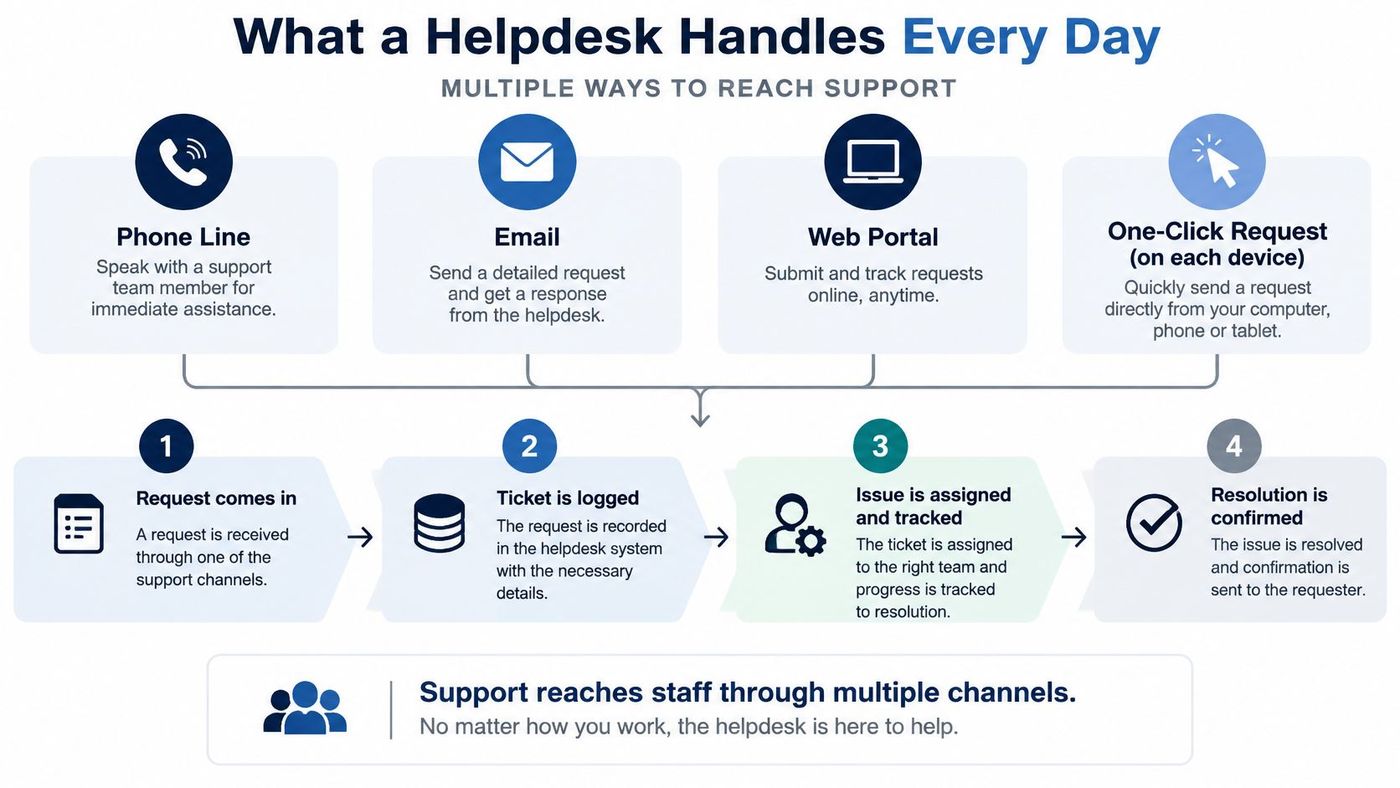
Tier 1 is passwords, account access, and new-device set-up. Tier 2 is software faults, network trouble, and deeper configuration. Specialists and vendors sit past that, for the line-of-business app or the phone carrier.
A freight desk in Edmonton doesn't close at 5 p.m. Ontario time, and an on-call clinic doesn't either. Live support 24/7/365 from a Canadian-based team means the night dispatcher reaches a person, not a voicemail that waits for Monday. Most faults are fixed remotely. Hardware swaps, cabling, and office moves still need someone on site, and on-site work is part of a fully managed agreement, not a surprise add-on.
A useful ticket always has four things a manager can see: a number, a status, a named technician, and a history. Without those, you can't tell a recurring printer fault from a one-off.
Before you sign, ask how routing works after hours, who is allowed to escalate, and whether the night person can reach the same admin tools as the day team. The help desk support levels breakdown is a clean way to test whether a proposal names Tier 1, Tier 2, and the handoff.
A clinic's phones die at 8 a.m. after a router update wipes the quality-of-service rules. Cloud mail and phone service create support work that never touches the office server closet, and the failure usually sits in a setting nobody looks at until the morning rush.
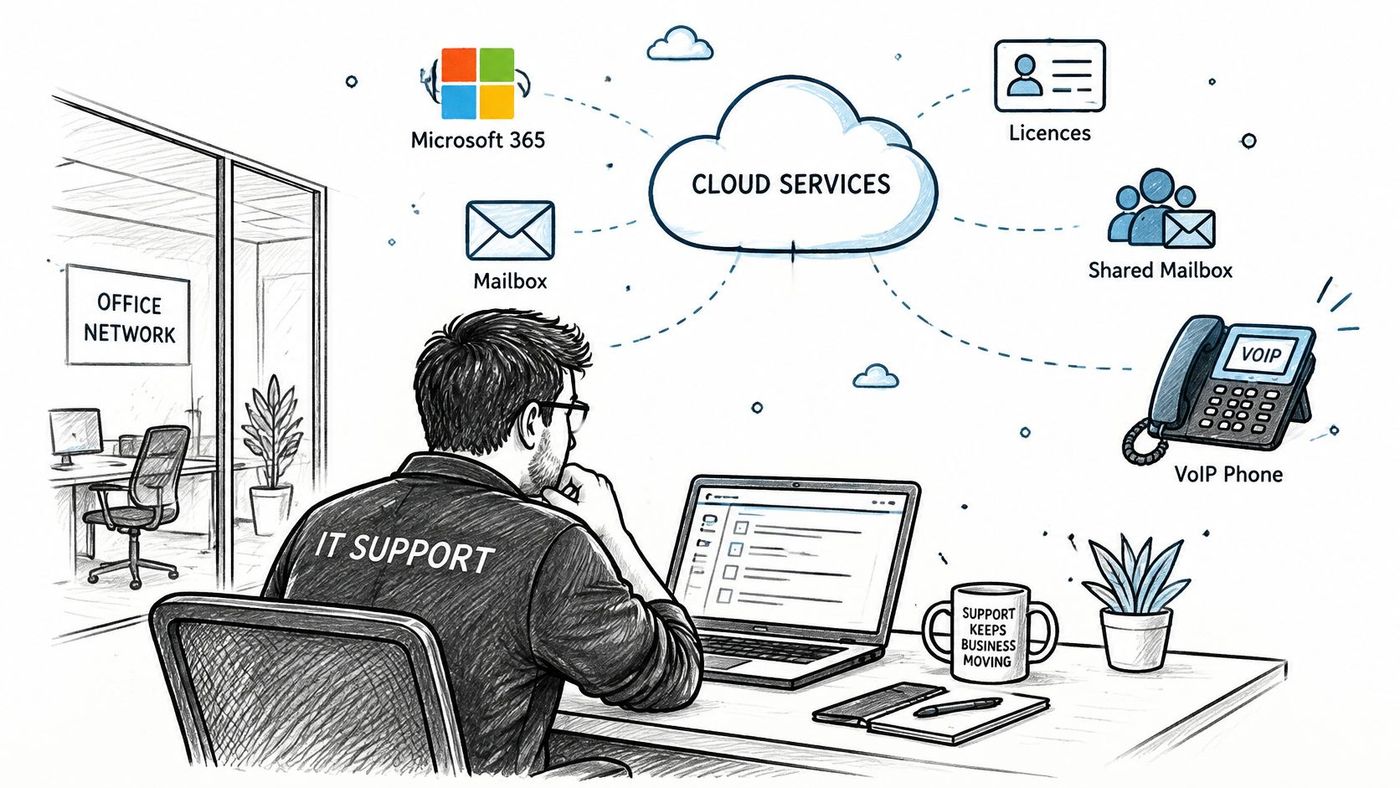
Day-to-day Microsoft 365 work is mailbox and licence administration, shared mailboxes, SharePoint and OneDrive permissions, and multifactor authentication enrolment. The failures that hurt are quiet. A departed employee's account stays active. A certificate expires and single sign-on dies for the whole firm. Someone shares a folder with "anyone with the link" because a file was needed at 6 p.m.
The dividing line that matters is who holds admin access. We typically hold admin access for endpoint management, security tools, and infrastructure monitoring. Access to ERP, CRM, and other line-of-business systems stays with your team unless you explicitly delegate it, and every login is documented, audited, and reviewed quarterly. That split keeps a support partner out of patient or client records they don't need, while still letting them patch laptops and watch the tenant. If you are weighing what belongs in the tenant, start with a practical look at Microsoft 365 for a small business.
VoIP tickets are usually call quality, jitter, dropped calls, number porting, auto-attendant changes, or failover to a mobile line. Back at the clinic, new handsets would have wasted the morning. The fix is a network check, then a test call, then a documented rule so the next firmware update doesn't repeat the wipe.
Voice quality follows the whole route, and long routes expose weak configuration fast. An employee working abroad who has to phone Social Security while living abroad hears the same jitter a caller hits on a badly tuned trunk. Treat the voice network as part of IT, with the same ownership as email, and ask who answers when a port fails at 2 a.m.
Migrations are not routine tickets. Plan the cutover, keep a rollback, and pilot with one team before you move the firm. A provider who cannot name the admin scope, the porting sequence, and the after-hours owner in one answer is still guessing at all three.
A breached laptop at a 20-person firm rarely stays a laptop problem. Incident recovery now sits on the operating budget.
In 2025, 16% of Canadian enterprises with 10 or more employees reported a cybersecurity incident, including 15% of small businesses and 21% of medium-sized businesses, and 8% of affected organizations reported ransomware involvement, according to Statistics Canada's 2025 cybersecurity brief. Recovery spending by Canadian businesses doubled from about CA$600 million in 2021 to CA$1.2 billion in 2023, as Statistics Canada's Computer Security Day note records. That spend lands hardest where one compromise spreads because patches sat for weeks.
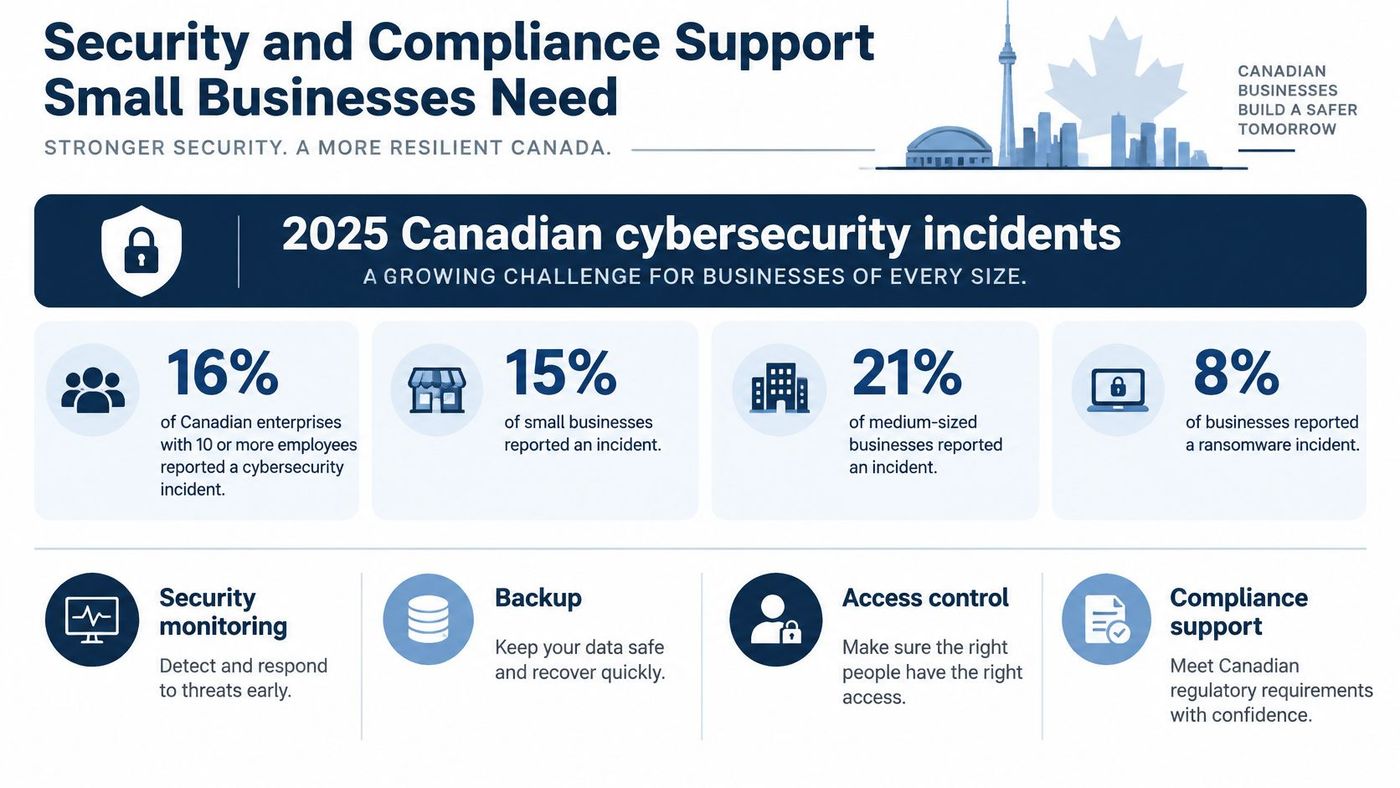
The earlier baseline is just as blunt. Statistics Canada's 2019 incident study found that 21% of Canadian businesses were affected that year. Among those hit, 54% said the incident stopped employees from doing day-to-day work, and 30% paid extra repair or recovery costs.
Skip “do you do security.” Ask a provider, in this order, whether they run each control:
Unpatched systems let one foothold spread, and continuous monitoring shortens the gap between detection and containment. Sequence matters more than a long shopping list of tools.
Federal privacy-breach procedure expects you to contain, assess, and mitigate before you report, a workable benchmark for a small firm's own playbook. Once a delegated head decides a breach is material, the report to the Treasury Board of Canada Secretariat and the Office of the Privacy Commissioner goes out no later than seven days later, as the Treasury Board's breach reporting phase sets out. Federal breach guidance also requires a record of every privacy breach for five years, covering when it happened, what occurred, the personal information involved, and the assessment.
Your provider has to produce logs and a timeline inside that window, so ask who collects them and how fast. A yearly PDF is too slow.
The policy pack to ask for covers an Acceptable Use Policy, an MFA and password policy, a device policy, a remote and hybrid work policy, an incident response plan, a disaster recovery plan, and a data governance framework based on Canadian standards. CloudOrbis pairs that pack with endpoint protection (EDR and MDR), documented security training, patch reporting, backup validation, and monthly compliance reporting when preparing clients for cyber insurance applications. How those duties line up with Canadian data privacy laws belongs in the playbook, worked out before the breach.
The Canadian Centre for Cyber Security's baseline controls use an 80/20 approach. Aim for about 80% of the cybersecurity benefit from 20% of the effort, starting with access management, secure configuration, patching, backups, and incident response. Your contract should fund that sequence, not a vague promise of “full coverage.”
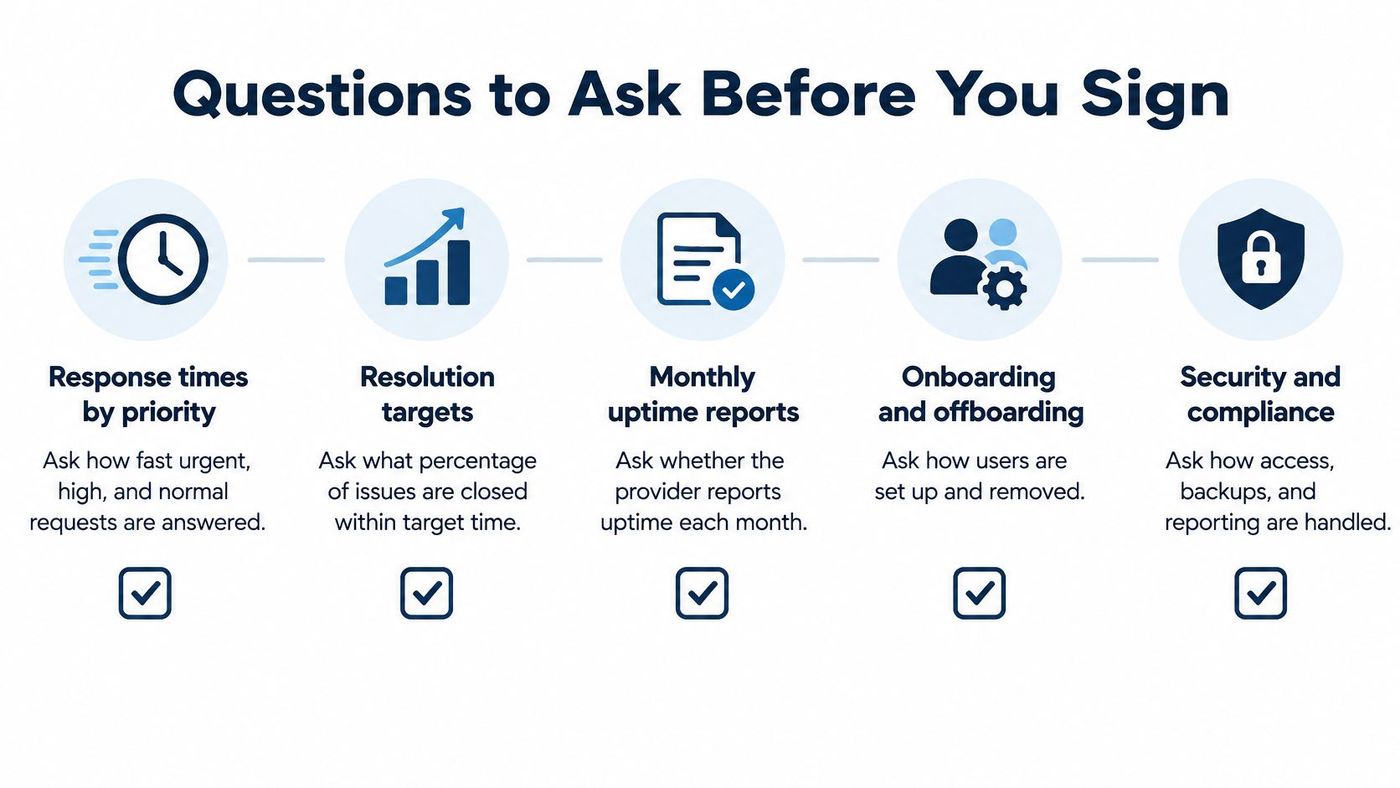
Score each provider from 1 to 5 on every point below, then compare the totals. A strong answer is specific and written.
Red flags are vague service levels, no written exit terms, and one technician who holds all the knowledge. Exit terms matter as much as the welcome pack. You should be able to leave with your admin passwords, your documentation, and your data.
The same helpdesk looks different in a clinic and in a freight yard. The data you hold, and the hour you can't be down, set the priority.
| Sector | Main data or uptime risk | Support priority |
|---|---|---|
| Healthcare and clinics | Patient records and privacy obligations | MFA, encryption, access reviews |
| Legal, finance and accounting | Confidential client and financial data | Access controls, retention rules, audit logs |
| Manufacturing and logistics | Downtime halts production or shipping | Network monitoring, VoIP failover, tested backups |
| Construction and engineering | Mobile teams and shared project files | Secure remote access, file sync, device policy |
| Oil and gas | Remote sites and operational systems | Co-managed support, 24/7 security monitoring |
| Education | Many devices and student accounts on tight budgets | Device management, MFA, incident response plan |
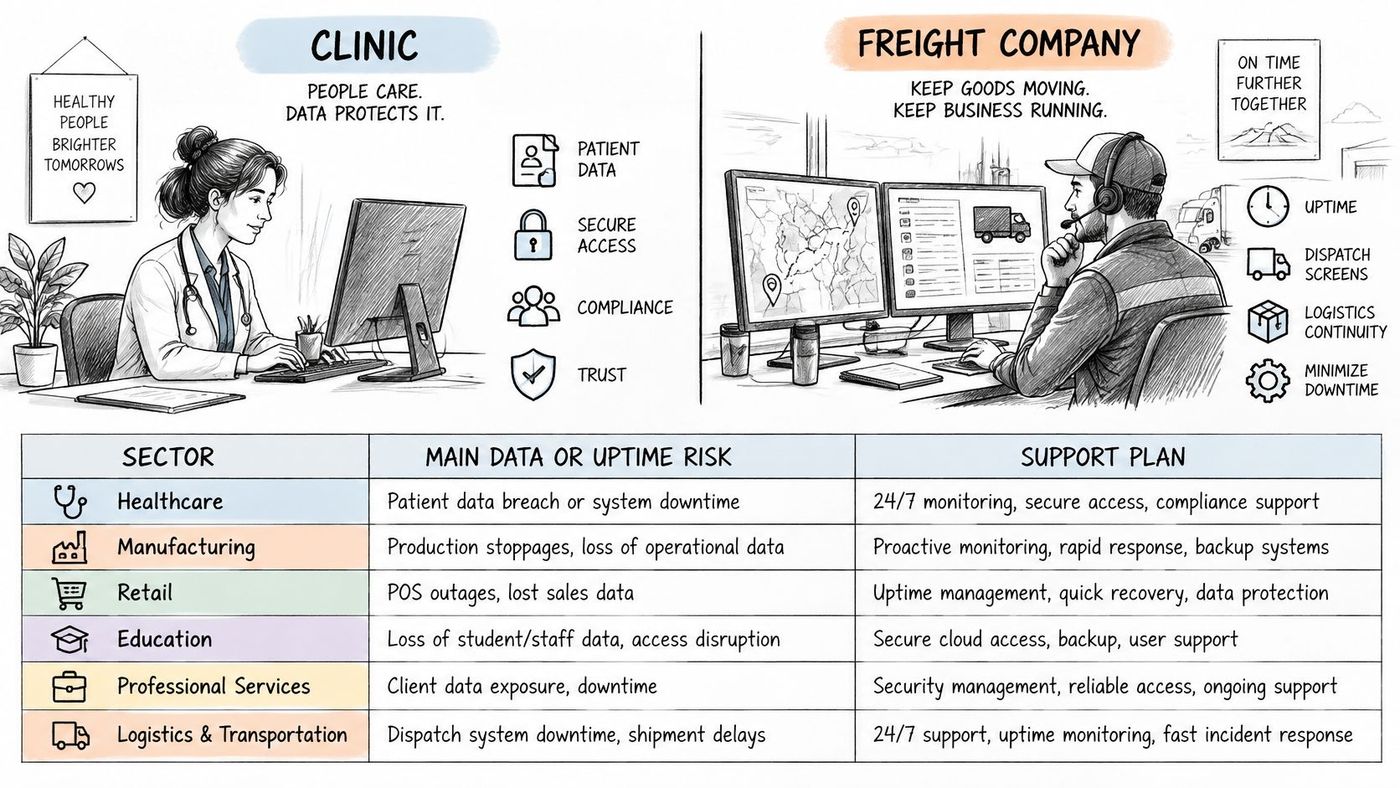
Clinics, law firms, and finance shops live or die on who can open a file. MFA, encryption, access reviews, retention rules, and audit logs come before a faster laptop refresh. A missed access review is how a former contractor still opens a client folder six months later.
Manufacturing and logistics stop making money when the line or the dock stops. Network monitoring, phone failover, and backups you have restored matter more than a new intranet. Construction and engineering crews work from sites and phones, so secure remote access, file sync, and a device policy carry the weight. Oil and gas sites often can't staff a night watch, so co-managed support with round-the-clock security monitoring fits better than a lone internal generalist. Education stretches many devices and student accounts across a tight budget, which pushes device management and a written incident plan ahead of custom projects.
For plants and warehouses, the IT support pattern for manufacturers is a useful contrast with a professional-services desk.
Whatever the sector, ask three plain questions. Who keeps the logs? How long are they retained? Who owns third-party data when a vendor is in the path? If the answers are fuzzy, the playbook is not finished.
Pick the model from the facts on your floor, not from a brochure.
Two questions settle most of the fit. Who holds admin access to your endpoint tools, security stack, and monitoring? And who answers when something breaks at 2 a.m.? Whatever you sign, get those access arrangements documented, audited, and reviewed quarterly. In a co-managed setup, the provider typically carries Tier 1 and 2 end-user tickets while your team keeps internal escalations and business-critical systems.
Don't sign a multi-year deal on a demo alone. Ask for a free IT risk assessment first, and have it look at backups, MFA, patching, and who holds admin access. Compare the written proposals against the checklist above, and set a 90-day review so a weak fit does not become a three-year habit.
CloudOrbis is a Canada-based managed IT provider in Oakville, Ontario. Managed IT Services, Co-Managed IT Services, IT Consulting, and a Free IT Risk Assessment are the engagement paths, with live support 24/7/365 from a Canadian-based team for Canadian businesses. On-site support is a standard part of Fully Managed agreements. The assessment is the practical first step: it shows the gaps before you commit to a fee.
CloudOrbis Inc. helps Canadian clinics, plants, professional firms, and other mid-sized teams put a named owner on admin access, after-hours response, and the controls insurers expect. If you want that operating model instead of another break/fix invoice, visit CloudOrbis Inc. and book a free IT risk assessment before the next Monday morning outage.
Book a 30-minute call with a senior engineer. No sales script, just straight answers about your environment.


