Help Desk Support Levels for Canadian SMBs
See how help desk support levels work from Tier 0 to Tier 3, with escalation rules, Canadian SLA benchmarks, and a design guide for SMBs.

See how help desk support levels work from Tier 0 to Tier 3, with escalation rules, Canadian SLA benchmarks, and a design guide for SMBs.

It's 8:40 on a Monday and three things land at once. A nurse can't sign in to the charting system, the label printer on line two is offline, and someone in accounting has approved a multi-factor prompt they didn't request. On paper, all three are tickets. In practice, only one can wait in a normal queue.
That's the problem vague support creates. If everyone calls the same person and hopes for the best, the risky issue competes with the routine one, and nobody can say who owns the update at noon. A clear set of levels fixes that, but only if you define them by ownership and consequence, not just by technical difficulty.
Help desk support levels are ownership boundaries. They decide who answers a request, who may change a system, and who stays accountable to the user until the work is confirmed done.
Help desk support levels and what each one owns
| Level | Who owns it | Typical work | Escalate when | Success signal |
|---|---|---|---|---|
| Tier 0 | User with a portal and knowledge base | Password self-service, how-to articles, status checks | The article fails or the account looks risky | The user finishes without a ticket |
| Level 1 | Service desk | Intake, categorization, priority, basic troubleshooting, user updates | The runbook fails or a security flag appears | Routine requests resolved at first contact |
| Level 2 | Application, network, and endpoint specialists | Complex configuration, apps, VPN, and devices | The fix needs engineering, code, or a vendor | Service restored with a documented cause |
| Level 3 | Engineers and architects | Design defects, major incidents, permanent fixes | The product maker must change the service | A lasting fix or a controlled vendor handoff |
| Vendor Level 4 | Software maker, cloud vendor, or carrier | Firmware, SaaS defects, and carrier faults | Only when the contract says they own it | Resolution inside the vendor SLA |
Tier 0 is self-service you'd trust a person to finish alone. That means a password portal, short knowledge articles, and a status page, and nothing that can expose data if the steps go wrong.
Level 1 is the human front door. The Government of Canada information technology framework defines the service/help desk as the single contact point for incidents, questions, complaints, and IT assistance, with Level 1 owning intake, categorization, prioritization, user communication, initial diagnosis, and closure. Level 2 handles complex configuration, application, network, and endpoint problems, while Level 3 addresses specialist engineering, code defects, or vendor escalations.
Tier 0 to Tier 3 and L1 to L3 describe the same ladder. Don't mix them. Pick one label and use it in every ticket, report, and contract, or staff will argue about words while a user waits.
Start at the left and ask who owns it, not who's smartest. Level 2 is for work a runbook can't finish, such as a Microsoft 365 configuration fault, a VPN that fails for one site, or a line-of-business app that errors after an update. Level 3 owns engineering changes, recurring defects, and the design work behind a major incident. Vendor Level 4 is the product maker or carrier, engaged only under contract.
The escalation column matters more than the work column. A ticket should move because a stated trigger was met, not because someone got tired of looking at it. Choosing a help desk ticketing system helps here only if the system enforces those triggers with required fields.
Practical rule: If you can't name the owner, the trigger to escalate, and the success signal for a level, you don't have that level yet. You have a queue with a nicer name.
Use the table as a responsibility sketch before you buy support hours. It'll tell you whether you need more front-line coverage, deeper specialists, or better self-service for repeat questions.
Escalation should work like a relay with one baton. The technical work can move, but one named owner keeps the user informed and confirms the result.
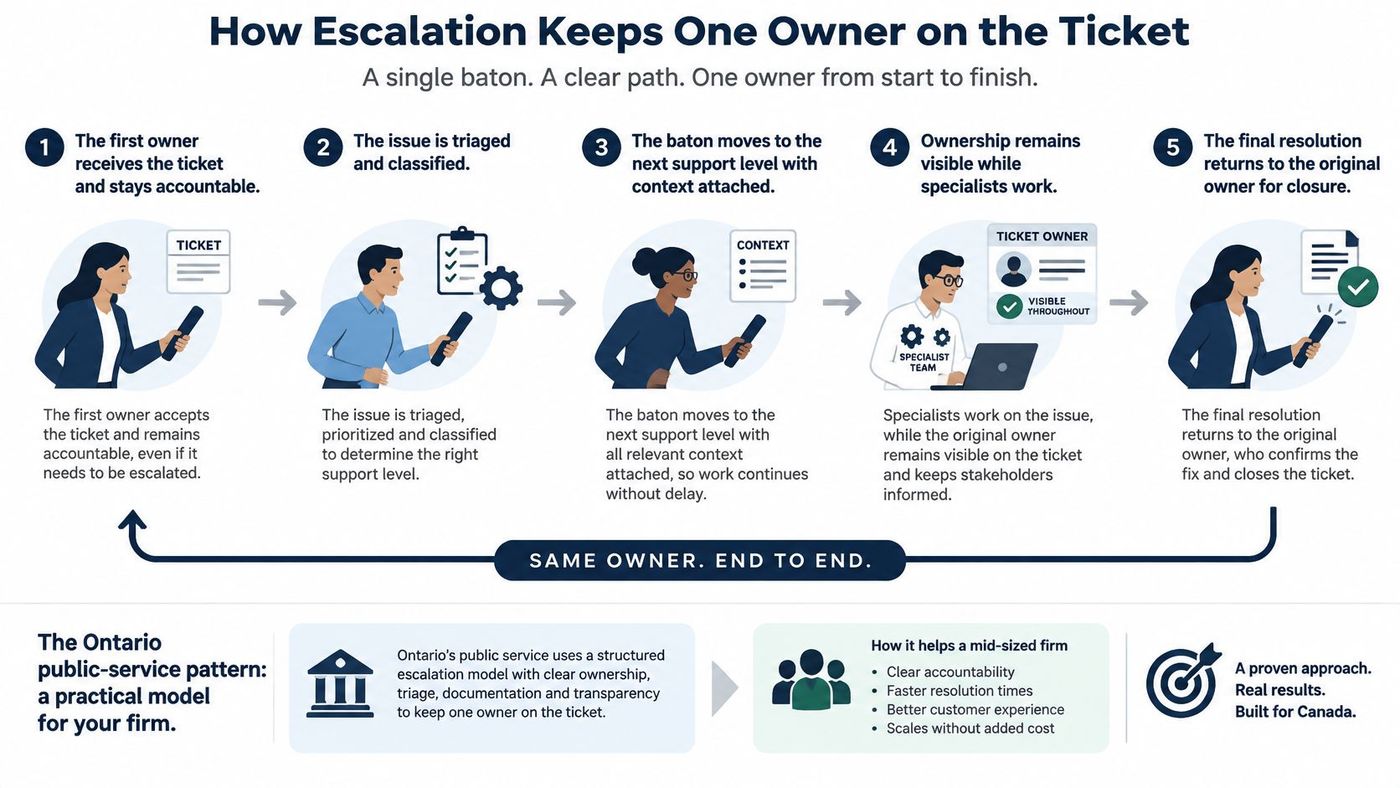
Ontario offers a pattern a mid-sized firm can copy without copying its size. The Ontario public service IT service desk standard assigns the service desk ownership of monitoring, communication coordination, escalation, updates, and resolution or fulfilment, and for Priority 1 and Priority 2 incidents an incident coordinator acts as the primary focal point.
Most failed escalations aren't technical failures. They're information failures, where the next person starts again and asks the user to repeat everything.
Require these fields before a ticket can move:
Good habits for managing a help desk come down to this discipline. The front line remains accountable even when a partner does the specialist work.
A ticket that changes queues three times and never has a named owner isn't escalated. It's abandoned in stages.
A help desk isn't mature until the clock is written down. Saying you're available doesn't tell a clinic manager when someone will answer, when service will be restored, or when they'll hear an update.
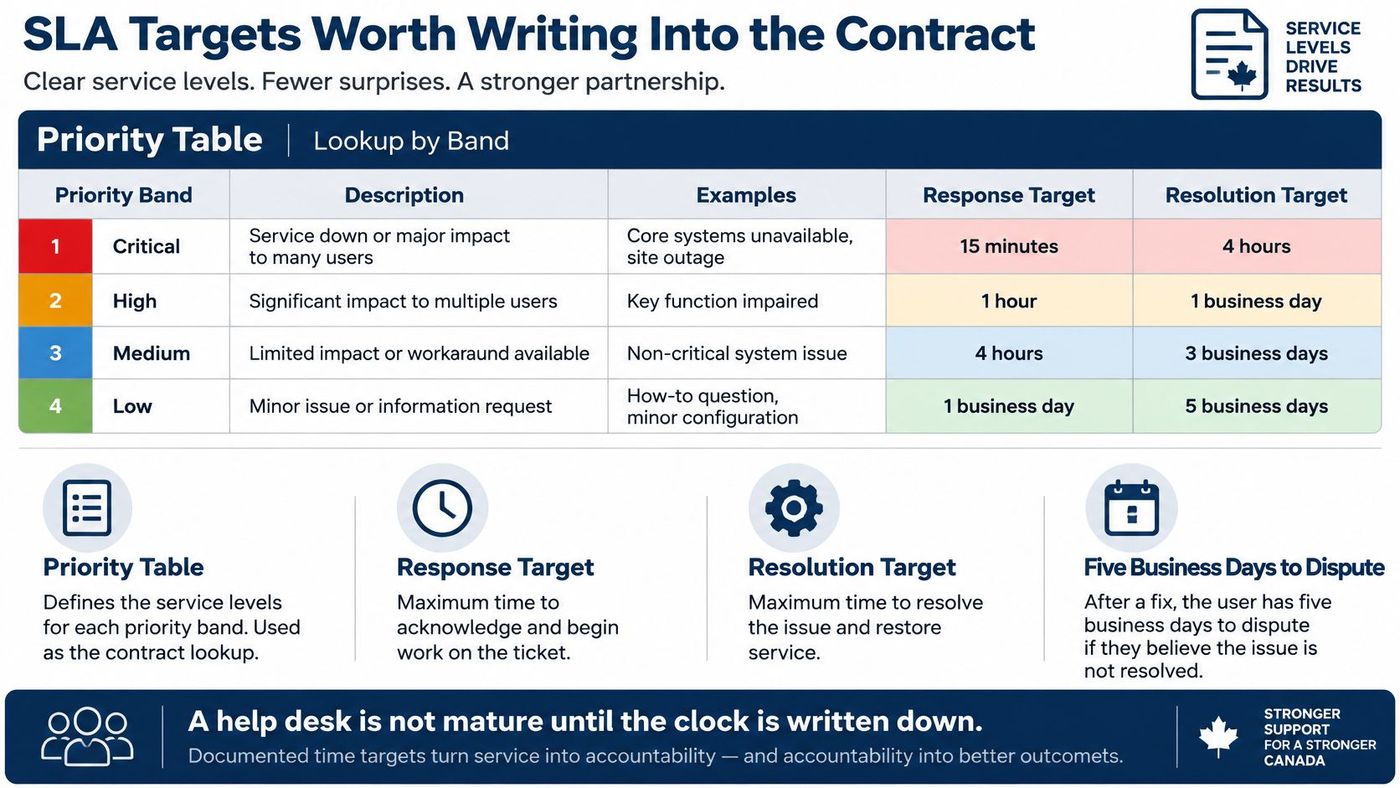
Use priority bands based on business impact, not on who shouted loudest. Saskatchewan's incident management service standard sets resolution targets of four hours for Critical, six hours for High, one business day for Moderate, and three business days for Low, and gives customers five business days to confirm a fix before automatic closure.
Priority bands and resolution targets
| Priority | Business impact | Resolution target |
|---|---|---|
| Critical | Severe, widespread disruption of a key system with no workaround | 4 hours |
| High | Major widespread degradation, limited function, and no workaround | 6 hours |
| Moderate | Minor operational impact, sometimes a single user | 1 business day |
| Low | Minimal or no business impact, workaround often available | 3 business days |
Speed to answer and speed to restore are different promises. Shared Services Canada's evaluation of Distributed Computing Services designates the Service Desk as Level 1 and sets targets of answering at least 70% of calls within 120 seconds, keeping abandonment after a 60-second wait at 7.5% or lower, resolving 75% of end-user requests at first contact, and dispatching no more than 18% to higher technical levels.
Treat those figures as design inputs, not as numbers every SMB must copy. A 40-person firm might set business-hours targets for Low and Moderate work and a named after-hours path only for Critical and High. That's an honest trade-off, and it's cheaper than paying for overnight coverage you don't need.
Chase first-contact resolution too hard and you'll get premature closures, repeat contacts, and, worse, security mistakes made to close a ticket quickly. Watch it alongside reopen rate, transfer rate, and severity.
Staffing is part of the same negotiation. If you're building the front line yourself, a guide on how to hire customer service representative staff can help you judge communication skills before you test technical ones, because Level 1 agents need both. If you're buying coverage, compare the written targets in support management services service by service.
Negotiate one service at a time. Email, phones, and a clinical or production system don't deserve the same clock, and one blanket uptime slogan hides that.
Strict order feels fair. Level 1, then Level 2, then Level 3. But consequence should outrank technical difficulty, and some small-looking tickets shouldn't climb at all.
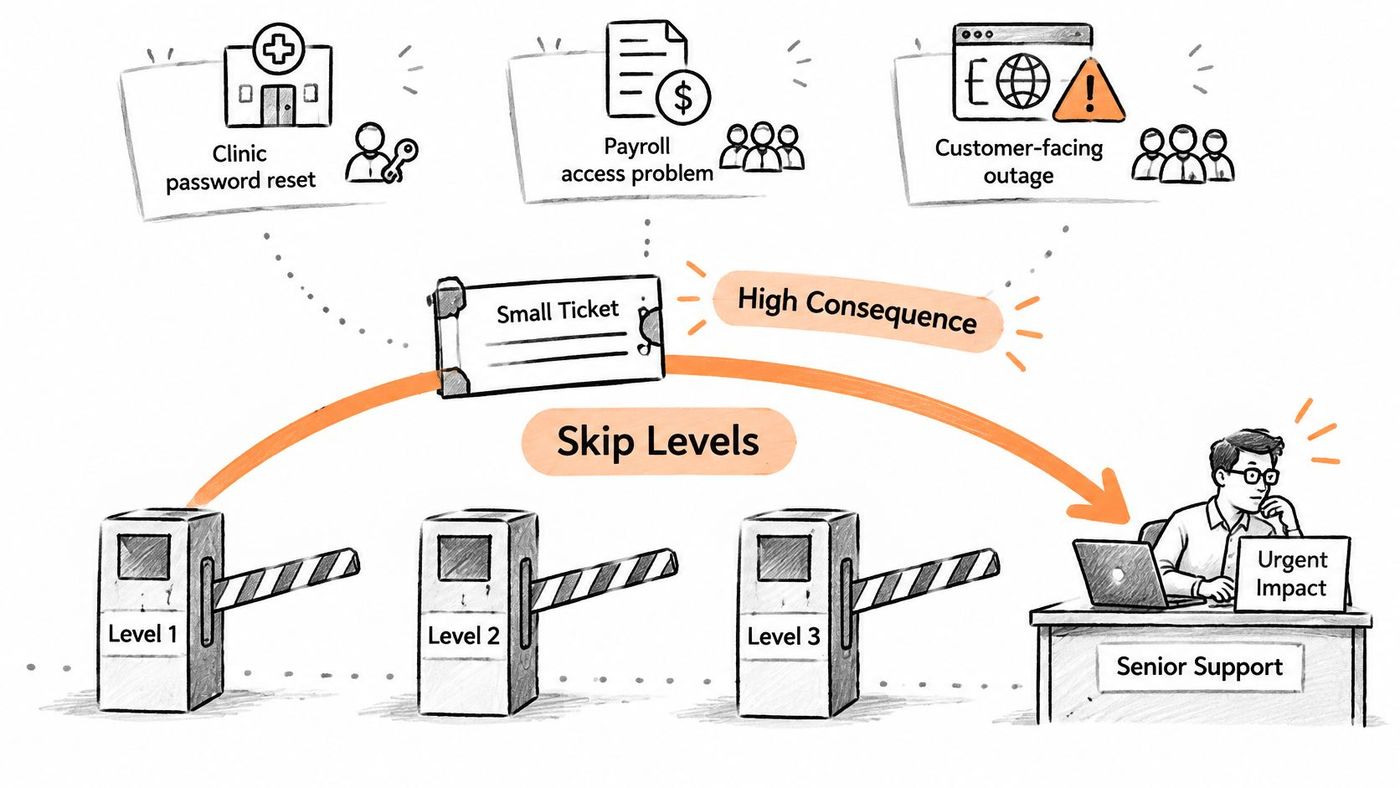
A clinic password reset looks routine until it follows a suspicious MFA prompt on a charting account. That isn't a reset anymore. It goes to security and the on-call lead, because resetting first could hand access to the wrong person.
A law firm laptop that won't open stays a Level 1 or Level 2 device job. But a shared client folder suddenly exposed to the wrong guest is a privacy event, even if the fix is two clicks. It escalates immediately so exposure can be checked, logged, and reversed in the right order.
A manufacturer's label printer can wait until the next break. A line-stop alarm or a ransom note on a plant workstation can't. Both may arrive as one-line tickets, but only one stops shipping or spreads.
CDW Canada's summary of IT and cybersecurity trends for small businesses in Canada reports that in 2025 approximately 16% of Canadian businesses were affected by cybersecurity incidents, while detection for small organizations increased from 4.0 days in 2024 to 6.8 days in 2025, response from 10.9 to 13.3 days, and recovery to 25.7 days. A skip-level rule exists to cut exactly that delay.
Bypass triggers: Patient-care disruption. Production stoppage. Privileged-account compromise. Suspected ransomware. Privacy exposure. A multi-site outage. Any one of these sends the ticket straight to security or a senior engineer.
Write that list into the runbook before the outage. During one, nobody should be debating whether they're allowed to break the ladder. A mature desk sometimes skips levels on purpose, and it can say why in one sentence.
Owners ask a fair question. Does Level 1 only troubleshoot, or does it also triage security? For a firm without a separate security team, it has to do both.
The Insurance Bureau of Canada's survey on Canadian small business cyber preparedness reports that only 47% of surveyed SMB decision-makers said their organization was prepared for a cyberattack or data breach, fewer than half had implemented any cyber defence, and only 48% believed their business was vulnerable, while BDC research cited there found 73% of small businesses had experienced a cybersecurity incident. That gap lands on whoever answers the phone.
On ordinary tickets, finish with a short coaching note. One plain sentence about checking the sender before approving a prompt does more than a yearly training slide. Use bilingual or plain-language updates where your workforce needs them, because a warning nobody understands isn't a control.
Measure this work with early-report rate and repeat-incident rate, not ticket speed alone. You're looking for users who report sooner and click less often.
For a firm of roughly 20 to 200 people, the design is a set of decisions, not a software purchase. Work through them in order, with operations and IT in the same room.
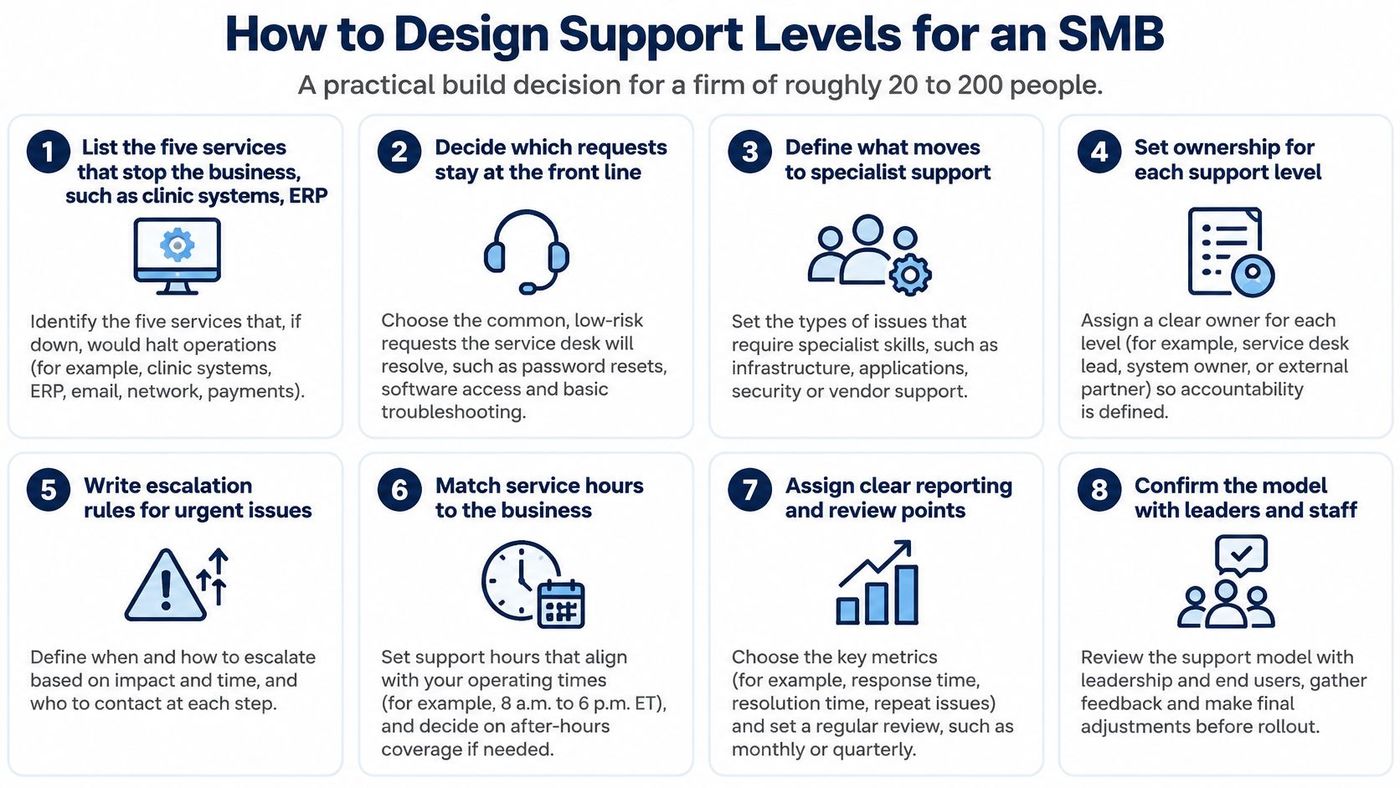
Thinking through how to improve IT service delivery at this stage keeps the design tied to user outcomes rather than tool features.
A lone internal generalist works until holidays, nights, or one resignation expose the gap. They know the business well, but they can't be Level 1, Level 3, and the security reviewer at the same time.
A co-managed desk splits the load. A partner runs Level 1 and overnight coverage while internal IT keeps application ownership and vendor relationships. Statistics Canada's Canadian Survey on Business Conditions analysis reports that in 2025 14.4% of Canadian businesses reported outsourcing information technology service support, so this is a normal option, not a sign of failure. CloudOrbis Inc. is one Canada-based provider that offers a 24/7 managed help desk with triage, prioritization, and escalation to higher tiers.
A fully managed desk suits firms with no internal IT staff. It's simpler to govern, but you still need an internal owner who can approve changes and judge business impact.
Pick the shape that covers your riskiest hours. A cheaper model that leaves a Saturday production stoppage unowned isn't cheaper.
Go back to that Monday at 8:40. The nurse, the printer, and the odd MFA prompt will compete again. Your job is to decide now, while it's calm, which one jumps the queue and who says so.
Hold one working session with operations and IT. Mark the five critical services, agree the bypass list, and assign a named owner and a clock to each priority. While you're there, review how people join your network in the first place, since identity-based networking for cautious IT teams raises useful questions about tying access to a verified person rather than a shared password.
If the session exposes a coverage gap, weigh it against your current arrangement using the trade-offs in break-fix vs managed services. Firms that can't cover nights or security triage with current staff can talk to CloudOrbis about co-managed, Canada-based help desk support that keeps internal leaders in control of business systems. Bring your own service list to cloudorbis.com and review managed IT support and cybersecurity against it, line by line.
What you get for one session's work is practical. Fewer repeated tickets. Faster containment when a ticket is an incident. And leaders who can get back to running the business.
CloudOrbis Inc. provides 24/7, Canada-based managed IT support, cybersecurity, cloud services, and a structured help desk that routes requests by impact and risk, so routine issues close quickly and serious ones reach senior help without delay. If your current support levels live in people's heads rather than on paper, visit CloudOrbis Inc. to review your service list with the team and design coverage your staff can rely on.
Book a 30-minute call with a senior engineer. No sales script, just straight answers about your environment.


