IT Support for Manufacturers Your Guide to Uptime & Growth
Boost uptime with expert IT support for manufacturers. Our guide covers OT/IT integration, cybersecurity, ROI, and how to choose the right partner in Canada.

Boost uptime with expert IT support for manufacturers. Our guide covers OT/IT integration, cybersecurity, ROI, and how to choose the right partner in Canada.
On Monday morning, the line is ready, operators are in place, material is staged, and shipping is asking whether the afternoon run will leave on time. Then a small technology failure stops everything. A switch locks up. A server hosting a production application hangs. A workstation that bridges office data to plant equipment loses access. The machines are still there, but production slows or stops because the digital path between planning and execution has broken.
This reflects modern manufacturing. The line no longer runs on mechanics alone. It runs on networks, endpoints, applications, data flows, security controls, and the people who support them.
For Canadian manufacturers, the cost of treating IT as an afterthought is no longer manageable. A 2024 Info-Tech Research Group survey found that 72% of Canadian manufacturers reported IT downtime costs averaging $50,000 per hour, while the Canadian Centre for Cyber Security noted a 300% increase in ransomware attacks against the sector between 2021 and 2024 (Info-Tech Research Group).
The right it support for manufacturers does not sit off to the side as a helpdesk function. It protects uptime, hardens the plant against cyber risk, keeps office and production systems talking to each other, and gives ownership clearer control over cost and change.
Manufacturers discover the value of IT support the hard way. A production halt gets traced back to something that looked minor the day before. An aging firewall. A failed backup that nobody tested. A PC on the floor still running a critical application because “it’s always worked.”
The problem is not only failure. It is delay. Reactive support means your team starts diagnosing after the line is already down. In manufacturing, that is like waiting for a motor to seize before ordering bearings.
Break-fix support can look economical when things are quiet. You pay only when something breaks. For a plant, that model falls apart quickly because downtime costs money by the hour, but diagnosis, vendor calls, patching, and recovery all take time.
A reactive provider misses the early warning signs:
Good it support for manufacturers starts before a ticket is opened. It includes monitoring, patch management, endpoint protection, backup verification, network oversight, and escalation paths for production-critical systems.
That matters even more when resilience planning is tied to recovery, not just prevention. A practical continuity plan should map which systems must return first, who makes decisions during an outage, and how production can operate in a degraded mode if core systems go offline. A strong business continuity and disaster recovery approach then stops being an IT document and becomes an operations safeguard.
Tip: If your plant can explain how a machine fault is escalated but cannot explain how an ERP outage, ransomware event, or failed switch is handled, your operational planning is incomplete.
Plant owners do not need more complexity. They need fewer surprises. This is the fundamental purpose of modern support.
A factory’s technology stack works like a digital nervous system. Signals move from the front office to the floor and back again. Orders come in, inventory gets checked, production gets scheduled, machines run, sensors report status, and managers rely on live information to decide what happens next.
When IT and OT are managed separately, that nervous system becomes unreliable.
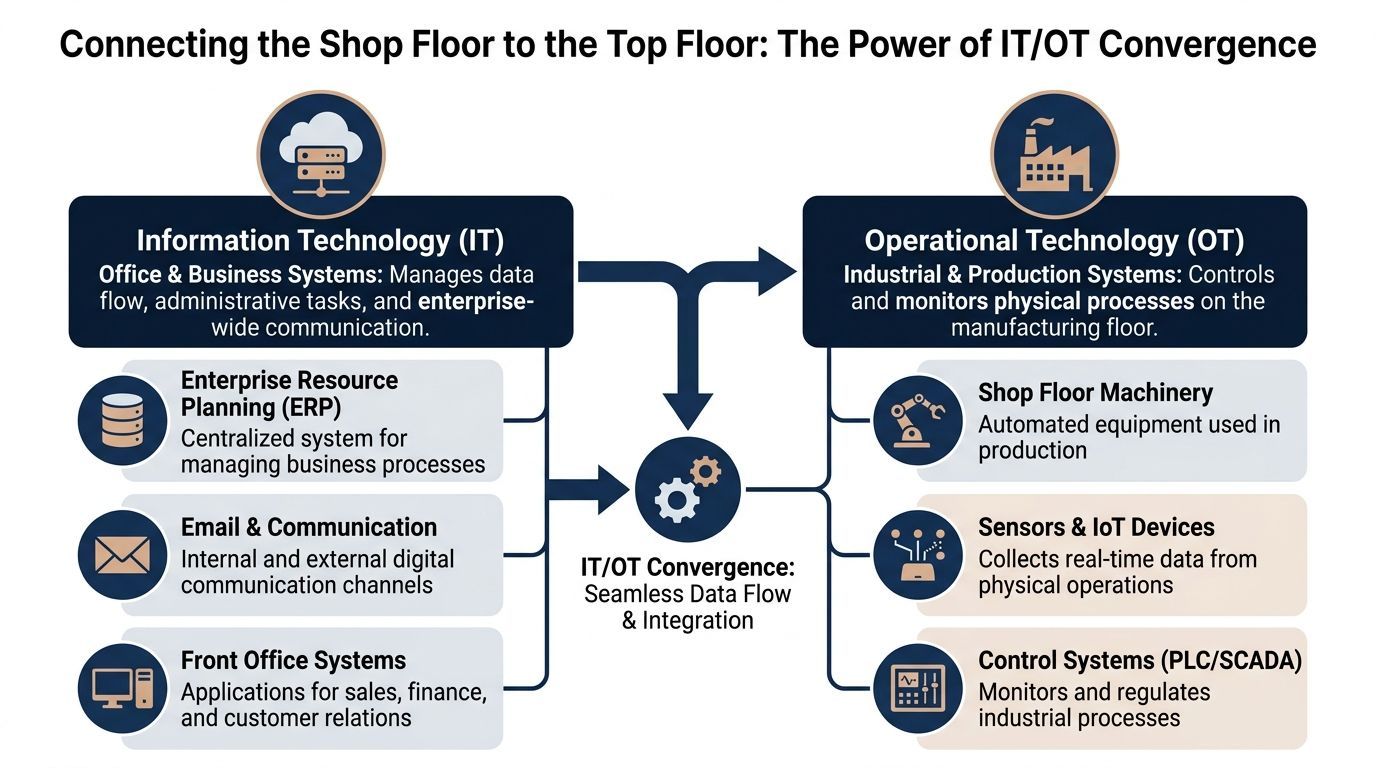
Information Technology (IT) covers the business side. Think ERP, Microsoft 365, file storage, email, user devices, cloud apps, identity, and networking.
Operational Technology (OT) runs physical processes. That includes PLCs, SCADA systems, HMIs, edge devices, industrial sensors, and the networks that let them communicate.
In older plants, these were treated as separate worlds. That no longer works well. Production data now needs to feed planning, purchasing, quality, maintenance, and leadership reporting. At the same time, business systems increasingly influence what happens on the floor.
The security and reliability gap between IT and OT is now one of the biggest blind spots in manufacturing. According to a 2025 Canadian Manufacturers & Exporters report, 62% of Canadian manufacturers identify OT vulnerabilities as a primary concern, yet only 28% have implemented an integrated IT/OT security framework (Canadian Manufacturers & Exporters data cited here).
That gap creates predictable problems:
| Area | When IT and OT stay siloed | When IT and OT are integrated |
|---|---|---|
| Visibility | Teams troubleshoot in isolation | Shared monitoring shows business and plant impacts together |
| Security | Flat networks expose critical devices | Segmentation limits spread and improves control |
| Change management | Updates break production unexpectedly | Changes are tested with plant impact in mind |
| Data flow | Manual workarounds and duplicate entry | ERP, reporting, and equipment data align better |
A converged environment does not mean dumping office IT tools onto production equipment. It means designing the infrastructure so the two worlds exchange data securely and predictably.
That includes:
The practical point is simple. If your front office can’t trust the floor data, or your plant equipment depends on brittle office systems, you do not have two separate issues. You have one operational problem with two labels.
Most plants do not need more tools. They need a support model that matches how manufacturing runs. The strongest environments stand on five pillars. Miss one, and the rest of the stack carries unnecessary risk.
Support should start with prevention. That means continuous monitoring of endpoints, servers, network gear, storage, backups, and the applications your team depends on.
A plant with proactive support catches degraded performance before users start calling. Disk alerts are investigated before a database stalls. Login failures are reviewed before they become an access crisis. Wireless dead zones get fixed before handheld scanners become unreliable.
This is the difference between “call us when it breaks” and managed oversight. If you want a practical baseline for what that service should include, review the core elements of managed IT support services.
Manufacturing security is no longer just about protecting email accounts and office laptops. The attack surface now stretches from user identities to remote access tools to production-adjacent devices.
Good manufacturing security includes:
Security on the shop floor needs to respect uptime. You cannot throw changes at production systems the same way you would a standard office fleet. The work must be planned around operations, vendor constraints, and risk tolerance.
Key takeaway: In manufacturing, a security control that ignores production realities is often bypassed. A useful control is one your operators, supervisors, and IT team can live with every day.
Cloud can simplify manufacturing IT, but only when it is used deliberately. Not every workload belongs in the cloud, and not every local system should stay on-premises.
The strongest approach is selective. Collaboration platforms, file sharing, backups, identity, and some business applications benefit from cloud delivery. Latency-sensitive plant systems, certain machine interfaces, and some legacy applications may still need local infrastructure or edge processing.
The benefit is not “move everything.” The benefit is placing each workload where it performs best and can be supported properly.
Backups are easy to overestimate. Many companies think they are protected because a job says “successful.” That is not the same as proving you can restore.
In a manufacturing setting, backup planning should answer specific questions:
A backup strategy should support business continuity, insurance conversations, and leadership confidence. If one of those is missing, the plan is probably too shallow.
Manufacturing relies on communication that moves as fast as operations. Network and voice design matter more here than many firms realise. That includes office collaboration, supervisor calls, warehouse coordination, support escalations, and alerts that reach the right person at the right time.
If your VoIP platform, wireless coverage, and shop-floor network are poorly aligned, communication delays become production delays.
A practical environment supports both people and systems:
One factual example of this kind of service model is CloudOrbis, which provides managed support, cybersecurity, cloud, backup and disaster recovery, and business VoIP for Canadian SMB environments, including manufacturing.
The point is not to buy every service category. It is to build a support stack that matches how your plant works when conditions are normal and when they are not.
Foundational support keeps the lights on. Specialised manufacturing support improves how the plant runs.
The difference matters. A generic IT provider can reset passwords and replace a failed laptop. A manufacturing-capable partner understands that SCADA traffic, PLC communication, HMI reliability, and edge processing all affect production outcomes.
When a problem touches control systems, first-line troubleshooting is rarely enough. These incidents need people who can trace root cause, review logs, inspect traffic, work with vendors, and understand the relationship between firmware, network behaviour, and production logic.
A Canadian Manufacturers & Exporters benchmark shows that manufacturers with dedicated L3 support for their SCADA and PLC systems achieve 99.7% uptime, compared to 92% for those relying on reactive support models (CME benchmark summary).
That result makes sense in the field. L3 support does not stop at “reboot and see if it clears.” It investigates the fault path.
A few examples make the difference clearer.
An operator reports intermittent conveyor faults. A basic support team checks the workstation and network connection. A stronger team goes further. It reviews log correlation in Splunk, captures traffic in Wireshark, checks for unusual protocol activity, and validates whether the issue originates in the HMI, the PLC, the network path, or a firmware mismatch.
That matters because manufacturing faults cascade. A problem that looks like a controls issue may start with a congested edge device, poor segmentation, or an unstable link to a supervisory system.
Some decisions need to happen close to the machine, not after data takes a longer trip through business systems. Edge computing helps plants process local data quickly while still feeding summary information upward to ERP, reporting, or analytics tools.
Such a setup is especially useful when you need fast local action and broader business visibility simultaneously.
Manufacturers hear a lot about AI. The useful version is not hype. It is sensor data, thresholds, trend analysis, and maintenance actions tied to actual equipment behaviour.
For example, vibration data, temperature changes, and recurring alarm patterns can help teams intervene before failure. The result is not magic. It is better maintenance timing.
Some plants also connect support data to inventory planning. If you are looking at ways to align replenishment and parts visibility with operations, this overview of intuitive smart inventory software is a practical reference because it shows how digital inventory workflows can support production readiness.
Tip: The best manufacturing technology projects do not start with “Which AI tool should we buy?” They start with “Which recurring stoppage, maintenance delay, or visibility gap costs us the most?”
A plant does not become “smart” because it added sensors. It becomes more capable when support, control systems, data collection, and maintenance decisions are tied together. For firms evaluating that path, a manufacturing-specific service view such as CloudOrbis manufacturing IT support can help frame the operational requirements before tools are selected.
Many owners still judge IT spending by invoice size. That is understandable, but it is incomplete. In manufacturing, the more useful question is this: what does unreliable technology cost the business in lost production, delayed orders, overtime, recovery effort, and management distraction?
That is how you build the business case for better support.

Reactive IT costs more than emergency labour. It also drives:
This is why “we saved money by not signing an IT contract” often turns out to be false when looked at over a full year.
There is a reason break-fix still appeals to smaller firms. The invoice can look lower in the short run. But that view ignores repeat incidents, slow recovery, labour shortages, and the cost of instability.
A 2026 CME benchmark shows that managed IT services yield a 3.2x ROI over 24 months for Canadian manufacturing SMBs, primarily by boosting uptime to 99.9% and avoiding the 18% higher costs associated with reactive fixes due to skilled labour shortages (CME benchmark summary).
That should shift the conversation from “What does support cost?” to “What does instability cost us now, and what would predictable support prevent?”
Use this table with your leadership team.
| Question | Weak answer | Strong answer |
|---|---|---|
| Do we know which systems are production-critical? | “Mostly” | Clear list with business owners |
| Can we estimate the impact of an hour of outage? | No formal view | Known operational and financial impact |
| Do we know our recurring IT failure patterns? | Ticket history is fragmented | Trends are reviewed and acted on |
| Is spending predictable? | Emergency-driven | Planned and reviewed regularly |
A managed model should improve operational confidence, not just lower support drama.
Useful indicators include:
If your leadership team needs a broader framework for this comparison, the operational case for proactive support is well covered in this overview of the benefits of managed IT services.
The strongest ROI discussions do not centre on technology for its own sake. They focus on uptime, margin protection, and management control.
Choosing an IT provider for a manufacturing business is not the same as choosing one for a standard office environment. A vendor can be technically competent and still be a poor fit for a plant.
Effective questions quickly expose this.
Use this checklist in vendor meetings.
A good vendor should answer these without hand-waving:
If answers stay generic, keep digging.
Key takeaway: A provider that does not ask about your plant layout, production hours, critical systems, or maintenance windows is already telling you how shallow their manufacturing experience is.
Many owner-led firms choose vendors based on trust and responsiveness. Those matter, but process matters more once the relationship begins.
Look for evidence of:
For procurement teams trying to structure these conversations better, this guide to vendor management best practices is useful because it focuses on setting expectations, accountability, and performance review, all of which matter in manufacturing support relationships.
A good IT partner should reduce uncertainty. If the sales process already feels unclear, the service experience usually gets worse, not better.
Most plant owners worry about the handoff more than the contract. That concern is justified. A sloppy onboarding can create the very disruption you hired a new provider to prevent.
A well-run transition feels more like a controlled maintenance shutdown than a surprise line stoppage.
The first step is assessment. The incoming team should inventory systems, users, devices, applications, backups, network dependencies, vendor relationships, and production-sensitive assets.
This stage also identifies what must not be touched without planning. In many plants, that list includes line-side PCs, label systems, scheduling tools, quality platforms, and any system connected to machinery or shipping.
Strong onboarding rarely starts with big moves. It starts with visibility and control.
A practical sequence often looks like this:
In this scenario, weak providers create problems. They treat every environment like an office, schedule changes during business hours, and underestimate how tightly production systems are tied to old processes.
Even a good technical rollout can stumble if staff are not prepared. Supervisors, office users, and floor-adjacent teams need to know what changed, who to call, and what the new support path looks like.
That training does not need to be elaborate. It needs to be clear.
A smooth onboarding includes:
The handoff is not the finish line. The first weeks after onboarding should be used to tune alerts, refine documentation, resolve inherited issues, and prioritise improvement projects.
Good providers stabilise first, then modernise. That order matters. Plants do not need a dramatic technology event. They need a calm transition that leaves them stronger than they were before.
No. Smaller manufacturers often have less tolerance for disruption because a few people wear many hats. If one outage pulls the owner, production lead, and office manager into troubleshooting, the business feels it immediately. The right support model should match complexity and risk, not just headcount.
Start with an operational risk review. Identify the systems that would hurt production, shipping, customer communication, or finance if they failed. Then look at support coverage, backups, security gaps, and aging hardware around those systems first. Do not begin with a shopping list. Begin with criticality.
Yes. Many manufacturers already own capable platforms but use only part of them. A good provider should help configure, secure, and standardise what you have before recommending replacements. That often applies to Microsoft 365, collaboration tools, file workflows, identity controls, and reporting access.
A practical partner helps translate compliance into daily controls. That includes user access, data handling, backup practices, device security, logging, and policies that people can follow. In Canada, that should include awareness of privacy obligations such as PIPEDA, along with any customer, insurer, or contractual requirements your plant must meet.
Usually, yes. Machine vendors support the equipment they sold. They usually do not manage your broader network, identity controls, segmentation, backups, user devices, or the business systems connected to production. Someone needs to own the full environment and coordinate when issues cross boundaries.
It looks boring in the best sense. Fewer surprises. Cleaner escalations. Better documentation. More stable systems. Planned upgrades instead of emergency replacements. Production teams focus on output, not chasing technology problems.
CloudOrbis Inc. helps Canadian SMB manufacturers improve uptime, security, cloud readiness, backup resilience, and day-to-day support with a 24/7 Canada-based service model. If your plant is dealing with legacy systems, recurring outages, or a gap between office IT and shop-floor operations, visit CloudOrbis Inc. to start a practical conversation about what needs attention first.
Book a 30-minute call with a senior engineer. No sales script, just straight answers about your environment.


