IT Consulting Mississauga: Drive Your SMB Success
Elevate your business with expert IT consulting Mississauga services. Optimize tech, enhance security, and drive growth for your SMB. Partner with us.

Elevate your business with expert IT consulting Mississauga services. Optimize tech, enhance security, and drive growth for your SMB. Partner with us.
Most business owners start looking for IT consulting in Mississauga after something has already gone wrong.
A server slows down during a busy week. Staff struggle to access Microsoft 365 from the road. A clinic worries about whether patient data is protected. A manufacturer adds new systems, but no one has stepped back to ask whether the network, cybersecurity controls, backup process, and support model still fit the business.
That marks a significant decision point. You are not just hiring someone to fix tickets. You are choosing a partner who can reduce operational friction, support growth, and help you avoid expensive mistakes in a market where compliance, uptime, and responsiveness matter.
For Mississauga businesses, that choice is more strategic than many leaders realise. The local market is deep, competitive, and advanced. If you approach it well, you can find a consulting partner that understands your sector, your risk profile, and the practical constraints of running a mid-sized business in Ontario.
Mississauga is more than just adjacent to Toronto. It is a serious business technology market in its own right.
That matters because local context shapes the quality of IT consulting you can access. A city with mature industry, dense business activity, and a large tech workforce gives buyers more specialised options. You are more likely to find firms that understand regulated environments, hybrid infrastructure, Microsoft ecosystems, cybersecurity operations, and the pace that growing SMBs need.
According to Invest Mississauga, Mississauga’s technology sector contributes 17% to annual GDP, employs more than 44,000 people in tech-related roles, and the city is home to 12 Fortune 500 tech giants. Software sector employment has also surged by 138% over the past five years, outpacing every other GTA city (Invest Mississauga technology profile).
A stronger local tech base creates practical advantages:
For a business owner, this changes the buying process. You can expect more than “we support computers.” You can ask how a provider handles security baselines, business continuity, user training, remote access, and governance.
Tip: Treat IT consulting mississauga as a strategic procurement decision, not a rushed support purchase. Local market strength provides an advantage, but only if you use it.
Mississauga businesses often sit at an awkward stage. They are too complex for ad hoc support, but not large enough to maintain a fully staffed internal IT department with deep expertise in every area.
That is where local consulting becomes valuable. A capable partner can bring structure without forcing enterprise-level overhead. If you are evaluating support models, it helps to compare consulting needs with broader managed IT services in Mississauga so you can separate strategic guidance from day-to-day operations.
The best outcomes usually come from providers who can do both. They should advise on the roadmap and support the environment after changes go live.
Many disappointing IT engagements begin with a weak brief.
The business says it needs “better IT support” or “stronger security.” The consultant responds with a broad proposal. Nobody has defined the actual business outcome, the operational pain, or the constraints that will shape the work. That is how you end up buying tools without fixing the true issue.
A better approach starts internally.
Before you contact vendors, write down what the business needs to achieve over the next year to three years.
That may include smoother remote work, better support for multiple locations, cleaner reporting, stronger protection for sensitive files, more reliable plant-floor connectivity, or a more disciplined backup and recovery process.
Good consultants can recommend Microsoft 365 improvements, endpoint protection, cloud architecture, VoIP changes, or network redesign. But they need a business target first.
Use questions like these:
If your goals are still fuzzy, that usually signals the need for strategy work before implementation. A useful starting point is this guide to IT strategy and consulting, which helps frame technology decisions around business priorities rather than isolated purchases.
You do not need a perfect technical audit before talking to consultants. You do need a clear picture of your environment.
Create a short internal document that captures:
This list does two things. It helps vendors scope the work properly, and it exposes where your environment may have grown without a plan.
Do not ask only what is broken technically. Ask who is feeling the friction.
A logistics company may find that dispatch staff lose time because cloud file access is inconsistent. A legal office may discover that document permissions are too broad. A clinic may realise that shared workstations and access controls do not match how patient information should be handled. Many owners overlook this aspect.
A stronger brief translates problems into business terms:
| Business area | What to document |
|---|---|
| Operations | Delays, downtime, duplicate work, slow applications |
| Finance | Unplanned IT spend, licensing waste, audit concerns |
| HR | User onboarding, offboarding, training gaps |
| Leadership | Reporting blind spots, lack of roadmap, unclear accountability |
You do not need to publish your exact ceiling to every vendor. You do need an honest internal range.
Without one, consultants will either underscope the work to stay attractive or overscope it because they are protecting themselves against uncertainty. Neither outcome helps you.
Budget planning should consider:
Key takeaway: The strongest IT consulting engagements begin with a documented business brief. Clear goals produce better proposals, cleaner pricing, and fewer surprises.
A vendor that only solves current pain can still leave you boxed in later.
Ask what the business may need next. More mobile staff? New compliance requirements? Mergers, acquisitions, or software integration? Better reporting? AI features inside Microsoft 365? A shift from on-premises systems to cloud services?
When you define future-state needs early, you give vendors a chance to recommend architecture that scales instead of patching what is already under strain.
Business owners often hear service labels that sound similar but solve very different problems. The easiest way to evaluate them is to tie each one to a real operating challenge.
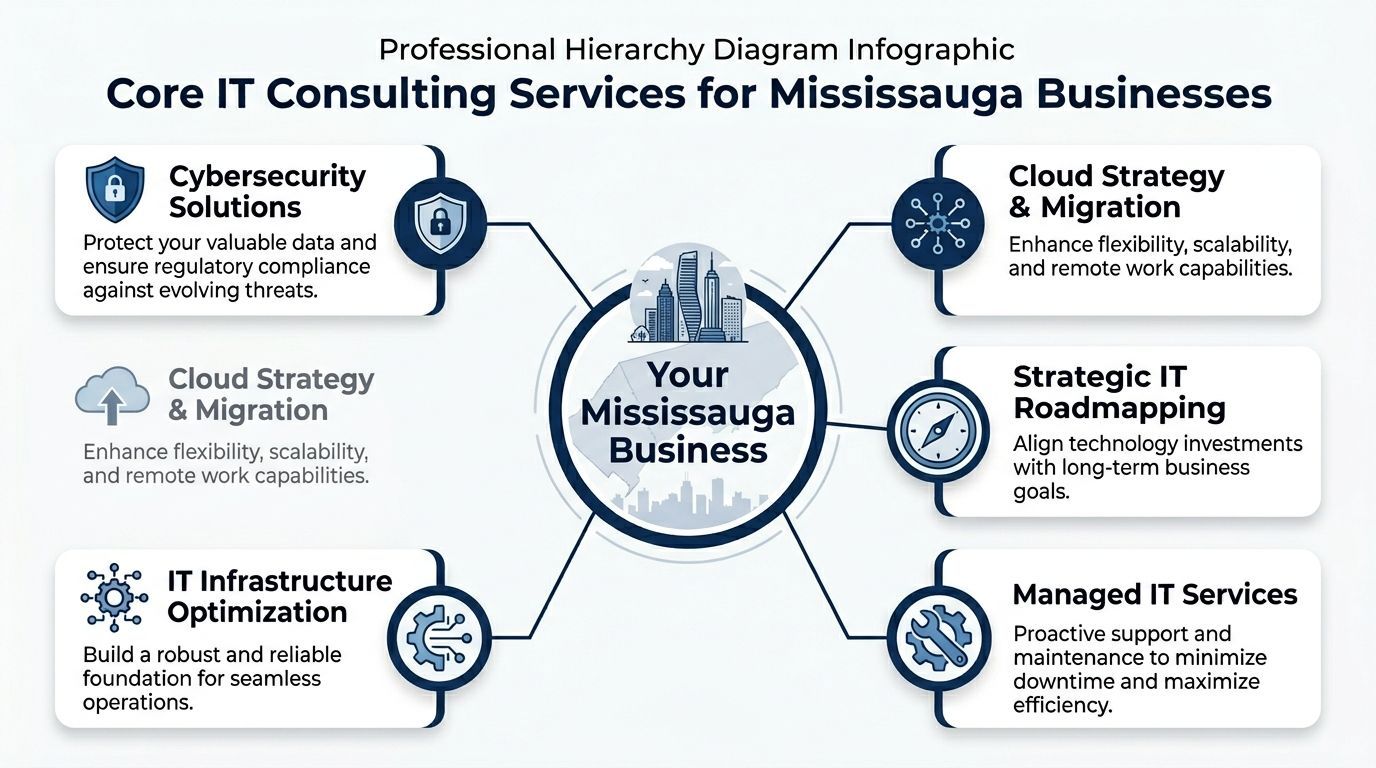
If your team loses time to recurring issues, delayed support, or systems that only get attention after they fail, managed services are usually the first gap to address.
This service model covers day-to-day support, monitoring, maintenance, patching, and issue resolution. It is less about dramatic transformation and more about creating a predictable baseline.
Manufacturing and logistics firms often benefit here because even minor IT disruption can affect scheduling, communications, inventory flow, or customer service.
If you want a plain-English breakdown of the model, this overview of what managed IT services are is a useful reference.
Cybersecurity consulting should not be reduced to antivirus and awareness training.
A proper engagement often includes vulnerability assessments, endpoint protection, identity and access controls, email security, logging, incident response planning, backup integrity, and policy review. In some environments it also includes aligning controls with legal or sector requirements.
Healthcare clinics, legal firms, and finance teams usually need this service because the consequence of weak controls goes beyond downtime. It touches confidentiality, audits, client trust, and business continuity.
Cloud consulting is valuable when the business has outgrown a patchwork setup.
Common triggers include:
The right cloud plan is rarely “move everything.” Sometimes the answer is Microsoft 365 optimisation. Sometimes it is a staged migration. Sometimes core applications stay where they are for now because timing, cost, or integration risk says they should.
Many SMBs do not need a full-time CIO. They do need someone who can think like one.
A strategic consultant or vCIO helps management connect technology choices to operational and financial priorities. That includes budgeting, lifecycle planning, vendor selection, security governance, software rationalisation, and sequencing major projects.
This service becomes important when the business is making bigger decisions, such as replacing an ERP-adjacent system, standardising Microsoft licensing, redesigning backup strategy, or supporting growth into new sites.
Some firms do not need a broad digital transformation. They need a reliable foundation.
That can mean network redesign, Wi-Fi upgrades, firewall review, server consolidation, backup architecture, or business VoIP improvements. These projects are often less glamorous than cloud or AI conversations, but they shape everything that depends on stable connectivity and communication.
A nearby provider such as CloudOrbis Inc. offers consulting and operational support across areas like cybersecurity, cloud, backup, VoIP, and vCIO services for Ontario SMBs. The key point is not the provider name. It is whether the firm can connect technical work to the way your business runs.
Practical advice: When vendors describe services, keep asking the same question. “What business problem does this solve for us?” If the answer stays vague, the proposal probably will too.
Compliance work fails when businesses treat it as a document exercise.
In practice, compliance is operational. It affects who can access data, how systems are configured, how incidents are handled, what gets logged, where backups sit, and whether staff understand their responsibilities. That is why generic “secure your business” messaging often falls short for Mississauga firms in healthcare, legal, finance, and other regulated settings.
According to a 2025 Ontario Health report cited in local Mississauga market coverage, 42% of clinics in Peel Region faced compliance breaches due to inadequate IT, with average fines of CAD 15,000 (Adeptivity Mississauga IT consulting page). For clinic owners and administrators, that is not an abstract warning. It is a sign that weak IT controls have direct financial consequences.
For Ontario businesses, security and compliance usually involve some combination of:
For healthcare, PHIPA considerations change the conversation. For legal and finance, client confidentiality, records handling, and auditability shape the controls you need. Federal privacy obligations such as PIPEDA may also be relevant depending on the business and data flows involved.
A consultant can be technically competent and still be the wrong fit.
A provider that mainly supports general office environments may not understand the workflow pressures of a clinic, the document sensitivity of a law firm, or the operational uptime demands of manufacturing and logistics. That matters because sector-specific reality drives the right control design.
Ask vendors direct questions:
Tip: If a provider answers compliance questions with broad cybersecurity language only, keep pushing. You need operational detail, not sales vocabulary.
Compliance conversations should also include accessibility where digital systems affect customers, patients, or staff.
For organisations reviewing websites, portals, forms, and digital touchpoints, this overview of AODA compliance is a useful starting point. It helps frame accessibility as part of operational risk management rather than a separate web issue.
Businesses that want a broader view of technical controls and response planning can also review practical guidance on cyber security services.
The point is simple. Security and compliance in Ontario are too specific to outsource blindly. Your consultant should understand both the tools and the regulatory context your business lives in.
Once you know what you need, the next step is disciplined vendor evaluation.
Many businesses skip this and choose the firm that responded fastest, sounded the most confident, or offered the simplest price. That can work, but it often leads to hidden gaps in support, strategy, or accountability.
A better method is to run every serious candidate through the same checklist.
You are not only checking technical capability. You are testing how the firm thinks.
Do they ask sharp questions? Can they explain trade-offs? Will they challenge bad assumptions? Are they transparent about scope, response expectations, training, and risk? Those are stronger signals than polished sales language.
For businesses that rely heavily on Microsoft business applications, it can also help to compare broader partner-evaluation criteria. Even though it focuses on another market, this article on choosing the right Microsoft Dynamics partner is useful because the same buying logic applies. Look for implementation discipline, sector understanding, and long-term fit.
| Category | Key Question to Ask | What to Look for in a Response |
|---|---|
| Technical expertise | What platforms, tools, and environments do you support most often? | Specific answers tied to Microsoft 365, cybersecurity controls, cloud platforms, backup, networking, or industry software relevant to your business |
| Industry fit | Have you worked with organisations in our sector? | Clear examples of healthcare, legal, finance, manufacturing, logistics, or other relevant environments, plus understanding of your operational realities |
| Security approach | How do you assess risk before recommending changes? | A method that includes discovery, review of current controls, vulnerability assessment, identity/access review, and prioritised remediation |
| Compliance capability | How do you support businesses with Ontario and federal compliance obligations? | Operational detail on policies, access controls, data handling, training, documentation, and review cycles |
| Support model | Who handles day-to-day issues, and how are tickets escalated? | Defined service process, named escalation path, realistic communication standards, and clarity on after-hours support |
| Strategic guidance | How do you align technology with business plans? | Evidence of roadmap thinking, budgeting support, lifecycle planning, and regular leadership-level review |
| Implementation discipline | How do you run projects and manage change? | A structured process with discovery, planning, pilot testing where appropriate, user communication, training, and post-go-live review |
| Pricing transparency | How do you bill for projects and ongoing support? | Straight answers on inclusions, exclusions, assumptions, variable charges, licensing impacts, and change requests |
| Documentation | What documentation do you maintain and share? | Asset records, network diagrams, admin access procedures, backup status, policies, and change history |
| Exit readiness | If we leave, how is knowledge transferred? | A professional offboarding stance, documented systems, and no sign of vendor lock-in tactics |
Some warning signs show up in the first meeting:
A strong local comparison point is this guide on selecting an IT consultant in Toronto, which outlines many of the same buying principles that Mississauga firms should apply.
Key takeaway: The right provider should make your environment clearer, not murkier. If conversations leave you with more ambiguity, do not assume the details will improve after signing.
A signed agreement does not create a good IT relationship. A disciplined onboarding process does.
At this stage, many engagements either gain momentum or start accumulating avoidable problems. The business assumes support will improve quickly. The provider starts gathering information. Users are unsure what is changing. Critical details sit in old documentation, someone’s inbox, or not documented at all.
That is why structured onboarding matters.
According to analyses of GTA projects, 70% to 80% of failed IT initiatives lack defined objectives. Projects with clear KPIs can achieve 25% to 35% higher ROI and reduce downtime by up to 40% through proactive monitoring (Right People Group on IT consulting ROI mistakes).
A practical 10-step engagement usually follows a clear path.
The middle of an engagement is where coordination matters most.
Implementation should cover technical deployment, communication to users, training, and clear go-live planning. If staff are left out, even sensible changes can create confusion, resistance, or workarounds that weaken the result.
Then come the steps many providers underplay:
Training is not an optional extra. It is part of risk reduction. If people do not understand new sign-in methods, file access rules, backup expectations, or security prompts, the design will not hold up in daily use.
Tip: Ask every vendor to walk you through onboarding week by week. If they cannot describe the sequence clearly, they may not run projects in a repeatable way.
The best onboarding process does not end at launch.
The final steps are where a provider shifts from installer to partner:
That cadence is what separates transactional support from real consulting. It also gives you a practical benchmark when comparing providers. If one firm can articulate assessment, planning, implementation, training, monitoring, and review in a coherent sequence, while another speaks only in generalities, the difference will show up later.
Choose the team that understands your business, can support your locations reliably, and has a delivery model that fits your environment.
A local Mississauga presence can help when you need on-site work, local industry familiarity, or easier executive communication. A broader GTA provider may still be a strong fit if support processes, responsiveness, and sector knowledge are solid.
Both matter, but they solve different problems.
Technical depth tells you whether the provider can design and support systems properly. Industry experience tells you whether they understand how those systems affect patient flow, document confidentiality, production continuity, or financial controls. The strongest candidates usually show both.
Listen to the questions they ask.
A reactive vendor focuses on symptoms, tools, and ticket handling. A strategic one asks about business goals, risk tolerance, user workflows, compliance obligations, lifecycle planning, and leadership priorities. They care about where the business is going, not only what broke last week.
Sometimes. Not always.
Separating the two can work if you have internal IT leadership and want an outside adviser for major projects or architecture. For many SMBs, it is more effective to work with a provider that can both advise and support. That reduces handoff risk and gives the consultant real visibility into how the environment performs after changes are made.
Enough to compare scope, assumptions, responsibilities, and exclusions with confidence.
A useful proposal should explain the current-state understanding, what will be delivered, what the client must provide, how change requests are handled, and what success will look like. If pricing appears simple but scope is vague, the simplicity is misleading.
Then do not buy one.
Some businesses need a strategic roadmap, better security controls, cleaner documentation, and a more stable support model before they attempt bigger shifts such as full cloud migration or major platform replacement. Good consultants know how to phase work. They do not force a grand plan when the business needs order first.
Yes, but only after the basics are under control.
AI features and Microsoft 365 improvements can help, but they depend on identity security, permissions, data governance, user training, and sensible adoption planning. If your environment is still inconsistent, fix the foundation before chasing advanced features.
If you are searching for it consulting mississauga, the right decision is rarely about finding the cheapest vendor or the fastest proposal. It is about finding a partner that understands your operating pressures, your compliance reality, and your growth path, then proving that understanding through a clear process.
If your business needs a more structured way to assess vendors, priorities, or compliance risk, CloudOrbis Inc. can help you evaluate your current environment, clarify your roadmap, and identify the right next step for secure, practical IT improvement.
Book a 30-minute call with a senior engineer. No sales script, just straight answers about your environment.


