Security Posture Management: A Practical Guide for SMBs
Learn what security posture management is, why SMBs and regulated firms need it, and the KPIs and roadmap to build it step by step.

Learn what security posture management is, why SMBs and regulated firms need it, and the KPIs and roadmap to build it step by step.
Your finance lead forwards a "suspicious sign-in" email, your bookkeeper works from a laptop at home, and your Microsoft 365 tenant has been collecting guest accounts since 2022. Nothing has caught fire. That's the trap.
Most small and mid-sized businesses don't get breached because one control failed. They get breached because nobody was checking the whole picture on a schedule. A firewall installed three years ago, an antivirus renewal nobody tracked, a cloud app someone approved on a Friday afternoon. Each decision made sense at the time. Together they form a security posture that no one has reviewed since.
Security posture management replaces that guesswork with a loop. You find what you own, compare each system against a written standard, rank the gaps by business risk, fix them, and prove the fix held. It's less a product than a habit, and it's the habit that separates a company that recovers from an incident from one that loses a month to it.
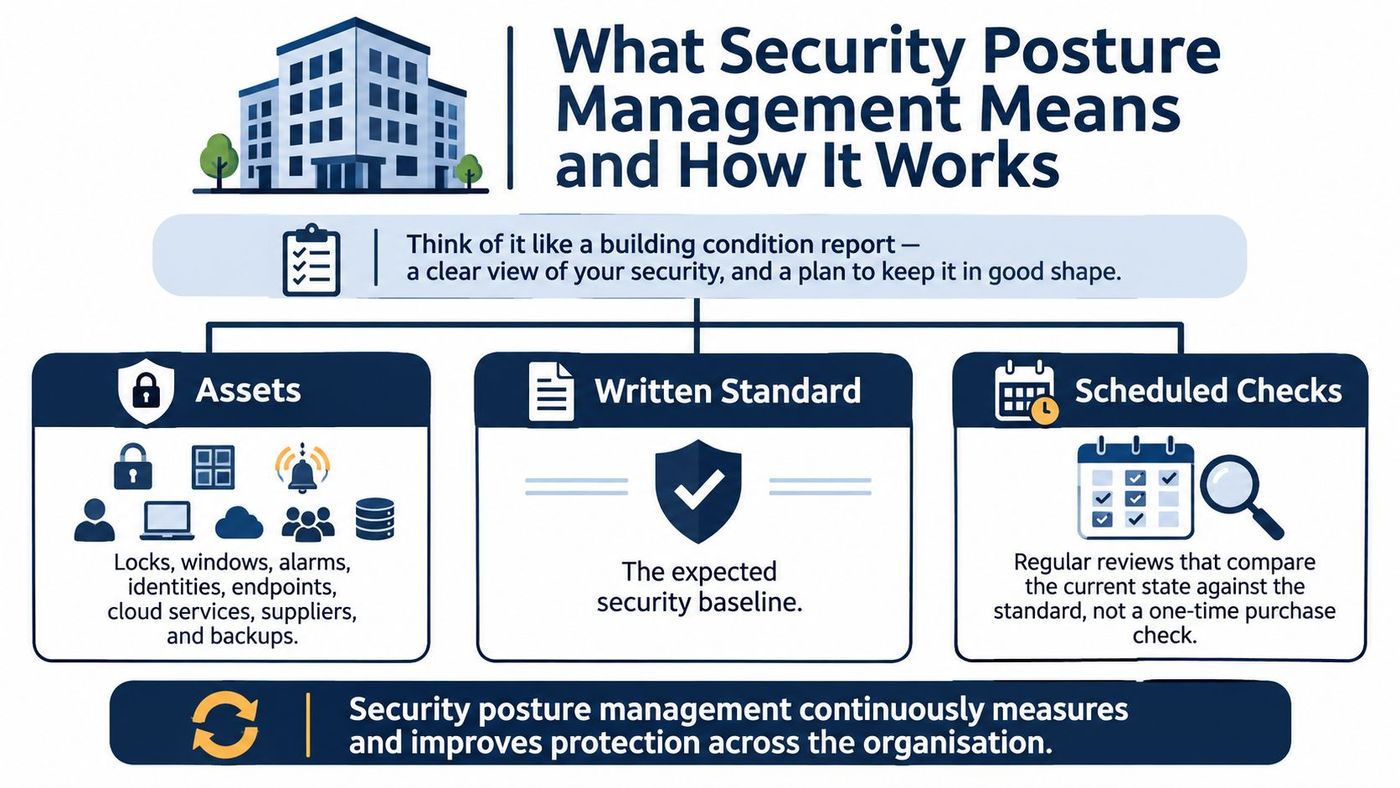
Think about how a building stays safe. Nobody inspects the locks, windows and alarms once at purchase and calls it done. A condition report lists every opening and system, measures each one against a written standard, and gets repeated on a schedule. What matters isn't the inspection itself. It's the record showing what changed since last time and what still needs work.
A security posture works the same way. The building is your identity provider, your endpoints, your cloud services, your line-of-business applications, your network and your suppliers. The written standard is a baseline you've agreed to, such as requiring multi-factor authentication on every administrator account. The scheduled checks are the continuous comparisons that catch drift before an attacker does.
Canada's own national thinking followed that arc. The 2010 National Cyber Security Strategy committed $431.5 million over ten years across three pillars of action, tying prevention and detection to response and recovery. By 2016 the government had launched a Cyber Review to reassess the threat as the country became more connected. The lesson scales down neatly: security is a governance capability that has to keep pace with change, not a purchase order.
Every posture program does the same five jobs, whether it runs on a spreadsheet or a platform. Each answers a question a business owner asks out loud.
| Component | Question it answers | Example signal for an SMB |
|---|---|---|
| Asset inventory | What do we own, including devices and cloud accounts? | A laptop with no owner or a Microsoft 365 tenant nobody manages |
| Vulnerability management | Which weaknesses can attackers actually reach? | An unpatched VPN appliance exposed to the internet |
| Configuration and compliance drift | Has a setting moved away from the approved baseline? | MFA disabled on an administrator account |
| Threat detection | Is anything suspicious happening right now? | Impossible-travel sign-in on a finance user's account |
| Remediation orchestration | Who fixes each item, by when, and how is the fix confirmed? | Ticket closed only after the patch is verified on every device |
The order matters because each step depends on the one before it. You can't prioritise a weakness on a system you haven't inventoried, and you can't confirm a fix you never assigned to anyone.
A vulnerability scan is a single snapshot. A compliance audit checks one moment against a framework and produces a report you file. Both are useful, and neither tells you what happened last Tuesday.
Posture management runs continuously and links every finding to a named owner, a due date and a verification step. That last part is the difference between a report and a result. The NIST Cybersecurity Framework 2.0 is a helpful map here, because it treats identify, protect, detect, respond and recover as one cycle rather than five separate projects.
The practical test: for any open finding, can you name the person who owns it and the date it will be closed? If the answer is a shrug, you have a dashboard, not a program.
Start by naming your ten most business-critical systems. If payroll, email, the patient record system and the production scheduler all disappeared tomorrow morning, those are the four that decide whether you open. Everything later in this guide hangs off that list.
The national numbers look encouraging until you read them closely. Statistics Canada reported that 16% of Canadian businesses were impacted by a cyber security incident in 2023, down from 21% in 2019 and 18% in 2021. A falling average sounds like progress.
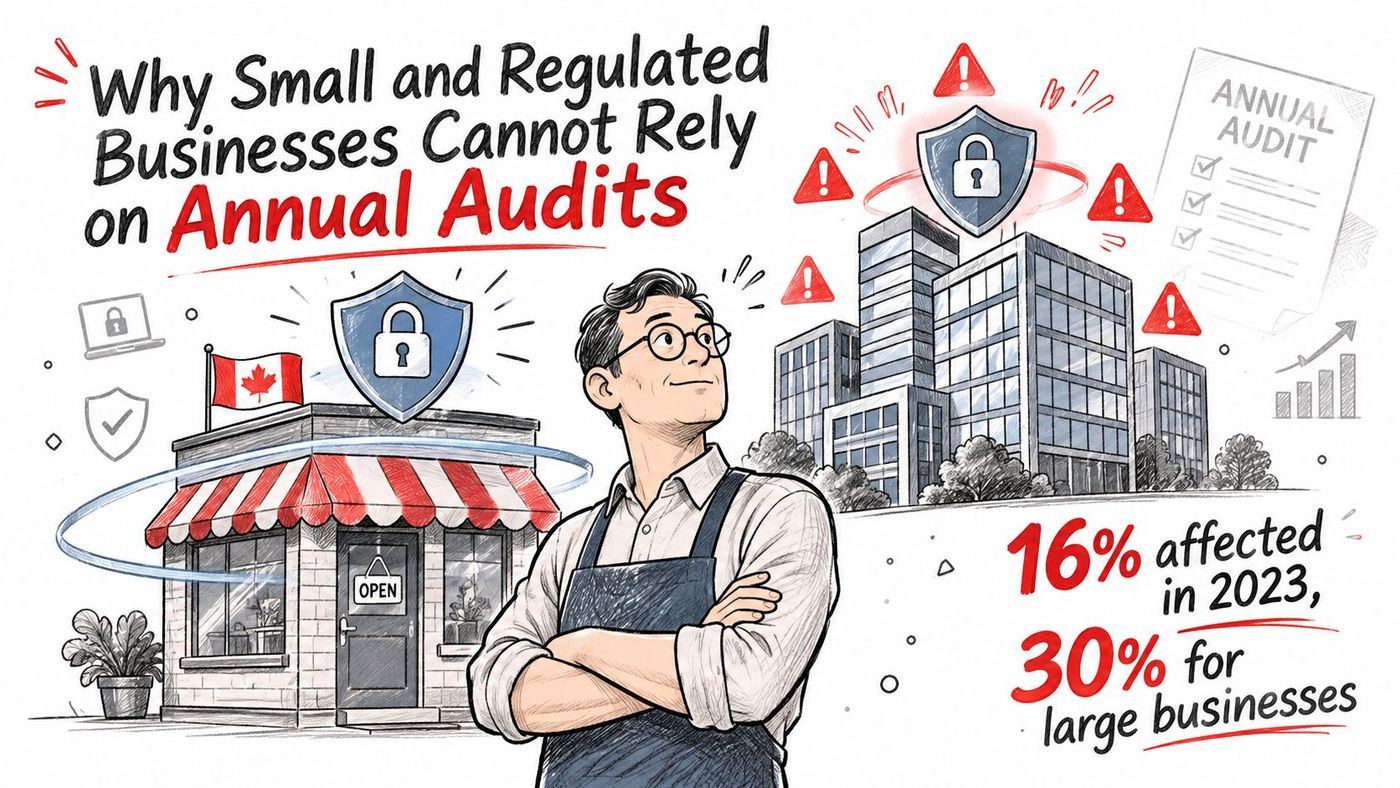
Then the size gradient shows up. 30% of large businesses reported an incident in 2023, and earlier figures put 37% of large businesses affected in 2021. Bigger organizations get attacked more because they present more surface. That doesn't make a 25-person firm safe. It means a substantial minority of firms your size still lose days to an incident, and the national average tells you nothing about which side of it you'll land on.
| Business group | Share affected | Year |
|---|---|---|
| All Canadian businesses | 16% | 2023 |
| Large businesses | 30% | 2023 |
| Large businesses | 37% | 2021 |
| Medium businesses (50 to 249 employees) | 25% | 2021 |
| Small businesses (10 to 49 employees) | 16% | 2021 |
Picture a Tuesday afternoon. A vendor is helping your office manager troubleshoot a scanner integration and asks her to disable multi-factor authentication on a shared administrator account "just for the session." The session ends. The setting doesn't get turned back on. Nobody notices, because nothing breaks.
That gap stays open for eleven months until the next annual audit finds it. Eleven months is not a hypothetical. It's arithmetic, and it's why a once-a-year check is the wrong cadence for a setting that can be changed in ten seconds.
Clinics hold patient records and need tight access control and audit trails, and clinics that serve US patients or partners often face HIPAA-aligned expectations from those partners. Law firms hold privileged client files. Finance and accounting firms hold account and transaction data. All three face privacy duties under PIPEDA and provincial law, and all three would rather find a misconfiguration themselves than explain it afterwards.
Under PIPEDA's incident response requirements, an organization must report a breach of personal information to the Office of the Privacy Commissioner of Canada when it poses a real risk of significant harm, notify affected individuals, and keep records of every breach. Missing a record is a compliance failure in its own right, which is why the response plan needs to name who assesses risk and how fast they escalate.
A cadence a small team can sustain looks like this: a weekly review of critical findings, a monthly review of the KPIs that follow, and a quarterly leadership review that compares this quarter with the last. If you'd rather benchmark your current state against a formal standard first, our security audit services are built for that starting point.
Closing 200 low-risk findings feels productive and changes almost nothing. Closing the three critical exposures on your internet-facing systems changes your year. That's why posture reporting counts a small number of ratios instead of a large number of findings.
| KPI | How it is measured | Suggested starting target |
|---|---|---|
| Asset coverage | Share of devices and cloud accounts in the inventory | 100% of the ten most critical systems, 95% overall |
| Privileged accounts reviewed | Share of administrator accounts with a documented review in the last 90 days | 100% |
| Critical misconfigurations by age | Count of unresolved critical settings, grouped by days open | None open longer than 30 days |
| Patch compliance | Share of critical patches installed within 14 days of release | 95% |
| Mean time to remediate | Average days from a critical finding to a verified fix | Under 7 days |
| Restore test success | Share of critical systems restored in a test within the recovery time objective | 100% each quarter |
Asset coverage matters first because every other number is a lie if the inventory is incomplete. A forgotten test tenant or a laptop belonging to a contractor can sit outside every check you run.
Privileged accounts reviewed is the most impactful ratio in the set. An unreviewed administrator account is the shortest path from a phished password to a full environment takeover, so a 90-day review cycle forces someone to look at who holds the keys.
Critical misconfigurations by age is the anti-backlog metric. A count that never gets older than 30 days proves the team is keeping up. A count with six items over 90 days proves the opposite, whatever the total says.
The Cyber Centre's cloud security assessment guidance recommends classifying the sensitivity of each business activity, choosing a matching control profile, then periodically reassessing the threat environment, technical performance, assessment results and whether the provider has kept its contractual obligations. In practice, that means tracking coverage of assets under assessment, privileged accounts reviewed, unresolved critical misconfigurations by age, and exceptions with a documented owner and expiry date.
Report those per service. If your endpoint scores look excellent, a gap in Microsoft 365 administration can hide behind them for months. A per-service view puts the gap where a manager will see it.
Ransomware deserves its own line rather than being folded into general incidents. The Cyber Centre's ransomware outlook notes that 13% of businesses that experienced a cybersecurity incident identified ransomware as the attack method, up two percentage points from the 2021 survey, and that total recovery costs doubled in 2023 to CAD 1.2 billion.
The same National Cyber Threat Assessment estimated the average ransom paid in Canada in 2023 at CAD 1.13 million. Counting backups tells you nothing about whether they restore, so measure restore tests against recovery time objectives and map which systems would halt operations if encrypted.
These targets are starting points to tune against your own baseline. Run one test: if a KPI moved last month and no decision changed, replace it with a metric that would. Our vulnerability management approach follows that principle, prioritising by reachability rather than raw volume.
A file-sharing service can encrypt its data centres and still leave your business exposed if an employee account has excessive access. Cloud providers protect the underlying platform; customers remain responsible for identities, permissions, configuration and decisions about how data is handled.
For Microsoft 365, that means Microsoft maintains the service and its infrastructure, while your team decides whether MFA is enforced, who can share files externally, which mailbox forwarding rules are allowed and how long email is retained. Provider security does not set those choices for you.
A control-ownership list works like a map: it shows who is responsible for each safeguard and what evidence demonstrates that it is in place. Provider evidence may include current SOC reports, certifications, assessment scope, listed exceptions and remediation status. Customer evidence may include MFA coverage, privileged-access reviews, conditional-access policies, encryption settings, logging retention, backup independence and validation of data residency.
Keep the list specific to each cloud service. A single compliance score can conceal controls that have no owner, while a clear assignment helps managers, auditors and insurers see what remains to be done.
The same division applies to suppliers that handle sensitive information. Statistics Canada published a 2024 dataset on how cybersecurity concerns affect contracts and supply chains, with results broken down by industry, business size, activity and ownership. A clinic that outsources billing should vet that vendor as carefully as its IT suppliers. Use billing questions for physician practices to frame that review, and apply the same scrutiny to security controls, access and responsibility. Third-party risk management can help organize oversight of those relationships.
CloudOrbis assesses the existing environment during discovery and can integrate tools that work well, including Microsoft 365, line-of-business applications and CRM systems. For endpoint protection, password management and MDR, it requires a standardized stack to keep protection and response consistent. Admin access typically covers endpoint management, security tools and infrastructure monitoring. Access to ERP, CRM and other business-critical applications stays with the client unless explicitly delegated; all access is documented, audited and reviewed quarterly.
The most common reason a posture program stalls isn't budget. Statistics Canada found that 47.6% of businesses and organizations said they did not plan to take new cybersecurity measures in 2025, and 58.4% of that group said they believed they didn't need them. Only 7.4% cited insufficient financial resources. Manufacturing stood out: 46.7% planned no new measures, and 15.4% of those cited financial constraints, the highest sector share for that reason.
That gap is usually a translation problem. Technical findings never got converted into business priorities like production downtime, patient care or lost revenue, so nothing got funded. A ranked plan fixes it.
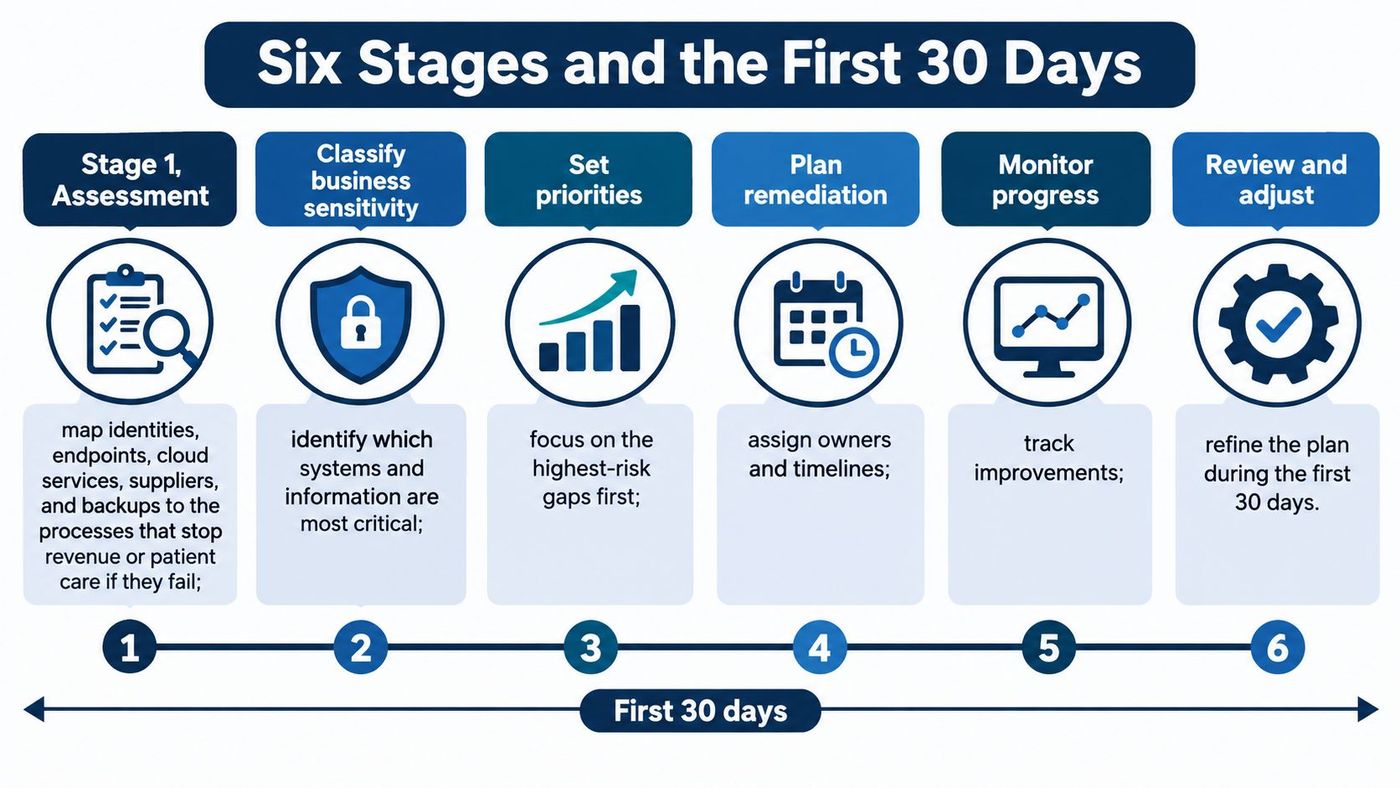
1. Assessment. Map identities, endpoints, cloud services, suppliers and backups to the processes that stop revenue or patient care if they fail. Classify the sensitivity of each business activity before choosing a cloud control profile, following Cyber Centre guidance, and treat the asset list as finished only when a named person signs it off.
2. Prioritisation. Rank exposures by how easily an attacker can reach them and how much damage they'd cause. Build one ransomware scenario that names the systems that would halt operations if encrypted, then choose three improvements for this quarter, each with an owner and a due date.
3. Tooling. Deploy the standard stack covering endpoint protection, monitoring, backup, email security, secure access and security awareness training. In our engagements this is step three of the process, structured implementation, and it includes policy documentation, access control lists, password governance and backup validation.
4. Playbooks. Write incident response and disaster recovery plans that name who decides on containment, who assesses significant-harm risk under PIPEDA, who speaks to clients and how evidence is preserved. The stage is done when you can point to the named decision-makers in a document someone has read.
5. Monitoring. Review alerts continuously, hold quarterly reviews, test disaster recovery and plan hardware and software lifecycles before the warranty expires rather than after. Finished evidence is a test record with a date and the gaps it found.
6. Continuous improvement. Each month, compare KPIs with targets, retire any metric that drives no decision, and update the baseline whenever a new system, site or acquisition changes the environment.
Week one: list your ten most business-critical systems and every administrator account that touches them. No tools.
Week two: run one vulnerability scan and one configuration check against a written baseline. Record the results even if they're ugly.
Week three: rank the findings by exploitability and consequence, then assign owners and due dates to the critical items only.
Week four: pick three KPIs from the table above and book a monthly review in the calendar. Invite whoever signs cheques.
Reporting should be short enough to read before a management meeting. Our clients receive a Monthly Operational Report covering tickets, recurring issues, asset inventory and response times, a Strategic Technical Review each quarter covering budget forecasting, hardware lifecycle planning and technical deep dives, and a Cybersecurity Compliance Report covering training completion, phishing results, patch compliance and insurance-ready documentation. That last one does double duty, since insurers now ask for formal policies, endpoint protection, password governance, validated backups and monthly compliance evidence. If you'd rather see the whole shape before committing, we'll build a customised roadmap starting from your asset list.
A security score can rise while the risks that matter to the business remain unresolved. This happens when teams close easy findings but leave serious issues without clear owners or deadlines.
| Pitfall | Warning sign | Fix |
|---|---|---|
| Treating the score as the goal | Score rises while incidents stay flat | Tie each KPI to a business risk and a named owner |
| Scanning without owners | The findings list grows every month | Assign one owner and a due date to each critical finding |
| Assuming the provider covers it | No one can name the customer-side controls | Keep a control-ownership list for each cloud service |
| Confusing an alert with a breach decision | Alerts closed without a privacy assessment | Document who assesses significant-harm risk and the escalation timeline |
| Ignoring the human layer | Phishing simulations fail repeatedly in the same teams | Run monthly simulations and provide targeted training to employees who fail |
The fourth pitfall can turn an alert into a confused response. An alert shows that something happened; it does not establish whether personal information was involved, whether there is a real risk of significant harm, or whether the Privacy Commissioner must be notified. Document who assesses the risk and the escalation timeline so the response has a clear path.
People are part of the security posture, too. Ongoing awareness training and monthly phishing simulations can help employees practise password security, recognising phishing emails, safe browsing, mobile device security and remote work practices. Employees who fail a simulation should receive additional targeted training, so the follow-up is practical rather than punitive.
The fixes point to a common problem: tools cannot assign responsibility. A finding needs an owner, a due date and a way to confirm it was addressed. Without those, new scans can add to the backlog without reducing risk.
CloudOrbis assesses the existing IT environment, identifies risks and gaps, and can provide a customized roadmap that ranks improvements by business risk. Its security posture management combines cybersecurity and compliance practices, with ongoing monitoring, quarterly reviews and disaster recovery testing. Leadership can review monthly reporting without digging through raw tool output. Visit CloudOrbis Inc. to learn about its managed IT and security services.
Book a 30-minute call with a senior engineer. No sales script, just straight answers about your environment.


