What Is Vulnerability Assessment? a Canadian SMB Guide
Learn what is vulnerability assessment, how the process runs, the main assessment types, and how Canadian SMBs rank findings and set fix deadlines.

Learn what is vulnerability assessment, how the process runs, the main assessment types, and how Canadian SMBs rank findings and set fix deadlines.
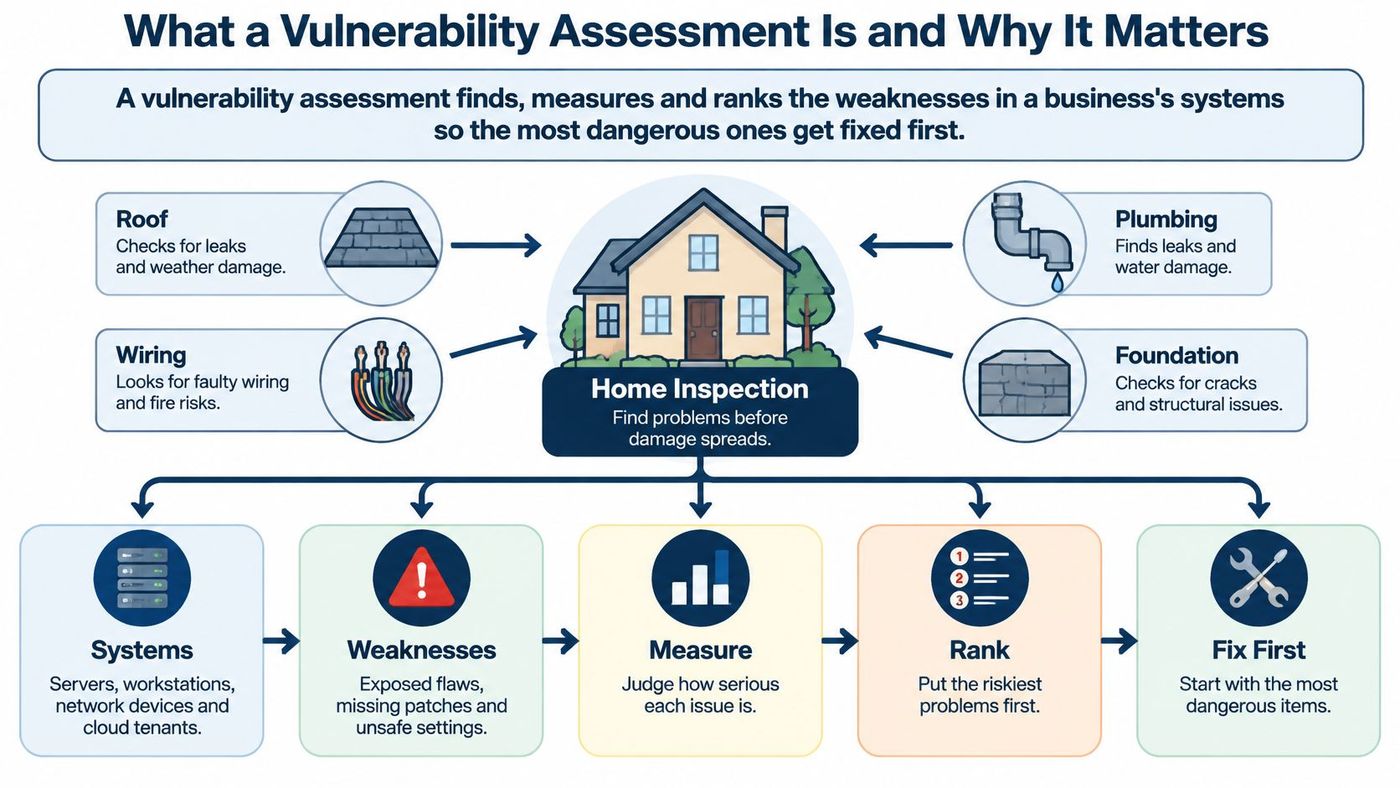
A vulnerability assessment finds, measures and ranks the weaknesses in a business's systems so the most dangerous ones get fixed first.
Your IT provider has sent a scan report full of warnings, but your operations manager needs to know whether fixing them will interrupt patient appointments, production or client work. The report doesn't answer the question that matters most: who should fix what, and by when?
That's where an assessment earns its place. It turns technical alerts into decisions your business can act on, without treating every warning as an emergency.
Say a scan report lands in your inbox with hundreds of findings. Your IT administrator starts patching laptops because they're straightforward, while an exposed client application waits for its software vendor. Everyone's working, but nobody has decided whether they're addressing the greatest risk.
Think of a home inspection. The inspector examines the roof, wiring, plumbing and foundation, then distinguishes a loose railing from structural damage. The useful product isn't the catalogue of defects. It's the written assessment that helps the owner decide which repairs cannot wait.
The Government of Canada's vulnerability-management guideline takes a similarly practical approach: consider exploitability, active exploitation, system criticality, internet exposure and existing protective controls, rather than relying on a scanner's severity label.
That means asking whether an attacker can reach the weakness, what they could do with it and what business activity depends on the affected system. A finding on a scheduling server has different consequences from the same finding on a disposable training machine.
Practical rule: A finding without an owner and a deadline is unfinished decision-making, even when the technical diagnosis is correct.
For a hypothetical business with 30 to 300 people, an unread list of 400 findings doesn't create a workable repair programme. Management needs to distinguish urgent exposure from work that can safely enter a maintenance window.
Assessment itself doesn't patch systems or guarantee compliance. Its value comes from directing corrective action and preserving the reasons behind those decisions. Done consistently, that supports fewer surprise outages, a documented due-diligence record for clients, insurers and regulators, and a clearer budget case based on business impact rather than alarm volume.
| Assessment type | What it examines | Typical small-business example | Usual test method |
|---|---|---|---|
| Network | Firewalls, switches, open ports, exposed remote access | Office firewall with an old remote access port left open | Authenticated and unauthenticated network scanning |
| Host or endpoint | Servers and workstations, patch levels, local settings | Staff laptops missing monthly updates | Credentialed scan with patch-level checks |
| Web and application | Login flows, input handling, known coding flaws | Client portal with weak login checks | Dynamic testing and code review |
| Cloud and SaaS configuration | Tenant settings, admin accounts, storage permissions | Microsoft 365 admin accounts without multi-factor authentication | Configuration benchmark checks |
| Wireless | Access points, encryption, rogue devices | Guest network sharing a segment with payment terminals | Wireless site survey and scanning |
| Database | Access control, unpatched engines, excess privileges | Client records database with a shared admin login | Credentialed database scanning |
| Operational technology | Production controllers, sensors, legacy systems | Factory line controller on a flat network | Passive monitoring and segmentation review |
Network and endpoint checks answer different questions. A firewall review can identify an exposed remote-access service, but it won't necessarily reveal unsafe permissions on a staff laptop. Conversely, a fully patched laptop doesn't prove that the office firewall is configured safely.
Application assessments need more than a search for outdated software. A client portal might use current components but still allow a user to access another client's records through faulty authorisation logic. Dynamic testing examines the running application; code review helps identify how the application handles those decisions.
Cloud services need their own lens. Microsoft manages parts of Microsoft 365, but your organisation still makes decisions about administrator access, sharing and authentication. A conventional office-network scan won't adequately examine those tenant settings.
Wireless and database reviews also expose problems that broad network checks can miss. Confirm that guest devices can't communicate with payment terminals, and check whether database accounts have more privileges than their users need.
Don't aim an aggressive scanner at a factory controller or clinical device without approval. Start with passive observation, architecture review and vendor-supported testing methods where availability or safety could be affected.
Health Canada's medical-device cybersecurity guidance applies to software-enabled devices across Classes I through IV and describes a process involving vulnerability collection, assessment, mitigation, remediation and stakeholder communication. For clinics, that makes device connectivity, supporting software and identity exposure relevant to the assessment, not just office computers.
A useful cybersecurity testing services comparison helps distinguish these methods before you commission work.
Start with systems that are internet-facing or hold sensitive information, then extend the scope to their dependencies. Record any exclusions explicitly so an untested system isn't mistaken for a secure one.
A useful assessment combines automated collection with human judgement. Before testing begins, agree on permission, scope, safe testing windows and who can stop the work if a business service becomes unstable.
The Canadian Centre for Cyber Security's risk-assessment guidance recommends scanning at an organisation-defined frequency and performing additional scans when newly discovered vulnerabilities may affect the environment. It also calls for remediation based on organisational risk, not severity alone.
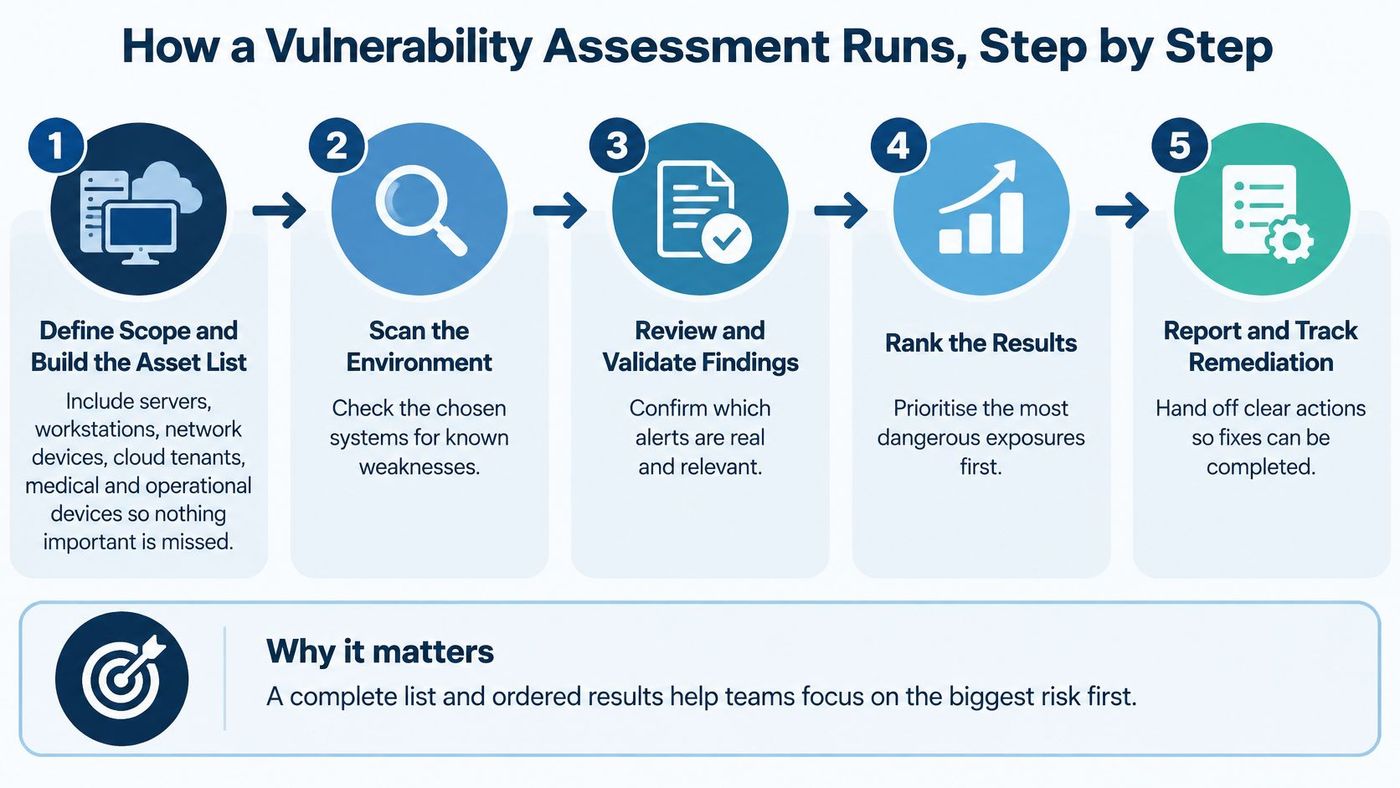
The Government of Canada's event-logging guidance identifies asset and software records that help connect findings to specific installations. Preserve that context so later reviewers can distinguish a repaired system from a renamed or replaced one.
For planning purposes, consider a hypothetical 50-person office allowing one to two weeks for its first full assessment. That's an illustrative estimate, not a service commitment: asset count, access approvals and the number of systems requiring credentials determine the actual effort.
Discovery and credential preparation consume staff time; scanners can run unattended during approved windows. Validation and prioritisation need focused analyst work, while remediation may follow a separate maintenance schedule.
Use this tool-selection checklist:
Connect that workflow to IT security risk management so business leaders can approve priorities and exceptions.
A fresh scan of a small office network can return hundreds of findings, and sorting them by severity score alone produces a queue that ignores your actual exposure. A high-rated flaw on an isolated test server can matter less to the business than a medium-rated flaw on an internet-facing client portal holding personal information. Reachability, consequences and existing controls determine the repair order.
A scanner's severity score describes technical characteristics. Your remediation queue must describe business risk.
Review each finding against these factors:
This ranking pass takes real effort. Working a long findings list into a defensible order is analyst work that requires knowing which systems hold sensitive data and which can tolerate downtime; the scanner cannot supply that context. Patching downtime shapes the repair plan while the risk itself stays just as serious, so a difficult patch still needs an accountable decision and an interim protection plan.
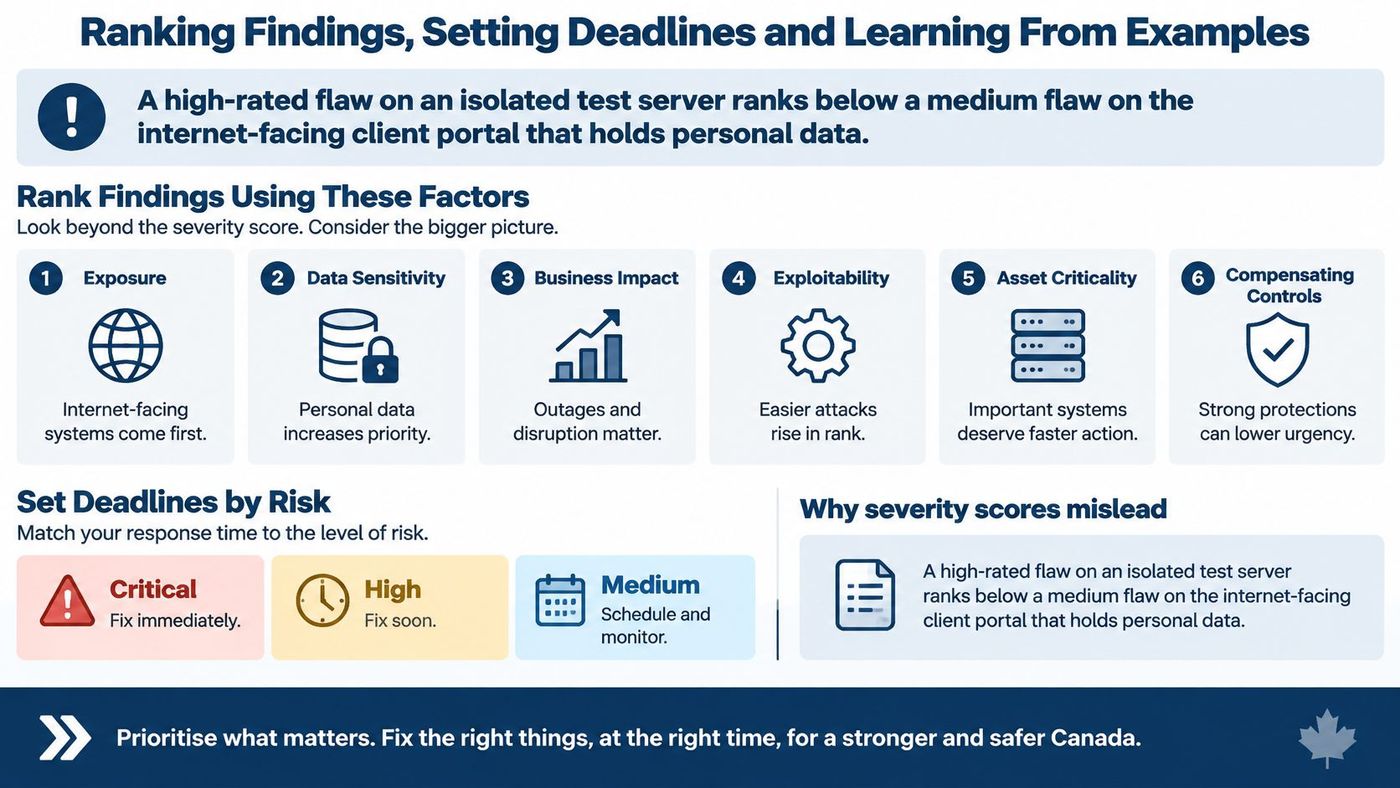
The Government of Canada's patch-management guidance provides deployment windows of within three months for medium- or high-impact vulnerabilities without significant expected collateral damage, and within two weeks where medium- or high-impact vulnerabilities could expose additional assets to compromise.
Patch deadlines by impact and collateral risk
| Situation | Response window |
|---|---|
| Medium or high impact, no significant collateral damage expected | Deploy within three months |
| Medium or high impact that could expose additional assets to compromise | Deploy within two weeks |
| Actively exploited and internet-facing | Emergency action; no fixed window in the cited guidance |
| Low impact | Normal maintenance cycle; no fixed window in the cited guidance |
Treat these as federal guidance examples rather than universal legal deadlines for Canadian businesses. The emergency and routine-maintenance rows describe operational handling categories, since that guidance sets no numerical window for them.
The longer window gives you room to test, coordinate and schedule; it does not make an easily exploited service safer to leave exposed. Keep the two risks distinct: the chance the vulnerability causes further compromise, and the chance an update interrupts production. The first argues for speed, the second for preparation.
A remediation deadline should reflect the exposure you're accepting, not simply the next convenient date on the calendar.
A production line or clinical system may require vendor approval before patching. Record why the normal deadline can't be met, what could happen during the delay, which compensating controls apply, who approves the exception and when they must review it.
Where a safe permanent repair has to wait, segmentation and enhanced monitoring can reduce exposure in the meantime. Those measures limit the attack opportunity rather than remove the weakness, which is why they belong in the exception record with a review date attached.
An exception stays open and visible until the repair passes verification or an authorised owner formally accepts the remaining risk.
Setup: Consider a hypothetical 40-person clinic with a patient portal and an isolated imaging workstation. Finding: Both have software weaknesses, but the portal is reachable from the internet and handles patient information. Ranking reason: Its exposure and privacy consequences justify earlier action, while the workstation's isolation must be verified rather than assumed. Fix: Restrict or patch the portal through an approved change, coordinating application testing with its vendor. Retest: Check the original vulnerability and confirm that patients can still authenticate and use the required functions.
Setup: A hypothetical 120-person manufacturer operates controllers that require a planned shutdown for updates. Finding: Production devices share a network with ordinary office systems. Ranking reason: That connectivity creates a route from an office compromise into production, while untested scanning or patching could interrupt the line. Fix: Restrict communication through segmentation, monitor necessary connections and schedule vendor-approved patches during a maintenance window. Retest: Verify permitted and blocked traffic, then confirm safe production operation after the updates.
Setup: A hypothetical 25-person law firm relies on Microsoft 365 for confidential collaboration. Finding: Administrator accounts lack multi-factor authentication. Ranking reason: Those accounts can make tenant-wide changes, so the assessment treats the weakness as urgent. Fix: In this scenario, the firm chooses to implement the change within days, using controlled enrolment and tested recovery arrangements rather than waiting for routine workstation maintenance. Retest: Confirm that administrative sign-ins enforce the intended policy and inspect exclusions that could bypass it.
Each example ends with evidence, not an assurance that someone completed the task. A useful vulnerability assessment report preserves that evidence alongside the decision.
Build a working list with finding, asset, owner, ranking reason and deadline. If you can't explain why the first item comes before the next, the prioritisation needs more work.
A scanner finishes its run, hands back a long list of findings and everyone exhales as if the work is done. That reaction sits behind most of the mistakes below.
A scan equals an assessment. Detection is only the first step. Someone still has to judge impact, name an owner and decide what happens next, which is where prioritisation and accountability begin.
Last year's assessment still applies. A new cloud application, a changed access policy or a newly disclosed flaw can shift your exposure without adding a single visible device to the office. Plan a full review roughly once a year, add shorter check-ins after significant changes and give externally accessible systems early attention.
A penetration test covers everything. It validates selected attack paths at one point in time, like a fire drill that proves specific exits work on the day you run it but says nothing about whether anyone checks the alarm the rest of the year. The asset inventory, ownership and remediation tracking around it are what keep findings moving.
A small business isn't vulnerable. Perception is a poor substitute for examining actual access and exposure. In Statistics Canada's discussion of business security practices, 73% of small businesses reported having experienced a cybersecurity incident. Leadership confidence that "we're too small to be a target" needs testing against evidence, not assumption.
Management check: Ask which unresolved exposure the business is accepting, who approved it and when that decision expires.
Misconceptions survive when nobody owns the follow-through. A lightweight review habit closes the gap better than another unowned spreadsheet:
That recurring loop is what vulnerability management turns into routine: findings get owners, deadlines and retests rather than a ticket count. Leadership reviews overdue exposure and blocked repairs, not just how many tickets closed.
Outsourced IT and SaaS providers belong inside that scope as well. Examine their remote access, privileged accounts, integrations and data-sharing arrangements, including who removes that access when the relationship ends. A vendor departure counts as a significant change, so it belongs on the same reassessment trigger list.
This week, build an asset list with a named owner for every system. Select your highest-priority findings by internet exposure and data sensitivity, then assign deadlines that the responsible people can meet.
CloudOrbis offers a free IT Risk Assessment for small and mid-sized businesses that want a clearer starting point. Our process begins with Discovery, followed by Step 2, the Deep Dive Assessment, which identifies structural weaknesses, undocumented systems and risk exposure.
During Week 1 of the transition process, our Discovery & Audit work maps the client's network and identifies risks without disrupting the team. Assessment findings should become a prioritised action list with recommended deadlines, rather than another report to file.
Technical checks also need a human reporting habit. Gini Help's resource on screening suspicious calls, texts, and emails provides a complementary starting point for recognising suspicious communications.
Review the free IT Risk Assessment details and keep your asset list, existing scan results and known maintenance constraints ready for the first conversation.
CloudOrbis Inc. offers vulnerability assessments and managed IT support to help Canadian businesses turn security findings into prioritised, accountable work. Visit CloudOrbis Inc. to book your free IT Risk Assessment, and bring your asset list so the conversation starts with the systems your business depends on.
Book a 30-minute call with a senior engineer. No sales script, just straight answers about your environment.


