
September 23, 2026
DDoS Protection for Canadian SMBs: What Works in 2026Learn what DDoS protection really does, the latest Canada-specific threats, and a practical playbook for small and mid-sized businesses
Read Full Post%20(1).webp)
Usman Malik
Chief Executive Officer
May 11, 2026

Canadian businesses don't need another generic warning about cyber risk. They need a practical way to protect your database before a breach turns into a compliance issue, an operations issue, and a trust issue at the same time.
The urgency is hard to ignore. In 2023, Canada experienced a 55% year-over-year increase in data breaches involving databases, with healthcare organizations accounting for 28% of reported incidents, according to the Office of the Privacy Commissioner of Canada, as cited by Edge Delta's summary of Canadian data security statistics. For a clinic, manufacturer, law firm, or finance team, that isn't just an IT problem. It affects service delivery, audit readiness, and whether staff can keep working when systems are under pressure.
A strong database security plan has to do three things well. It must reduce the chance of unauthorised access. It must limit blast radius if something goes wrong. And it must help the business recover quickly enough to avoid extended disruption.

Database security used to be treated as a back-office control. That approach no longer works. Your database now sits at the centre of customer records, billing, scheduling, inventory, reporting, and often compliance evidence too.
When attackers reach the database, the damage spreads fast. Teams lose access to the information they need to serve clients. Leaders scramble to answer legal and contractual questions. Regulators want to know what was exposed, who had access, and what controls were missing.
For Canadian SMBs, the issue isn't only theft of records. It's the chain reaction after the event. A database incident can force manual workarounds, delay invoicing, interrupt production, and create disclosure obligations under privacy law.
That's why the discussion needs to move beyond antivirus and passwords. To protect your database, you need a roadmap that covers identity, network design, encryption, monitoring, backup validation, and clear recovery steps.
Database security is business continuity with technical controls attached.
Generic checklists can still help as a starting point. If you want a plain-language overview of crucial database security tips, that resource is useful for framing the basics. The gap for most Canadian SMBs is prioritisation. A healthcare clinic in Ontario doesn't face exactly the same exposure as a manufacturing firm in Alberta, and their roadmap shouldn't look identical.
In practice, most database exposures come from a short list of failures:
A business leader doesn't need to memorise every control standard. But they do need to recognise this point. If your organisation depends on data to operate, then protecting the database is no longer optional maintenance. It's part of keeping the doors open.
Access control is where every sensible roadmap starts. If the wrong person can get in, every other control has to work harder than it should.
The two strongest first moves are multi-factor authentication and the Principle of Least Privilege. MFA reduces the value of a stolen password. Least privilege reduces the damage a legitimate account can do if it's misused or compromised.
Least privilege is easy to explain to leadership. Don't hand out master keys when someone only needs access to one room. The same rule applies to databases. Finance staff may need reporting access. A developer may need a non-production environment. A vendor may need temporary administrative rights for a defined task. Those aren't the same level of access, and they shouldn't be treated that way.
A practical access review usually asks:
If your team is cleaning this up, a primer on privileged access management helps frame how admin rights should be requested, approved, and monitored.
Practical rule: Remove standing admin rights wherever you can. Permanent privilege becomes invisible over time, and invisible privilege creates avoidable risk.
Healthcare environments need finer control than broad role groups usually provide. A receptionist, nurse, physician, and billing team may all touch patient systems, but they should not all see the same data in the same way.
That's where Row-Level Security (RLS) becomes valuable in platforms such as PostgreSQL and SQL Server. RLS lets you enforce access at the record level. A clinic can restrict a user to the patients, locations, or business units relevant to that role, rather than exposing the whole table.
For Canadian healthcare providers, this isn't theoretical. Implementing Row-Level Security can reduce data leak incidents by up to 92%, according to a 2025 audit of Ontario SMBs, as reported by Querio's database security guidance.
A practical RLS rollout usually includes:
What doesn't work is bolting RLS on without testing. Teams often create a policy, confirm one happy-path query, and assume the problem is solved. It isn't. Access control only works when the rules match real workflows and someone reviews them regularly.
A database with strong login controls can still be exposed if the surrounding environment is weak. That's why the next layer is infrastructure hardening.
Think of your database like a bank vault inside a secure building. You don't leave the vault in the lobby. You place it behind controlled doors, separate it from public areas, and make sure anyone intercepting communications can't read what they capture.

Network segmentation keeps your database in a tightly controlled zone rather than on a flat network where everything can talk to everything else. If an attacker compromises a workstation, a web server, or a vendor connection, segmentation can stop that foothold from becoming a direct path to sensitive records.
For most SMBs, this means separating production databases from user devices, development environments, and public-facing systems. It also means applying strict firewall rules so only approved systems and services can reach the database at all.
If you're reviewing that layer, this overview of managed firewall services is a good reference point for how controlled traffic policies support database protection.
A quick decision table helps leadership see the trade-off:
| Environment choice | What happens in practice |
|---|---|
| Flat network | Easier to set up, harder to defend, larger blast radius |
| Segmented environment | More design effort upfront, much better containment during an incident |
Encryption has to cover both storage and movement. Data at rest protects what sits on the server, backup media, or cloud storage. Data in transit protects what travels between the database, applications, administrators, and integrated systems.
This is a major weakness across Canada. A staggering 72% of database security incidents in Canada stem from unencrypted data at rest or in transit, with the financial and legal sectors suffering 41% of these attacks, according to the 2024 Canadian Internet Security Report summary published by Commvault.
If data moves unencrypted between systems, an attacker doesn't need to break the database first. They may only need to watch the traffic.
Encryption projects often stall because teams worry about compatibility, certificate handling, or application changes. Those concerns are real, but they're manageable. The wrong response is delay. The right response is to prioritise the systems holding regulated or contract-sensitive data and phase the work properly.
Many SMBs also rely on external development resources for line-of-business apps that connect to databases. That can work well, but only if database security requirements are defined upfront. If you're using external engineering capacity, including LATAM developers, make sure secure connection standards, secret handling, and environment separation are part of the delivery process, not an afterthought.
What works here is clear architecture. What fails is assuming application teams will “handle security later.” By then, the risky design choices are already embedded.
Most database breaches don't happen because a single control was missing. They happen because controls aged, drifted, or stopped being maintained. Security hygiene is repetitive work, and that's exactly why it matters.

Unpatched database engines, operating systems, and supporting applications are a common entry point. Once a vendor has released a security fix, attackers know what to look for. Delaying patches extends the window in which known weaknesses remain usable.
A workable patching rhythm includes:
Availability monitoring tells you whether the database is up. Security monitoring tells you whether someone is behaving abnormally inside it. Those are different jobs.
Database activity monitoring can flag unusual query patterns, after-hours access, large exports, repeated failed logins, privilege changes, or suspicious service account behaviour. When teams need better visibility across multiple tools, a platform like the ThreatCrush platform for unified security analysis can help bring events into one investigative view.
Operational reality: SMBs rarely struggle because they don't care about monitoring. They struggle because nobody has enough time to review alerts consistently.
A lot of database incidents start somewhere else. An attacker compromises a laptop, steals credentials, or abuses a server that already has trusted access. That's why database security and endpoint security have to work together.
If your leadership team is reviewing detection coverage, this explanation of endpoint detection and response shows how endpoint telemetry helps catch the early stages of attacks before they reach core systems.
This is also where a managed model becomes practical. One option is CloudOrbis Inc., which provides 24/7 monitoring and managed security support for SMB environments. The value isn't magic technology. It's making sure patching, review, escalation, and follow-through happens week after week.
A business can do many things right and still get hit. That's why resilience matters as much as prevention.
The easiest way to explain this to leadership is with two familiar scenarios. Company A says it has backups but never tests restores. Company B tests recovery steps on a schedule, knows who approves failover decisions, and has already documented contact paths for legal, IT, and operations. Both companies are attacked. Only one has a real recovery plan.
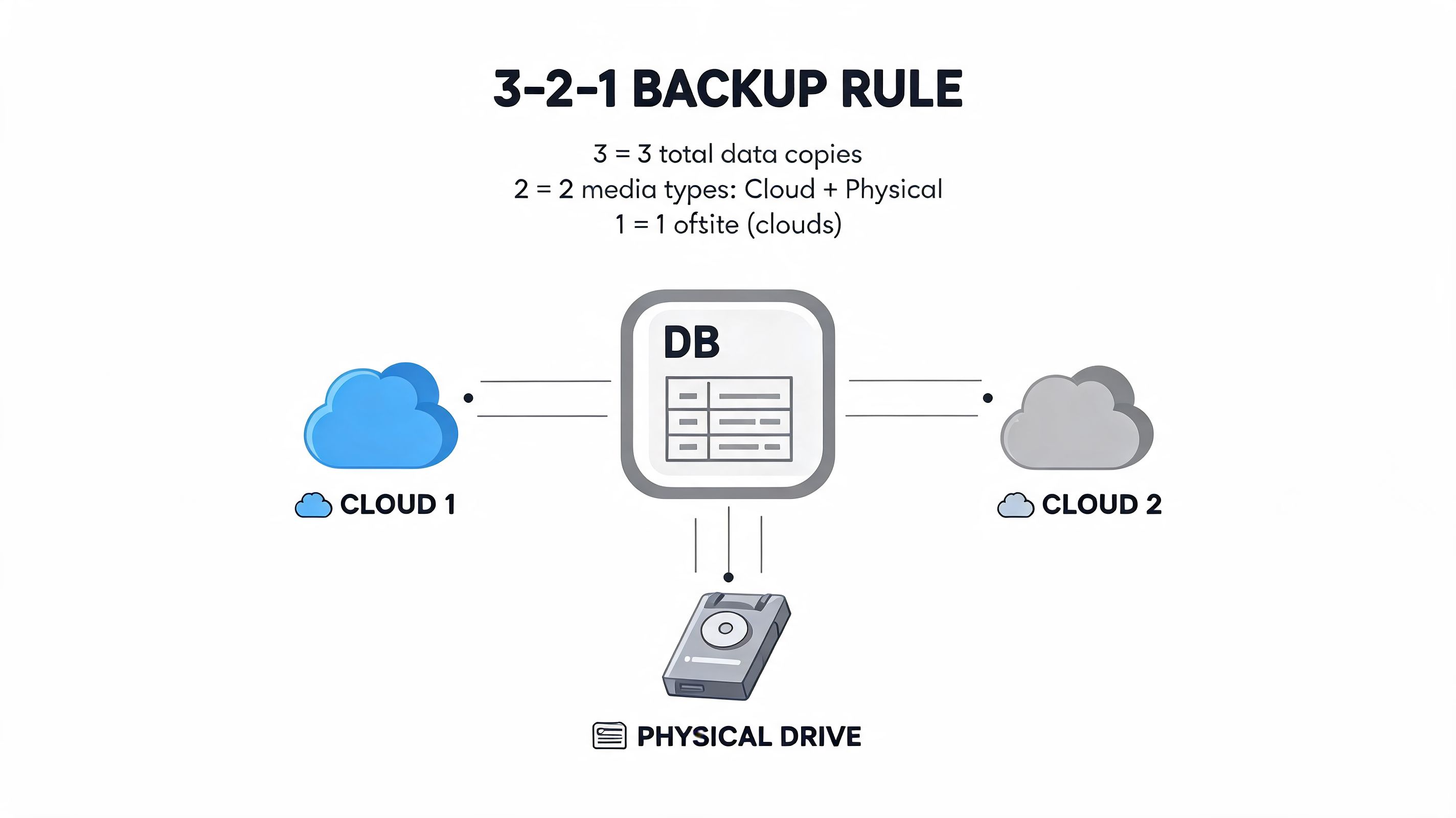
Most leaders have heard of the 3-2-1 backup rule. Keep multiple copies of data, on different media, with one copy stored separately. It's still a sound principle. But the rule most organisations miss is simpler. Test the restore.
That gap shows up clearly in manufacturing. In a recent survey, 73% of Canadian manufacturing firms that suffered a ransomware attack lacked a validated disaster recovery plan, leading to 3-5 times longer downtime compared to peers with proactive testing, according to Legit Security's database security best practices summary.
For manufacturers and logistics firms, extended downtime doesn't stay inside IT. Production stops. Orders stall. Customer commitments slip. Finance teams can't close accurately if source systems are unavailable or questionable.
A concise incident response plan is better than a long document nobody uses. The plan should answer a few essential questions:
A useful companion read is this data backup and recovery guide, especially for leaders who want to connect backup design with business recovery decisions.
The difference usually isn't budget alone. It's discipline.
When companies fail here, it's usually because the backup plan belonged to IT alone. Recovery is broader than that. Operations, leadership, compliance, and communications all have a role.
Compliance gets harder when a business operates across jurisdictions. This is especially true in healthcare, where Canadian clinics may serve U.S. patients, use cloud platforms hosted across regions, and still need to align privacy controls with domestic obligations.
That hybrid exposure is no longer niche. A 2025 Canadian Centre for Cyber Security report noted that 42% of healthcare breaches involved non-compliant cloud databases that mishandled protected health information across borders, a scenario many Canadian clinics face when serving U.S. patients.
Many security tools are designed around broad frameworks, not the practical overlap between HIPAA, PIPEDA, and provincial rules such as PHIPA. The result is a false sense of readiness. A clinic may have encryption and MFA in place, but still create compliance risk through data residency choices, vendor access, or unclear retention practices.
A better approach is to line up the controls with the business reality:
| Risk area | Better leadership question |
|---|---|
| Cross-border data flows | Where does patient data live, move, and get backed up? |
| Vendor access | Which third parties can reach production data, and how is that reviewed? |
| Audit readiness | Can we show who accessed sensitive data and why? |
| Recovery obligations | Can we restore safely without creating a second compliance problem? |
Most SMBs don't need a massive internal security department. They do need someone who can translate technical controls into risk decisions, coordinate implementation, and keep the programme moving after the initial project ends.
That's where managed support and strategic guidance matter. A partner should be able to review access models, assess cloud data handling, align controls with your sector, and maintain the operational routines that teams often struggle to sustain internally. For leaders evaluating that model, this overview of data security management is a useful place to start.
Compliance isn't a separate project from security. It's what you can prove about the controls you operate every day.
If you want to protect your database properly, don't start with everything at once. Start with the systems that would hurt the business most if they were exposed or unavailable. Tighten access. Segment the environment. Encrypt data. Monitor continuously. Validate recovery. Then review the compliance impact with the same seriousness as the technical design.
CloudOrbis Inc. helps Canadian SMBs turn that roadmap into an operating model. If your clinic, manufacturing firm, legal practice, or finance team needs help strengthening database security, reducing compliance risk, and improving recovery readiness, speak with CloudOrbis Inc. about a practical assessment of your current environment.
September 23, 2026
DDoS Protection for Canadian SMBs: What Works in 2026Learn what DDoS protection really does, the latest Canada-specific threats, and a practical playbook for small and mid-sized businesses
Read Full Post
September 22, 2026
Security Audit Services Guide for SMBs in CanadaDiscover why security audit services are vital for Canadian SMBs. Explore typical scope, deliverables, timelines, and tips to choose the right provider.
Read Full Post
September 21, 2026
Secure File Sharing Guide for Canadian BusinessesLearn secure file sharing essentials for Canadian SMBs — encryption, compliance, protocols and best practices to protect data and stay compliant.
Read Full Post
