Best Managed Service Providers Vancouver 2026
Find the best managed service providers vancouver has to offer with our 2026 checklist. Evaluate MSPs on security, compliance, SLAs, and pricing.

Find the best managed service providers vancouver has to offer with our 2026 checklist. Evaluate MSPs on security, compliance, SLAs, and pricing.

A lot of Vancouver businesses start looking for a new MSP after one bad month. Tickets sit too long. Security alerts keep coming back. Staff lose patience with workarounds. Leadership starts hearing the same sentence in different forms: “IT is slowing us down.”
That moment matters because replacing an IT provider is not just a support decision. It affects risk, compliance, project execution, user trust, and how fast the business can grow. In a city with a crowded provider market, the better question is not “who says they do managed IT?” It is “who can take over cleanly, support our business model, and prove they can operate to Canadian requirements without drama?”
A common pattern looks like this. A mid-sized company has outgrown the MSP it hired a few years ago. The provider still handles passwords, patching, and routine tickets, but strategic gaps keep widening. Cloud costs are murky. Security recommendations feel generic. The same recurring issue keeps resurfacing because nobody is fixing the root cause.

That frustration is happening in a market with real depth. British Columbia held 18% of Canada’s managed services market share in 2024, driven by Vancouver’s digital economy and SMEs investing in managed IT infrastructure, according to Credence Research’s Canada managed services market report. That scale helps explain why the shortlist process can feel messy. There are many providers, and many sound similar at first pass.
Most buyers still begin with a familiar filter:
That approach usually produces a support vendor, not a business partner.
A stronger lens is business impact. If your team is dealing with recurring outages, failed onboarding of new tools, weak documentation, or slow executive guidance, you are not just buying helpdesk. You are buying execution discipline.
A mature MSP should reduce decision friction for leadership. If every IT issue still requires your team to chase updates, interpret risks, or translate technical language into business language, the provider is not carrying enough of the load.
Vancouver buyers also tend to benefit from looking beyond day-to-day support and asking whether the provider can help with planning. Businesses that need that broader advisory layer often start with a more strategic checklist such as this guide to IT consulting in Vancouver, BC.
If you start your search without internal clarity, every sales call sounds plausible. That is a problem in a market this crowded. Clutch profiles at least 166 managed service providers in Vancouver as of 2026, which makes a vague buying process almost guaranteed to stall, as noted in Clutch’s Vancouver MSP listings.
The first job is not provider outreach. It is internal discovery.
Write down what is happening in your environment. Not what should be happening. Not what your current provider promised. What users, managers, and IT staff experience right now.
Capture items such as:
A good managed service providers vancouver search becomes easier when your needs are written in plain business language. “We need better cybersecurity” is not enough. “We need endpoint controls, stronger identity protection, and documented incident handling because our staff access financial records from multiple locations” is much better.
Many businesses build their shortlist around symptoms. They say they need faster support because the queue is backed up. In practice, the deeper issue may be weak documentation, no standards for endpoint configuration, poor change management, or no clear ownership between internal IT and the MSP.
Use these questions to get to the root:
The right MSP is not just taking over today’s support load. They are stepping into the environment you are building toward.
Some future-state prompts:
If your leadership team cannot describe what “better IT” looks like in business terms, providers will fill in the blanks for you. That usually leads to broad proposals and thin accountability.
Before you speak with any MSP, create a short internal document that includes:
| Item | What to include |
|---|---|
| Business profile | Industry, locations, users, hybrid work model |
| Core systems | Key apps, cloud platforms, telephony, data workflows |
| Current pain points | Recurring issues, support gaps, project delays |
| Compliance needs | Privacy obligations, audit expectations, industry requirements |
| Success definition | Faster onboarding, fewer recurring tickets, clearer reporting, stronger security |
| Constraints | Budget guardrails, timelines, internal staff capacity, contract deadlines |
This one-pager changes the tone of every MSP conversation. It also makes it easier to reject proposals that sound polished but do not answer your actual needs.
Security claims are cheap. Every provider says they take security seriously. That statement means very little unless they can show how controls are designed, operated, documented, and reviewed.
The gap is especially important in Canada. Over 60% of BC SMBs report limited confidence in their MSP’s ability to demonstrate concrete compliance controls, according to Compro Business’s guide to managed IT services in Vancouver. That is why generic language like “secure,” “compliant,” and “enterprise-grade” should trigger more questions, not more confidence.
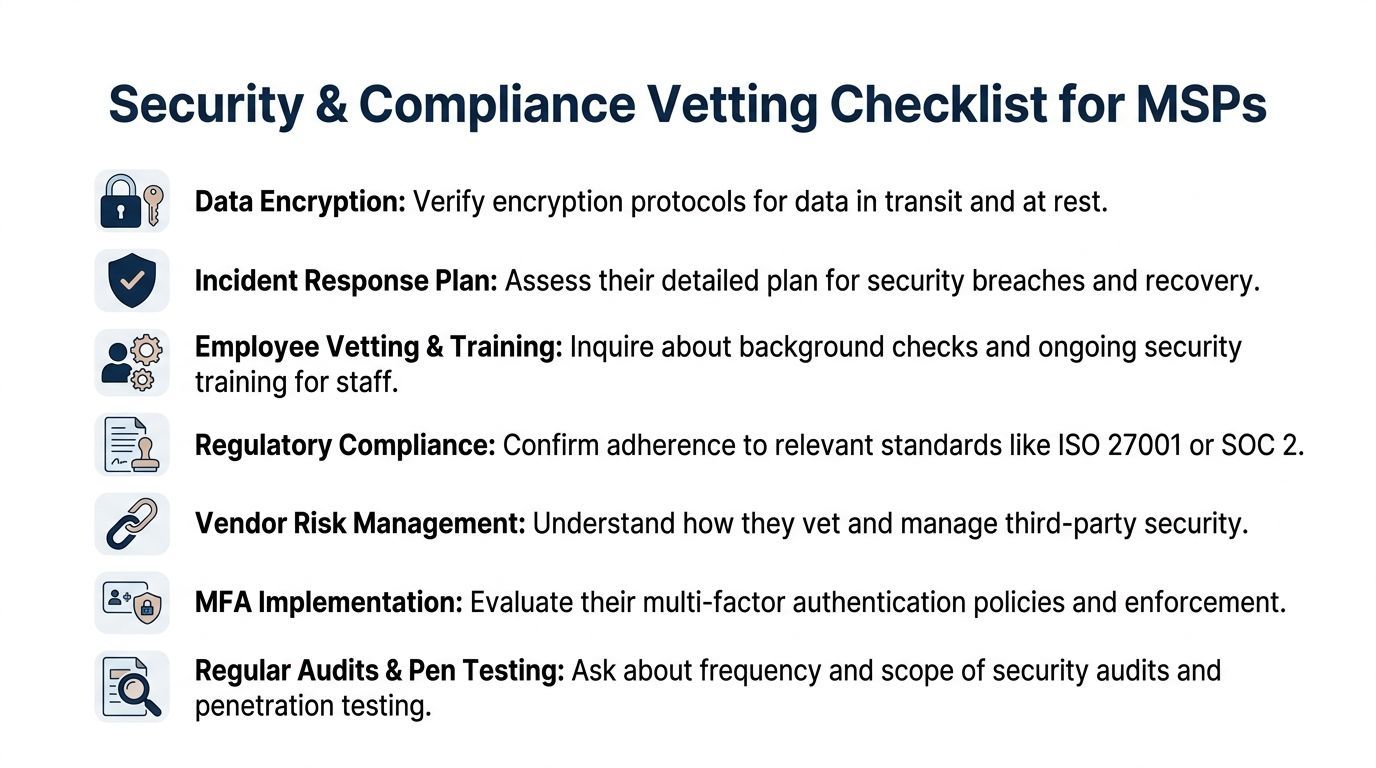
If your business handles client records, financial data, health information, legal files, or regulated communications, ask the MSP to show how they support Canadian privacy and compliance requirements in practice.
Ask for concrete examples such as:
If the answer is mostly verbal, keep digging.
A provider does not need to be your law firm, but they should know how technical operations support your obligations. For Vancouver businesses, that means asking directly how the MSP handles issues tied to PIPEDA and BC privacy requirements.
Use questions like these:
A strong answer usually includes process, tooling, ownership, and examples. A weak answer usually circles back to antivirus, firewalls, or generic “best practices.”
Many buyers ask whether the MSP offers endpoint protection. Fewer ask how that protection is operated.
Press on topics such as:
Good security operations are visible. You should be able to see the control, the owner, the report, and the escalation path.
If you want a practical benchmark for what a broader managed security approach can include, this overview of IT security services is a useful comparison point. CloudOrbis is one example of a Canada-based provider that combines managed support with cybersecurity and compliance-focused services.
Some MSPs perform confidence well. They name-drop frameworks, mention audits, and list security tools, but they do not connect any of it to your business process.
Red flags include:
If the MSP cannot explain security in plain English to leadership, they will struggle when an incident forces fast executive decisions.
Most MSP buyers notice the uptime number first. That is understandable, but it is rarely the first thing users complain about. Staff feel slow response, handoff confusion, repeat tickets, and poor communication long before they think about an uptime target.
A more useful benchmark is how the provider handles incidents under pressure. Some Vancouver MSPs publicly reference a 10-step engagement model, less than 5-minute mean-time-to-respond, 24/7 NOC monitoring, and 40-50% productivity gains, according to Tenecom’s managed IT services Vancouver page. That does not mean every provider delivers the same standard. It does mean buyers should ask for operating detail, not just broad assurances.
A fast acknowledgement is useful. It is not the same as a fix.
When reviewing SLAs, separate these concepts:
| SLA element | What it means | What to ask |
|---|---|---|
| Response time | How quickly the MSP acknowledges the issue | Is this human triage or just automated ticket confirmation? |
| Resolution target | How quickly the issue should be fixed | Is there a target by severity, and what exclusions apply? |
| Escalation path | What happens when the first team cannot solve it | Who owns escalation and who updates your team? |
| Coverage window | When support and monitoring operate | Is after-hours support included or billed separately? |
| Communication standard | How status updates are handled | How often are users and leaders updated during major incidents? |
An SLA that looks strong on paper can still fail in practice if resolution ownership is vague.
The best support experience is usually boring. Users know where to go. Tickets are categorized properly. Recurring issues trigger root-cause work. After-hours incidents do not disappear into a black hole. Leadership receives concise updates instead of long technical email chains.
Ask each MSP for:
If you need a structured way to compare language in proposed contracts, these Service Level Agreement templates can help you pressure-test what belongs in the document and what is missing.
A useful SLA protects operations before an outage happens. It defines priorities, roles, escalation, and communication so nobody is inventing the process during the incident.
For Vancouver businesses, local familiarity can make a difference when the issue spans internet providers, on-site hardware, line-of-business workflows, or executive communications. Even when support is remote, you want clear ownership and a team that understands your operating context.
A practical comparison point is a provider model built around managed IT support services, where the focus is not only ticket closure but continuous monitoring, support coordination, and business continuity.
Many businesses assume the hard part is signing the new MSP. In practice, the true test starts the day after. That is when documentation gaps surface, old agents need removal, privileged access must be transferred, and staff begin measuring the new provider against the old one.
Many transitions go sideways at this stage. Over 40% of BC businesses switching providers reported unclear expectations around the first 30 to 90 days of migration, according to New Charter Technologies’ managed IT support Vancouver resource. That number reflects a familiar problem. Buyers focus heavily on the proposal and not enough on the handover plan.
A well-priced agreement can still create pain if the scope is fuzzy.
Look closely at:
If contract language is vague around transitions, expect trouble later.
A serious MSP should be able to walk you through the transition in operational terms. Not just “we have a process.” They should describe the sequence, ownership, and expected friction points.
A practical onboarding plan usually covers these workstreams:
Ask the MSP to answer these in writing:
Strong MSPs usually have a documented transition journey. Weak ones talk as if onboarding is just installing agents and waiting for tickets.
The best transition plans do not promise a frictionless first month. They explain where friction is likely, who owns each issue, and how progress will be measured.
Users do not judge a new MSP by architecture diagrams. They judge by whether they can work, whether communication is clear, and whether recurring pain starts dropping.
That is why onboarding should include executive checkpoints, service review cadence, and shared visibility into priorities. If the provider cannot articulate how they manage projects and operating changes, ask them to show examples of governance. This kind of planning discipline is easier to assess if you compare their process against practical guidance for IT project planning best practices.
By this point, the shortlist usually narrows on its own. One provider sounds polished but light on compliance evidence. Another has solid security operations but weak onboarding detail. A third may be operationally strong but misaligned with your internal team.
That is why a scorecard helps. It turns a subjective discussion into a weighted business decision.
Pick the criteria that matter most to your organisation, assign each a Weight (1-5), then score each provider from 1-10. Multiply weight by score if you want a final weighted total, or use the notes column to capture risk flags that numbers alone may miss.
A legal firm may put the highest weight on auditability and data handling. A manufacturer may care more about site support, vendor coordination, and network reliability. A clinic may prioritise privacy controls, rapid escalation, and disciplined onboarding.
| Evaluation Criterion | Weight (1-5) | Provider A Score (1-10) | Provider B Score (1-10) | Notes |
|---|---|---|---|---|
| Business alignment | Do they understand your operating model and goals? | |||
| Security operations maturity | Alert handling, endpoint controls, incident response | |||
| Canadian compliance readiness | Evidence for privacy, logging, audit support, data handling | |||
| SLA quality | Response, resolution, escalation, communication | |||
| Helpdesk experience | User clarity, after-hours support, ownership | |||
| Onboarding plan | Documentation handover, timeline, stabilization approach | |||
| Strategic guidance | Roadmapping, lifecycle planning, leadership reporting | |||
| Tooling fit | Works with your stack without unnecessary disruption | |||
| Commercial clarity | Scope definition, billing transparency, exit terms | |||
| References and proof | Similar clients, sample deliverables, operating evidence |
A scorecard does not replace judgement. It improves it.
The best managed service providers vancouver businesses choose do not just fix tickets. They align technology decisions with business risk, operational priorities, and growth plans.
That means looking at the whole picture. Internal clarity first. Then proof of security and compliance discipline. Then support quality that holds up under pressure. Then a transition plan that is specific enough to survive the first few months.
For organisations weighing different service models, this primer on remote managed IT services is useful because it helps separate delivery model questions from outcome questions. Remote, local, co-managed, or fully managed can all work. What matters is governance, ownership, and execution.
If you want one more practical checkpoint before you decide, review these signs of an MSP that has your business goals in sight. The right partner should make your environment more stable, more secure, and easier to manage as the business changes.
Co-managed IT means your internal IT team keeps part of the workload and the MSP fills specific gaps. That can include helpdesk overflow, cybersecurity operations, cloud management, project delivery, or after-hours coverage.
Fully managed IT means the MSP takes primary responsibility for day-to-day IT operations. This model usually works well when the business does not want to hire a full internal team or needs broader coverage than one or two in-house staff can provide.
The better option depends on management capacity, internal technical depth, and how much ownership leadership wants to retain.
No. A longer agreement can make sense when the provider is taking on onboarding work, standardising tools, and building a roadmap around your environment.
The issue is not contract length alone. The issue is whether the agreement clearly defines scope, review points, transition obligations, and exit mechanics. A fair contract should protect both parties. It should not trap the client.
Ask for specifics that are hard to fake.
Useful prompts include:
If the discussion stays generic, their industry depth may be thinner than the proposal suggests.
You should see structured discovery, access transfer, documentation review, tool deployment planning, and clear user communication. You should also know who your escalation contacts are and how major issues will be handled.
You should not be guessing who owns the handover, chasing administrative credentials, or learning halfway through that important systems were excluded from the onboarding scope.
Not automatically. Local presence can help when on-site coordination matters, but geographic footprint alone does not guarantee better service.
Prioritise operational fit. Ask who supports your users, who handles escalations, how after-hours coverage works, and whether they understand the regulatory and business context you operate in. Those answers matter more than a postal code.
If your business is comparing providers and wants a practical second opinion before making a change, CloudOrbis Inc. can help you assess your current environment, pressure-test shortlisted MSPs, and map out what a clean transition should look like for your organisation.
Book a 30-minute call with a senior engineer. No sales script, just straight answers about your environment.


