Legacy System Modernization for Canadian SMBs
Unlock growth with legacy system modernization. Our guide helps Canadian SMBs navigate strategies, costs, and risks for a smooth transition to modern IT.

Unlock growth with legacy system modernization. Our guide helps Canadian SMBs navigate strategies, costs, and risks for a smooth transition to modern IT.
Most mid-sized businesses don't wake up one morning and decide they have a legacy problem. It usually shows up in smaller ways first. A finance team keeps one extra spreadsheet because the ERP report can't be trusted. Customer service staff leave sticky notes beside their monitors to remember which screen freezes if they click too quickly. IT spends too much time keeping an old application alive, while every new project gets delayed because “it has to connect to that system first.”
That's the true shape of legacy system modernization. It isn't a theory exercise. It's the work of removing friction from daily operations without breaking the systems your business still depends on.
For Canadian SMBs, the challenge isn't whether to modernize. It's how to modernize in a way that controls risk, protects cash flow, and creates useful business value quickly. The businesses that handle this well don't chase a full rebuild on day one. They make deliberate decisions about what to keep, what to integrate, what to move, and what to retire.
A common scene plays out in growing companies. Sales wants faster quoting. Operations wants cleaner reporting. Leadership wants better visibility across departments. But the system underneath everything was built for a smaller business, a different workflow, or a team that no longer exists.
So people adapt.
They export files manually. They re-enter customer data into multiple tools. They wait for one employee who “knows how the old system works.” When a patch is needed, everyone gets nervous because no one is fully sure what else might break. The technology still functions, but it's no longer helping the business move.
That's where the cost of standing still becomes obvious. Slow systems don't just waste time. They create decision delays, frustrate staff, increase support overhead, and make growth harder than it should be. If any of that sounds familiar, these are often the same warning signs behind hardware upgrade red flags in growing businesses.
Business leaders rarely begin with technical language. They notice symptoms:
Old technology becomes a business problem long before it becomes a complete outage.
The longer a company waits, the more operational knowledge gets trapped in ageing software and a few key people's heads. That creates business risk, not just IT risk. If your team can't change a process, launch a new service, or improve customer experience without worrying about a brittle back-end system, the platform is already limiting growth.
Legacy system modernization starts with acknowledging that maintenance isn't neutral. Keeping the status quo has a cost. It shows up in delay, duplication, exposure, and missed opportunities.
Legacy system modernization means updating business-critical technology so it supports current operations, security expectations, and future change. Sometimes that means moving workloads to cloud infrastructure. Sometimes it means integrating an old core platform with newer applications. Sometimes it means replacing a system that no longer fits the business at all.
What matters is the business case behind the decision.
In Canada, this isn't a niche issue. The Canada cloud computing market generated USD 27.49 billion in 2024 and is projected to reach USD 74.76 billion by 2030, with 18.2% CAGR from 2025 to 2030, according to this analysis of modernization trends in Canada. That scale matters because modernization and cloud adoption now move together in many organisations. As more companies shift workloads into cloud and hybrid environments, legacy platforms face more pressure to integrate, evolve, or be replaced.
Most modernization efforts begin for one of four reasons:
A weak business case says, “the system is old.” A stronger case says, “this system is slowing order processing, increasing support effort, and making data harder to trust.”
That shift matters. ROI in legacy system modernization should include direct cost control, but it should also capture business value:
| ROI lens | What to evaluate |
|---|---|
| Cost control | Support effort, licensing overlap, infrastructure sprawl, and consultant dependency |
| Risk reduction | Security exposure, outage risk, data handling issues, and compliance gaps |
| Speed | Time to launch changes, onboard users, add integrations, or support a new workflow |
| Experience | Customer response times, employee friction, and reporting confidence |
Practical rule: If the only benefit on paper is “newer technology,” the business case isn't finished yet.
For leaders who want another plain-language view of the application side, Cleffex's guide to modernizing business applications is a useful companion read.
A good modernization plan also fits broader operating strategy. For many mid-sized firms, that overlaps with outsourced support, security oversight, and roadmap planning. That's why modernization often connects naturally with managed IT services for growing businesses, especially when internal teams are stretched.
Not every ageing system needs the same answer. One application may be worth moving quickly with minimal change. Another may need a deeper redesign. A third may need to be shut down.
That's why the 5 Rs framework works well in practice. It gives leaders a structured way to choose the least disruptive path that still delivers meaningful improvement.
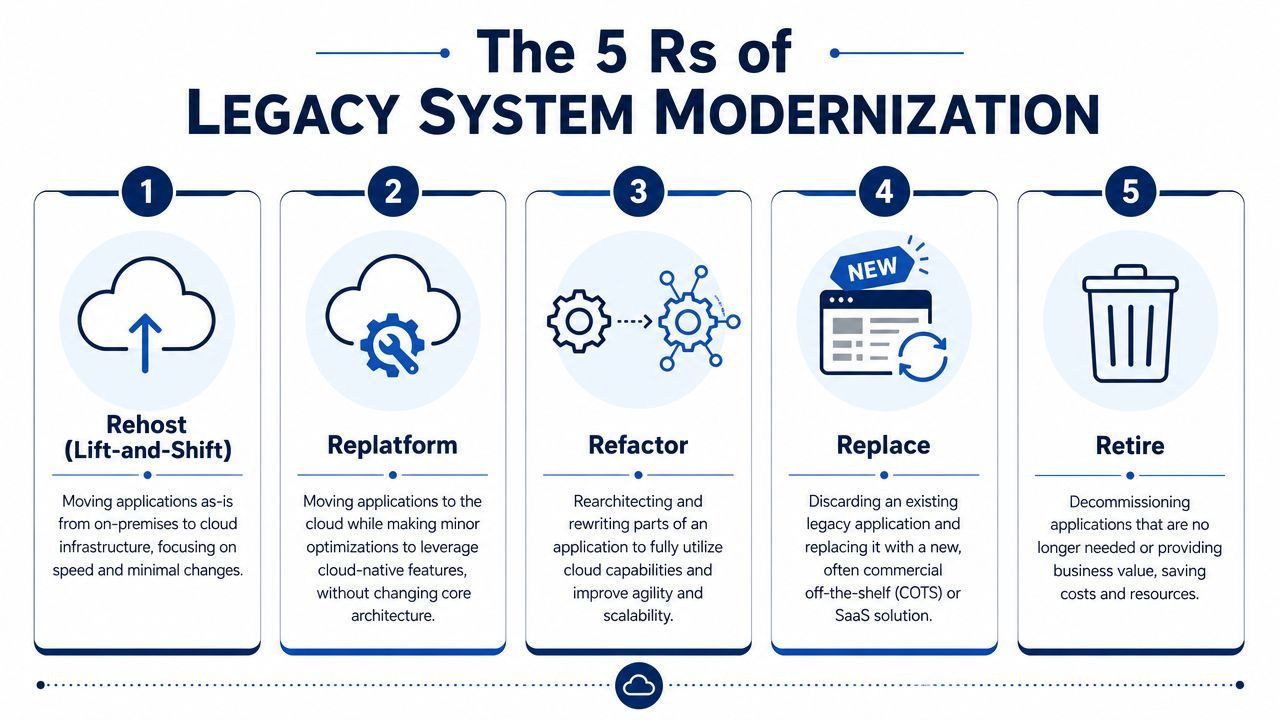
Here's the simplest way to think about them:
For Canadian businesses with systems that are still core to operations, an incremental path often works best. This guidance on legacy modernisation highlights incremental modernization and API or middleware integration as especially important when downtime risk is high and old and new systems need to coexist.
| Strategy | Description | Best For | Risk/Cost | Business Impact |
|---|---|---|---|---|
| Rehost | Move the application with minimal code change | Urgent infrastructure moves, limited time | Lower change risk, but may carry old issues forward | Faster move, limited process improvement |
| Replatform | Keep core logic but improve parts of the stack | Applications that still fit the business but need better performance or compatibility | Moderate effort and moderate disruption | Better stability and flexibility without full rebuild |
| Refactor | Restructure parts of the application for agility and scale | Core systems with long-term strategic value | Higher delivery effort and stronger governance needed | Stronger long-term adaptability |
| Replace | Introduce a new product or system | Legacy software with poor fit, weak support, or limited future value | Significant change management and migration work | Can reset process design and user experience |
| Retire | Shut down systems that are redundant or obsolete | Low-value applications, duplicate tools, old reporting platforms | Usually lower technical risk, but requires dependency checks | Immediate simplification and lower support burden |
A few patterns show up repeatedly in successful programmes.
What works
What doesn't
For leaders weighing cloud timing and workload fit, this comparison of cloud computing and on-premise environments helps frame the infrastructure side of the decision. For another strategic perspective, Kogifi's modernization insights offer a useful overview of how different approaches fit different system profiles.
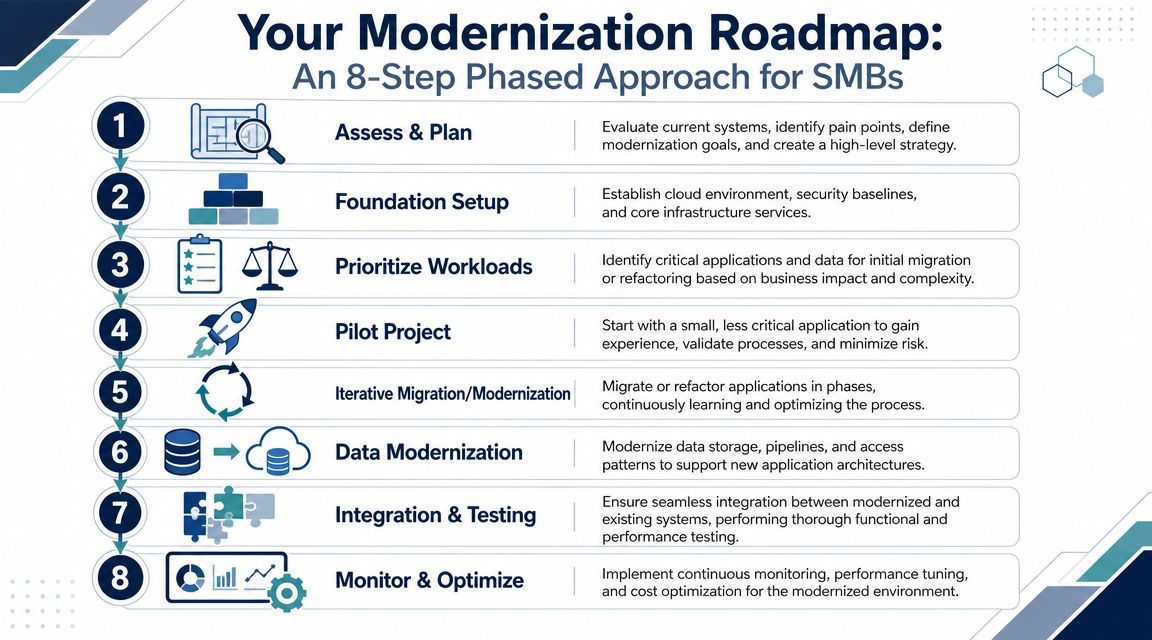
The hardest part of legacy system modernization is usually not deciding that change is needed. It's turning a broad intention into a sequence the business can execute.
That's where a phased roadmap matters. It keeps scope under control, gives stakeholders clear checkpoints, and reduces the chance of costly surprises.
Canadian SMBs face a specific pressure here. This Canadian modernization analysis notes that about 16% of Canadian businesses used or planned to use generative AI in 2024, which increases pressure on data access and integration. The same source notes that Ontario's 2024 Budget added C$900 million to the Skills Development Fund, reinforcing that execution capacity and change management are now economic constraints, not just technical ones.
If a pilot succeeds technically but the business can't support the new process, the pilot didn't really succeed.
Use these as a working filter with your team:
A steady roadmap beats a dramatic transformation plan almost every time. Mid-sized businesses rarely fail because they moved too slowly. They fail because they moved too broadly, underestimated data complexity, or treated training as optional.
Business leaders don't need to become architects, but they do need enough technical fluency to ask better questions. The architectural pattern you choose will shape cost, speed, resilience, and how much disruption the business experiences during change.
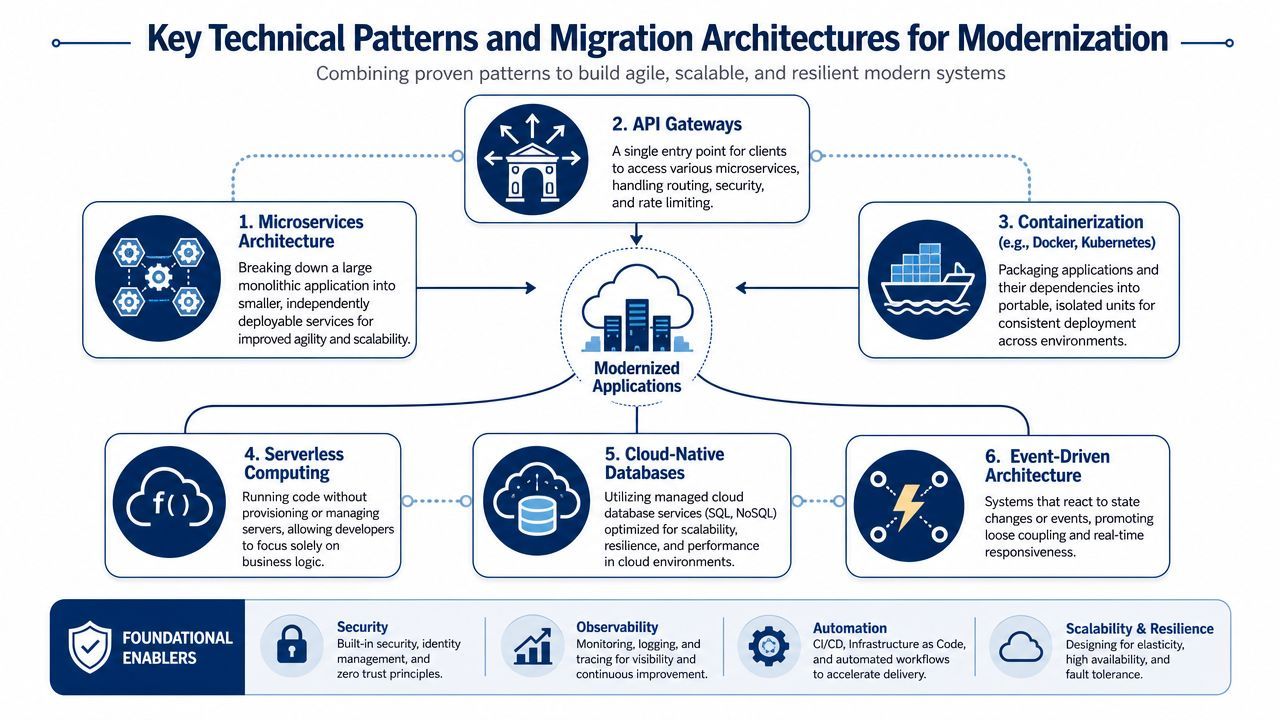
If one concept matters most in legacy system modernization, it's the API. Think of APIs as controlled connection points. They let newer applications exchange data and trigger actions without rewriting the entire old system on day one.
That matters because staged modernization usually beats big-bang replacement. A finance platform, warehouse tool, or scheduling system can continue doing its core job while new services are added around it.
For many businesses, the visible application is only half the problem. The harder issue is fragmented data, unclear ownership, and slow reporting pipelines.
This analysis of legacy system modernization patterns points to a strong technical combination for data and analytics modernization: automated migration assessment, centralized data governance, and real-time streaming. In practice, that means mapping dependencies before cutover, assigning clear data accountability, and reducing latency so decision systems can use operational data continuously rather than waiting on delayed batch processes.
The application may be old, but the real bottleneck is often the data model underneath it.
The point isn't to adopt every modern pattern at once. It's to choose the smallest architectural change that removes a real business constraint.
Legacy system modernization gets easier to understand when you look at familiar business situations instead of abstract architecture diagrams.
A clinic, for example, may rely on an ageing practice management system that still handles appointments and billing, but struggles with secure remote access, reporting, and integration with modern collaboration tools. In that case, a sensible path might involve keeping the core patient workflow in place initially, wrapping it with tighter security controls, improving backup and disaster recovery, and adding modern interfaces for staff and remote administration. The first win isn't a full replacement. It's safer operations and fewer manual steps.
A manufacturing company often faces a different problem. Production data, inventory records, and shipping updates may sit in separate systems that don't communicate well. Teams then rely on emailed spreadsheets, phone calls, and duplicate data entry to keep orders moving. Here, modernization usually creates value by improving integration first. APIs, middleware, and cleaner reporting can reduce confusion long before the ERP itself is fully replaced.
Technical teams sometimes underestimate this part. A platform can be upgraded correctly and still fail in practice because users don't trust it, don't understand it, or weren't prepared for process changes.
That's why change management has to be part of the plan from the start.
Good adoption rarely feels dramatic. Staff stop creating side spreadsheets. Managers trust reports more quickly. Support calls shift from “the system is broken” to “how do I use this feature better?” Those are signs the technology and the operating model are starting to line up.
A modernization project is successful when users stop talking about the system and start using it to do better work.
If you're dealing with ageing applications, disconnected data, or a system your team is afraid to touch, the right next move isn't a full transformation programme. It's a short list of practical actions.
One practical option is to use CloudOrbis Inc. for roadmap work that combines strategic IT consulting, cloud migration support, managed cybersecurity, backup and disaster recovery, and ongoing operational support. That kind of model aligns well with phased modernization because it covers planning, execution, and post-launch stability rather than treating migration as a one-time event.
A good partner should help you narrow scope, sequence the work properly, and avoid a cost structure that grows faster than the value delivered.
If your business is still relying on systems that create workarounds, slow decisions, or make change feel risky, it's time to turn that into a clear plan. CloudOrbis Inc. helps Canadian SMBs assess legacy environments, modernize in phases, strengthen security, and support the business through change without unnecessary disruption.
Book a 30-minute call with a senior engineer. No sales script, just straight answers about your environment.


