Vancouver IT Support Guide for Businesses
Explore Vancouver IT support services, pricing models, compliance requirements, and MSP vetting tips to secure reliable managed IT solutions for your business.

Explore Vancouver IT support services, pricing models, compliance requirements, and MSP vetting tips to secure reliable managed IT solutions for your business.

Monday starts with three small problems that don't look related. A staff member in Burnaby can't sign into Microsoft 365. A Richmond warehouse printer drops off the network. A clinic manager in Vancouver notices a suspicious email that looks almost real. By lunch, your team is juggling calls, restarting devices, and wondering whether this is just a bad day or a sign that your IT setup is too reactive.
That's the point where many mid-sized businesses start looking seriously at Vancouver IT support.
Reactive, break-fix IT usually feels cheaper right up until it interrupts payroll, patient scheduling, inventory updates, or document access. Managed IT support changes the model. Instead of waiting for something to fail, a provider monitors systems, applies patches, handles user support, strengthens security controls, and plans upgrades before they become urgent. If you run a healthcare clinic, law office, manufacturer, logistics company, or construction firm, that shift matters because downtime rarely stays “just technical.” It quickly becomes an operations problem.
Canada's broader tech expansion helps explain why demand has risen. Canada added nearly 300,000 technology jobs over the six years preceding 2022, with Vancouver's tech workforce expansion driving new demand for managed IT support among SMBs, according to CompTIA's report on Canada's technology workforce. More digital tools mean more endpoints, more cloud apps, and more security exposure.
If you're weighing options, this overview of managed service providers in Vancouver is a useful companion. The key question isn't whether your business uses enough technology to justify managed support. Most mid-sized firms already do. The real question is whether your current support model matches the risk, compliance, and pace of your business.
Vancouver businesses rarely operate from a single office with a single server anymore. Staff work from clinics, job sites, warehouses, home offices, and shared spaces. Files sit in Microsoft 365, line-of-business apps live in the cloud, and security threats arrive through email, browsers, mobile devices, and vendor connections.
That's why Vancouver IT support now means much more than “someone who fixes laptops.” It covers the systems your team relies on every day, including identity, collaboration, backups, endpoint protection, connectivity, and user access.
Break-fix support solves visible problems after they interrupt work. It's like calling a mechanic only when the truck stops in traffic. You might get moving again, but you're still losing time, confidence, and often money.
Managed support works more like fleet maintenance. The provider watches the environment, flags risks early, standardises devices, and documents how systems are supposed to run. That lowers friction for users and gives leadership better visibility into risk.
Practical rule: If your leadership team only hears about IT when something breaks, your support model is probably too reactive.
Most business leaders aren't buying “IT hours.” They're buying consistency. They want staff to sign in without issues, files to sync properly, calls to route, backups to restore, and suspicious activity to get caught before it spreads.
In Vancouver, there's another local factor. Talent is strong, but the support model is shifting. More firms now use remote administration, cloud identity, and centralised management. That makes a modern managed service relationship more practical than trying to handle every issue with on-site visits alone.
Managed IT support is easiest to understand when you stop thinking of it as one service. It's a stack of connected services that keep users productive and systems stable.
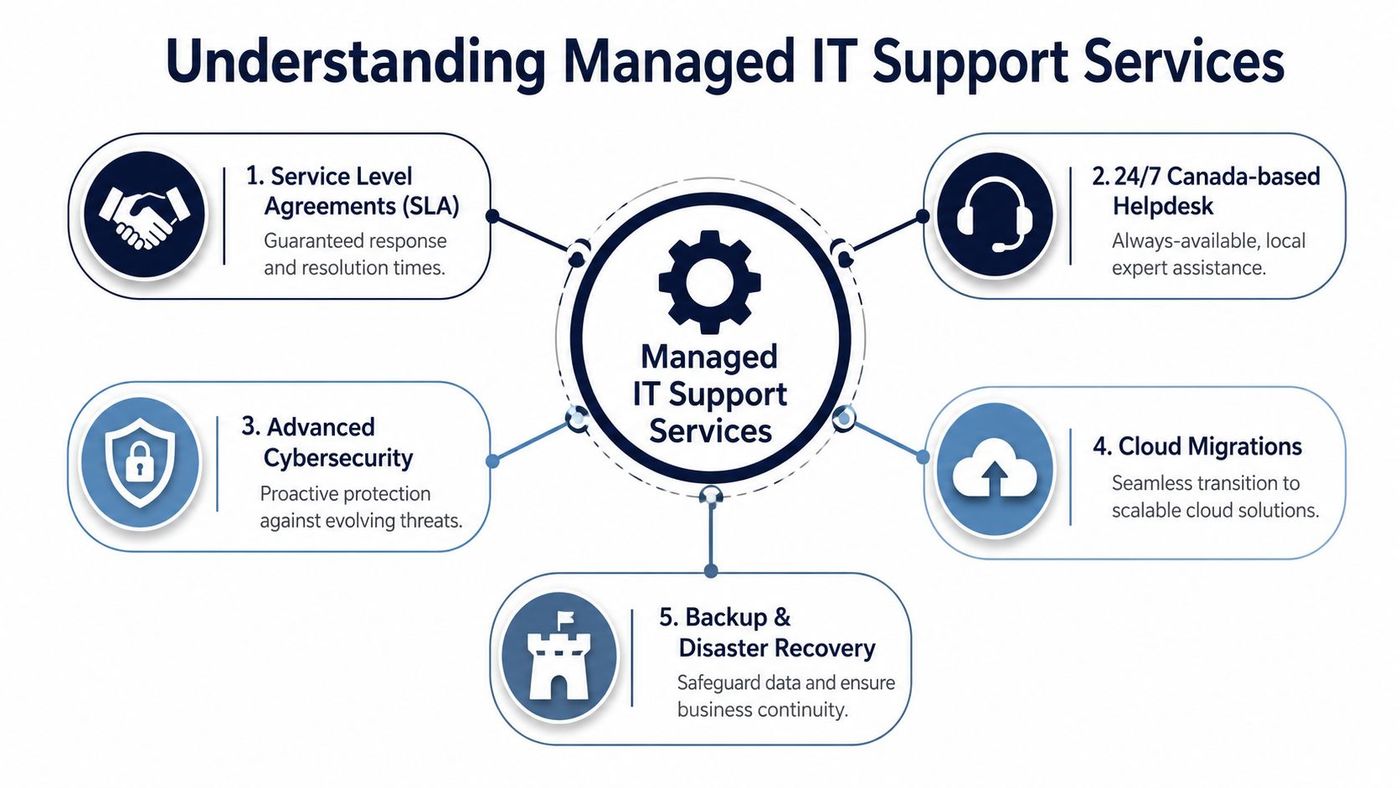
British Columbia's labour outlook reinforces this shift. In British Columbia, automation and cloud-based centralized management are reshaping IT roles, as IT Support Technician growth remains “Limited” for 2025–2027, according to the Government of Canada Job Bank outlook for IT support technicians in BC. That pushes more businesses toward remote, managed services models rather than relying on a purely local, on-site technician approach.
For a broader breakdown, see this guide to managed IT support services.
A strong provider usually combines these functions:
These services aren't separate purchases in practice. They overlap.
A user calls the helpdesk because Teams won't connect. The issue could be a device policy, a licence problem, a security block, or a connectivity fault. Good managed support means the provider sees the whole chain, not just the symptom.
A mature MSP doesn't just close tickets. It reduces the number of tickets your staff need to open.
Consider a mid-sized clinic moving from aging desktops and a local file share to Microsoft 365 with managed endpoints. The migration itself is only one part of the job. Users need secure sign-in, multi-factor authentication, device policies, backup coverage, and support when workflows change. Without those pieces, “moving to the cloud” just relocates old problems.
That's why the best Vancouver IT support providers build around operations, not gadgets. They ask how your staff work, where your data sits, who needs access, and what would cause the biggest disruption if it failed.
Professional support pays off in fewer interruptions, clearer accountability, and better risk control. Those benefits sound abstract until you tie them to daily operations.
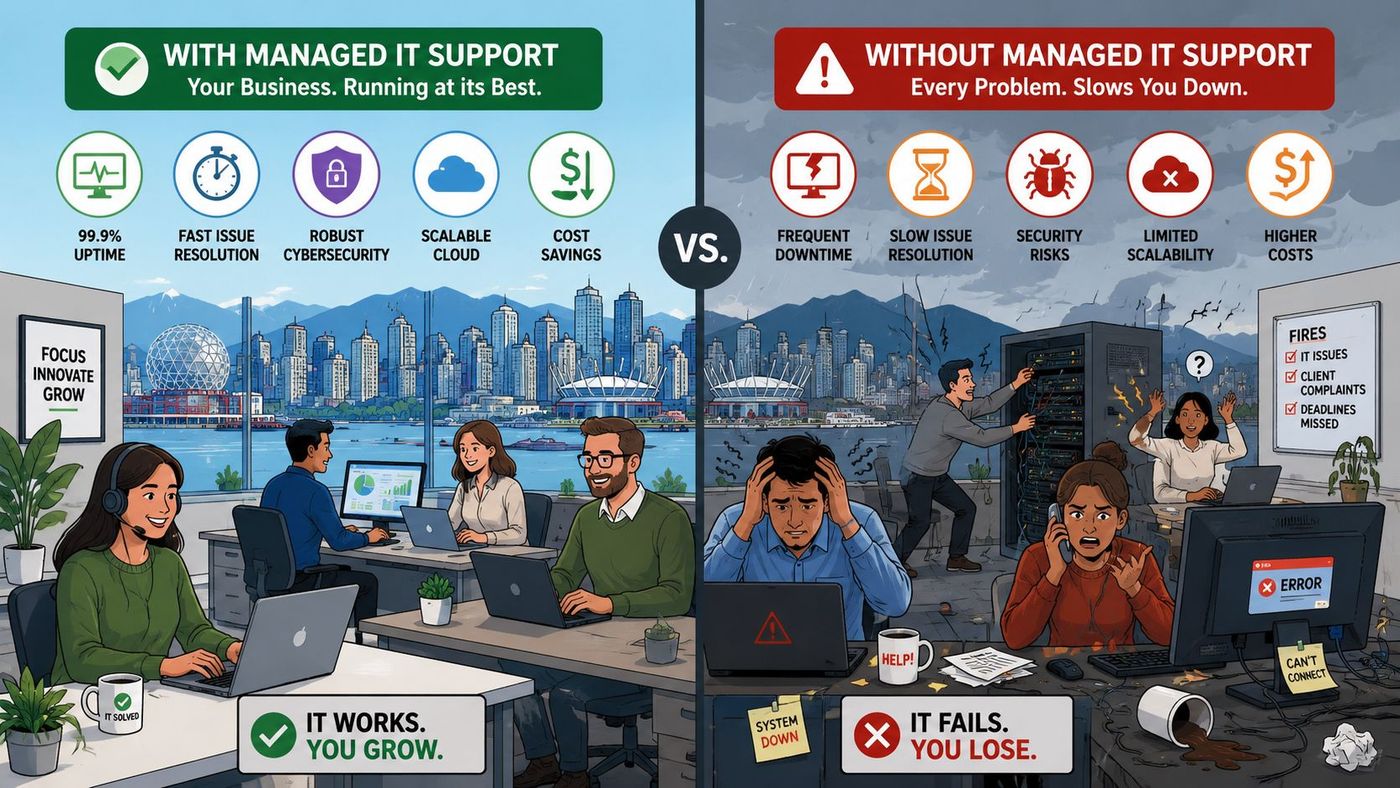
Many businesses still depend on one internal “computer person,” one legacy vendor, or one manager who knows where everything is. That setup can limp along for years. Then one outage exposes the weakness. Documentation is thin, backups are uncertain, and no one knows whether security tools are configured properly.
Managed support brings process. Devices get standardised. User onboarding follows a checklist. Patches don't depend on memory. Issues are tracked instead of handled informally.
A good provider doesn't treat cybersecurity like a separate annual project. It becomes part of normal support. New laptops are enrolled correctly. Former staff lose access quickly. Alerts are reviewed. High-risk changes are documented.
Take a mid-sized logistics firm in the Lower Mainland. A dispatcher clicks a suspicious attachment, but continuous monitoring and endpoint protection isolate the device before the issue spreads further. The business still has a tense afternoon, but it avoids the larger operational mess that often follows unmonitored incidents.
Professional IT support also changes budgeting. Break-fix costs are unpredictable because they arrive when the business is least prepared. Managed support turns more of that spend into a planned operating cost tied to services, users, and business priorities.
Here's how the benefits typically show up:
Strong IT support isn't about making technology exciting. It's about making it predictable.
This matters even more for firms adding AI tools, automation, or cloud workflows. As those projects expand, support gets more complex. User permissions, data handling, device policies, and integrations need coordination. Professional support gives mid-sized businesses a way to scale without rebuilding IT from scratch every year.
A generic IT provider may be fine for basic support. Regulated sectors need more. They need systems that help them meet legal, contractual, and audit expectations.
In British Columbia, the gap is especially visible in healthcare and legal services. 42% of BC healthcare organizations experienced a security incident in the past year, yet free community tech programs rarely address enterprise-grade HIPAA and SOC 2 compliance for clinics and legal firms, as noted in reporting on community tech support initiatives and the surrounding compliance gap.
For healthcare-specific guidance, this overview of healthcare IT compliance is worth reading.
Healthcare clinics often need tighter control over access, device encryption, user activity visibility, secure backups, and documented incident response. Leaders sometimes assume that buying Microsoft 365 or endpoint protection solves the compliance issue. It doesn't. Tools matter, but configuration, access rules, retention settings, and staff behaviour matter just as much.
Legal firms face a similar challenge from a different angle. Client confidentiality, secure file sharing, identity protection, and auditability all matter. If a provider can't explain how user access is reviewed, how backups are tested, or how remote devices are secured, that's a warning sign.
A side-by-side view helps:
| Industry | Typical compliance focus | IT controls that matter most |
|---|---|---|
| Healthcare | Privacy, patient data protection, audit readiness | Identity controls, encrypted devices, secure backups, access logs |
| Legal | Confidentiality, secure collaboration, document retention | File security, multi-factor authentication, controlled sharing |
| Finance and accounting | Sensitive financial records, vendor assurance | Endpoint protection, access reviews, reporting, secure email |
| Construction | Distributed teams, mobile devices, subcontractor access | Mobile device management, cloud access control, backup coverage |
| Manufacturing | Operational continuity, plant and office coordination | Network segmentation, backup planning, endpoint control |
Many support firms can reset passwords and replace hardware. Fewer can map business workflows to compliance obligations. That's the difference between basic IT and regulated-sector IT.
Compliance work starts with a business process. Technology should support that process, not guess at it.
If you're in a clinic, law office, finance team, or production environment, ask whether your provider understands the records you handle, the systems people use, and what evidence you'd need after an incident or audit.
Pricing confuses a lot of buyers because providers often bundle different services under the same label. One “managed plan” may include security, backups, and strategic advisory. Another may only include helpdesk and monitoring.
A useful benchmark does exist locally. A Vancouver MSP lists flat-rate managed IT support at $180 per user per month, covering helpdesk, patching, endpoint security, backups, Microsoft 365 management, and vCIO advisory with no per-ticket fees, according to Fusion Computing's Vancouver IT support pricing page.
For a budgeting lens that goes beyond monthly fees, this guide on total cost of ownership helps frame the trade-offs.
| Pricing Model | Included Services | Average Monthly Cost |
|---|---|---|
| Flat-rate per user | Helpdesk, patching, endpoint security, backups, Microsoft 365 management, vCIO advisory | $180 per user per month |
| Tiered bundle | Varies by plan level. Often combines support, monitoring, and optional security | Varies by provider |
| Value-based SLA | Built around business criticality, response expectations, and reporting needs | Varies by provider |
| Co-managed IT | Shared responsibilities between internal IT and external MSP | Varies by scope |
The monthly rate is only part of the story. Ask what happens when you add locations, onboard seasonal staff, need on-site work, or start a cloud migration. Some providers keep pricing clean. Others make the base plan look simple and recover margin through projects or exclusions.
A practical budgeting review should include:
The right pricing model is the one that matches your operating reality. A law firm with strict confidentiality needs won't budget like a construction company with mobile field teams. The service model should reflect that.
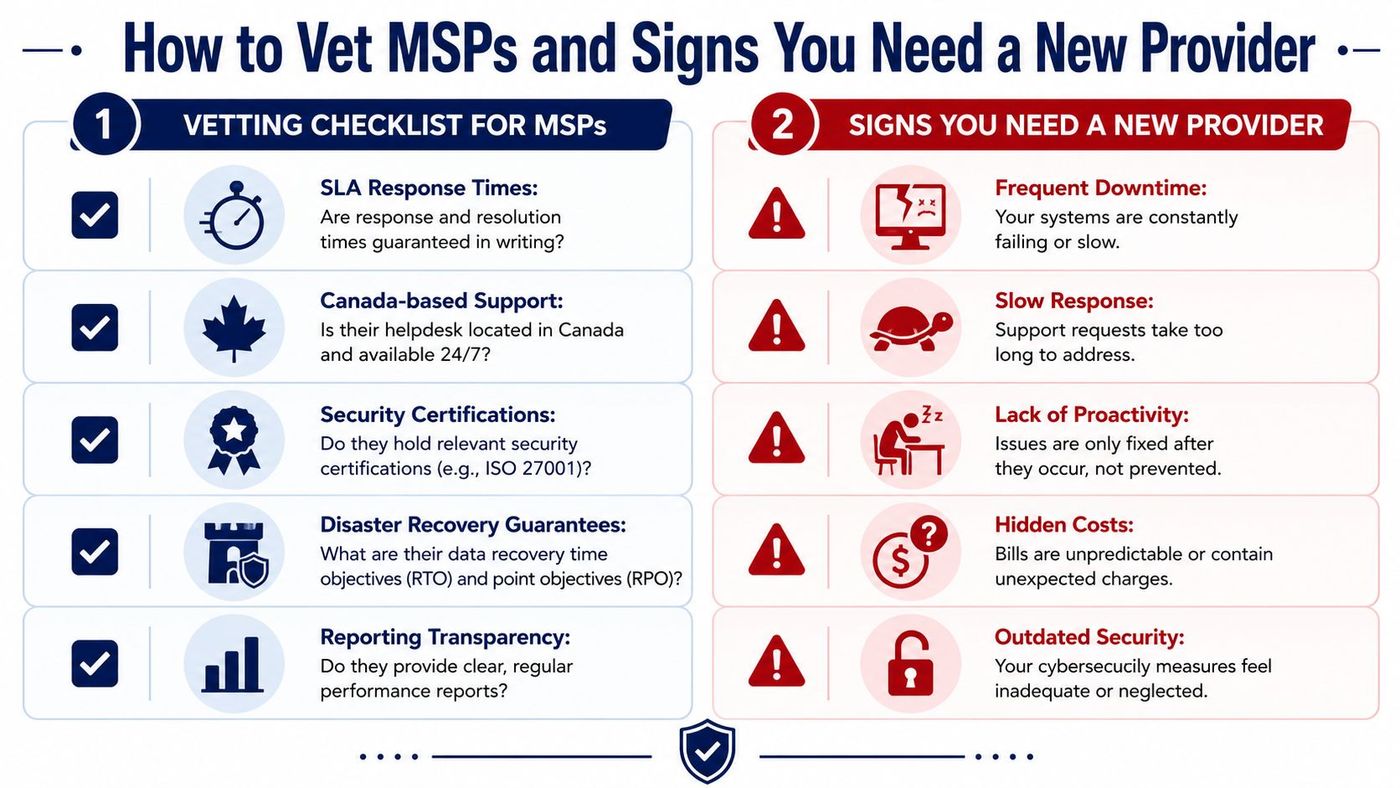
Choosing an MSP is part procurement exercise, part risk review. The glossy pitch matters less than the provider's operating discipline.
There's a newer reason to tighten your evaluation process. In Q2 2025, 12.2% of Canadian businesses reported using AI in operations, according to Statistics Canada's release on AI use by businesses. That increases support complexity. MSPs now need to understand user governance, Microsoft 365 controls, data handling, and workflow changes tied to AI tools.
A practical managed services questionnaire can help you formalise the conversation.
Use a shortlist like this during vendor calls:
Some signs show up subtly:
If your provider mainly reacts, rarely advises, and struggles to explain your environment clearly, you're not getting managed service. You're getting outsourced chaos.
The best onboarding process feels organised, not dramatic. Staff should know what's changing, who to contact, and what to expect during the transition.
A typical engagement starts with assessment. The provider reviews users, devices, Microsoft 365 tenancy, security controls, backups, internet dependencies, and major business applications. This stage is part technical review, part business discovery. A clinic may highlight privacy and uptime concerns. A manufacturer may focus on shop-floor continuity and remote access.
Most mature MSPs follow a sequence that looks something like this:
Your team also has work to do. Assign an internal point person. Confirm who approves changes. Clean up old user accounts and shared access where possible. Tell managers when support contacts will change.
The most successful transitions are the ones where leadership treats onboarding as an operational project, not just an IT handoff. When users know what's happening and why, disruption stays lower and adoption improves.
A good provider should leave you with clearer documentation, better visibility, and fewer points of failure than you had before. That's the ultimate test of Vancouver IT support. Not whether the onboarding meeting was polished, but whether your business runs more smoothly a few months later.
If your organisation is rethinking Vancouver IT support, CloudOrbis Inc. can help you evaluate your current environment, identify compliance and security gaps, and build a practical managed IT roadmap with 24/7 Canada-based support.
Book a 30-minute call with a senior engineer. No sales script, just straight answers about your environment.


