

September 17, 2026
Cloud Migration Roadmap Template That Prevents Costly ReworkGet a practical cloud migration roadmap template plus steps to customize it for assessment, waves, testing and cutover without budget surprises.
Read Full Post%20(1).webp)
Usman Malik
Chief Executive Officer
March 20, 2026
When choosing between incremental and differential backups, the decision comes down to a trade-off between speed and simplicity. Incremental backups are faster and use significantly less storage, as they only copy what has changed since the last backup, regardless of its type. Conversely, differential backups are much simpler to restore but consume more storage space because they save all changes made since the last full backup.
To properly protect your organization’s data, you must understand the mechanics behind your backup strategy. While full backups—which copy every single file—are the most straightforward, they are often too slow and storage-hungry for daily use. This is where incremental and differential backups come in, offering more efficient ways to handle day-to-day data protection.
At its core, your backup strategy is a critical part of business continuity. Before diving into the more advanced methods, it’s helpful to understand the general process of how to back up computer files. With that foundation, we can see how these two methods build on it to offer unique advantages.
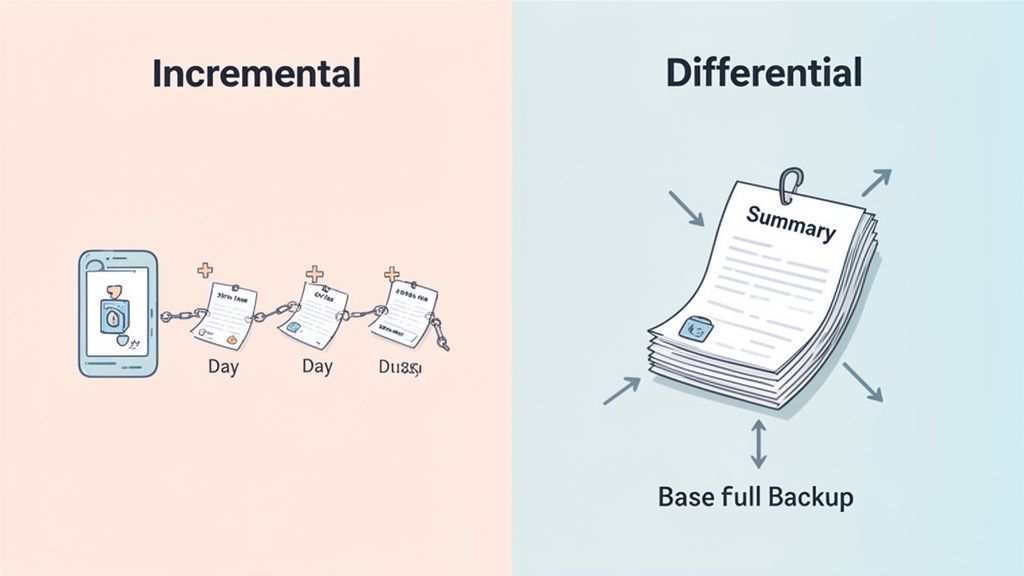
An incremental backup captures only the data that has changed since the most recent backup was completed, whether that last backup was a full or another incremental one. This approach creates the smallest possible backup files, making the daily backup process extremely fast and storage-efficient.
A differential backup, by contrast, saves all the data that has changed since the last full backup was performed. Each time a differential backup runs, it backs up every file that has been modified since that initial full copy. While the daily backup files are larger than incrementals, this method makes the restoration process much more straightforward.
For a more in-depth look at building a resilient strategy, you can explore our comprehensive data backup and recovery guide. The table below gives a quick snapshot of how these two core methods stack up.
| Feature | Incremental Backup | Differential Backup |
|---|---|---|
| Data Saved | Only changes since the last backup (full or incremental) | All changes since the last full backup |
| Backup Speed | Fastest | Slower than incremental |
| Storage Space | Uses the least amount of space | Uses more space over time |
| Restore Speed | Slower, more complex | Faster, simpler |
| Restore Process | Requires the last full backup + all subsequent incrementals | Requires the last full backup + the latest differential |
When weighing incremental vs. differential backups, performance is not a single metric. It is a trade-off between how fast you can secure your data and how quickly you can bring it back online after a failure. For any Canadian business, this balance has a direct impact on daily operations and the ability to recover from a disaster.
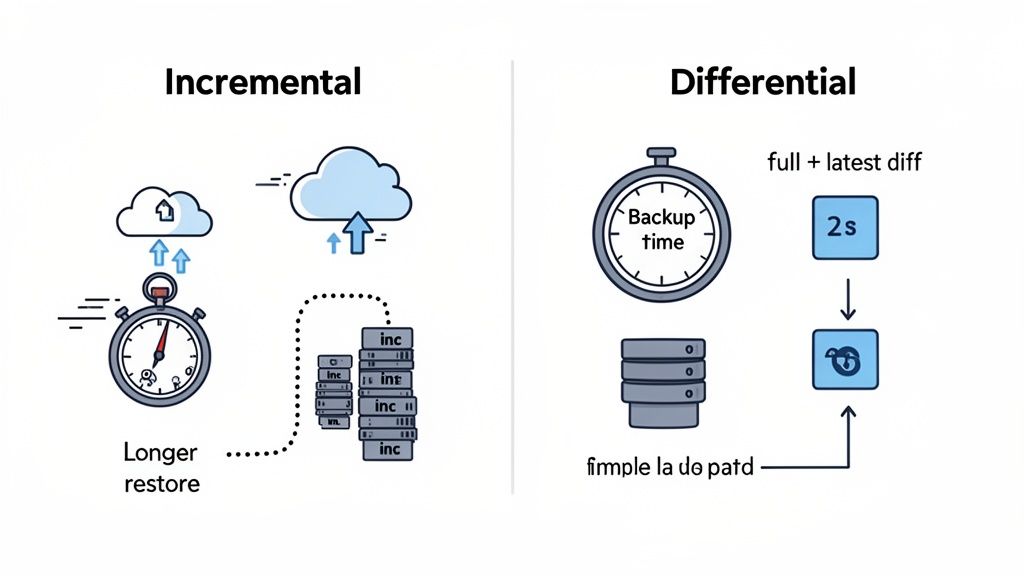
This is not just a technical decision. It is about matching your data protection strategy to your business’s actual tolerance for downtime. The right choice hinges on a simple question: which scenario is a bigger risk to your business—a slower daily backup, or a slower emergency restore?
When it comes to the day-to-day task of creating backups, incremental backups are the undisputed winner in speed. Their design is elegantly simple: they only copy data that has changed since the last backup ran. This results in much smaller backup files.
This efficiency brings significant advantages to your IT environment:
A 2024 analysis of Canadian managed IT service providers found that using incremental backups led to 35-45% faster execution times compared to differentials in typical SMB environments. For our clients in sectors like healthcare and manufacturing, this is not just a number—it is a real operational advantage. Incremental jobs on a standard 100GB dataset often finish in 15-30 minutes, whereas a differential backup might take 25-45 minutes, especially a few days into the backup cycle.
While incremental backups win the daily speed contest, the situation flips entirely when you need to recover your data. This is where differential backups truly shine, offering a faster and far simpler restoration process.
Let us picture it. A server goes down on a Friday morning. Your strategy was a full backup on Sunday, followed by daily backups.
For a business, every minute of downtime has a cost. The simplicity of a two-file restore with differential backups directly reduces your Recovery Time Objective (RTO), getting your operations back online faster when it matters most.
This difference is not a minor technical detail. It has direct business consequences, affecting everything from employee productivity to customer trust during an outage.
This table breaks down the core differences between the two backup types to help you see the trade-offs at a glance.
| Attribute | Incremental Backup | Differential Backup |
|---|---|---|
| Backup Speed | Fast. Only copies changes since the last backup (full or incremental). | Moderate. Copies all changes since the last full backup. Gets slower over time. |
| Storage Space | Minimal. Uses the least amount of storage space. | Moderate. Uses more space than incremental, as files grow daily. |
| Restore Speed | Slower. Requires the last full backup plus all subsequent incremental backups. | Faster. Requires only the last full backup and the latest differential backup. |
| Restore Complexity | High. The entire chain of backups must be intact and applied sequentially. | Low. Only two backup sets are needed, reducing the chance of error. |
| Network Impact | Low. Smaller file sizes result in less network traffic. | Moderate. Larger file sizes create more network traffic than incremental. |
| Best For | Minimizing daily backup windows and storage costs. | Businesses that need the fastest possible recovery time. |
Ultimately, choosing the right backup method means understanding how these characteristics align with your company's specific needs and priorities.
The central conflict between incremental vs. differential backups comes down to a strategic choice: do you prioritize daily efficiency or recovery speed? Neither approach is universally better; the right one fits your organization’s operational reality and risk tolerance.
Think of a Canadian manufacturing firm with a 24/7 production line. A long, complicated restore could shut down the entire floor, costing thousands per hour. For them, the slightly higher daily storage cost of differential backups is a small price for the guarantee of a fast, two-step recovery.
Now, consider a legal practice with a massive archive of client files. Their priority might be minimizing daily network load and storage costs. Since they can tolerate a slightly longer restore time in a disaster, the efficiency and lower footprint of incremental backups make more financial sense. The right choice is always contextual, driven by what your business values most.
When choosing between incremental and differential backups, it is easy to fixate on storage costs. But that is only part of the picture. The smarter approach is to view it through the lens of Total Cost of Ownership (TCO), which factors in not just your monthly storage bill, but the very real financial impact your business would face from downtime and labour during a recovery.
Think of your backup strategy as an investment in business resilience, not just another line item on your IT budget.
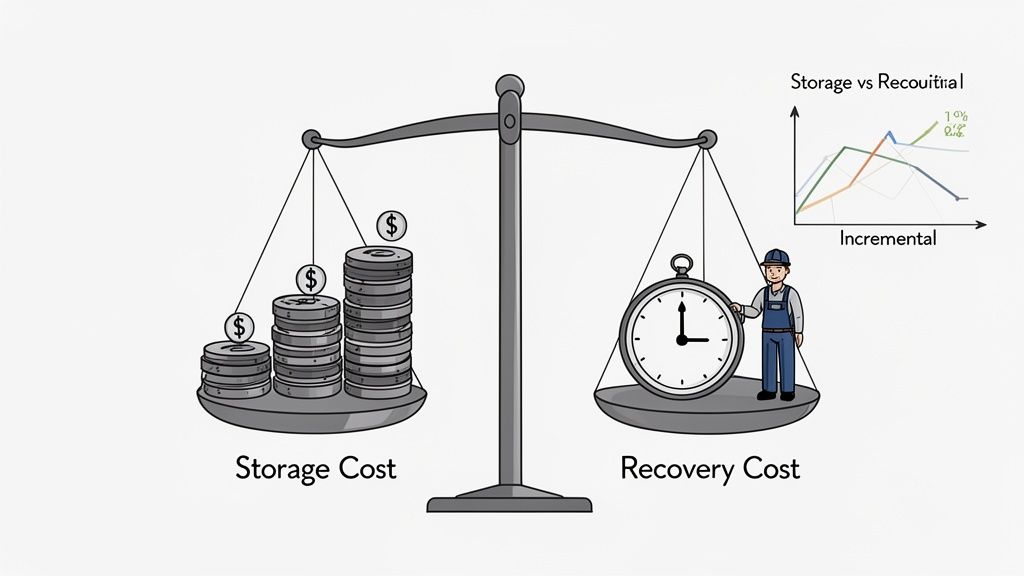
This broader financial view quickly shows that the cheapest option on paper might not be the most cost-effective when you are in the middle of a crisis. The true cost of any backup strategy is measured by how well it protects your operations and your bottom line when things go wrong.
Day-to-day, incremental backups have a clear cost advantage. Because they only save the small slices of data that have changed since the last backup, they use far less storage space. This efficiency is a massive plus for businesses managing huge datasets or keeping a close eye on their cloud services budget.
Our analysis of managed service providers across Ontario and Alberta shows that Canadian small and mid-sized businesses using incremental backups often see storage cost reductions of up to 40-60% compared to differential methods. A mid-sized manufacturing firm with 2TB of data might find its daily incremental backup is only 15-25GB. A differential backup for that same firm could easily climb to 40-80GB a week after the last full backup, driving up monthly costs. For more on how these strategies affect your budget, see this breakdown of data protection costs from ConnectWise.com.
This makes incremental backups look very attractive, especially if you have long-term data retention rules where every gigabyte saved truly adds up over time.
While you save on storage with incremental backups, you can end up paying for it in other ways during a recovery. These are the "hidden" costs. Restoring from a long chain of incremental files is a complex, time-consuming process. Every extra hour of downtime means lost revenue, unproductive staff, and a hit to your reputation.
The true cost of a backup is not just the storage fee; it is the price of business interruption. A faster restore process often provides a far greater return on investment than lower daily storage costs.
This is exactly where differential backups prove their financial worth. The restore process is simple: the last full backup plus the latest differential file. That is it. This direct approach dramatically shortens your Recovery Time Objective (RTO). The higher storage cost of differential backups starts to look less like an expense and more like an insurance policy against a costly, extended business shutdown.
When calculating the real cost of recovery, think about these factors:
When you weigh these potential expenses, the financial case for each backup type becomes much clearer.
Let us look at the financial impact for a mid-sized Canadian healthcare clinic that must follow PIPEDA regulations.
In this situation, the slightly higher operational cost of differential backups delivered a huge return by minimizing a catastrophic financial and operational blow. This is where partnering with an expert provider can help optimize these costs and strategies; you can learn more about the benefits of managed IT services and how expert management plays a critical role.
When comparing incremental vs. differential backups, boilerplate advice does not cut it. The right choice is not purely technical—it is a business decision that needs to align with the operational, financial, and regulatory realities of your specific industry. For a Canadian business, that means balancing everything from PIPEDA compliance and uptime demands to tight budget constraints.
Think about it: a law firm in Toronto operates in a completely different world than a manufacturing plant in Calgary. Getting these distinctions right is the first step in building a data protection strategy that actually works and gives you a real-world advantage. The best approach depends entirely on what you do, how you do it, and how much risk you are willing to accept.
For industries like healthcare and legal services, data is not just an asset; it is a regulated liability. Canadian organizations in these fields are bound by strict privacy laws like the Personal Information Protection and Electronic Documents Act (PIPEDA). This act dictates secure data handling and, more importantly, often demands you hold onto sensitive information for years.
The small daily backup files created by an incremental strategy translate directly into lower cloud storage bills. This is a massive plus when you are archiving a decade's worth of patient or client records. While the restoration process is more involved, that is a trade-off many are willing to make. A medical clinic can schedule a major system restore after hours, making a slightly longer Recovery Time Objective (RTO) a manageable issue compared to the spiralling cost of storing huge differential files indefinitely.
For organizations bound by strict data retention policies, the long-term storage savings from incremental backups often outweigh the inconvenience of a more complex restore. The focus is on compliant, cost-efficient archiving over immediate recovery speed.
This approach lets healthcare providers and legal firms meet their regulatory duties without inflating their IT budgets. The sheer efficiency of incremental backups makes them the pragmatic choice for sectors where data grows steadily and must be kept for the long haul.
On the flip side, industries like manufacturing and e-commerce run on razor-thin margins where every minute of downtime hits the bottom line—hard. When a production line grinds to a halt or an online storefront goes dark, it is not just an operational headache; it is a direct stop to revenue.
For these businesses, the Recovery Time Objective (RTO) is everything. A faster, simpler restore is not a nice-to-have; it is a core business necessity. Restoring from a differential backup is a quick two-step process: load the last full backup, then apply the latest differential file. It is significantly faster and less prone to error than piecing together a long chain of incremental files.
The higher storage costs are seen as a necessary cost of doing business—a calculated investment in operational continuity. Paying more for storage is a small price when compared to losing thousands of dollars in production or sales for every hour of an outage. You can learn more about crafting the perfect strategy in our guide to backup and disaster recovery in Calgary.
By choosing differential backups, these fast-paced industries are buying an insurance policy against disaster. They willingly accept higher storage costs to protect themselves from the catastrophic financial and reputational damage of being down for too long.
Choosing between incremental and differential backups is just the first step. The real test is putting that strategy into practice, which requires a disciplined approach to scheduling, testing, and day-to-day management.
This is especially true in today's complex cloud and SaaS environments. Without solid best practices, even the most well-designed backup plan can fall apart right when you need it most. A successful strategy is not a static document; it is a living process that needs constant attention to stay aligned with your business needs.
A common and highly effective schedule for many medium-sized organizations is the weekly full, daily incremental model. This hybrid approach delivers the reliability of a recent full backup combined with the speed and storage efficiency of daily incrementals.
While this schedule offers a great balance, you should tailor it to your specific data change rates and recovery goals. For mission-critical systems, you might find yourself running incrementals multiple times a day.
A backup you have not tested is not a backup—it is a liability. Manual testing is one of those tasks that often gets pushed aside, which is why automation is so important.
Modern backup solutions can automatically spin up a virtual machine from a backup, verify that the system boots and data is accessible, and then email you a success report.
Regular, automated testing is the only way to be certain your data is recoverable. It turns your backup from a hopeful assumption into a proven, reliable asset ready for any disaster recovery scenario.
This process confirms data integrity and ensures there are no hidden issues in your backup chains, which is critical when you are relying on a sequence of incremental files. Finding a corrupted file during a routine test is an inconvenience; finding it during an emergency is a catastrophe.
Your data protection duties do not disappear when you move to the cloud. Platforms like Microsoft Azure and SaaS applications like Microsoft 365 operate on a shared responsibility model. While Microsoft guarantees platform uptime, you are ultimately responsible for protecting your own data from accidental deletion, user error, or cyberattacks.
Applying incremental or differential principles here is crucial. For example, you can use specialized tools to perform daily incremental backups of your entire Microsoft 365 environment, covering:
This gives you the power to restore a single lost file or an entire mailbox in minutes, without being limited by Microsoft's short-term retention policies.
Proactive monitoring is vital for managing this process effectively. It's why many businesses rely on expert partners for remote monitoring and management to keep a close watch on their cloud data. By actively managing backups for these cloud services, you close a critical gap in your data protection strategy.
Picking between incremental and differential backups is not a simple coin toss. The best strategy rarely involves a strict either-or choice. Instead, it comes from asking the right questions about your operations and, often, blending both methods into a custom-fit solution for your business.
To land on the right approach, every business leader should start with these critical questions:
This visual decision tree can help simplify the process, walking you through the key steps of scheduling, testing, and securing your data.
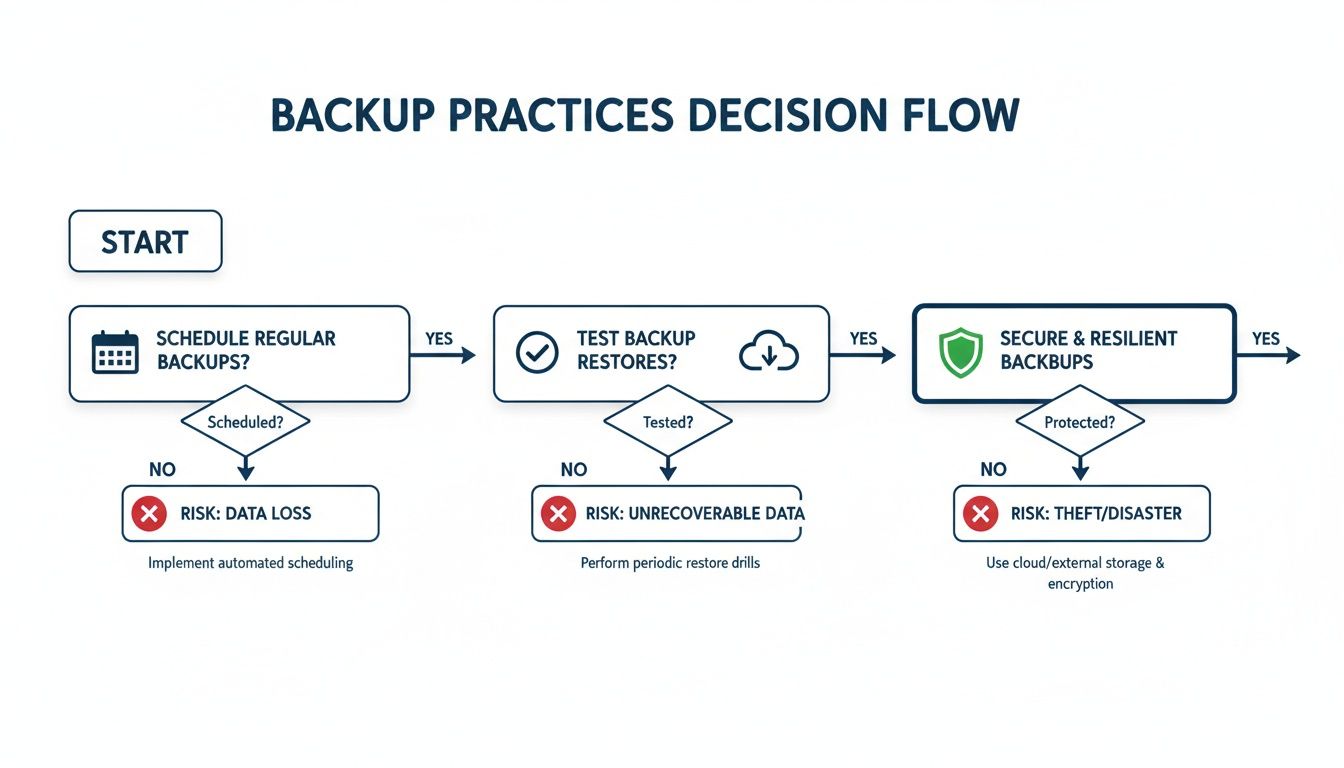
The real lesson here is that a successful backup strategy is a continuous cycle. It is not a "set it and forget it" task but a loop of planning, validation, and execution.
In the real world of modern IT, a one-size-fits-all approach does not cut it. The most robust and cost-effective data protection plans almost always use a hybrid model. This means applying different backup methods to different data sets, based on their value and how quickly you need them back.
A hybrid backup strategy is not about compromise; it is about precision. It allows you to apply the right level of protection to the right data, ensuring mission-critical systems are highly available while managing costs for less vital information.
This strategic blend shows a mature understanding of the incremental vs differential backups debate. It moves the conversation from a simple choice to a sophisticated, business-aware plan.
Here are a few real-world examples of how you can put a hybrid model into practice:
By adopting a hybrid model, you build a dynamic and efficient system. You get the rapid recovery you need for your most valuable assets and the cost savings you want for everything else, creating a truly resilient data protection framework.
Even after weighing the pros and cons, practical questions always come up when it is time to choose a backup strategy. Let’s tackle some of the common ones to help you navigate the finer details of implementing incremental or differential backups.
Yes, you can absolutely switch between backup methods. The key is to plan the transition carefully to ensure you do not leave any gaps in your data protection.
For example, if you are moving from a differential to an incremental strategy, you will need to start with a new full backup. Once that new baseline is set, you can start creating your smaller, daily incremental files. You will also need to hold onto the old full backup and its differential files until they meet your retention policy, then you can safely retire them.
Working with a managed IT service provider can make this transition seamless, ensuring your data stays secure every step of the way.
Synthetic full backups are a game-changer that shakes up the incremental vs. differential backups debate by boosting the incremental model. A synthetic full is created by your backup system, not by pulling data directly from your live servers again. It intelligently combines the last full backup with all the incremental files that followed, building a completely new, up-to-date full backup on your storage target.
The real advantage with a synthetic full is getting the fast, low-impact daily performance of an incremental strategy combined with the simple, quick restore capabilities of having a recent full backup. Best of all, it does this without putting any extra load on your production environment.
This gives you a powerful hybrid approach that blends the best of both worlds. It makes incremental strategies a much more attractive option for businesses that cannot afford lengthy recovery times.
The most dangerous—and common—mistake is the "set it and forget it" mindset. Too many organizations assume their backups are working perfectly. It is only when a disaster strikes that they discover the data is corrupted, incomplete, or was never being captured correctly in the first place. This is why regular, automated backup testing is so critical.
Another frequent error is a basic misalignment between the backup type and what the business actually needs to operate. A business might choose a long incremental chain, which can be slow to restore, when its operations cannot tolerate being down for that long.
As you make your final decision, be sure to work through a comprehensive disaster recovery planning checklist to protect your organization from these kinds of easily avoidable disruptions.
At CloudOrbis Inc., we help Canadian businesses build and manage resilient data protection strategies that align with their specific operational needs and budget. Our proactive approach ensures your backups are always tested, secure, and ready for recovery. To learn how we can modernize your backup and disaster recovery plan, visit us at https://cloudorbis.com.
September 17, 2026
Cloud Migration Roadmap Template That Prevents Costly ReworkGet a practical cloud migration roadmap template plus steps to customize it for assessment, waves, testing and cutover without budget surprises.
Read Full Post
September 16, 2026
How to Send Secure Email in Outlook Made SimpleLearn how to send secure email in Outlook with encryption, S/MIME and compliance tips for Canadian businesses. Step-by-step guide inside.
Read Full Post
September 15, 2026
Why Managed IT Services Matter for Canadian SMBsDiscover why managed IT services are a smart move for Canadian SMBs. Learn the benefits, real ROI, and how to choose the right provider.
Read Full Post
