

September 23, 2026
DDoS Protection for Canadian SMBs: What Works in 2026Learn what DDoS protection really does, the latest Canada-specific threats, and a practical playbook for small and mid-sized businesses
Read Full Post%20(1).webp)
Usman Malik
Chief Executive Officer
August 9, 2026
35.8% of employees with Microsoft Copilot access actively use it, which means 64.2% are licensed but not generating measurable value from the tool [industry analysis cited in Avantiico]. That gap is the story behind microsoft copilot training, because access alone doesn't change how people work. In Canadian mid-market firms, the difference between a licence purchase and a business result usually comes down to whether training is tied to governance, role design, and measurable workflows.
Microsoft has made Copilot measurable at the tenant level, which is useful because it shifts the conversation from opinions to usage data. In the Microsoft 365 admin centre, leaders can track Enabled Users, Active Users, and Total prompts submitted for Microsoft 365 Copilot, while the Copilot Dashboard adds active Copilot users, Copilot actions taken, and estimated time assisted over the last 28 days [Microsoft usage reporting]. For Ontario, Alberta, and British Columbia business units, that matters because you can compare training outcomes across regions instead of guessing which team is adopting the tool.
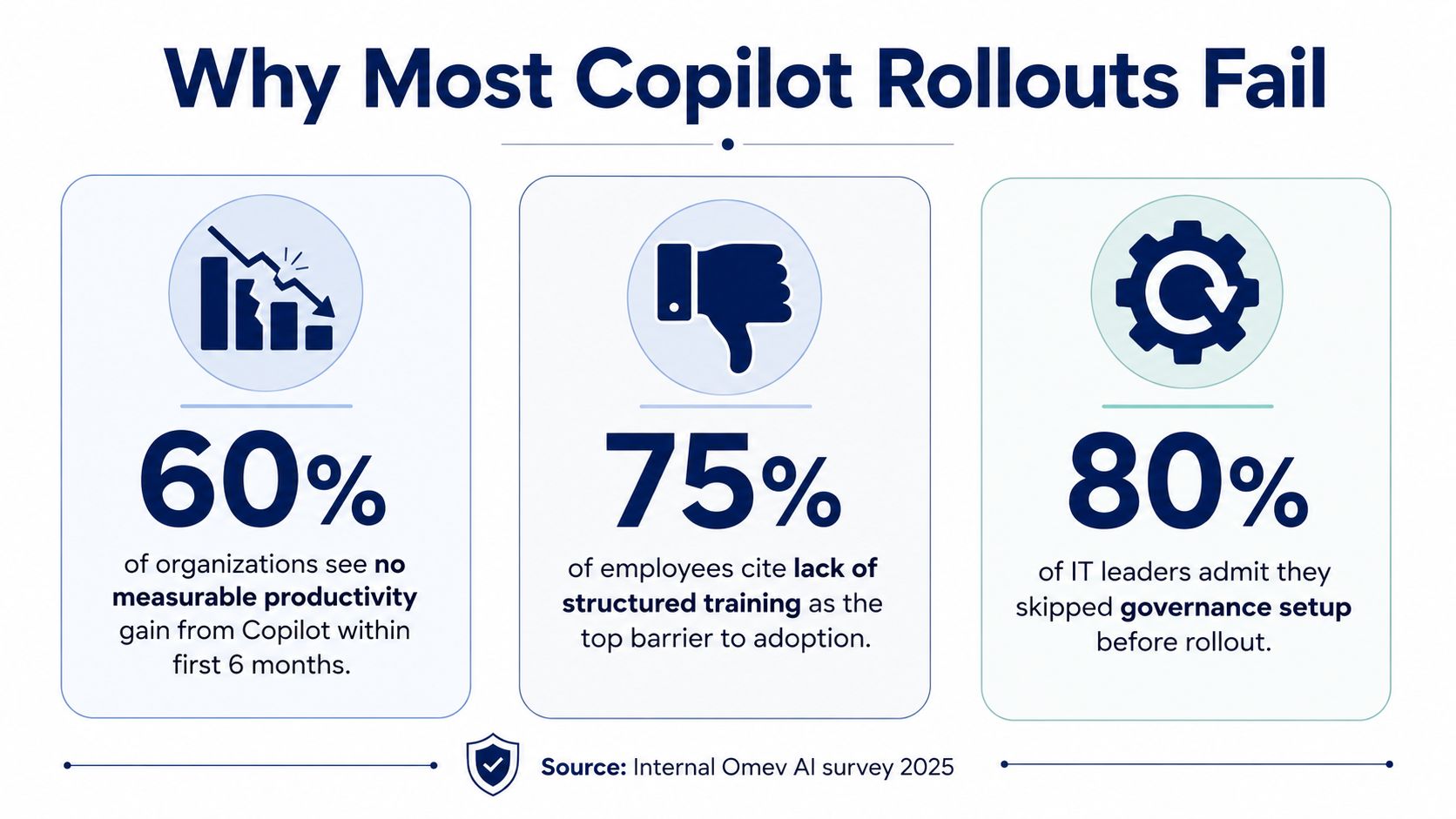
The common failure isn't that Copilot is hard to buy. It's that organisations treat rollout like software installation instead of behaviour change. Generic tutorials, one-off lunch-and-learns, and “try it and see” messaging leave employees unsure what to ask, where to use it, and whether the output is safe to reuse.
Microsoft-linked reporting shows that trained users can save 14 minutes per day on average, and 22% of users save more than 30 minutes a day when they know how to use Copilot effectively [Avantiico adoption guide]. The problem is that many organisations stop at licence assignment. They never give people the prompting habits or workflow boundaries that turn a demo into a repeatable practice.
Practical rule: if users can't name the three tasks Copilot should help them with in their own job, the rollout isn't ready.
For Canadian healthcare, legal, accounting, manufacturing, and logistics teams, that gap is sharper because the work is process-heavy and documentation quality matters. A vague prompt can waste time or create rework, and in regulated environments it can create risk. That's why microsoft copilot training has to be framed as operational training, not feature familiarisation.
A useful first move is to align Copilot readiness with licence hygiene, user segmentation, and ownership. If the wrong people are licensed, training won't fix that. The hidden adoption gap starts before the first prompt.
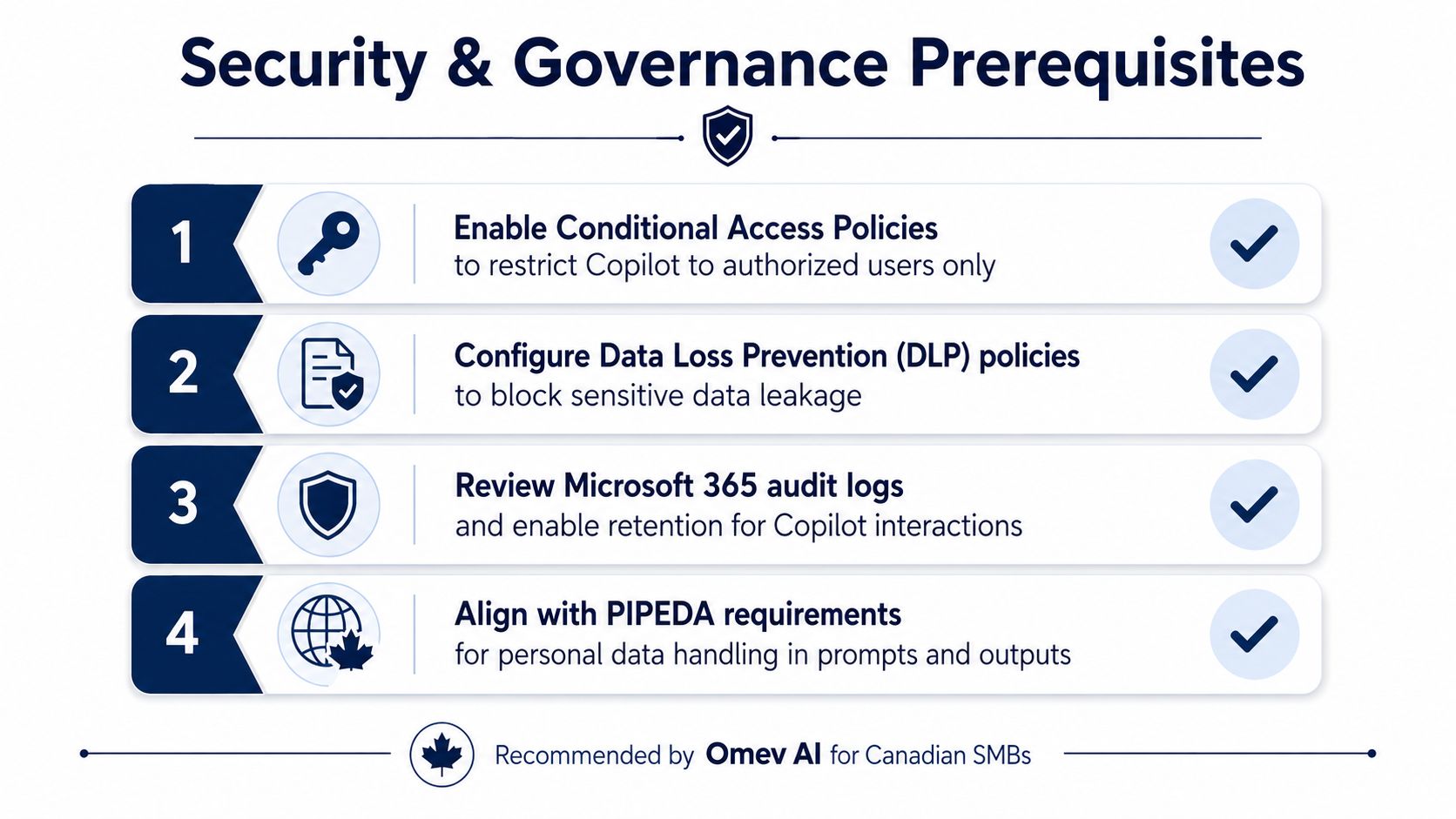
Copilot should never be the first system a user touches. The tenant has to be ready first, because Microsoft says Copilot uses the same security stack already protecting Microsoft 365, including multifactor authentication, conditional access, device compliance, and threat protection [Microsoft security overview]. Microsoft also states that prompts and responses stay within the company tenant and are not used to train its AI models [Microsoft security overview].
The first control is identity. If conditional access rules are loose, Copilot inherits that weakness. The second is data protection. Sensitivity labels and DLP policies need to match how teams classify client, patient, financial, and legal data.
A third concern is grounding. Microsoft distinguishes work-grounded responses from web-grounded responses, and that distinction matters because users need to know when internal documents should drive the answer and when the web is appropriate [Microsoft Copilot learning path]. That's also why training should teach verification habits, not blind reuse.
A prompt that touches sensitive records should be routed through governed Microsoft 365 workflows, not treated like a casual search query.
Canadian organisations handling personal information should also align prompt handling with privacy expectations, especially where internal data, external sources, and employee judgement intersect. CloudOrbis often approaches this through an AI governance framework before broad rollout, because the policy layer has to exist before users start experimenting [CloudOrbis AI governance framework].
If these basics aren't in place, microsoft copilot training becomes damage control. If they are, training can focus on workflow quality instead of emergency cleanup.
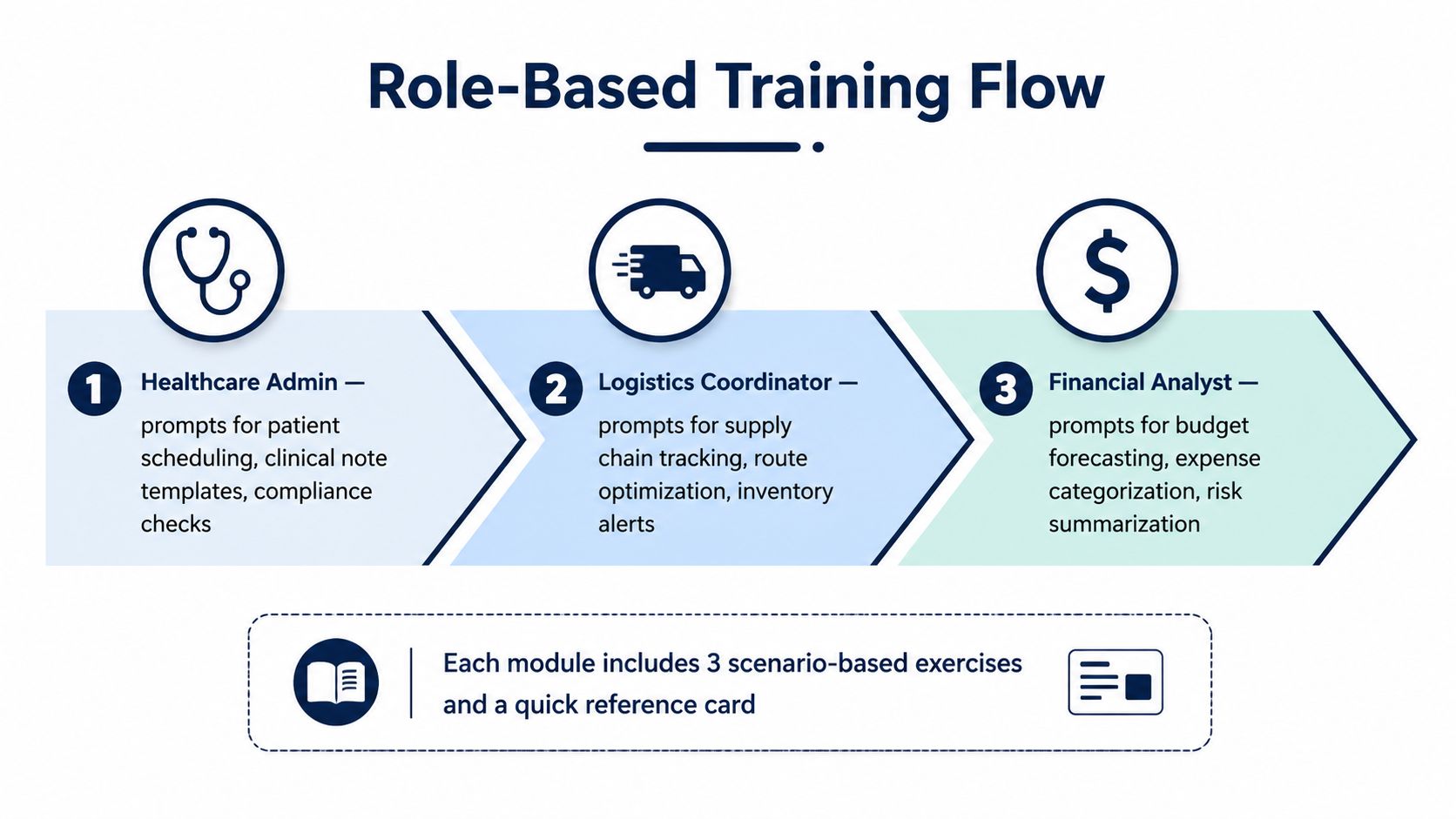
Generic training fails because the prompt a clinic administrator needs is nothing like the prompt a controller or dispatcher needs. Microsoft's own training material leans into role-relevant learning, including “Draft, analyse, and present with Microsoft Copilot 365 MS-4018” and “AI Fluency: Get started with Microsoft Copilot” [Microsoft training catalog]. That's a strong signal that structured learning, not casual exploration, is the right starting point.
A healthcare administrator needs prompts that support patient scheduling, clinical note templates, and compliance checks. A logistics coordinator needs help with supply chain tracking, route summaries, and inventory alerts. A financial analyst needs support with budget forecasting, expense categorisation, and risk summaries.
Reworx Recycling's training and education resources are a useful example of how practical training content works when it's tied to real operational tasks instead of broad theory. The format matters more than the industry. People learn faster when they can see a relevant use case, try it, and check the output against expectations.
Microsoft's Learning Agent preview follows that logic with a short onboarding session, role-specific examples, hands-on practice, and a knowledge check [Microsoft Learning Agent preview]. That model fits small cohorts well because it gives trainers a controlled way to verify comprehension before users work independently with sensitive data.
A strong module should include:
For finance and operations teams, the most useful habit is grounding prompts in organisational data first, then checking whether the answer is fit for reuse. For HR, legal, and compliance-heavy groups, that final review step can't be optional. You can reinforce the same discipline through CloudOrbis' compliance training guidance, which fits well beside Copilot adoption work.
The biggest mistake is trying to teach every feature at once. Teach the few workflows people use every week, then expand after they've proven they can use them safely.

Training content matters, but adoption usually breaks on emotion. Some employees worry Copilot will expose mistakes. Others assume it's just another productivity fad. A few test it once, hit a weak prompt, and never come back.
Internal champions need a real role, not a title. They should sit inside the business units where work happens, answer basic questions, and show examples in the language of the team. That approach works better than sending a central IT person to evangelise every workflow.
The best rollout rhythm is low-pressure experimentation paired with visible support. Give people a safe sandbox, a small set of approved use cases, and quick access to someone who can interpret failures. When users know they won't be judged for asking awkward questions, they're more likely to keep trying.
If you need a practical change-management reference point, The OKR Hub on execution issues is a useful reminder that adoption stalls when accountability is vague and owners disappear after launch. Copilot is no different. Someone has to own the move from interest to habit.
Good adoption question: what work gets easier for this team next Tuesday, not someday?
That question cuts through hype. It also forces managers to talk about concrete outcomes, which matters when a user is deciding whether to trust the tool or ignore it.
Incentives don't need to be expensive. Publicly recognise good prompts, shared templates, and better meeting summaries. Ask teams to submit before-and-after examples where Copilot reduced rework, clarified a message, or improved a deliverable.
CloudOrbis' broader change management process guidance aligns with that practical view. The point is to keep the human side of adoption visible long after the first training session ends.
If the first 90 days feel optional, the rollout will drift. If managers ask for examples, check-ins, and working habits, the tool starts to feel like part of the job.
Training without measurement is just a hope. Microsoft gives organisations enough telemetry to avoid that trap. In the Microsoft 365 admin centre, you can monitor Enabled Users, Active Users, and Total prompts submitted for Microsoft 365 Copilot, while the Copilot Dashboard shows active Copilot users, Copilot actions taken, and estimated time assisted over the last 28 days [Microsoft usage reporting].
The cleanest approach is to set a baseline, launch training, then compare behaviour after users have had time to practise. Baselines should include licence assignment, active usage, and the kinds of tasks each team is expected to perform. If the pilot group is sending prompts but not producing reusable work, that's a training issue, not a telemetry issue.
| Copilot Adoption Metrics Framework | Source | Baseline Target | 90-Day Target |
|---|---|---|---|
| Enabled Users | Microsoft 365 admin centre | Confirm intended licence population | Track against rollout cohort |
| Active Users | Microsoft 365 admin centre | Establish pre-training usage | Compare by role and department |
| Total prompts submitted | Microsoft 365 admin centre | Record initial prompt volume | Identify sustained use patterns |
| Active Copilot users | Copilot Dashboard | Capture pilot group behaviour | Measure adoption across Teams, Outlook, Word, Excel, PowerPoint, OneNote, and Loop |
| Copilot actions taken | Copilot Dashboard | Note early task completion | Review for workflow depth |
| Estimated time assisted | Copilot Dashboard | Set a starting point | Review as an efficiency indicator |
That table is only useful if leaders interpret it in context. A high prompt count with weak output quality usually means users are experimenting but not yet trained well enough. A modest prompt count with solid task completion can still be a win in a regulated environment.
For a deeper reporting habit, CloudOrbis' analytics and reporting guidance pairs well with Copilot measurement because both depend on clean baselines and repeatable dashboards.
The executive question isn't whether people clicked the tool. It's whether work moved faster, cleaner, or with less rework. That can show up in shorter turnaround on internal drafts, faster meeting prep, or improved consistency in recurring documents.
Microsoft says active users are those who perform an intentional action with an AI-powered capability in a Microsoft 365 app [Microsoft usage reporting]. That definition is useful because it rewards behaviour that reflects adoption, not passive access.
The measurement habit should also surface power users. They often reveal which prompts, workflows, and guardrails should become standard across the organisation. That's where microsoft copilot training stops being a launch exercise and starts becoming an optimisation cycle.
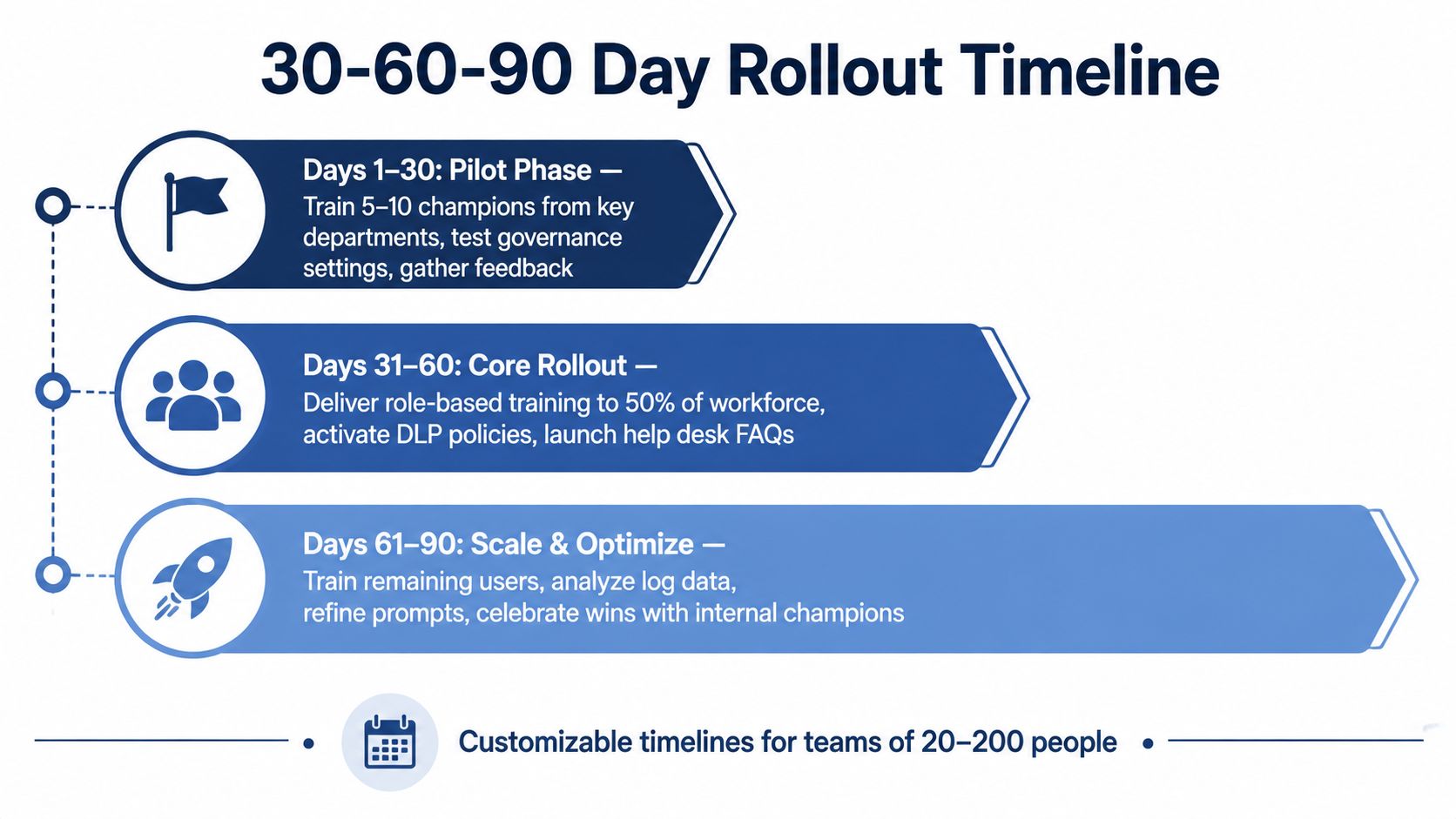
Microsoft recommends beginning with a guided evaluation, starting small, and expanding only after security controls and user readiness are confirmed [Microsoft rollout guidance]. That phased approach is the right fit for Canadian SMBs because it keeps the pilot controlled and the learning visible.
Train 5 to 10 champions from key departments. Test governance settings, confirm prompt boundaries, and collect the first round of feedback. Keep the pilot narrow and practical.
Roll out role-based training to about half the workforce, activate DLP policies, and publish help desk FAQs. At this point, teams should be using approved workflows in Word, Outlook, Teams, and other daily apps instead of treating Copilot like a novelty.
Train the remaining users, review log data, refine prompt libraries, and recognise internal champions who helped the rollout stick. If a department still resists, pause and fix the gap before expanding further.
If the first cohort can't explain when to use Copilot on the web versus Microsoft 365 Copilot, the next wave isn't ready yet.
That decision gate matters more than calendar pressure. A rushed scale-up creates confusion, and confusion creates abandonment. For teams of 20 to 200 people, the goal is steady adoption with clear checkpoints, not a noisy launch.
CloudOrbis Inc. helps Canadian SMBs line up Microsoft 365 security, Copilot training, and governance so adoption turns into measurable use, not licence waste. If you're planning a Copilot rollout or trying to rescue one that's stalling, visit CloudOrbis Inc. to explore managed IT support, Microsoft 365 optimisation, and practical training and governance services built for real business environments.
September 23, 2026
DDoS Protection for Canadian SMBs: What Works in 2026Learn what DDoS protection really does, the latest Canada-specific threats, and a practical playbook for small and mid-sized businesses
Read Full Post
September 22, 2026
Security Audit Services Guide for SMBs in CanadaDiscover why security audit services are vital for Canadian SMBs. Explore typical scope, deliverables, timelines, and tips to choose the right provider.
Read Full Post
September 21, 2026
Secure File Sharing Guide for Canadian BusinessesLearn secure file sharing essentials for Canadian SMBs — encryption, compliance, protocols and best practices to protect data and stay compliant.
Read Full Post
