IT Consultant Company: Boost Your Business Growth
An IT consultant company helps Canadian SMBs achieve security, compliance, and growth. Get expert guidance tailored for your business success.

An IT consultant company helps Canadian SMBs achieve security, compliance, and growth. Get expert guidance tailored for your business success.
Monday starts with three messages you don’t want to see. A manager says the shared drive is slow again. Your finance lead asks whether your remote staff are storing sensitive files in the right place. Then someone forwards a phishing email and asks, “Did anyone click this?”
For many Canadian business leaders, that’s what IT feels like. It’s not a strategy. It’s a stream of interruptions. You’re expected to keep operations moving, support hybrid work, protect customer data, satisfy compliance rules, and still find time to modernise systems that may already be holding the business back.
The hard part is that most technology problems don’t stay technical for long. A weak password policy becomes a client trust issue. An aging phone system becomes a service delay. An unclear cloud setup becomes a compliance risk. If you’re planning growth, acquisitions, new locations, or better use of Microsoft 365, the pressure gets heavier.
A capable it consultant company changes that dynamic. Instead of waiting for things to break, the right partner helps you decide what technology to keep, what to replace, what to secure, and what to prioritise first. That’s the difference between reacting to IT and using it deliberately.
If you’re trying to connect day-to-day problems with a broader business plan, this guide on building a strategic digital transformation plan offers useful context on how technology decisions should support real operational goals.
A mid-sized clinic in Ontario doesn’t usually wake up thinking about endpoint protection or vulnerability scans. It thinks about patient flow, billing, staffing, and keeping appointments on time. But when laptops aren’t patched, email settings are inconsistent, and nobody is clearly accountable for compliance, small gaps start to collect.
The same pattern shows up in manufacturing, logistics, legal, and finance. Leaders often inherit a patchwork of tools that were added one at a time. One vendor handles phones. Another set up Microsoft 365. Someone’s internal staff member resets passwords and manages printers. Cybersecurity sits in a separate bucket, if it exists at all.
Technology should reduce management load, not become another department you have to supervise by instinct.
That’s why businesses start looking for outside help. Not just for helpdesk tickets, but for someone who can step back and ask better questions. Are your systems aligned with your growth plans? Are your controls strong enough for regulated data? Are your people using the tools you already pay for?
A strong consulting partner brings order to that mess. They translate business goals into a roadmap, sequence the work, reduce unnecessary risk, and give leadership clearer choices.
An it consultant company is often described too narrowly. People hear “consultant” and assume slide decks, abstract advice, or short-term projects. In practice, the right firm acts more like a fractional technology leadership team for businesses that need direction, not just repair work.
Think of it this way. A break-fix provider is like calling a mechanic only after your vehicle stops on the road. An IT consultant is closer to having a transport manager who plans maintenance, upgrades the fleet, tracks risk, and makes sure your vehicles still fit the routes you need to run next year.
Traditional support usually starts with a symptom. The server is down. Email isn’t syncing. Staff can’t connect from home. Those issues matter, but they don’t answer larger questions such as whether your environment is secure, scalable, compliant, or too dependent on outdated systems.
A consultant works at that higher level. They look at your business model, your risk profile, your industry obligations, and the systems your staff use every day. Then they help shape decisions around cloud adoption, vendor selection, Microsoft 365 governance, cybersecurity controls, backup strategy, and IT budgeting.
That’s why many firms position consulting alongside broader digital transformation consulting. The core idea is simple. Technology shouldn’t be a pile of tools. It should be an organised operating model.
A real consultant doesn’t just recommend software. They connect decisions to outcomes leadership cares about.
For example, they may help you:
Some businesses need full strategic oversight. Others already have internal IT staff and need outside expertise for roadmap planning, vendor evaluation, or specialised projects. That’s where the consulting model becomes especially useful.
Practical rule: If your business keeps revisiting the same IT problems every quarter, you likely don’t have a tools problem. You have a planning problem.
For a closer look at how strategic advisory work differs from simple support, CloudOrbis has a helpful article on IT management consulting.
Business leaders don’t need a long list of technical terms. They need to know what services solve which business problems. The most useful way to evaluate an it consultant company is to look at the outcomes its services create.
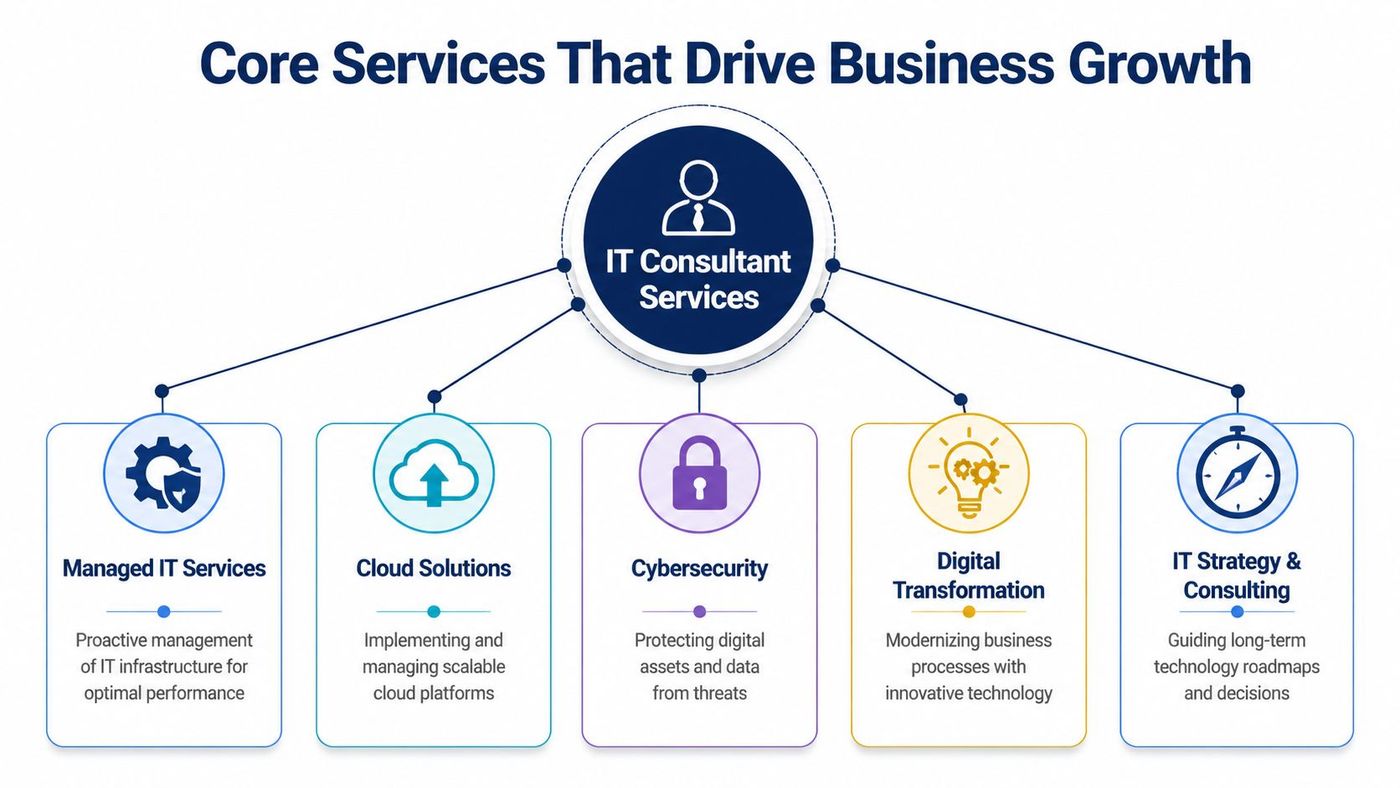
Managed IT services are the operational backbone. They cover monitoring, maintenance, user support, patching, device health, and issue resolution before employees start losing time.
For leadership teams, the value is stability. Your staff can work without constantly waiting on technical fixes. Your systems stay maintained. Your IT costs become more predictable. If your current environment feels reactive, this is usually where discipline starts.
For a practical overview of what that operating model looks like, see CloudOrbis’s explanation of information technology managed services.
Cybersecurity is where many firms discover that “we have antivirus” isn’t a strategy. Modern protection involves layered controls such as endpoint detection and response, vulnerability assessments, secure identity policies, email filtering, logging, and monitored response.
In healthcare and other regulated environments, cybersecurity also overlaps directly with compliance. That means the consultant isn’t only selecting tools. They’re shaping processes around them. Microsoft Defender for Endpoint, data loss prevention settings in Microsoft 365, and monitoring workflows only help if they’re configured to match your risk profile and your regulatory duties.
Cloud projects often get oversimplified. Moving files or email into the cloud isn’t the same as building a clean, manageable environment.
A consultant helps decide what should move, what should stay, and how users should access systems securely. They also reduce a common source of confusion. The cloud isn’t automatically safer or cheaper. It’s safer and more effective when it’s designed properly, access is governed, and backup responsibilities are clear.
This is especially important for businesses with multiple offices, remote teams, field staff, or seasonal growth. Cloud architecture should make operations easier, not introduce more sprawl.
A virtual Chief Information Officer, often shortened to vCIO, gives you executive-level technology planning without hiring a full-time internal executive for that role.
This work usually includes roadmap planning, budget guidance, lifecycle reviews, compliance alignment, vendor management, and quarterly business reviews. If managed services keep the lights on, vCIO services help leadership decide where the business should invest next.
An advisor may also map out where automation makes sense. In operations-heavy businesses, examples from these intelligent automation use cases can help leaders think through which repetitive processes should be optimized and which still need human oversight.
Most businesses believe they have backup until they need a recovery. Those are not the same thing.
A consultant tests whether backups are complete, recoverable, and aligned with business priorities. They also work through practical questions that non-technical leaders should ask. Which systems must come back first? How long can each department operate without access? Who approves failover decisions? What happens if a ransomware event affects both production systems and local backups?
A strong backup and disaster recovery plan turns a crisis into a managed incident rather than a prolonged shutdown.
Phone systems still matter, especially in customer service, healthcare, logistics, and distributed operations. Modern business VoIP ties calling, presence, voicemail, meeting tools, and mobile access together.
The business benefit is less about replacing desk phones and more about making communication consistent. Staff can answer from anywhere. Teams can route calls intelligently. New sites and users can be added without rebuilding the entire system. When paired with the right network design, VoIP supports faster coordination across locations.
A growing manufacturer in Alberta won’t need the same service mix as a downtown legal office or a clinic in Oakville. That’s why a good consultant doesn’t start with a canned package. They start with operating realities.
For Alberta manufacturers, expert guidance on Microsoft 365 optimisation has delivered 28% productivity gains in pilots, while 61% reported integration failures with legacy systems when trying to manage the work alone, according to Deloitte Canada’s 2025 manufacturing industry outlook. That gap is one reason co-managed models matter. Internal teams may know the business well, while outside consultants bring implementation discipline and broader platform experience.
CloudOrbis Inc. is one example of a provider that combines managed support, cybersecurity, cloud migration, VoIP, backup, and vCIO services in a single operating model for Canadian SMBs.
Most businesses aren’t choosing between “good IT” and “bad IT.” They’re choosing how to organise IT responsibility. The three common models are an in-house team, a managed services provider, and a strategic consultant. Many firms end up using a hybrid, but the decision still needs structure.
An in-house team gives you proximity. They know your people, your workflows, and your systems. That’s useful if your environment is complex or highly customised. The trade-off is that one or two internal staff members can’t cover every discipline deeply, especially security, compliance, infrastructure, cloud governance, and after-hours response.
An MSP gives you operational coverage. They’re built to monitor systems, respond to issues, and provide standardised support processes. If your priority is dependable day-to-day IT operations, this model often improves consistency quickly.
An IT consultant gives you direction. They’re strongest when leadership needs planning, specialised expertise, transformation guidance, project oversight, or compliance alignment. They may not replace support entirely, but they help ensure support is pointed in the right direction.
| Attribute | In-House Team | Managed Services Provider (MSP) | IT Consultant |
|---|---|---|---|
| Strategic planning | Varies by staff seniority | Often limited unless bundled with advisory services | Strong fit for roadmap, governance, and investment decisions |
| Day-to-day support | Direct and immediate during staffed hours | Structured support across users, devices, and systems | Usually not the primary focus |
| Breadth of expertise | Depends on team size | Broad operational coverage | Broad strategic and specialist guidance |
| Scalability | Can be slower to expand | Easier to scale with growth | Scales well for projects and planning |
| Best use case | Complex internal environments needing on-site familiarity | Businesses that want proactive outsourced operations | Leaders who need technology aligned with business goals |
| Typical limitation | Skill gaps and capacity constraints | Can become too ticket-focused without strategy | Needs another model beside it for full daily support |
Many medium-sized businesses don’t need to pick only one option. A common arrangement is to keep an internal IT generalist or small team, use an MSP for monitoring and support, and bring in a consultant for roadmap work, security reviews, vendor selection, or larger platform changes.
That structure is often healthier than asking one internal person to be helpdesk manager, security lead, cloud architect, telecom administrator, and compliance adviser all at once.
If your current provider responds quickly but never talks about risk, budgeting, or future-state planning, you probably have support, not strategy.
If you’re comparing outsourced operational models, CloudOrbis offers a useful primer on what to expect from a managed IT service.
A five-person clinic in Mississauga, a distributor in Edmonton, and a law firm in downtown Toronto can all hire an IT consultant company. They will not need the same plan. That is the point.
Industry context changes what “good IT” looks like. In one business, the priority is patient privacy. In another, it is keeping inventory, phones, and warehouse systems in sync. In a third, it is controlling who can access sensitive documents and proving that the right safeguards are in place. A consultant adds value by translating those business pressures into practical decisions about security, compliance, systems, and spending.
For healthcare organisations, technology decisions quickly become trust decisions. If staff share patient information through the wrong channel, if devices are not patched, or if access permissions are too broad, the issue is not only technical. It can become a privacy incident, a reporting problem, and a reputational problem at the same time.
IBM’s Cost of a Data Breach report found that organisations using security AI and automation saw lower breach costs, and healthcare remained one of the most targeted sectors. That matters to Canadian clinics because PHIPA in Ontario and PIPEDA obligations shape how patient data should be stored, accessed, and shared. Alberta providers also have to think carefully about health information handling, especially when remote work and cloud collaboration are involved.
A consultant helps turn those rules into a working operating model. That usually includes role-based access, secure Microsoft 365 configuration, device standards, backup review, incident response planning, and regular risk assessments. HIPAA may also matter for Canadian organisations that work with U.S. partners or serve cross-border patients, so a good adviser should be able to explain where HIPAA expectations overlap with PHIPA and where they do not.
The strategic benefit is clarity. Leadership gets a practical roadmap instead of a pile of disconnected security tools.
In manufacturing and logistics, small delays spread fast. A barcode scanner loses connection. A warehouse team calls the office because inventory is out of sync. Dispatch works from stale information for an hour. Revenue is affected, but so are customer commitments and staff productivity.
That is why consultants in these environments look at systems together, not one by one. Cloud applications, warehouse connectivity, Wi-Fi coverage, site-to-site networking, voice systems, and backup connectivity often shape the same operational outcome. If one part is weak, the rest of the process slows down.
For a Toronto manufacturer, the priority may be plant and office coordination. In Calgary, it may be multi-site communication across field and corporate teams. In Edmonton, it may be keeping distribution workflows stable during growth or relocation. The details change, but the pattern is consistent. Businesses need reliable data flow, fewer single points of failure, and a clear plan for modernising legacy systems without disrupting operations.
A consultant’s role here is part architect, part translator. They help leadership see whether a recurring “software problem” is really a network design issue, an aging phone setup, poor traffic prioritisation, or a cloud migration that was never fully planned.
These firms run on confidentiality, deadlines, and control. A missed retention setting, an overly broad SharePoint permission, or an unmanaged personal device can create risk that is far larger than the original mistake.
Consultants usually focus on reducing that exposure in practical ways. They standardise where documents live, tighten sharing settings, review email security, improve identity controls such as multi-factor authentication, and make sure backup and recovery align with the systems the firm depends on most. For finance and accounting teams, audit readiness and access traceability often matter just as much as day-to-day uptime.
The business outcome is consistency. Staff know how to work securely. Partners have better visibility into risk. Clients see a firm that treats information with discipline.
Small and mid-sized businesses rarely have the budget to build a full internal team for compliance, cyber security, infrastructure, vendor management, and long-range planning. They still face the same categories of risk.
An IT consultant company helps close that gap by matching advice to your specific business. A healthcare clinic needs guidance shaped by PHIPA and patient workflows. A growing distributor needs resilient operations across sites. A professional services firm needs tighter control over data, identity, and retention.
The best engagements start there. With your industry, your risk profile, and your growth plan.
Choosing an IT partner is less like buying software and more like choosing an operating partner. Technical skill matters, but it isn’t enough on its own. You need evidence that the firm understands your business, your industry pressures, and the decisions leadership has to make.
Use this checklist early. It will save time and prevent polished sales calls from distracting you.
Only 12% of top provider websites mention specific HIPAA/PHIPA strategies for Canadian clinics, according to the verified data linked to the Canadian Centre for Cyber Security’s national cyber threat assessment guidance. That’s a useful warning sign for healthcare SMBs. If compliance expertise isn’t visible, don’t assume it exists behind the scenes.
That gap is a reminder to ask direct questions instead of relying on broad claims about “security” or “compliance-ready solutions.”
Ask vendors to explain how they would handle your specific environment. General answers are easy. Detailed answers reveal whether they’ve done the work before.
Some questions quickly separate strategic partners from generic suppliers:
If you want a broader view of outsourced relationship models before making a final choice, CloudOrbis also explains what businesses should look for in an IT outsourcing company.
A common point of hesitation shows up before any technical discussion starts. A business owner in Toronto, Calgary, or Edmonton may agree that systems need attention, but still pause at one practical question: what exactly are we buying, and how will the work unfold?
That question matters because the engagement model shapes cost, accountability, speed, and risk.
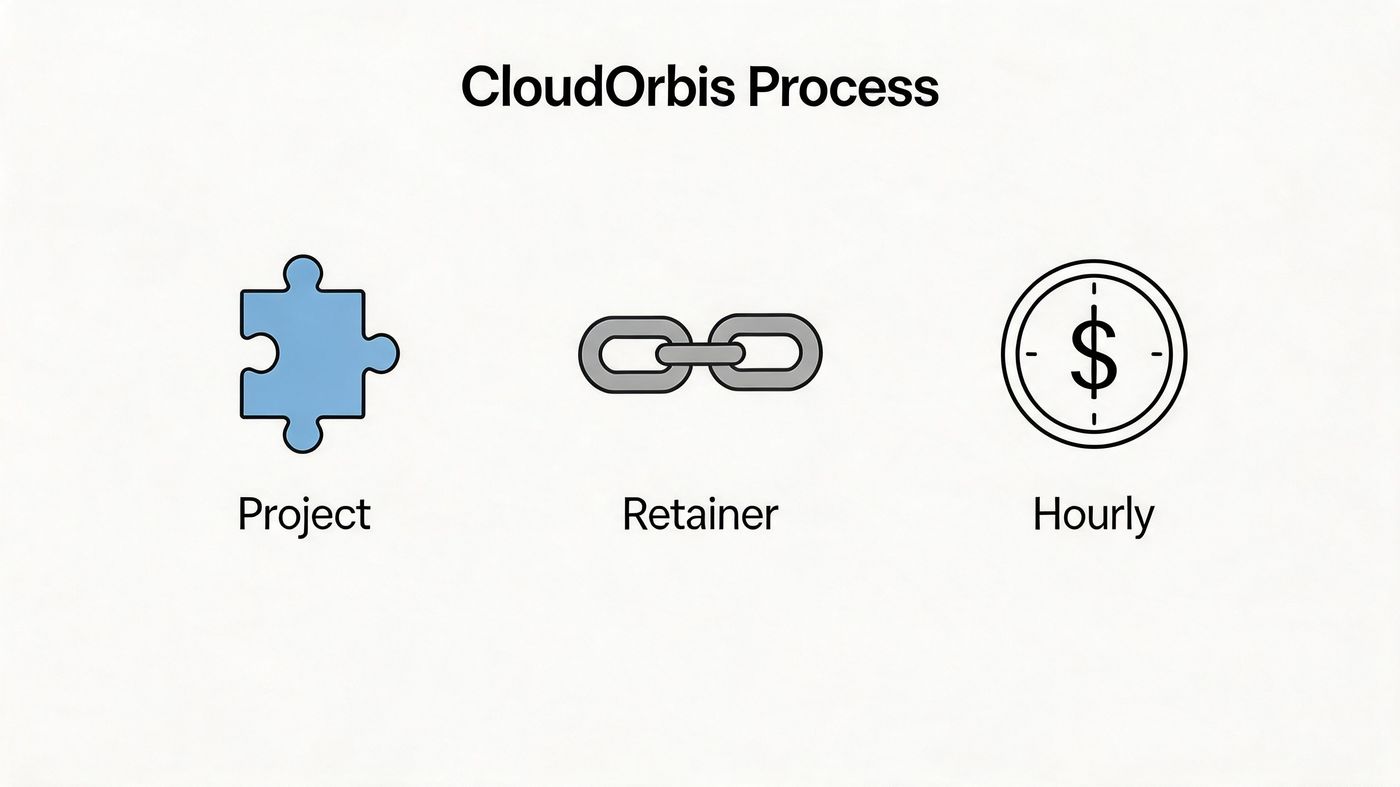
Consulting arrangements usually fall into three practical categories. Each fits a different stage of business growth.
A small clinic dealing with PHIPA obligations may start with a project to assess security and records handling. A growing manufacturer with multiple locations may need a retainer because priorities keep changing across operations, cybersecurity, and vendor management. A professional services firm with internal IT staff may only need hourly advisory for architecture decisions or contract reviews.
The model should match the business problem, not the other way around.
Price is only one part of the decision. Sequence matters just as much.
IT consulting works like a building renovation. If you install expensive finishes before fixing wiring, plumbing, or structure, you pay twice. Business technology follows the same pattern. Companies run into trouble when they migrate before setting governance rules, buy security tools before clarifying ownership, or roll out collaboration platforms before training staff and defining approval processes.
That point becomes even more important for Canadian SMBs in regulated fields. A healthcare practice may need privacy controls mapped to PHIPA before any cloud redesign begins. A cross-border health services provider may also need to account for HIPAA requirements. A construction or logistics company may care less about medical privacy, but more about device management, jobsite connectivity, and business continuity. The process should reflect those realities from the start.
CloudOrbis typically approaches engagements as a sequence of business decisions, not a stack of disconnected technical tasks:
This order reduces confusion. Leadership gets a clearer view of cost, timing, and trade-offs. Internal IT staff know where they fit. End users receive training before new tools become part of daily work.
It also helps separate urgent issues from important ones. An Edmonton firm may feel pressure to replace aging infrastructure immediately, while the assessment shows the larger risk is weak identity controls. A Calgary company may ask for faster cloud adoption, while discovery shows vendor sprawl and unclear data ownership will cause bigger problems later. A Toronto clinic may want better remote access, while the first priority turns out to be audit trails and access policies.
A sound process keeps those decisions in the right order.
The strongest consulting engagements feel organised from the first conversation. Clear steps, named responsibilities, and defined outcomes usually signal disciplined delivery later.
A strong it consultant company doesn’t just solve technical issues. It helps leadership make better decisions about security, compliance, resilience, communication, and growth. That’s why the right partner becomes part planner, part translator, and part risk manager.
If your business is tired of reactive support, scattered systems, or unclear IT priorities, it may be time for a more strategic model. You can start the conversation with CloudOrbis contact options and assess where your environment needs the most attention first.
If you're ready to turn IT from a recurring problem into a structured business advantage, speak with CloudOrbis Inc.. A focused assessment can help you clarify priorities, reduce risk, and build a practical roadmap for growth.
Book a 30-minute call with a senior engineer. No sales script, just straight answers about your environment.


