How to Protect Backups from Ransomware: A 2026 Guide
Learn how to protect backups from ransomware with offline copies, locked-down credentials, deletion alerts and restore tests that prove recovery works.

Learn how to protect backups from ransomware with offline copies, locked-down credentials, deletion alerts and restore tests that prove recovery works.
Your backup dashboard is green, last night's jobs completed, and your IT team says the data is protected. But could someone with a stolen administrator account delete those copies before you notice? Could your team restore the applications that keep appointments, production orders, shipping and billing moving?
Knowing how to protect backups from ransomware means answering those questions with evidence. Copy counts matter, but the stronger test is whether attackers can reach, alter or erase your recovery copies, and whether you can rebuild essential services without trusting compromised systems.
Use this checklist for an audit this week, asking your IT lead to attach evidence rather than mark each control complete.
Ransomware backup controls, targets and verification
| Control | Target standard | How to verify |
|---|---|---|
| Copy count | At least three copies of business data | Count copies against the critical-systems inventory |
| Media and location | Two storage media, with one copy offsite | Check each copy's media type and site in the backup register |
| Offline or air-gapped copies | Two copies with no active connection to production networks or the internet | Confirm no network route exists from production and production admin accounts have no access |
| Immutable retention | Write-once retention where the platform supports it | Test that early deletion is refused before retention expires |
| Encryption | All backup data encrypted at rest and in transit | Review encryption settings and who holds the keys |
| Separate backup identity | Backup admin accounts separate from production domain admins | Confirm no shared passwords and no domain-wide privileges on backup agents |
| Deletion and encryption alerts | Alerts on mass deletion, retention changes and unusual backup volume | Trigger a test alert and confirm who receives it |
| Documented runbook | Restore order, RTO and RPO recorded for each critical system | Review the runbook after every restore test |
Start with the backup register, not the software dashboard. Record what each copy contains, where it lives and which credentials control it. A successful job doesn't establish that every business-critical workload was included.
Then inspect protection and response controls. Screenshots of retention settings help, but a controlled deletion test provides stronger evidence. Cloudvara's small business ransomware defense strategies provide useful context for connecting backup controls with broader prevention work.
Audit rule: Any row without a named owner and a verification date remains an open gap.
Say a mid-sized manufacturer writes its nightly backup to a network share every workstation can see. The job finishes on schedule, but an infected workstation encrypts both production files and the reachable backup repository before staff arrive.
The attacker doesn't need a special route into backup storage. Stolen credentials and accessible shared drives can provide the same access employees use. Moving a backup to another folder won't help if the compromised account can still write to it.
The Canadian Centre for Cyber Security's ransomware guidance recommends frequent, encrypted backups stored without an active connection to local networks or the internet. Frequency limits potential data loss; isolation limits an attacker's access to recovery copies. Those controls solve different problems.
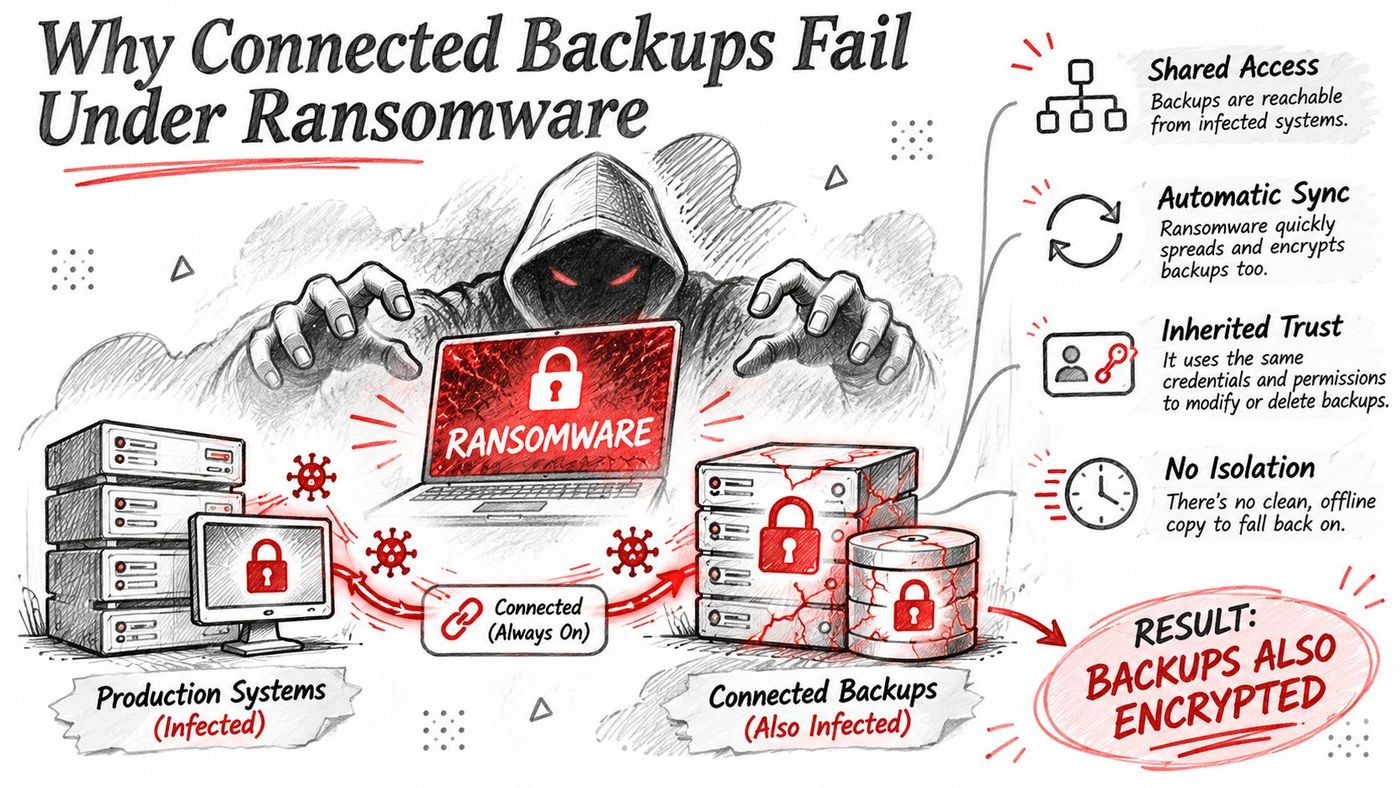
A cloud destination isn't automatically isolated, and a separate appliance isn't automatically safe. Evaluate the network paths, administrative permissions and deletion rights that connect production to recovery infrastructure.
Combine multiple copies, encryption, separation, restricted access and testing with broader cyber-security best practices for business. Keep an offline recovery plan, contact list and restore order as well. If staff need an unavailable identity service to open the instructions, the plan won't help them start recovery.
Design the layout around business services rather than whichever servers your backup software discovers. The Canadian Centre for Cyber Security's malware protection guidance warns that connected backups can also become infected, making separation an essential design consideration.
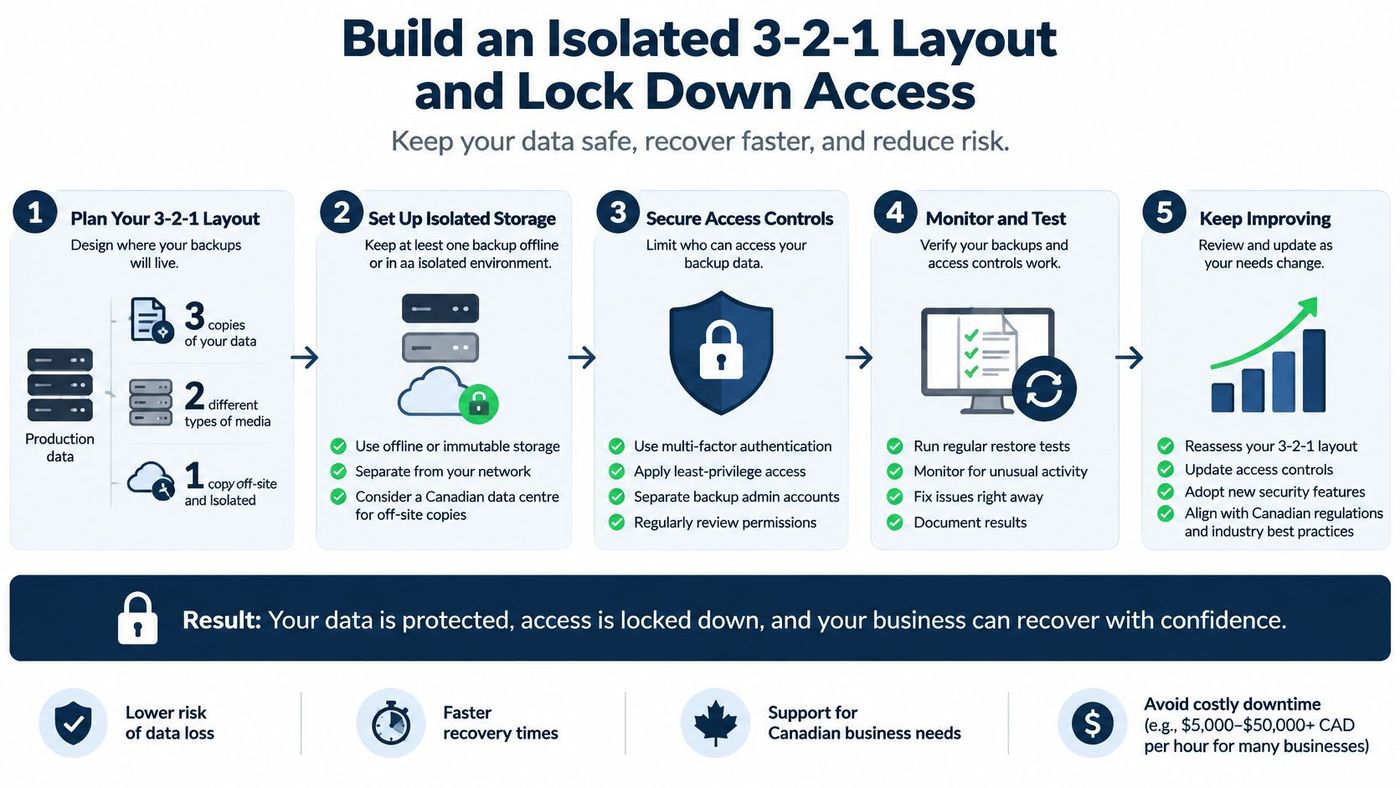
Access controls. Use dedicated backup administrator accounts, strong passphrases and phishing-resistant multifactor authentication, such as security keys. Limit backup-agent permissions to necessary functions instead of granting domain-wide privileges.
Monitoring. Alert on shortened retention, deleted recovery points, mass file changes and unexplained backup-volume increases or drops. Route alerts to someone authorised to respond after hours, and test delivery.
Could a compromised production domain administrator delete your recovery copies? If yes, add another independent protection layer.
Our data backup and recovery strategies connect architecture with operational planning. For cyber-insurance preparation, we combine backup validation and disaster recovery testing with formal Acceptable Use, MFA, Device, Remote Work, Incident Response and Disaster Recovery policies; EDR and MDR; password governance; documented training completion; patch-compliance reporting; and monthly compliance reporting.
Cloud services change where the data lives, not who can destroy it. A compromised Microsoft 365 administrator with sufficient permissions may delete mailboxes, shared files or retention settings within production's administrative environment.
Use these checks to evaluate the recovery boundary:
F1Group's Office 365 backup guidance offers additional context for evaluating SaaS protection. Our Office 365 backup and recovery guide addresses recovery planning.
A recycle bin isn't an independent backup. Items can expire, and sufficiently privileged attackers may be able to empty it.
A successful backup job proves that a job completed, not that your business can recover. Use a defined test rhythm, with the following schedule as an operational baseline rather than a universal compliance requirement.
Restore test cadence and what each test proves
| Test type | How often | What it proves | Pass check |
|---|---|---|---|
| Tabletop walk-through | Monthly | Roles, escalation paths and decision timing | Every owner names their step |
| Isolated restore test | Quarterly | Application consistency and real recovery time | Measured time sits within the RTO |
| Full disaster recovery test | Annually, or quarterly for higher compliance needs | Identity, DNS, network and core apps return in order | Post-test report lists each gap with an owner |
| Retest after a failure | After every failed test | The fix works in practice | Clean pass before the gap is closed |
The Canadian Centre for Cyber Security's prevention and recovery guidance recommends validating recovery through testing and exercises. Include an authorised attempt to alter or delete protected copies using production-level privileges, not just a routine file restore.
Use an isolated clean-room environment. Rebuild trusted identity services and DNS, restore network configuration, bring up core applications, and then recover endpoints according to documented dependencies.
Check application consistency, not merely file presence. Confirm that a database opens, a line-of-business application accepts a login and a restored Microsoft 365 mailbox loads. A file restore can succeed while the business remains unable to operate because authentication or name resolution is missing.
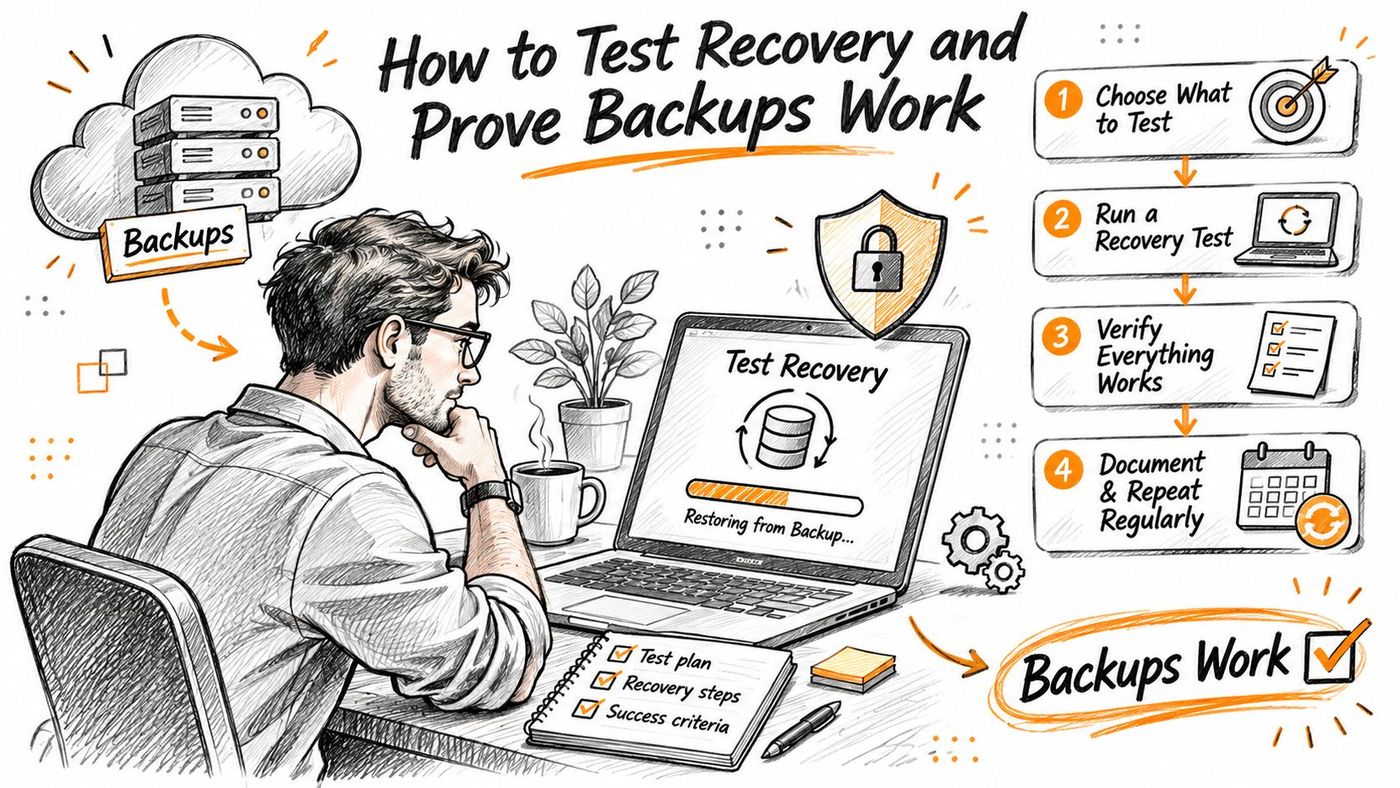
Record elapsed time from the recovery decision to usable service, including approvals, downloads and validation. Compare it with the documented recovery time objective, not a vendor's best-case transfer estimate.
A realistic isolated restore exercise can provide more protection than another untested copy controlled by the same credentials.
We conduct annual disaster recovery tests to validate backup integrity and recovery procedures, with quarterly tests available for higher compliance requirements. Post-test reports identify gaps and improvements; assign owners and retest failed controls before closing them.
Backups encrypted alongside production files indicate that the recovery target was reachable, not necessarily that the backup software malfunctioned. Use these symptoms to prioritise corrective work this week; larger changes may require staged implementation.
Backup recovery symptoms, causes and fixes
| Symptom | Likely cause | Fix |
|---|---|---|
| Backups encrypted with production files | Backup target reachable from an infected endpoint | Move a copy offline or behind a separate identity plane |
| Restore takes days, not hours | RTO never measured and no restore order documented | Run a timed clean-room restore and rewrite the sequence |
| Files restore but applications fail to open | Backups never checked for application consistency | Add database and application-level checks to every restore test |
| Older versions missing after an attack | An administrator can change retention settings | Separate retention rights and enable immutable retention |
| System reinfected after restore | Restoration began before malware persistence was removed | Isolate, reset credentials and scan backup files before restoring |
| Recovery plan unreachable during incident | Plan stored only on the affected network | Keep an offline copy of the plan, contacts and restore order |
During an attack, isolate affected systems without wiping logs or destroying forensic evidence. Check whether backup accounts, repositories and recovery infrastructure were compromised before authorising restoration.
Assign someone to coordinate reporting while technical staff handle containment. Canadian authorities recommend reporting ransomware to local police, the Canadian Anti-Fraud Centre at 1-888-495-8501, and the Cyber Centre through its reporting portal.
Put these responsibilities in your data backup and disaster recovery plan. Production restoration begins only after clean-room checks pass, not because a backup is available.
Take these actions this week:
Documented outcomes matter more than promises. In a CloudOrbis case study, a 90-person law firm that came to us after a ransomware scare achieved zero security incidents in 18 months, quarterly DR testing with documented RTOs, 95% phishing training completion and a 22% reduction in its cyber-insurance premium. Those results describe that engagement, not a guarantee for another organisation.
Our free IT Risk Assessment gives you an outside check grounded in your environment's evidence. Start with repository reachability, shared administrative credentials and the measured results of your latest restore test.
CloudOrbis Inc. provides managed IT, cybersecurity, and backup and disaster recovery services to help organisations protect their recovery path. Visit CloudOrbis Inc. to book a free IT Risk Assessment and bring your backup inventory, access permissions and latest restore-test results for review.
Book a 30-minute call with a senior engineer. No sales script, just straight answers about your environment.


