Data Backup and Disaster Recovery Plan: How to Build One
Build a data backup and disaster recovery plan that restores critical systems on time. Set RTOs and RPOs, test restores and assign owners.

Build a data backup and disaster recovery plan that restores critical systems on time. Set RTOs and RPOs, test restores and assign owners.

Shared Services Canada backs up more than 5,000 terabytes of data so it can restore systems after a disaster or failure, and its teams answer more than 91,000 IT incidents a year, according to a 2025 ministerial transition briefing. Put those two numbers side by side and the lesson for a 60-person clinic or a 200-person manufacturer comes through clearly. Volume isn't the hard part. Knowing which copy is clean, which system has to come back first, and how long the business can wait is.
That's why a data backup and disaster recovery plan is a timing document before it's a storage document. Every target you write should trace back to how long a specific function can stop before a client, a patient or a payroll clerk feels it. Every backup decision should be checked against a simpler question: could an attacker sitting in your production network reach that copy? The rest of this guide makes both of those real.
Nationally, about 16% of Canadian businesses reported being affected by a cybersecurity incident in 2023, and among those that had one, 13% involved ransomware, up from 11% in 2021, Statistics Canada reported. Recovery spending by Canadian businesses roughly doubled to about $1.2 billion, and small and medium-sized firms each carried roughly $300 million of that bill. Only 26% of businesses had written cybersecurity policies, the same share as two years earlier.
Then there's the part the spending doesn't show. A 40-person accounting firm runs nightly backups of its practice-management database, and every job reports green for two years straight. A bad update corrupts the database, the restore begins, and it stalls. The licence server the database authenticates against was never in the backup scope. Nothing failed. Everything ran exactly as configured.
What was missing was a plan, because a copy of the files isn't the same thing as the ability to resume work.
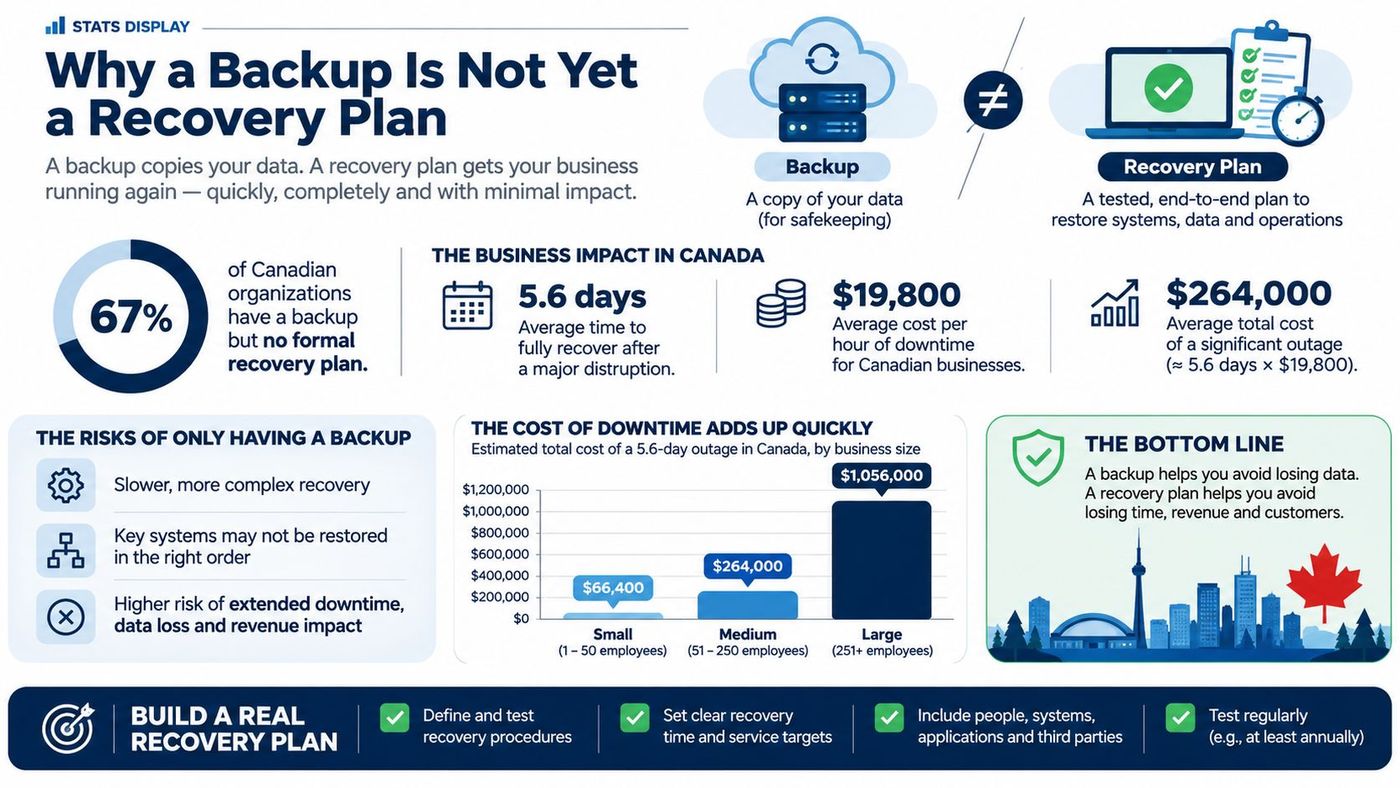
A working plan answers three questions that no backup schedule answers on its own.
Start with a list, not software. Write down the five systems that would stop work first if they disappeared this afternoon, then estimate how long each could be down before a client or a staff member feels it. That list is the input to every decision that follows, from how to set a recovery time objective to which systems earn continuous replication.
Two numbers carry the whole plan. Recovery time objective (RTO) is the longest a system can be offline before the business damage becomes unacceptable. Recovery point objective (RPO) is the most data you can lose, measured in time.
Set both per system, not per company, because a point-of-sale terminal and an archived matter file don't deserve the same budget. These are reference starting points for a mid-sized Canadian organization, and they should be adjusted to what the business says it can survive.
| Tier | Typical systems | RTO | RPO | Backup frequency |
|---|---|---|---|---|
| Tier 1 - Critical | Scheduling, point-of-sale, client-facing or patient-facing systems | 1 to 4 hours | 15 minutes | Continuous or every 15 minutes |
| Tier 2 - Important | CRM, accounting, email, line-of-business software | 8 to 24 hours | 4 to 24 hours | Every 4 to 12 hours |
| Tier 3 - Standard | File shares, project folders, shared drives | 3 to 5 days | 24 hours | Daily |
| Tier 4 - Archive | Long-term records, closed matters, historical data | 1 to 2 weeks | 1 week | Weekly or monthly |
Ask what breaks in the first hour, the first day and the first week without it. If staff are idle or clients are turned away inside the hour, it's Tier 1. If work continues on paper for a day, Tier 2. If nobody notices until month-end close, it's Tier 3 or 4. The tier follows business consequence, not the price of the server.
The cost of guessing badly is well documented. In 2017, 21% of Canadian businesses reported a cybersecurity incident that affected their operations, and 58% of the affected businesses experienced downtime averaging 23 hours, with 54% prevented from carrying out day-to-day work, according to Statistics Canada's analysis of cyber incidents. Twenty-three hours is a concrete planning benchmark, not an abstraction.
Availability promises collapse into vagueness unless someone measures them. Shared Services Canada reported external network connectivity available 99.66% of the time in 2022–23, 99.93% in 2023–24 and 99.81% in 2024–25, against a target of 99.5% for 2026–27 in its 2026–27 departmental plan. A mid-sized firm can copy the discipline: one target per critical service, actual outage time recorded, and a review whenever the two drift apart.
Practical rule: if a system has no RTO written down, its real RTO is however long it takes someone to notice and find the phone number of the person who can fix it.
Put the results on one page: system, tier, RTO, RPO, business owner and the systems it depends on. That page is the output of a business impact analysis, and it's the document you hand to a new hire, an auditor or an insurer. Without it, every recovery conversation starts from memory.
Nine steps, in order. Each one produces something you can hand to another person, and if a step produces nothing, it hasn't happened yet.
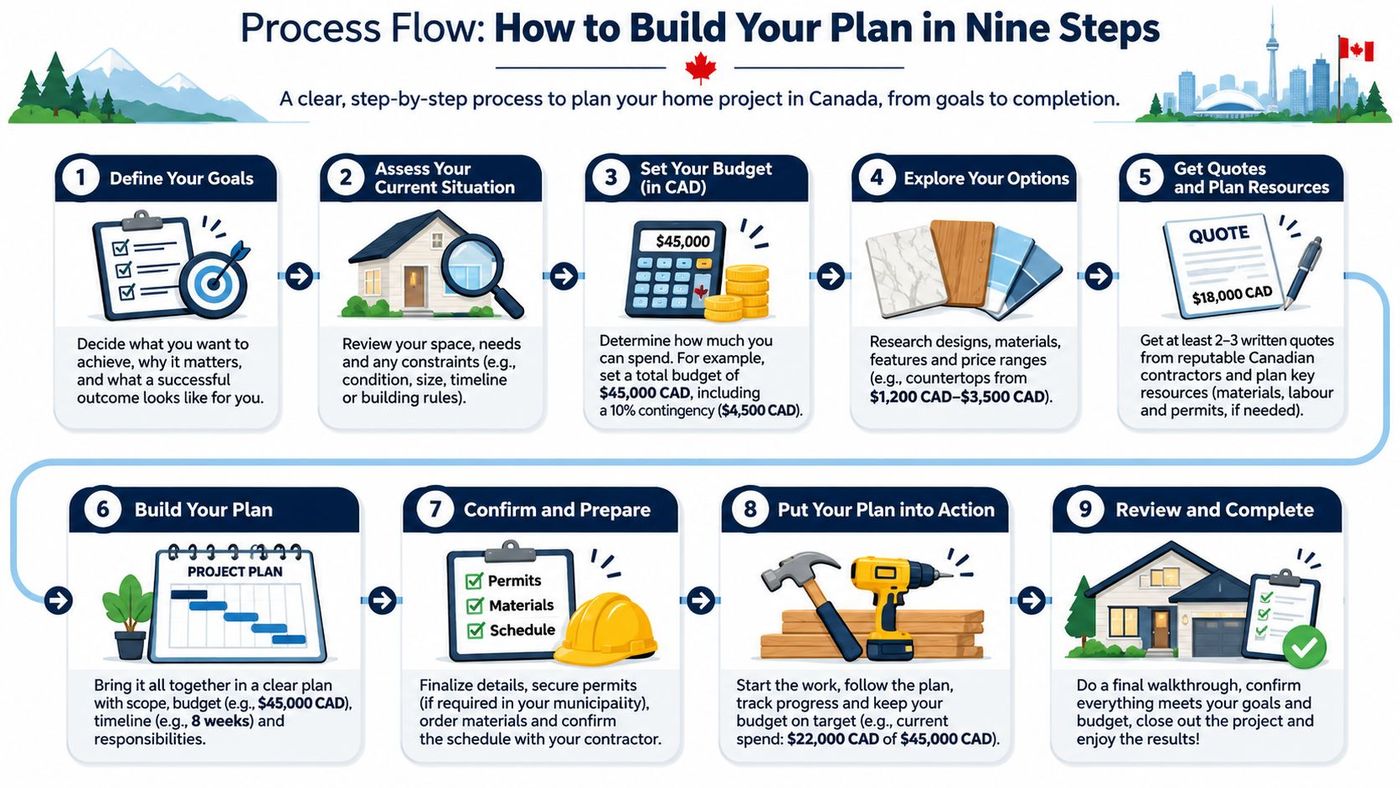
The finished plan belongs in a runbook, and the runbook belongs in two places: the document system and a printed copy off the network. Ours carry a full asset inventory with warranty tracking, logical and physical network diagrams, backup schedules and validation logs, recovery time and recovery point objectives, and environment documentation. When the network is the casualty, the version that lives only on it is worth nothing.
A regional logistics firm ran every backup through a single server, and that server authenticated with the same domain administrator account the production systems used. When the account was compromised on a Friday night, the attacker had a mapped path to three years of recovery points. The backups weren't the target. They were the prize.
The Canadian Centre for Cyber Security's backup guidance starts with the 3-2-1 rule: three copies of the information, on two different media types, with one copy off-site. Off-site in the cloud era means a separate trust boundary, not just a second region inside the same account.
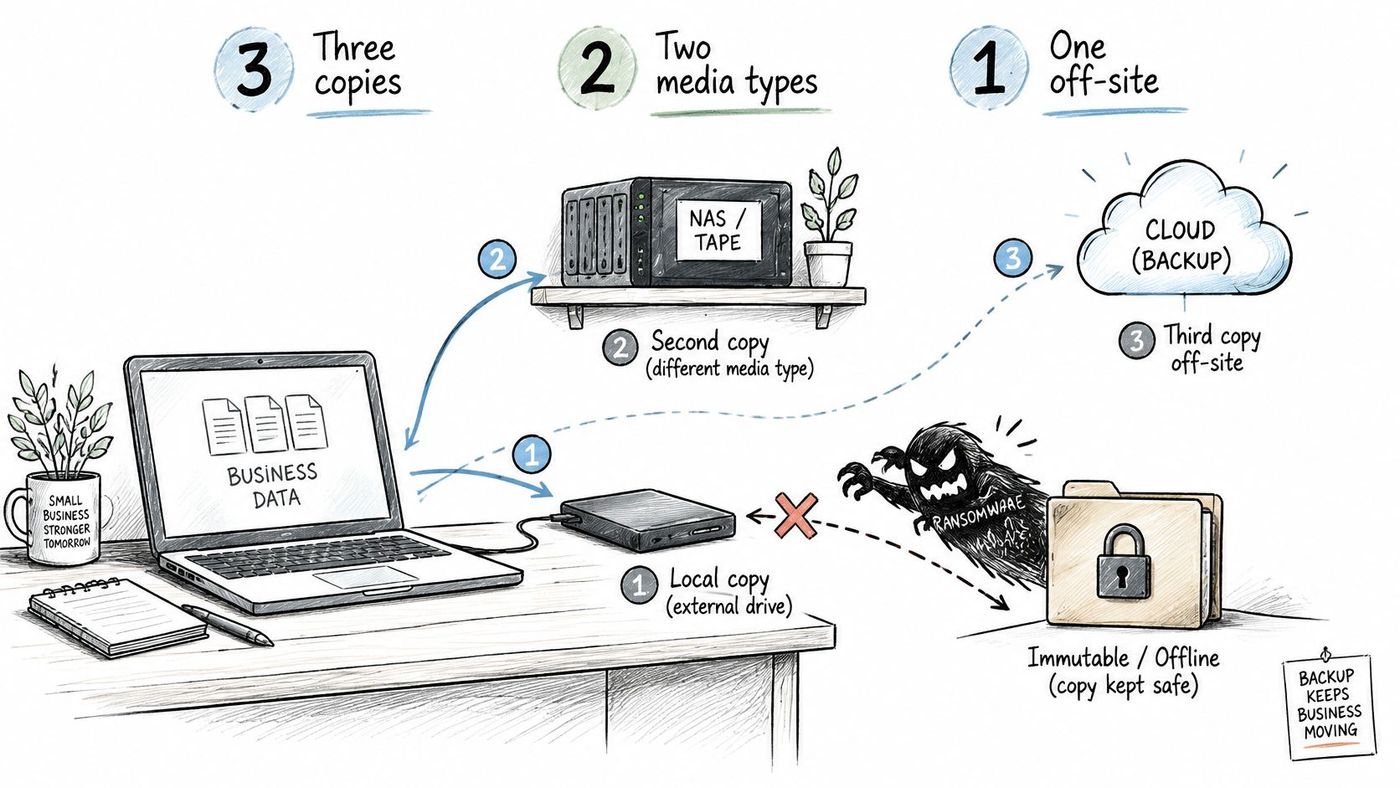
If the backup console accepts the same credentials as production, it is inside the blast radius. Five controls change that.
The principle scales down as well as up. Anyone who has spent an evening protecting family photos with cloud storage already understands it: the off-site copy is the one that survives when the laptop and the external drive leave the house in the same bag.
Speed without sequence makes things worse. The sequence that works is to contain the incident first, remove the malware or verify that it's gone, scan and validate the backup sets, and only then restore. Restoring early feels decisive and often reintroduces the compromised account or the encrypted volume. A compromised Microsoft 365 tenant is the everyday version of this, and a cloud data protection layer outside the tenant is what recovers a mailbox deleted along with its recycle bin.
Two pitfalls cause most of the damage. Treating a completed backup job as proof of recovery is the first, because an untested backup can be incomplete, corrupted, inaccessible or unable to start the application it feeds. Granting broad administrative rights to the repository is the second, since it turns a backup system into an attacker's shortcut.
A green backup report tells you a job finished. It doesn't tell you whether the service comes back, whether the data inside the copy is intact, or whether the three systems the application needs in order to start are available. Testing is the only thing that converts a backup into a recovery capability, and four test types cover the realistic range.
| Test type | What it proves | Frequency | Pass criterion |
|---|---|---|---|
| File-level restore | Individual files return intact | Monthly sample | Restored files match the known-good reference |
| Application restore | The application runs with its dependencies | Quarterly | Recovery time is within the Tier RTO and data is within the RPO |
| Full system restore | The complete system returns in an isolated environment | Annually, or quarterly for high-compliance clients | Elapsed time and data currency meet targets with no unrecorded manual steps |
| Tabletop exercise | Staff can respond to a compromised admin account and corrupted backups | Annually | Decision owners and communications steps are named and timed |
Book restores outside peak hours, and repeat the full test after any major infrastructure, application or vendor change, because the dependency map changes with them. Measure the outcome in business terms too: orders processed, patients seen, payroll run, deadline met.
We run disaster recovery tests annually to validate backup integrity and recovery procedures, and the post-test report lists every gap found along with the fix. RTOs and RPOs are documented in the runbook before the test rather than after it, and clients with heavier compliance obligations can move to quarterly testing.
The Canadian Centre for Cyber Security's ransomware threat outlook says every Canadian organization, whatever its size or sector, can be targeted. It also records that 84% of Canadian businesses affected by ransomware in 2025 did not make a ransom payment, while ransomware accounted for 8% of incidents among affected businesses.
Planning isn't the missing piece, at least on paper. In 2024, 83% of Canadian cybersecurity decision-makers reported having a cyber incident response plan, according to the Canadian Internet Registration Authority's 2024 survey of 500 organizations across the country.
What's thinner is the part that names a person for each decision and a deadline for each one. Backups reduce ransom pressure. They don't remove downtime, investigation costs, notification duties or the risk of restoring compromised credentials and configurations.
Government of Canada direction supplies the mechanical standard worth copying, as set out in its cyber security readiness direction. Test restoration regularly for systems supporting critical services, verify restored data against a known-good reference so both recoverability and integrity are confirmed, separate critical-service backups logically from production, use immutable or write-once storage where feasible, and put access controls and monitoring on the backup system itself.
The test of a plan: hand the responsibility matrix to someone who wasn't in the room and ask them to run the first hour. If they can't, the document describes intentions rather than roles.
Formal runbooks and policies also satisfy insurance requirements, pass audits and keep continuity intact when the person who built the plan leaves. Everything we write, including runbooks, policies and network diagrams, stays with the client, and when an in-house team takes on more of the work, the responsibility matrix is adjusted so the document always matches who acts.
Plans decay. A system gets replaced, a vendor changes how its API works, the person who knew about the licence server retires, and the document becomes fiction. Maintenance is what keeps it true.
Review the register, dependency map and responsibility matrix quarterly, and update immediately after a new system goes live, a vendor change, an office move or a staff departure. Put a revision date on the runbook and a name beside it, so the question "who last touched this" has an answer.
Four actions for this quarter:
If you'd rather have someone check the current setup against these targets first, we're happy to do that review with no service commitment attached. You keep the documentation either way.
A plan is proven only when a restore has been timed, checked and fixed. Everything before that is a document with good intentions.
CloudOrbis Inc. builds and maintains data backup and disaster recovery plans for small and mid-sized organizations across Canada, from written RTOs and RPOs through runbooks that survive the person who wrote them. If your backups report green and nobody has ever timed a restore, that's the gap we close first, with annual recovery testing, post-test reporting and quarterly reviews for teams with heavier compliance obligations. Visit CloudOrbis Inc. to start with a free IT Risk Assessment.
Book a 30-minute call with a senior engineer. No sales script, just straight answers about your environment.


