Endpoint Security vs Antivirus: Which Do You Need?
Endpoint security vs antivirus explained: what each covers, where antivirus falls short, and which setup fits a Canadian SMB in 2026.

Endpoint security vs antivirus explained: what each covers, where antivirus falls short, and which setup fits a Canadian SMB in 2026.
The popular advice is simple. Replace old antivirus with modern endpoint security and you're safer. That advice isn't wrong, but it's incomplete, and following it blindly can leave a medium sized business spending on the wrong control first.
The key question in endpoint security vs antivirus isn't which product has more features. It's which attack path is most likely to hurt you, and whether anyone on your team, or your provider's team, will act when a tool raises an alert. A technically superior platform that nobody watches after 5 p.m. can protect you less than a narrower control that's properly managed.
I would start with your actual exposure. Do staff work remotely on laptops you rarely see? Do you hold health, legal, financial, or manufacturing data that would trigger regulatory and insurance questions after an incident? Are your last near misses mostly phishing and payment fraud rather than malware? Those answers decide whether your next dollar belongs in endpoint detection, identity controls, email security, patching, or tested backups.
Antivirus stops known malicious files on a device. Endpoint security prevents, detects, investigates, and contains attacks across every laptop, server, and workstation you own.
That distinction matters because Canadian federal guidance treats antivirus as a required baseline, not as an alternative to broader endpoint tooling. In 2019, 76% of Canadian businesses used anti-malware software while 21% reported being affected by a cybersecurity incident, according to Statistics Canada's summary of cybersecurity risks to Canadian businesses. Wide deployment didn't mean incidents stopped.
| Criterion | Traditional antivirus | Endpoint security |
|---|---|---|
| Main job | Blocks and removes known malicious files | Prevents, detects, investigates and contains attacks |
| Detection method | Signatures, heuristics and scheduled scans | Signatures plus behavioural analysis and device telemetry |
| Visibility | Scan results on each device | Central console covering all endpoints |
| Response | Quarantines or deletes the file | Isolates the device, stops processes and collects evidence |
| Fileless and credential attacks | Limited detection | Designed to detect and investigate |
| Patch and device control | Usually not included | Often included or integrated |
| Staffing needed | Minimal; runs unattended | Someone must review alerts, or a managed partner does |
| Typical fit | Home users and very small teams with few devices | Teams with sensitive data, remote staff or unmanaged devices |
First, can you see every laptop and server in one console, including remote devices, and confirm each one is reporting and compliant? Second, can someone isolate a compromised device within an hour of an alert, including in the evening?
If either answer is no, you have an antivirus only setup in practice, whatever the product is called. That's not a criticism of antivirus itself. It's a sign that visibility and response are missing. For a useful comparison of how device level checks differ from broader monitoring, see this device security guidance for Houston SMBs, then apply the same two questions to your own estate.
Antivirus earns its place. It blocks known malware using signatures, patterns that match recognised malicious files, and heuristics, rules that flag files behaving like malware. It runs on access scans as files open and scheduled scans across disks, and it usually adds little load to a well specced device. For commodity viruses, trojans, and older ransomware variants, that prevention is fast and cheap.
That's why it stays a baseline. The Canadian Centre for Cyber Security recommends antivirus or anti-malware alongside EDR, firewalls, and network inspection, not instead of them. If you're reviewing business grade options, our guide to choosing antivirus software for a small business covers what to check before you renew.
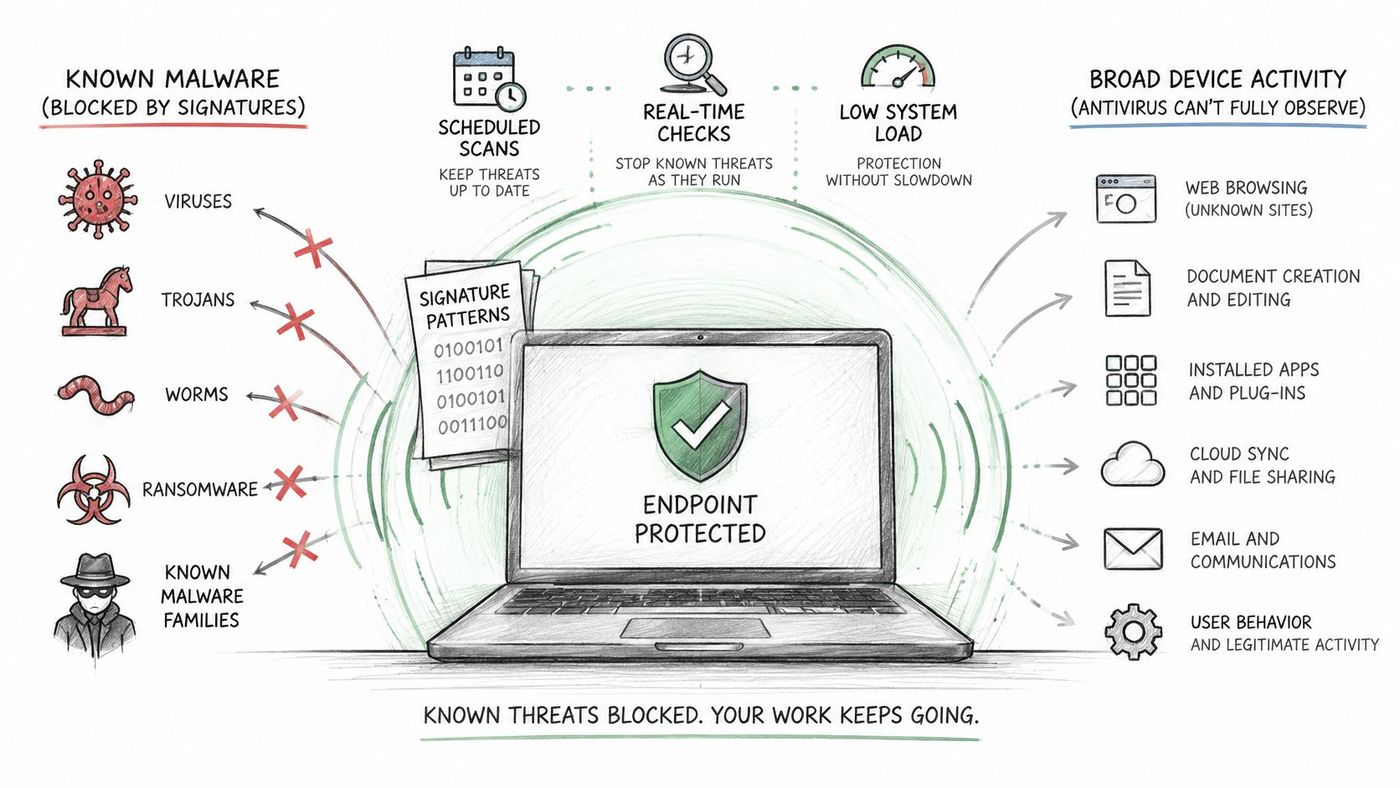
Consider a phishing email that carries no attachment at all. A staff member clicks a link, lands on a fake Microsoft 365 sign in page, and hands over a password. There's no malicious file for a signature to match, so the antivirus sees nothing to block.
Consider a valid remote access tool. An attacker signs in with stolen credentials and uses software your own IT team might use. The tool is legitimate, signed, and familiar. Antivirus can't flag it for existing alone, and it doesn't know the person using it shouldn't be there.
Consider an unpatched application. Say a browser, PDF reader, or line of business app has a known flaw. Antivirus doesn't repair that flaw or report which devices still run the vulnerable version. The gap sits outside the product entirely.
Antivirus answers whether a file matches something known to be bad. It doesn't answer who signed in, what they did next, or how you contain them.
Three questions show where you stand. When did definitions and patches last update across every device? Can your current tool show who logged in, from where, and what ran after? And after a detection, who does what, in what order? If you can't answer those clearly, you don't have a response process yet. You have a scanner.
Endpoint detection and response, or EDR, records what a device does so someone can investigate and act. It captures processes started, command line activity, persistence changes, and network connections, then presents that activity in a timeline instead of a single scan result.
Say a staff member opens a document. The document launches a script, the script reaches out to an unfamiliar server, then changes a startup setting so it runs again after reboot. No recognised malware signature may exist for that file. The sequence is still suspicious, and behavioural detection flags the pattern rather than waiting for a matching fingerprint.
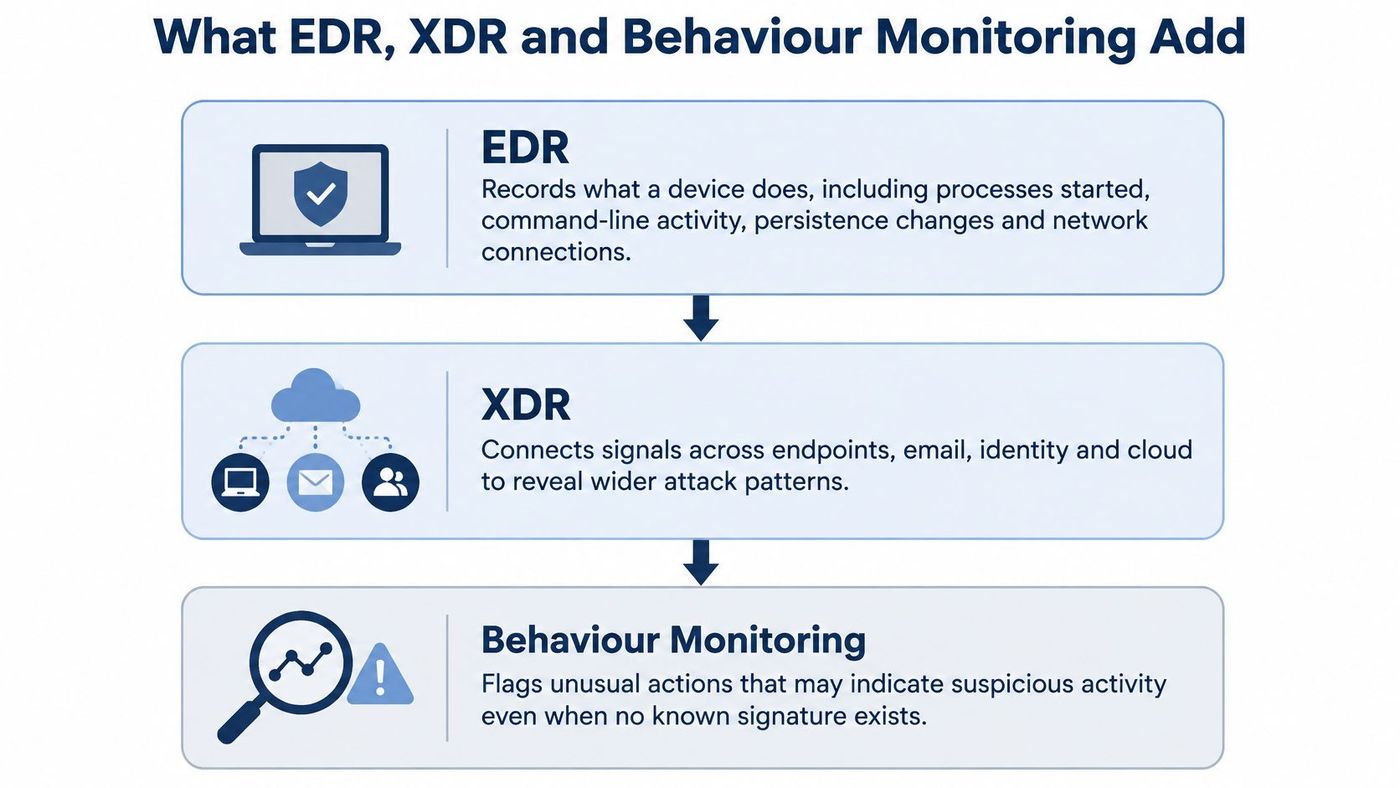
Containment is the practical difference. With EDR, staff can isolate a device from the network, terminate a running process, and collect telemetry for investigation, all from a central console. Our explainer on what endpoint detection and response does in practice walks through those response steps in detail.
Extended detection and response, or XDR, goes one layer higher. It correlates signals across endpoints, email, identity, and cloud services. A suspicious sign in from an unusual location and a suspicious process on that user's laptop an hour later stop looking like two minor events. Linked together, they look like one incident.
Think of the layers in order. Prevention sits at the base, detection and telemetry sit in the middle, and response and correlation sit at the top.
Antivirus asks whether a file is known to be bad, while EDR asks what the device just did and whether it can be stopped now.
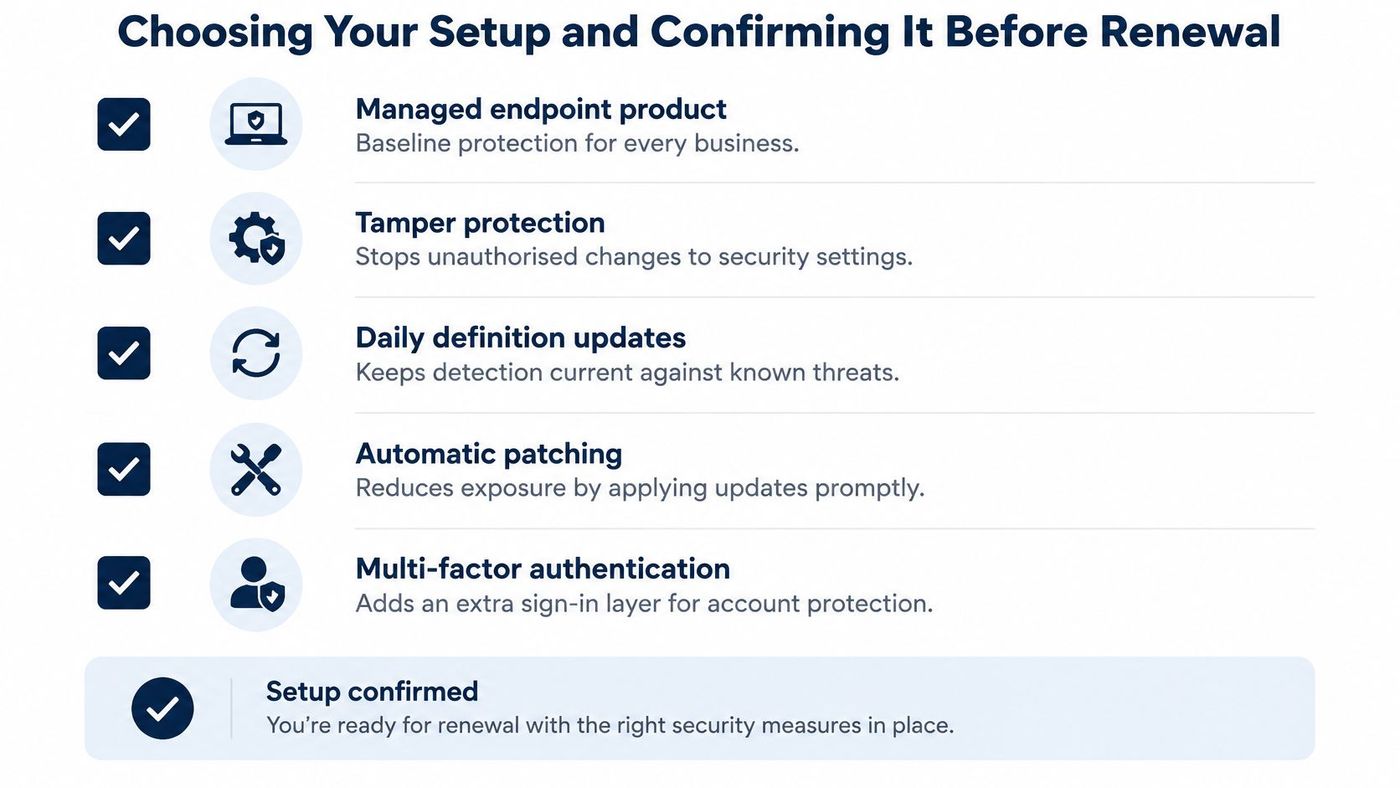
The Government of Canada endpoint protection requirements set a useful bar. They specify protection that detects known and unknown malicious activity, detects fileless malware, scans fixed disks and removable media automatically, and updates engine and definition files at least daily. Tamper resistance matters too, so malware or an unauthorised user cannot easily switch protection off.
Don't assume a managed offer includes all of this. Many providers still sell basic antivirus. We provide MDR, EDR, and ACL based governance, compared to typical MSPs which provide basic antivirus, so ask any provider plainly whether EDR and XDR are included or whether you're buying scanning alone. This overview of stronger endpoint security for small businesses gives helpful background on how managed detection extends basic protection.
The threat mix should drive your choice more than any product label. Among Canadian businesses affected by an incident, scams and fraud represented 55% of incidents, compared with 8% involving ransomware, according to Statistics Canada's 2025 release on cybersecurity prevention measures. That same release reports that 69% of Canadian businesses used anti-malware software, 73% used email security, and 67% used network security in 2025.
That gap changes the spending order. If most incidents start with deception, a better endpoint agent alone won't fix your biggest exposure.
| Threat | Antivirus | Endpoint security |
|---|---|---|
| Ransomware | Known variants caught by signature; weak against new strains | Behavioural detection, rapid isolation and recovery support |
| Phishing and scams (55% of incidents) | Limited; may block known malicious attachments | Email security and training lead; EDR helps after a click |
| Stolen credentials and identity misuse | Usually not detected | Sign-in anomaly alerts and privileged-access monitoring, paired with identity controls |
| Fileless and living-off-the-land attacks | Limited detection | Process, command-line and persistence telemetry |
| Unpatched applications | Not addressed | Vulnerability and patch management where included |
| Unmanaged or remote devices | Only where installed and updated | Central inventory, policy enforcement and isolation |
EDR does not replace email protection, identity controls, patching, secure configuration, or staff training. A business with weak Microsoft 365 account controls, shared admin passwords, and untested backups can buy excellent endpoint tooling and still lose money to a convincing invoice fraud email. Our regional guide to ransomware protection and recovery planning shows why recovery has to sit beside detection.
Use a simple decision rule. Upgrade to EDR first where ransomware, credential theft, or remote, unmanaged laptops are your main exposure. Fund multi-factor authentication, email security, and tested backups first where fraud and phishing dominate your incident history.
Decision rule: Let your last five incidents or near misses set the budget order, not a vendor feature list.
Write those five events down this week. Tag each one by attack path, such as phishing, stolen credential, unpatched software, or malicious file. If three of five start in email or identity, you already know where the next dollar works hardest.
The licence is rarely the cost. Staff time and after hours response are. An alert raised at 9 p.m. that nobody sees until morning gives an attacker the whole night, and that risk doesn't appear on a quote.
| Model | Who watches alerts | Best fit | What to verify |
|---|---|---|---|
| Standalone antivirus | Nobody centrally; device-level alerts only | Very small teams with few devices and no sensitive data | Definitions update daily and tamper protection is on |
| Self-managed EDR | Your own IT staff | Teams with an internal IT lead and business-hours coverage | Alert volume, and who responds outside office hours |
| Managed EDR through a provider | Provider's security team during agreed hours | Teams without after-hours staffing | Response times and escalation steps in writing |
| MDR with 24/7 human oversight | Provider's security operations team around the clock | Regulated sectors, remote staff and lean IT teams | Automated containment speed and who approves isolation |
Our MDR service uses SentinelOne EDR and Vigilance MDR, with automated threat mitigation and human oversight. Automation handles the first containment steps quickly, and people review context, decide on escalation, and coordinate recovery. You can see the service structure in our overview of managed EDR services and monitoring.
Device visibility is the other half of deployment. You can't protect laptops, servers, or connected equipment you don't know exist, and network access control helps close that blind spot for unmanaged devices. If unknown devices are a recurring problem, you can find NAC solutions for IoT visibility that complement endpoint inventory work.
Ask cost questions neutrally and early. Which controls sit in the base price, which are billed as extras, and is basic protection included at all? We don't charge extra for basic security, and enterprise grade protection is included in every partnership, but you shouldn't assume every provider structures pricing that way.
If a provider can't answer those four points clearly, you're buying software, not a response capability.
Whatever model you choose, every business needs the same baseline. You need a managed endpoint product with tamper protection, daily definition updates, automatic patching, multi-factor authentication, and tested backups. Skipping any one of those leaves a gap that a better scanner won't close.
Every client environment we run uses a security stack of endpoint protection, monitoring, backup, email security, secure access, and security awareness training. For endpoint protection, password management, and MDR, we require that standardised stack to ensure consistent protection and response times.
The stakes justify that rigour. In 2023, 16% of Canadian businesses were impacted by a cyber security incident, and among affected businesses 13% reported ransomware incidents while identity theft accounted for incidents involving 31%, according to Statistics Canada's 2023 survey of cyber security incidents. Canadian businesses also spent approximately $1.2 billion recovering from cyber security incidents in 2023, double the roughly $600 million reported in 2021, in that same survey.
A firm with few devices, no regulated data, and a capable internal IT lead can start with managed EDR and add MDR later. A clinic, law office, or manufacturer with regulated data, remote staff, or thin IT coverage needs MDR with 24/7 oversight from the start. A team already hit by fraud should fund email and identity controls before adding more endpoint tooling.
Our guide to endpoint security best practices for Canadian businesses expands on how those layers fit together day to day.
We help clients prepare for cyber insurance by providing formal IT policies covering Acceptable Use, MFA, Device, Remote Work, Incident Response, and Disaster Recovery, plus EDR and MDR, password governance, training with documented completion, patch compliance reporting, backup validation, DR testing, and monthly compliance reporting.
Book our free IT Risk Assessment to test your current setup against those five steps before your next renewal locks you in.
CloudOrbis Inc. helps Canadian small and mid sized businesses replace antivirus only setups with managed endpoint protection, EDR and MDR monitoring, patching, backup, and identity controls that someone watches around the clock. If you're unsure whether your current tool can see every device and isolate a compromised laptop after hours, book a free IT Risk Assessment through CloudOrbis Inc. and get a clear, prioritised plan before your next renewal.
Book a 30-minute call with a senior engineer. No sales script, just straight answers about your environment.


