Endpoint Protection Microsoft: A Practical Guide for SMBs
Learn how endpoint protection Microsoft works, what Defender for Endpoint includes, licensing options, and best practices for Canadian SMBs deploying it.

Learn how endpoint protection Microsoft works, what Defender for Endpoint includes, licensing options, and best practices for Canadian SMBs deploying it.

A clinic administrator approves a Microsoft 365 subscription, signs in to the portal, and assumes the business is protected. Months later, an employee nearly sends a large wire transfer after a convincing phishing message reaches their inbox. The incident ends as a near miss, but the follow-up exposes the uncomfortable truth: Defender was licensed, several devices weren't enrolled, and no policy required a healthy device before it could access company data.
That scenario is common in Canadian clinics, manufacturers, legal practices, and professional firms. Microsoft 365 licensing doesn't automatically create a defensible endpoint posture. The result depends on the plan you own, the devices you manage, the policies you enforce, and the identity controls that decide whether a user or device can reach sensitive information.
The phrase endpoint protection Microsoft usually leads buyers toward a product question: “Do we have Defender?” The operational question is different: Can this device prove that it is known, secure, monitored, and allowed to access Microsoft 365?
That distinction matters because endpoint protection isn't a boxed antivirus product. It combines device configuration, threat detection, vulnerability management, compliance enforcement, and access decisions. The Government of Canada's Microsoft 365 Security Playbook treats endpoint-management configuration as a foundational control and requires approved configurations for endpoints accessing government systems or sensitive information.
A private organisation doesn't become a federal department by adopting the same model, but the principle is highly relevant. Auditors, clients, insurers, and procurement teams increasingly want evidence that the organisation knows which devices connect to its cloud environment and can restrict devices that fail security requirements.
The answer to “Do we have endpoint protection?” depends on four checks:
A 75-person manufacturer might have excellent protection on office laptops while leaving a file server, engineering workstation, or shared production PC outside the management boundary. A clinic might manage staff notebooks but overlook diagnostic systems or shared clinical workstations because they don't fit a standard user-device workflow.
Operational rule: Treat Microsoft 365 as a platform to configure, not a security outcome you receive at purchase.
The rest of the decision follows from that rule. First identify the licensed capabilities. Then establish device coverage, apply a secure baseline, connect device health to access, and test the response process. The result is a policy and identity layer supported by endpoint telemetry, not just another antivirus icon in the system tray.
Microsoft Defender for Endpoint combines several security functions that work together. Next-generation protection blocks known and emerging malicious activity. Attack-surface reduction limits risky behaviours before an attacker can use them. Endpoint detection and response, or EDR, records activity and helps investigators understand what happened. Vulnerability management identifies weaknesses and recommends corrective action.
The easiest way to understand the stack is to compare it with a controlled building:
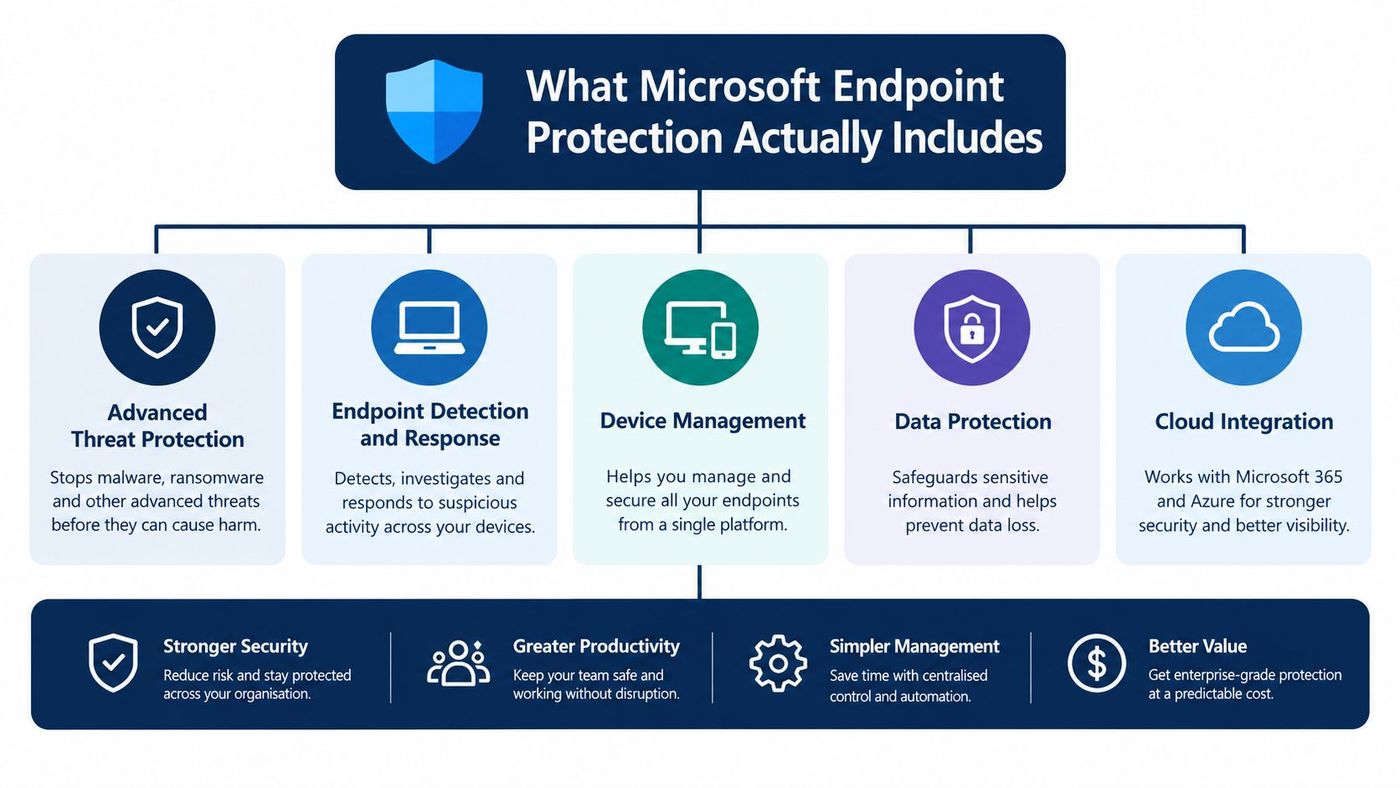
Defender for Endpoint becomes much more useful when its device signals feed Microsoft Intune and Microsoft Entra ID. Intune can evaluate whether a device meets the organisation's compliance requirements. Conditional Access can then use that result when deciding whether the user may reach Microsoft 365, business applications, or sensitive data.
For example, an organisation can require a device to be encrypted, enrolled, updated, protected by antivirus, and connected to the Defender sensor before granting access. A device that fails those requirements can be blocked, challenged, or routed through a remediation process rather than remaining trusted without intervention.
Teams that need to connect security controls with wider governance can also use this practical roadmap for Microsoft GRC as a planning reference. Governance shouldn't sit in a separate binder from technical enforcement. The policy should describe the control, the platform should enforce it, and an owner should be able to show the evidence.
For a deeper explanation of investigation and response workflows, see CloudOrbis's guide to endpoint detection and response.
Defender for Endpoint isn't the same as Defender Antivirus. It also doesn't replace identity protection, tested backups, business continuity, email security, or privacy and compliance processes. A healthy endpoint can still be used by an attacker who steals a valid cloud session, and a well-managed device can't recover data that ransomware has encrypted if backups haven't been tested.
That boundary should shape the architecture. Defender protects and observes the endpoint. Intune manages its state. Entra controls access. People and processes determine how alerts become action.
Microsoft offers distinct Defender for Endpoint options, and the capability differences matter. Microsoft identifies Defender for Endpoint Plan 1, Plan 2, and Microsoft Defender for Business as available options. Microsoft 365 E5 and Microsoft 365 E5 Security include Plan 2, while server deployments require separate server licensing. The current Microsoft licensing overview should be checked with your Microsoft partner or CSP before purchase because bundles and entitlements can change.
| Capability | Defender for Business | Plan 1 | Plan 2 |
|---|---|---|---|
| Next-generation protection | Included | Included | Included |
| Attack-surface-reduction capabilities | Included | Included | Included |
| Centralised configuration through the Defender portal and Intune | Included | Included | Included |
| Endpoint detection, investigation, and response | Verify the current entitlement and configuration | Not the full Plan 2 capability set | Included |
| Vulnerability-management capability | Verify the current entitlement and configuration | Limited compared with Plan 2 | Included |
| Server coverage | Requires separate server licensing | Requires separate server licensing | Requires separate server licensing |
The important distinction isn't the label on the invoice. It's whether the organisation receives the detection, investigation, and response functions needed for its risk profile and staffing model.
Defender for Business is designed for small and medium-sized businesses that want a simple endpoint security experience. It can be a sensible fit for a smaller Windows estate where the priority is centralised protection, device management, and practical security operations.
Plan 1 provides next-generation protection, attack-surface-reduction capabilities, and centralised configuration through the Microsoft Defender portal and Intune. It isn't the right assumption for a business that expects every advanced investigation and response function to be included.
Plan 2 is the choice to examine when the organisation needs the fuller EDR, investigation, response, and vulnerability-management capability set. Microsoft 365 E5 and Microsoft 365 E5 Security include Plan 2, but that doesn't mean every device in a mixed environment is automatically covered.
Licensing decision: Map the highest-risk device, the highest-risk user, and the most sensitive data flow. Choose the tier that covers all three and confirm server licensing separately.
A hybrid business with a file server or SQL system should never approve a licence based only on employee count. List user devices, servers, operating systems, and required controls. CloudOrbis's overview of Microsoft enterprise licensing can help structure that conversation, but the final entitlement should come from the current Microsoft agreement.
A realistic deployment starts with an inventory, not a download button. Canadian clinics and manufacturers often have standard laptops beside shared workstations, servers, mobile devices, network equipment, virtual machines, and operational technology. Each category creates different onboarding, ownership, and exception requirements.
Microsoft's Defender onboarding process requires administrators to select the operating system and connectivity model before deploying the service. In the Defender portal, the path is System, Settings, Endpoints, and Device management. The administrator selects the operating system, chooses Streamlined or Standard connectivity, selects a deployment method, and downloads the applicable package.
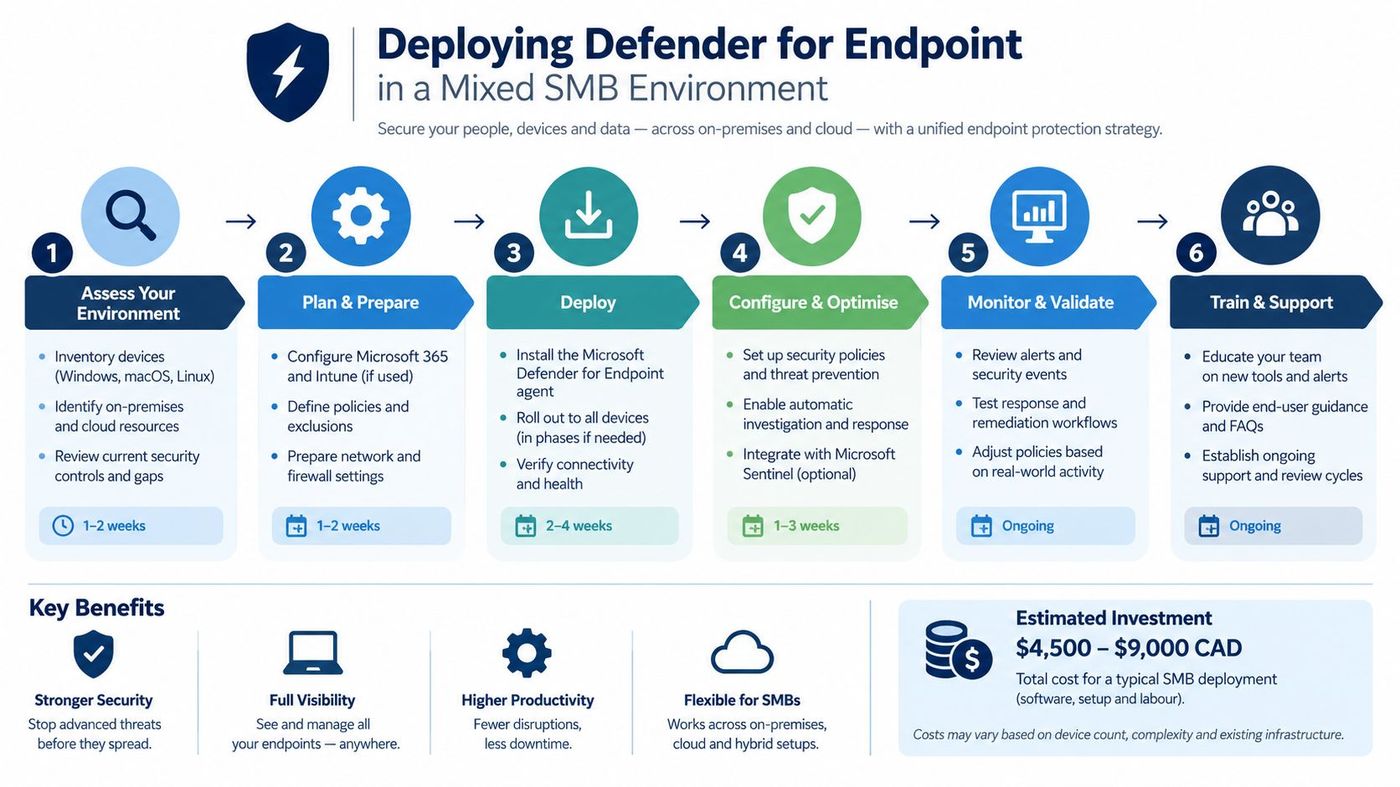
Streamlined connectivity reduces the connectivity configuration required for supported deployments. It can simplify rollout where branch offices and smaller IT teams need a straightforward path to service connectivity.
Standard connectivity gives administrators a more traditional model for controlling and documenting required service connections. It may suit environments with stricter outbound traffic review, proxy requirements, or established network governance.
Don't choose based on which option sounds simpler. Confirm the model against branch-office bandwidth, warehouse network design, proxy controls, firewall policy, and the organisation's ability to validate telemetry. A connectivity choice that works in head office can fail on a restricted manufacturing segment or a clinic with fragile connectivity.
Microsoft states that onboarding enables EDR, but other capabilities must be configured separately. That distinction prevents a common project failure: declaring success because an agent installed while policies, alert ownership, and access enforcement remain unfinished.
Defender for Endpoint can use onboarded devices to passively observe network traffic and actively probe the environment. It can classify discovered endpoints, network devices, and Internet of Things assets in the device inventory. Administrators can use the results to identify unmanaged systems, onboard them, and route discovered devices into vulnerability-management workflows.
At least one device must already be onboarded for device discovery to use onboarded endpoints as network sensors and data sources. That makes the first pilot more than a technical test. Select a well-managed device in each relevant environment, then use discovery to expose the devices that the original spreadsheet missed.
For practical guidance on the management layer, review Intune device management. Keep server licensing, Mac and Linux coverage, mobile management, and shared-device exceptions in the project scope. A mixed estate will not become organised just because Windows laptops report successfully.
A green Defender console doesn't prove that a cloud account is safe. Microsoft Defender for Endpoint is not a complete defence against identity-based attacks.
Adversary-in-the-middle phishing campaigns can steal authenticated session tokens. In that situation, the attacker may not need to install malware on the victim's device or defeat the user's conventional MFA prompt. The session itself becomes the target, which creates a boundary between endpoint telemetry and Microsoft Entra identity protection.
The Canadian Centre for Cyber Security reported more than 100 adversary-in-the-middle phishing campaigns against Canadian Microsoft Entra tenants between 2023 and early 2025, as described in its reported findings. Microsoft also reported a 2026-observed campaign that targeted more than 35,000 users across 13,000 organisations in 26 countries, including token-theft behaviour described in the same source.

Defender for Endpoint contributes valuable device risk signals, browser and process telemetry, and investigation context. It can help an analyst understand whether a device was compromised and support containment. It can't revoke a stolen cloud session by itself.
The identity layer should include:
The exact Conditional Access and identity-risk capabilities depend on the Microsoft Entra ID licence, including whether the organisation has P1 or P2. Confirm those entitlements before designing the policy. Teams reviewing broader access governance can also consult this resource on managing team access and permissions.
CloudOrbis's guide to identity and access management provides useful context for connecting endpoint signals to identity decisions. The operational objective is simple: a healthy device should support access, but a healthy device must not be treated as proof that the user's session is genuine.
The Government of Canada defines an endpoint broadly. The baseline includes laptops, desktops, tablets, mobile phones, servers, and virtual machines, whether they run on-premises or in the cloud. That definition is a useful corrective for SMBs that protect employee Windows PCs while ignoring servers, virtual workloads, shared devices, or unmanaged equipment.
The Canadian endpoint baseline calls for certificate-based device identification, controls that prevent unauthorised devices from accessing networks or sensitive data, full-disk encryption with approved cryptographic safeguards, host-based firewall controls for inbound and outbound traffic, automatic scanning of fixed and removable media, and tamper-resistant protection.
Device identity belongs in the enrollment and certificate model. Intune and Entra should know which device is connecting, who owns it, and whether it meets the organisation's access requirements.
Encryption belongs in the device configuration baseline. Require full-disk encryption and verify recovery-key handling before treating the device as compliant.
Firewall and media controls belong in endpoint security policies. Configure host firewall behaviour for inbound and outbound traffic, and enforce automatic scanning for fixed and removable media where the operating system supports those controls.
Tamper resistance prevents an attacker from disabling protection during an intrusion. Enable tamper-resistant settings and alert on devices that fall out of the expected protection state.
Conditional Access is the enforcement point. A device that fails encryption, antivirus health, sensor connectivity, update currency, management enrollment, or another required signal shouldn't retain unrestricted access to Microsoft 365 by default.
A shared clinical workstation may need a carefully designed sign-in process. A warehouse scanner may not support every standard control. A production PC may depend on a fixed application that can't be changed quickly.
Create a named exception with an owner, business reason, compensating controls, review date, and restricted access path. Don't exempt an entire department because one device is difficult. Put the exception in a separate policy group and keep access to only the applications and data that role requires.
Data handling also needs a written decision. Microsoft states that Defender for Endpoint data is stored in a customer-dedicated, segregated tenant specific to the service, and endpoint data remains visible across the portal for 180 days. If a licence is suspended or enters a grace period, data remains available during that period. After contract termination or expiration, Microsoft says the data is erased and made unrecoverable no later than 180 days afterward. Defender Vulnerability Management inventory records have shorter, source-dependent lifetimes, with some entries expiring after 7 days and others after 31 days.
For regulated organisations, export incident records and required evidence before relying on portal retention as the only historical record.
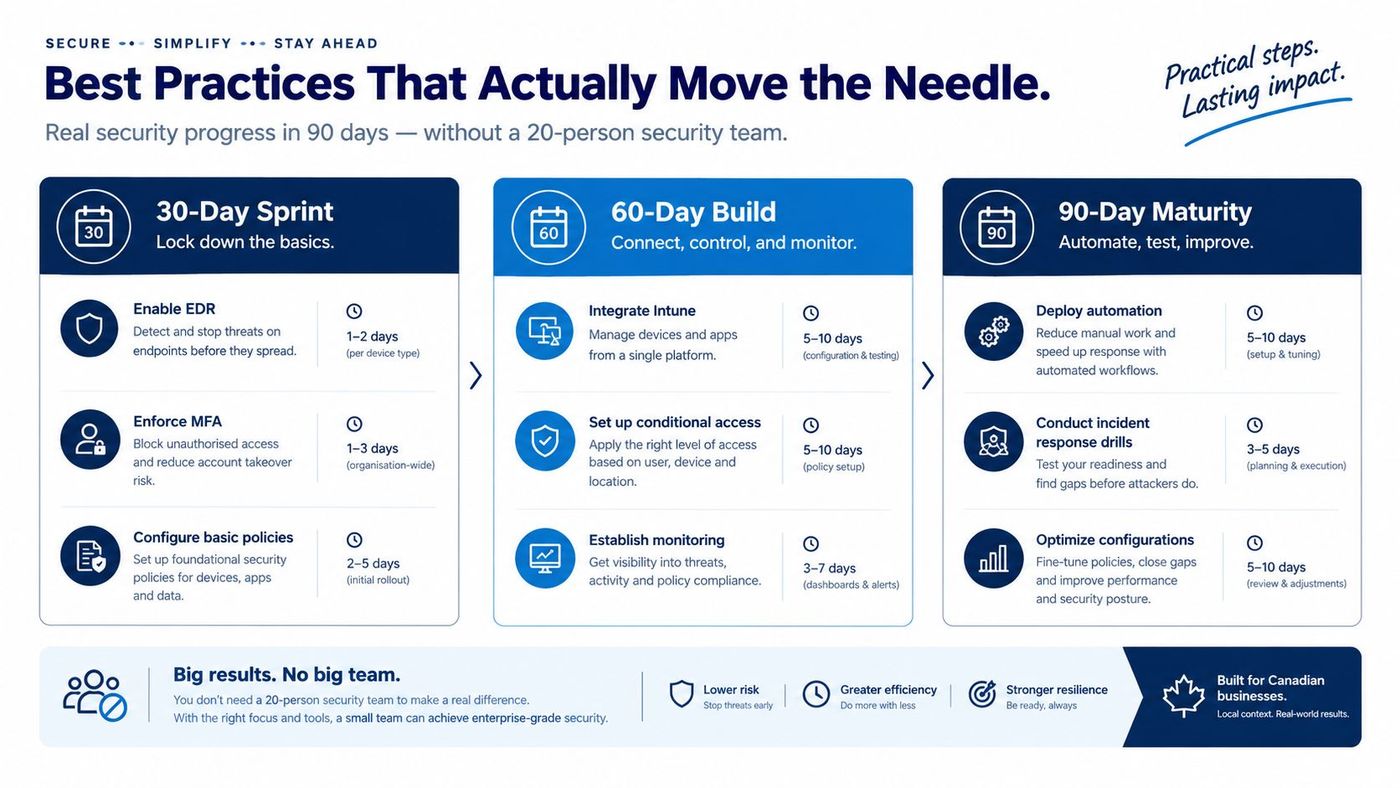
SMBs don't need a large security team to improve their endpoint posture. They do need a sequence, an owner, and the discipline to avoid activating advanced features before basic coverage works.
Start with visibility and protection.
Don't begin with elaborate custom detection rules. If the organisation can't explain which devices are covered, advanced hunting won't fix the blind spots.
Connect endpoint state to access and operations. Integrate Intune compliance with Conditional Access, establish an exception register, and test what happens when a device becomes noncompliant. Review the portal on a fixed schedule and record decisions, not just alerts.
This is also the point to use device discovery. Unknown devices should become onboarding tasks, remediation tasks, or documented exceptions. They shouldn't remain unnamed entries in an inventory.
Test response. Practise isolating a device, disabling or securing a compromised account, revoking sessions, preserving evidence, and communicating with affected staff. Then tune policies based on operational impact.
Full attack-surface-reduction rule sets, custom detections, and advanced Defender XDR hunting should follow stable coverage and reliable triage. A small team should skip features it can't monitor or maintain.
For a practical checklist, use endpoint security best practices. In-house operation is realistic when someone owns the portal, understands the environment, and can respond outside normal hours. Co-managed IT support adds genuine value when those responsibilities otherwise sit with an already overloaded office manager or generalist administrator.
Your starting position determines the right first move.
If you're already on Microsoft 365 with default settings, don't buy another tool immediately. Inventory devices, verify the actual Defender entitlement, enrol priority endpoints, and establish the baseline controls before expanding the stack.
If you're licensed for Defender but haven't fully deployed it, treat the project as an activation and governance exercise. Separate onboarding, connectivity, policy, validation, alert ownership, and Conditional Access. The licence isn't wasted, but it isn't producing its full value while devices and policies remain incomplete.
If you're starting fresh, map the highest-risk user, device, server, and data flow first. Select the licensing tier and identity capabilities that match that map, then pilot the architecture on representative devices before broad deployment.
Retention deserves a decision from the start. Microsoft says Defender portal endpoint data remains visible for 180 days, while some vulnerability inventory records expire after 7 days and others after 31 days. Contract termination can result in data being erased and made unrecoverable no later than 180 days afterward. Export incident records, investigation evidence, and compliance documentation when your legal, healthcare, financial, or contractual obligations require longer retention.
Defender for Endpoint can be enough for a capable internal IT team that monitors alerts, maintains policies, manages exceptions, and responds quickly. A Canada-based 24/7 helpdesk and proactive monitoring become a force multiplier when the business can't provide that coverage consistently. The right question isn't whether managed support is fashionable. It's whether a real person will investigate and contain an incident when the internal team is unavailable.
CloudOrbis Inc. provides managed IT support and cybersecurity services that can include Microsoft Intune, Microsoft Entra, managed EDR, threat investigation, endpoint containment, and Microsoft 365 environment support. Book a short assessment to map your current Microsoft estate to a defensible endpoint posture, identify licensing and coverage gaps, and prioritise the controls that should be switched on first.
Visit CloudOrbis Inc. to assess, implement, and operate Microsoft endpoint protection across your Canadian SMB environment. Their Canada-based helpdesk and managed cybersecurity services can help turn Defender licensing, Intune compliance, and Entra access policies into an endpoint programme your operations team can run.
Book a 30-minute call with a senior engineer. No sales script, just straight answers about your environment.


