How to Build a Vulnerability Management Plan in 2026
Learn how to build a vulnerability management plan, from asset discovery and risk-based prioritization to patching, verification and ongoing review.

Learn how to build a vulnerability management plan, from asset discovery and risk-based prioritization to patching, verification and ongoing review.
Your scanner has produced another list of critical findings. The operations manager can't approve downtime until production slows, the clinic's software vendor hasn't confirmed patch compatibility, and IT is still trying to identify who owns an exposed server.
That's where a vulnerability management plan has to do more than schedule updates. It must tell your team what to fix first, who can approve disruption, and how to keep a service running when an immediate patch isn't safe. For a medium-sized Canadian organization, the right sequence balances exposure, business impact and downtime tolerance, not just technical severity.
A complete plan runs as a loop: discover assets, identify vulnerabilities, prioritize, remediate, verify and review. Each stage needs an accountable person and an output someone else can inspect. A scanner subscription alone doesn't provide either.
Use the cycle below to connect technical work with operational decisions.
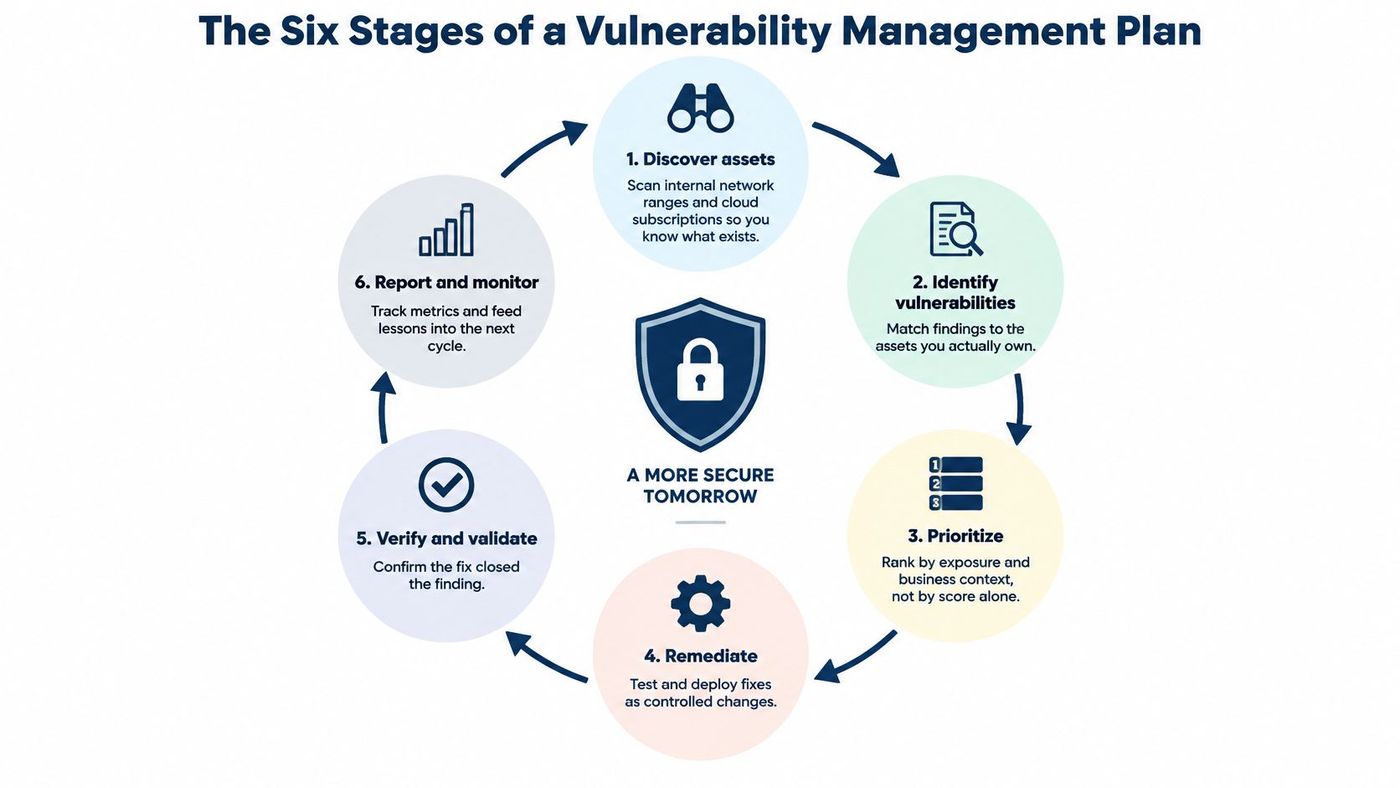
Vulnerability management stages at a glance
| Stage | Question It Answers | Required Output |
|---|---|---|
| Discover assets | What do we run, and who owns it? | Asset inventory with named owners |
| Identify vulnerabilities | Where are we exposed right now? | Scan results and external exposure list |
| Prioritize | What must be fixed first? | Ranked list with risk-based deadlines |
| Remediate | How do we fix or contain each item? | Patch records and documented compensating controls |
| Verify | Is the fix actually in place? | Rescan results and closure evidence |
| Review | Is the plan still working? | Metrics report and updated policy |
Discovery establishes scope. Identification connects a finding to an actual system, rather than leaving it as an anonymous entry in a report. Prioritization converts that entry into an assigned task with a deadline and a business reason.
Remediation might mean patching, changing a configuration, removing unnecessary software or containing exposure temporarily. Verification requires evidence that the action worked. Review examines missed deadlines, recurring weaknesses and changes to the environment.
The Canadian Centre for Cyber Security's National Cyber Threat Assessment reports that threat actors continuously scan for publicly known vulnerabilities and that attacks can begin within days of disclosure. That's why discovery and monitoring must continue between scheduled reviews.
Assign security staff to validate and rank findings, system administrators to execute changes, and business owners to approve service interruption. Smaller teams can combine roles, but they shouldn't leave responsibilities implied. TekRecruiter's staffing tips for vulnerability management teams are a useful resource when deciding how to cover those responsibilities.
Feed review decisions back into discovery each quarter. A newly acquired application, replacement production controller or changed vendor relationship should alter the inventory and the next assessment's scope.
Practical rule: If a stage has no named owner or no defined output, your plan has a gap.
Keep the outputs connected through asset identifiers and remediation tickets. That lets a reviewer trace a finding from discovery to closure without reconstructing the story from email.
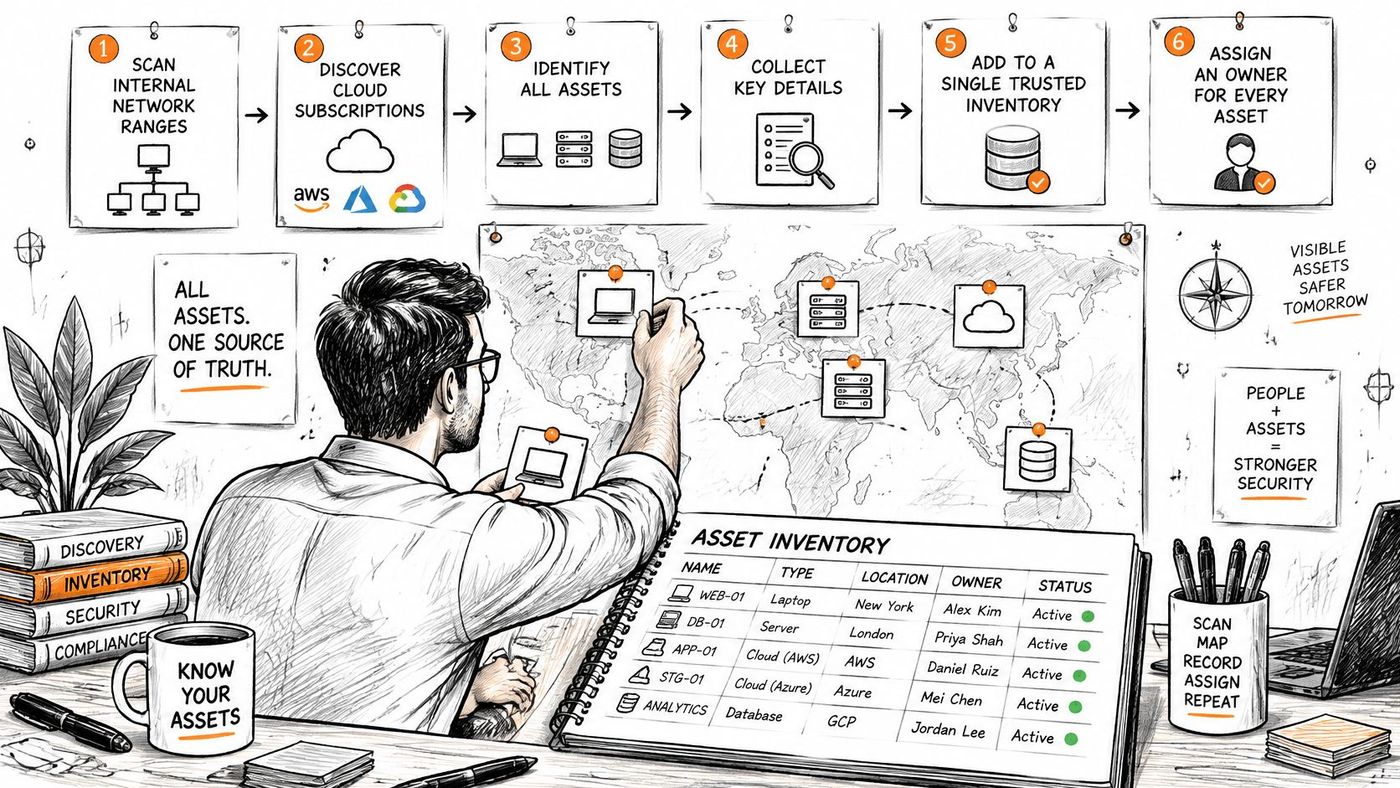
An inventory built only from purchasing records tells you what the organization bought, not everything it operates. A badge reader on a clinic floor, a contractor-managed firewall or a controller on a production line can remain outside the IT asset register while still creating exposure.
Build the inventory from observed systems, management tools and business knowledge. CloudOrbis's guide to asset inventory management provides a useful foundation for organizing those records.
Warranty, licence and support information help distinguish a patching problem from a replacement problem. Networking2000's discussion of hardware and licence tracking for Essex firms offers a complementary asset-management perspective, although your security inventory must also record exposure and service dependencies.
Give each asset a stable identifier so hostname changes don't break its history. For vendor-hosted applications, record the internal business owner and the vendor's security contact, even when your team can't scan the underlying infrastructure.
A trustworthy inventory has an owner, a criticality rating and a last-seen date for every asset. Its count should reconcile within a small, explained margin against discovery results, with every unexplained difference assigned for investigation.
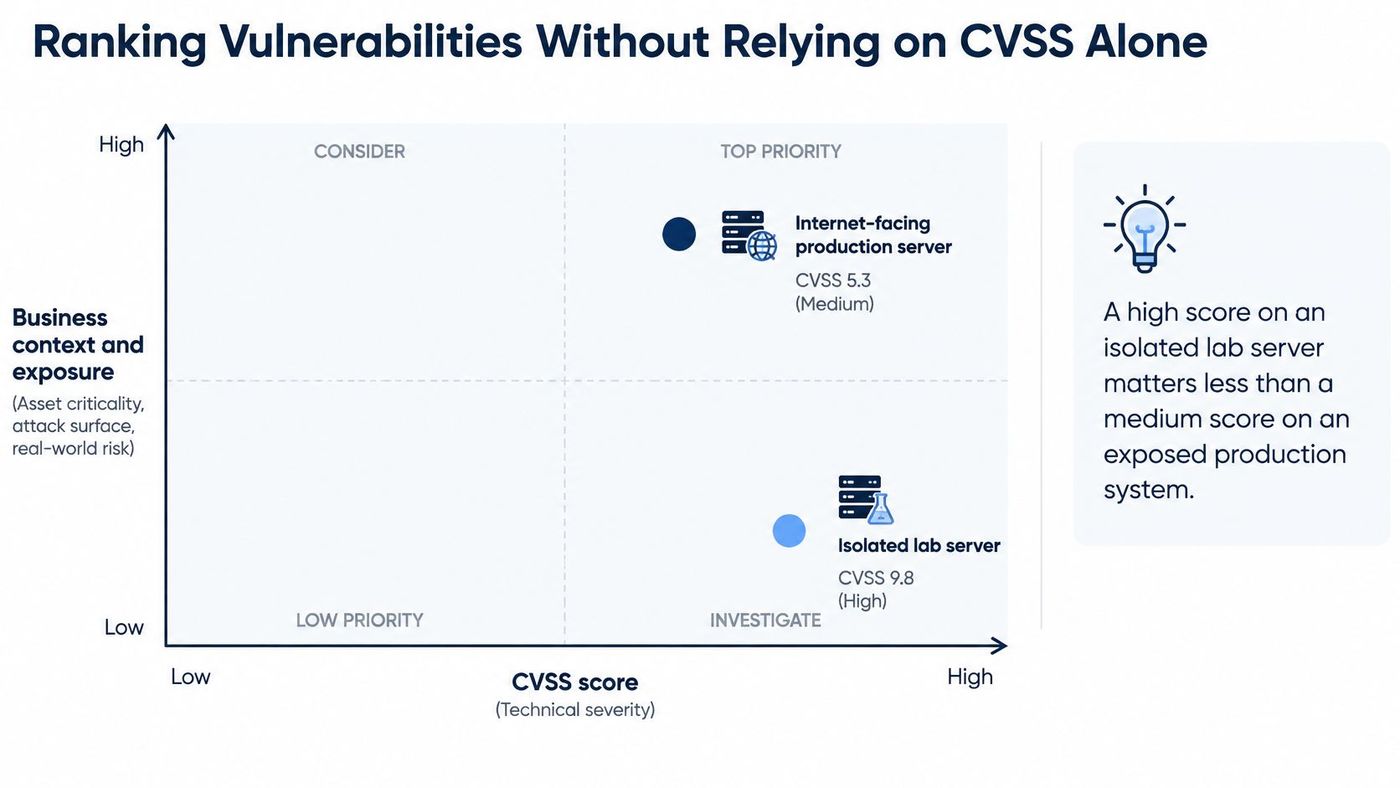
A high Common Vulnerability Scoring System (CVSS) score on an isolated lab server can deserve less immediate attention than a medium-scored flaw on an internet-facing file transfer service that attackers are exploiting. CVSS describes technical severity. It doesn't tell your operations manager which service can safely stop tonight.
Start with exposure, check exploitation, identify the affected business service, then assign the deadline. Keep technical severity in the assessment, but don't let it substitute for those decisions.
The Cyber Centre's patch-management guidance recommends maximum deployment timeframes of 48 hours for extreme risk, two weeks for high risk, the next major update or three months for medium risk, and the next major update or one year for low risk.
Patch deadlines by vulnerability risk
| Risk Level | Patch Deadline | Typical Situation |
|---|---|---|
| Extreme | 48 hours maximum | Actively exploited or reachable from the internet |
| High | Two weeks | Exploitable flaw on a critical service |
| Medium | Next major update or three months | Limited exposure with a compensating control in place |
| Low | Next major update or one year | Internal only, with no known exploit |
The deadlines follow the guidance; the situations are policy triage examples, not automatic classifications for every asset. Internet exposure should trigger urgent assessment, but reachability alone doesn't prove that a particular flaw is exploitable.
For medium- and low-risk items, use the next major update without exceeding the stated outer limit. Record when the remediation clock starts, preferably when applicability is confirmed, and track any delay between disclosure and that confirmation separately.
Before setting a deadline, assess business impact and downtime tolerance. Ask which clinic, production or dispatch function stops during maintenance, how long it can remain unavailable, and whether sensitive records increase the consequences of compromise.
Say a manufacturer identifies a high-risk flaw on its order system and assigns the high-risk window. Administrators then confirm the vulnerable service is internet-reachable and can be exploited through that route. They upgrade it to extreme risk and use the shorter deadline shown in the policy.
For a hypothetical clinic, an internet-reachable scheduling server with an exploitable flaw could also warrant extreme treatment. A weekend maintenance window is reasonable only if it falls inside the deadline; otherwise, the team must contain exposure or arrange an earlier change.
Downtime tolerance determines how you execute the fix. It doesn't make an exploitable system safe to leave exposed.
Write the downtime decision beside the risk rating, deadline and approving owner. Use a consistent IT security risk management approach so teams don't negotiate a different standard for every difficult application.
Successful deployment means the vulnerability is addressed and the business service still works. An update that installs cleanly but breaks label printing, clinical authentication or a dispatch integration hasn't met that standard.
The Cyber Centre's system and information integrity guidance advises testing software and firmware updates for effectiveness and side effects, deploying within defined periods, and recording changes through configuration management.
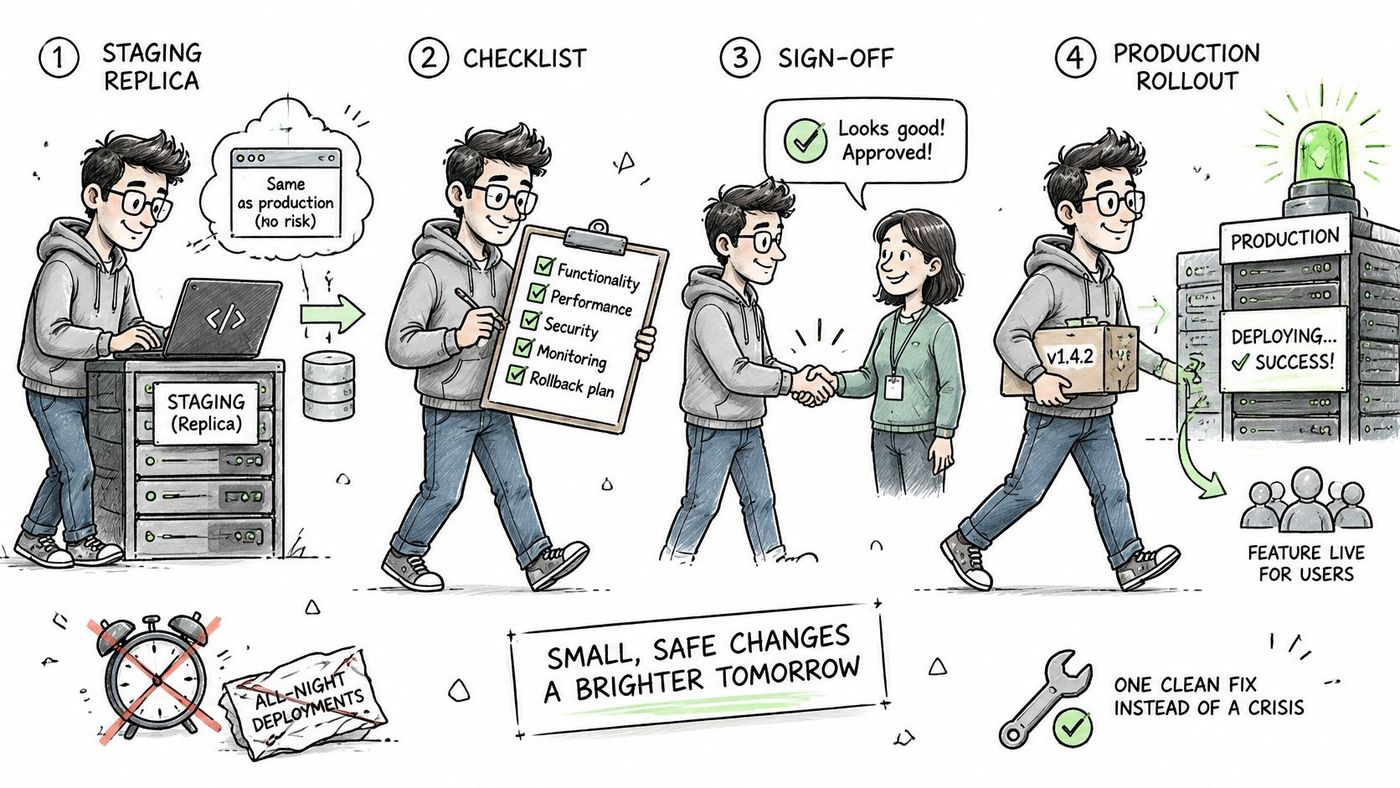
An IT-only pilot misses problems that clinic staff or line workers encounter. Include someone who can complete the workflow, such as processing an order through to its production label.
For a medical device or production controller, an untested update can create a serious operational problem. A delayed patch with restricted access and explicit approval may be safer, but the exception needs a review date and a route to permanent remediation.
Prepare rollback instructions before deployment, including the conditions under which you'd restore service rather than continue troubleshooting. Our change management process guide helps organize approvals, implementation records and recovery decisions.
Teams maintaining distributed edge systems can also use the Galliot edge DevOps webinar as a supplementary resource when discussing deployment practices. Keep the local runbook specific to your equipment, vendor constraints and business workflow.
A critical advisory arrives, the affected appliance is in production, and the vendor has no fix. Waiting for the next scheduled scan doesn't resolve the immediate question: can attackers reach the vulnerable function right now?
The Cyber Centre's National Cyber Threat Assessment reports that ransomware incidents in Canada increased by an average of 26% per year from 2021 through 2024. A static monthly routine isn't a sufficient response to a newly disclosed, exploitable weakness.
Name the role permitted to disconnect a system without waiting for committee approval, along with a deputy. Define triggers such as confirmed exploitation, evidence of compromise or inability to contain a credible attack path.
For clinical or industrial equipment, coordinate isolation with the designated operational authority so containment doesn't create a physical safety hazard. Document how staff will continue essential work if the system becomes unavailable.
A temporary exception is a controlled decision. An exception without an expiry date is an unresolved exposure.
If you find signs of compromise, activate incident response as well as remediation. Installing a later patch won't establish whether an attacker already accessed the environment.
Put critical vulnerabilities past due, extreme-risk mean time to remediate, and percentage of assets scanned on the leadership dashboard each month. Pair each with an accountable owner and a decision required, such as approving downtime, replacing unsupported equipment or assigning additional remediation capacity.
A count of completed scans proves activity. It doesn't show whether the team checked the right systems or removed the most consequential exposure.
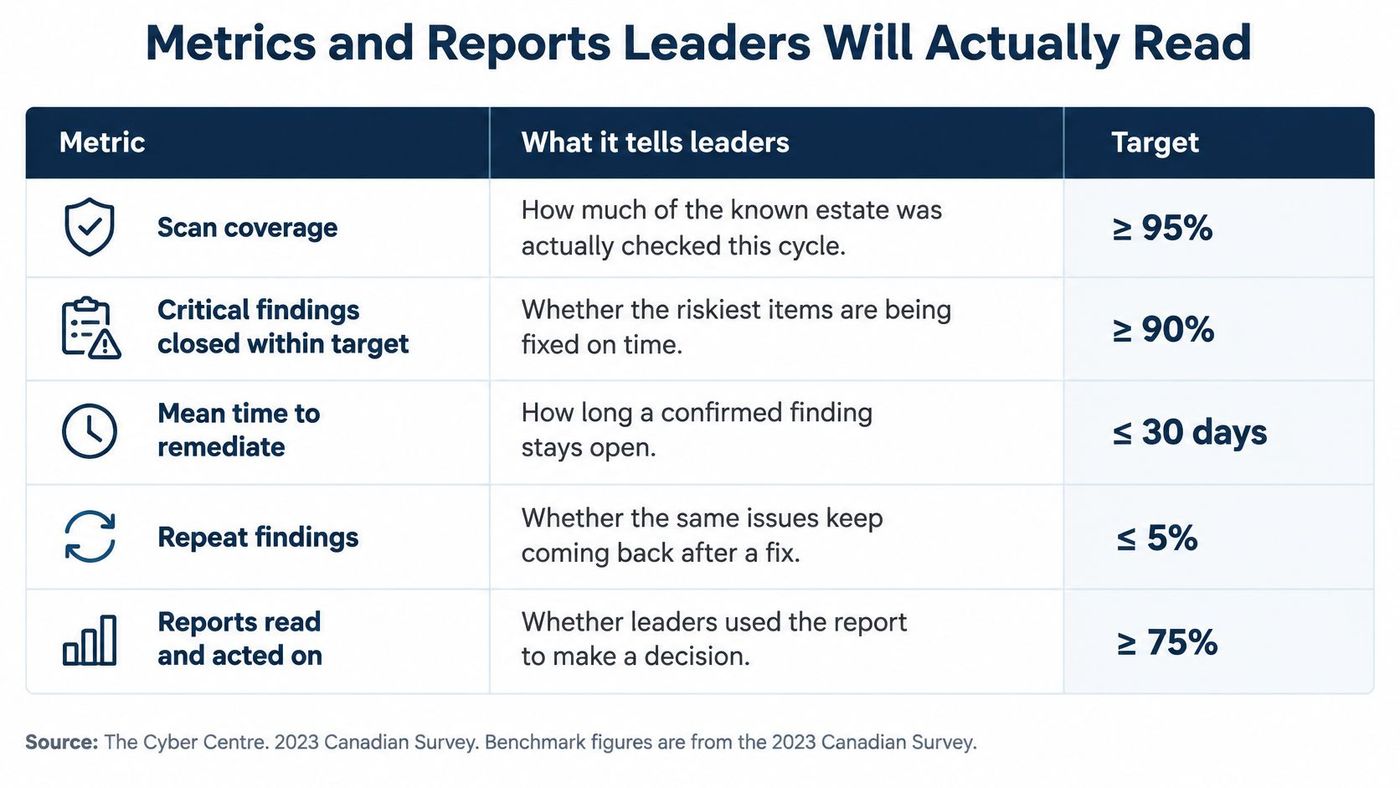
Metrics that show whether the plan works
| Metric | What It Shows | Suggested Target |
|---|---|---|
| Critical vulnerabilities past due | Work that has missed its deadline | Zero past due for extreme risk |
| Mean time to remediate | Speed of fixing, read by risk tier | Within the policy deadline for each tier |
| Time from disclosure to asset identification | How quickly you learn you are exposed | Identify affected assets during initial advisory triage |
| Percentage of assets scanned | Gaps in coverage | All in-scope assets assessed, with documented alternatives for non-scannable systems |
These are operating targets, not industry benchmarks. Read mean time to remediate by risk tier, because averaging low-risk maintenance with urgent fixes can hide overdue work. Include the age of open findings so closing easy tickets doesn't make the dashboard misleading.
Calculate scan coverage against the reconciled inventory, not just devices enrolled in the scanner. A failed authenticated scan shouldn't count as a complete assessment.
The Cyber Centre's Ransomware Threat Outlook, citing the 2023 Canadian Survey of Cyber Security and Cybercrime, notes that only about 22% of businesses reported formal cybersecurity training for non-IT workers. Include training completion and clear employee reporting procedures alongside technical measures.
Our leadership reporting is available through a manager dashboard in distinct tiers:
Use a vulnerability assessment report to retain technical evidence behind the summary. Keep the executive view to a page, with decisions, owners and due dates visible.
A vulnerability management plan becomes operational when people accept responsibility and reserve time to act. You don't need a lengthy policy document before making those commitments.
Start with decisions management can approve and the technical team can execute.
Keep the responsibility matrix in the runbook where internal and external teams can access it. At CloudOrbis, we create this matrix during onboarding, review it quarterly and update it as the environment evolves.
A managed provider is a practical option when your internal team lacks capacity, but outsourcing doesn't transfer business-risk ownership. An internal leader must still authorize disruption, approve exceptions and decide whether an aging system merits replacement.
Our process includes a Deep Dive Assessment to identify structural weaknesses, undocumented systems and risk exposure. Proactive Management includes ongoing monitoring, quarterly reviews, disaster recovery testing and lifecycle planning, connecting vulnerability work with continuity decisions.
Whether you run the cycle internally or with support, apply a simple readiness test: can you show a page with named owners, dated deadlines and a review already on the calendar? Supporting tickets and runbooks can hold the detail, but those commitments should be immediately visible.
CloudOrbis Inc. offers cybersecurity assessments, monitoring and managed IT support to help your team turn vulnerability findings into owned, verifiable remediation work. Visit CloudOrbis Inc. to discuss your asset coverage, patching constraints and the responsibilities needed to build a workable vulnerability management plan.
Book a 30-minute call with a senior engineer. No sales script, just straight answers about your environment.


