Tier 1 Network Support Explained for Canadian SMBs
Discover how tier 1 network support works, what it resolves, escalation paths, KPIs, and how to choose a 24/7 Canada-based managed IT provider.

Discover how tier 1 network support works, what it resolves, escalation paths, KPIs, and how to choose a 24/7 Canada-based managed IT provider.
Monday morning in a mid-sized Canadian clinic or plant rarely starts without incident. The phones light up with password resets, the printer on the front desk refuses to behave, and a few remote users are already complaining that the connection feels sluggish. By 9:15, the question is no longer whether IT is busy, it's whether the first layer of support can keep routine problems from becoming a lost day.
That first layer is tier 1 network support, and for Canadian SMBs it's more than a help line. It's the control point that decides whether a password issue gets cleared in minutes, whether a recurring connectivity problem gets routed properly, and whether staff stay productive across offices, shifts, and time zones. In practice, the difference between a smooth Monday and a blown one usually comes down to how well tier 1 is designed, staffed, and automated.
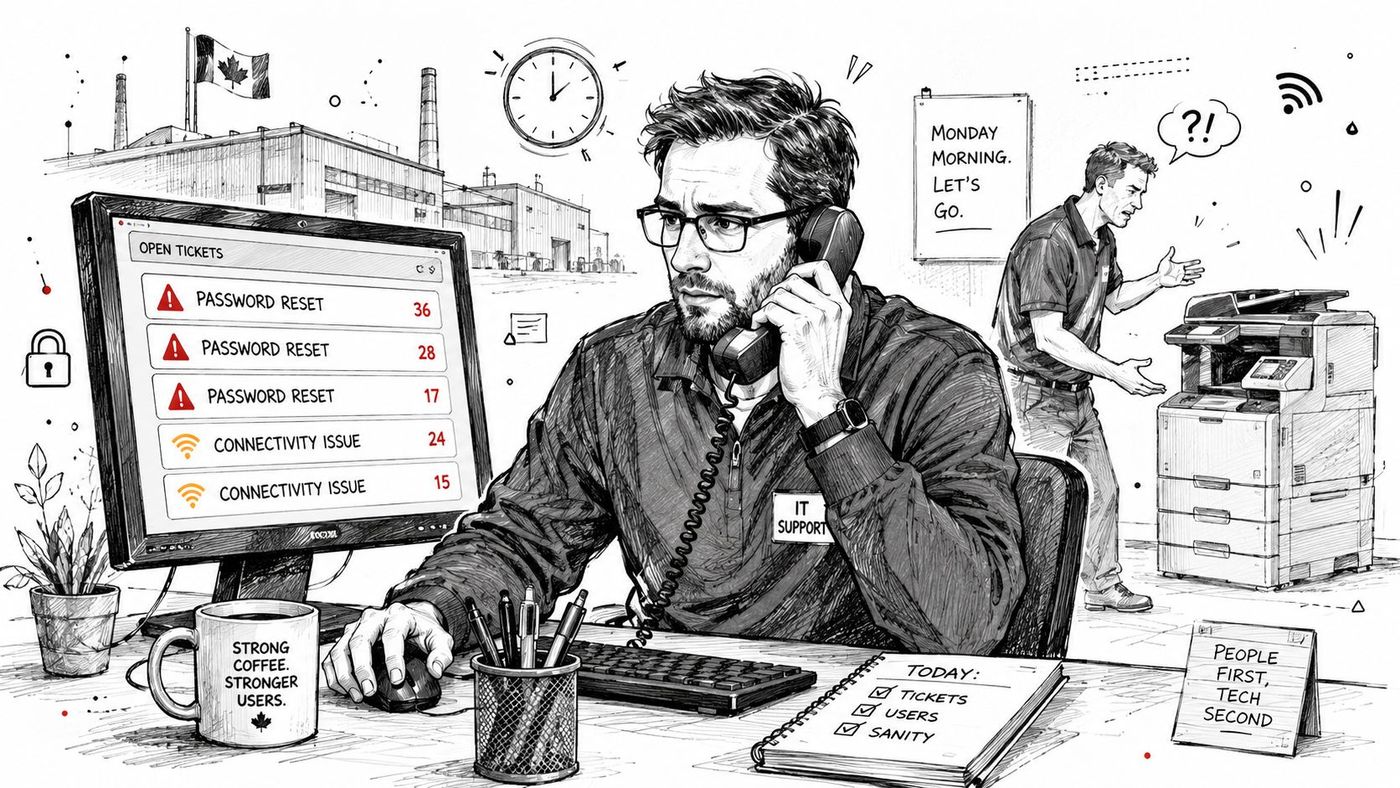
A bad start to the week usually looks small from the outside. One user can't log in, another can't find the shared printer, and a third says a cloud app is timing out. Inside operations, those are the tickets that decide whether supervisors spend the morning solving workflow problems or chasing IT updates.
Tier 1 support is the first response layer, so it shapes the user's entire impression of IT. If the team answers quickly, triages correctly, and resolves the obvious issues without bouncing tickets around, employees stay focused on their work. If the team is slow or unclear, frustration spreads into patient care, production schedules, client service, and internal morale.
That matters in Canadian environments where teams are often spread across sites and provinces. A receptionist in Toronto, a dispatcher in Calgary, and a field supervisor in Edmonton all need the same thing, a reliable front door for support. When tier 1 works well, it absorbs the noise before it reaches specialists. When it doesn't, it becomes the bottleneck everyone feels.
Practical rule: treat tier 1 as an operational safeguard, not a commodity line item. If routine issues are lingering, the rest of IT will spend the day in cleanup mode.
The public guidance on IT support tiers is consistent on this point. Tier 1 handles the first contact, logs and classifies tickets, and resolves standard requests before escalating what it can't fix. That's why a well-run help desk isn't just answering calls, it's protecting uptime and keeping routine work routine, as reflected in CloudOrbis's managed help desk overview.
A large queue doesn't automatically mean the team is underperforming. It often means the intake process is weak, the knowledge base is thin, or the service desk is receiving issues it should never have seen. In my experience, the best tier 1 teams are not the ones that know everything. They're the ones that know what to resolve immediately, what to document cleanly, and what to escalate with enough context that the next layer can act fast.
That's the hidden business case. Tier 1 support determines whether small operational problems stay small. For a Canadian SMB, that can mean fewer interruptions for staff, fewer delays for clients, and far less drain on higher-cost technical resources.
People use tier 1 to mean two different things, and that confusion causes bad buying decisions. In IT operations, tier 1 is the first human support layer. In network engineering, Tier 1 refers to the backbone networks that can reach the full internet through settlement-free peering and don't buy transit from an upstream provider.
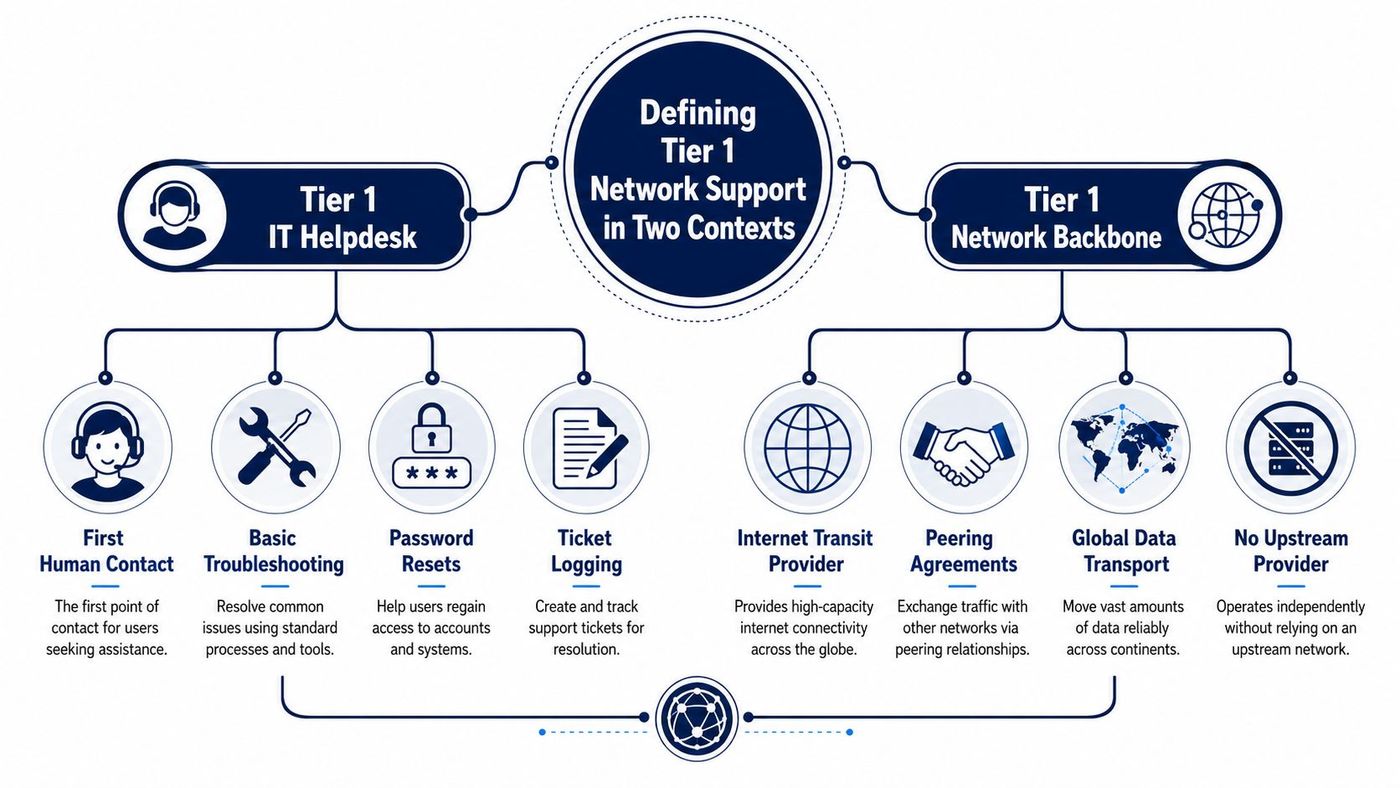
In the help desk sense, tier 1 is the intake and triage layer. It receives tickets, classifies them, decides whether they're simple enough to resolve, and routes the rest with the right detail. Typical work includes password resets, account access restoration, basic application access, printer problems, and routine connectivity troubleshooting, which aligns with the standard tier model described in IT support levels explained.
This is the support layer business owners feel every day. It's the voice on the phone, the person in chat, or the ticket queue that clears the clutter before it reaches specialists. If that layer is weak, the whole support structure feels slow, even when the underlying engineers are competent.
In the network sense, Tier 1 is a different animal. It refers to the global internet backbone, built on default-free routing and settlement-free peering, where a network can reach every other network without purchasing transit. A helpful way to explain it to non-technical leaders is to picture a postal hub that can send packages everywhere without paying another carrier to carry the final leg.
That definition matters because Tier 1 backbone providers aren't just big. They must maintain the full routing table, and they peer across multiple points to preserve path quality. Independent guidance also says global Tier 1 ISPs peer on more than one continent and own or lease transoceanic fibre transport, which is why the term describes infrastructure design, not a marketing badge, as outlined in NTT's Tier 1 ISP guidance.
For a Toronto office, a Calgary warehouse, or an Edmonton support centre, both meanings matter. Help desk tier 1 affects how quickly routine problems get cleared. Network Tier 1 affects how smoothly cloud apps, VoIP, and remote support traffic move through the internet path your users depend on.
The takeaway is simple. Ask whether your provider has strong frontline support, but also ask whether the network underneath it is designed for efficient routing. Those are separate layers, and weak performance in either one shows up as the same complaint from users, “IT is slow.”
A mature tier 1 team spends most of its time on repeatable issues, not deep engineering work. That's a good thing when the workflow is designed properly, because the whole point is to clear common tickets before they consume specialised staff.
Tier 1 technicians usually handle password resets, account recovery, printer issues, basic connectivity problems, software installs, and predefined service requests. One industry source says tier 1 can handle around 70% of all IT support requests Xantrion. Another source says ticket intake is often in the range of 30 to 50 tickets per technician per day, with password resets and account recovery sometimes making up roughly 30% of all tickets InvGate. Those figures are useful because they show how much of support is repetitive administration.
A strong tier 1 function isn't glamorous. It's disciplined. The value is in the tickets that never need a specialist at all.
The operational benchmarks are just as important. Commonly cited first-contact resolution sits in the 60% to 80% range, average handle times for basic issues are around 5 to 10 minutes, and escalation to tier 2 is often kept below 20% ExtNOC. For business owners, those numbers translate into a practical question, are your frontline agents resolving routine issues quickly, or are they creating extra work downstream?
The difference between an efficient desk and a messy one is usually process, not talent. Tier 1 needs clean ticket categories, a searchable knowledge base, and runbooks that match the actual environment. When those are weak, agents escalate too soon or ask users to repeat basic information, which drags out resolution and hurts satisfaction.
This is also where monitoring helps. If endpoint health, network events, and service status are visible at intake, the team can separate a user mistake from a broader outage faster. For teams that want to connect frontline visibility to security operations, a useful resource is network device monitoring for SIEM, because alert quality shapes how quickly the service desk can identify what's routine and what's systemic.
| Support Tier | Typical Tickets | Resolution Target | Escalation Rate |
|---|---|---|---|
| Tier 1 | Password resets, account unlocks, printer issues, simple connectivity, basic installs | First contact for routine issues | Below 20% to Tier 2 |
| Tier 2 | Deeper application, system, and configuration troubleshooting | Technical resolution after triage | Higher than Tier 1, based on complexity |
| Tier 3 | Specialised fixes, architecture changes, code-level issues | Expert-level resolution | Lowest volume, highest complexity |
A useful internal guide for workflows is CloudOrbis's help desk ticketing system overview, because ticket design, routing, and intake rules directly affect whether tier 1 keeps up or falls behind. The message for managers is straightforward. If your frontline team is spending too much time on avoidable work, the problem may be classification, not staffing.
The right delivery model depends on how much control you need, how much coverage you need, and how predictable your support load is. In-house and outsourced tier 1 can both work, but they fail for different reasons.
An internal help desk usually has the deepest institutional knowledge. Staff understand local apps, internal politics, and the quirks of older systems that never make it into documentation. That can be a real advantage in legal, finance, manufacturing, or healthcare environments where workflows are specific and sensitive.
The downside is cost and coverage. In-house teams are harder to scale quickly, and 24/7 availability is expensive to staff consistently. If your users work across time zones or outside standard business hours, the queue often gets stretched thin unless the organisation commits to a larger bench.
Outsourced managed support usually gives you predictable monthly cost and faster scalability. A Canada-based 24/7 help desk can be especially useful when the organisation needs local time-zone coverage, clearer data-handling expectations, and support aligned to Canadian operations. That matters for regulated sectors and distributed teams that can't wait until the next morning.
The trade-off is control. Some outsourced teams rely on generic scripts, and if the provider doesn't build a strong handoff model, you lose context at escalation. That's the failure mode to watch for, not the outsourcing itself. The best providers solve that with dedicated account teams, integrated ticketing, and proactive monitoring that keeps recurring issues visible.
CloudOrbis's IT staffing solutions overview is relevant here because the staffing model matters as much as the toolset. A provider can supplement internal staff, fully run tier 1, or support a blended model. The decision should follow your risk profile, not a sales pitch.
If your business depends on deep local knowledge and tightly controlled workflows, in-house may be the right fit. If you need round-the-clock coverage, standardised intake, and faster scaling across multiple sites, outsourcing usually makes more sense. For many Canadian SMBs, the best answer is a hybrid model where internal IT owns strategy and an external team handles first-line response.
Most tier 1 discussions stop at “resolve tickets faster.” That's useful, but incomplete. The bigger operational gain comes from stopping repetitive issues before they become tickets in the first place.
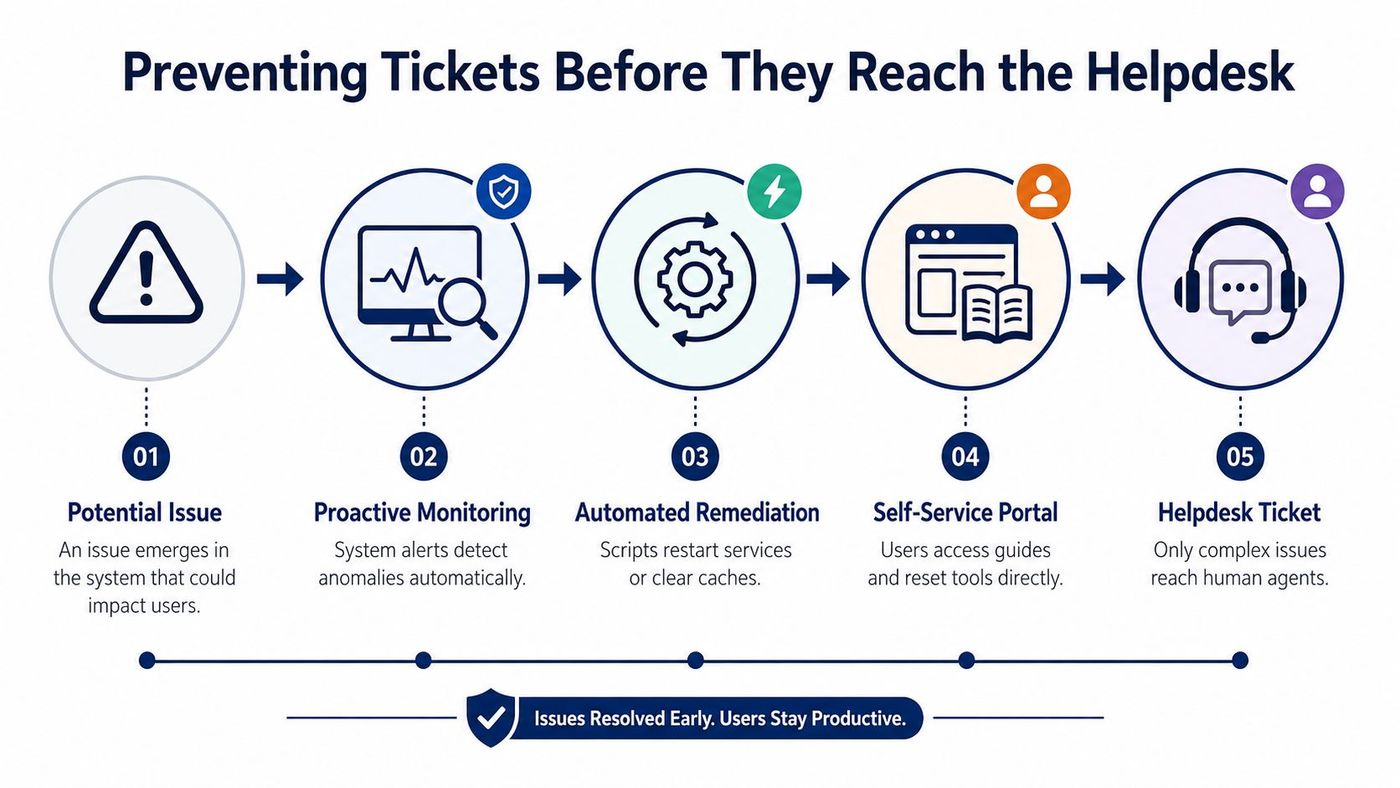
Password resets and other routine access issues are the easiest candidates for automation and self-service. If users can reset credentials, confirm identity, or find simple instructions without waiting on an agent, the ticket count drops before anyone answers the phone. That's where a knowledge base and service portal matter more than another queue agent.
A practical prevention stack usually has three layers. First, proactive monitoring catches anomalies before users feel them. Second, automated remediation handles the simple fixes, such as restarting a service or clearing a cache. Third, self-service portals let users solve common issues on their own, leaving the help desk for the cases that need judgement.
Canada's uneven broadband access makes this more than a desktop-support problem. Recent CRTC coverage says broadband access is improving, but affordability and meaningful adoption remain barriers in underserved communities, which means support teams can't assume every remote user has the same stability or digital confidence. In rural or remote settings, proactive monitoring and faster-install connectivity options often matter more than adding more reactive tickets.
That's especially relevant for SMBs with mixed urban and rural footprints. If a site has intermittent connectivity, tier 1 support should be catching the pattern, not rediscovering it ticket by ticket. The smarter move is to reduce repeat incidents through network visibility, clearer user guidance, and a support model that can tell the difference between one-off user error and a recurring infrastructure issue. For organisations exploring broader access and adoption issues, the perspective in broadband initiatives for unserved and underserved areas is worth understanding.
If users keep logging the same issue, don't train the help desk to type faster. Fix the process that keeps creating the ticket.
A mature tier 1 function isn't measured only by how fast it answers. It's measured by how many issues never become tickets, how well it detects patterns, and how quickly it feeds recurring problems back into automation or network design. That's how support stops being a cost centre and starts acting like an operational control layer.
A good provider isn't the one with the slickest promise. It's the one whose SLA, escalation path, and reporting match how your business runs. That's especially true for Canadian SMBs in healthcare, manufacturing, legal, and finance, where support quality affects both uptime and compliance.
Start with the basics. Ask whether the provider offers 24/7 Canada-based coverage, whether escalation paths are documented, and whether the service desk can show you how tickets move from intake to resolution. If the answers are vague, the support model probably is too.
Then look at compliance experience. For regulated environments, the team should understand HIPAA-aligned workflows where relevant, as well as PIPEDA expectations in Canadian operations. You also want sector fit, because a provider that supports plants, clinics, and law firms should be able to explain how its process changes by use case, not just by contract size.
The revenue-aligned technology roadmap is a useful lens here, because support only works when it supports the business plan, not the other way around. A provider should help you map service delivery to growth, risk, and operational priorities.
| Checkpoint | What Good Looks Like | Red Flag |
|---|---|---|
| SLA clarity | Response and resolution commitments are written clearly | Vague promises with no measurable commitments |
| Escalation paths | Defined procedures for severity and handoff | Tickets bounce without ownership |
| Compliance | Evidence of relevant certifications or controls | No clear compliance posture |
| Tooling | Transparent monitoring and ticketing stack | Black-box support with no visibility |
| Canadian presence | Local support aligned to time zones and regulations | Offshore-only coverage with weak context |
| Scalability | Services can grow with your organisation | Support stalls when ticket volume rises |
The biggest red flags are easy to spot once you know them. Offshore-only support can work in some contexts, but if your users need local alignment and fast escalation, it often creates friction. Vague SLAs usually mean the provider plans to manage expectations, not incidents. A lack of dedicated account management often means the team won't know your environment well enough when something breaks.
CloudOrbis's managed IT service companies overview is useful if you're comparing service models, because the provider category matters less than the operating discipline behind it. A good managed IT partner should make tier 1 predictable, visible, and boring in the best possible way.
Tier 1 support works best when it's designed as part of a larger operating model. It should connect to cybersecurity, cloud optimisation, disaster recovery, and strategic planning, not sit in isolation as a ticket queue. When that foundation is solid, support becomes less disruptive and more preventative.
The practical goal is simple. Eliminate avoidable tickets with automation, keep routine issues moving through tier 1, and escalate only what needs deeper expertise. That's how businesses protect productivity without overbuilding the support function. It also keeps capacity planning honest, especially when leaders use tools like practical cloud ops capacity planning to align support demand with infrastructure growth.
If your frontline support still feels reactive, the fix usually isn't more noise in the queue. It's better routing, better monitoring, better self-service, and a provider that understands how Canadian SMBs operate.
CloudOrbis Inc. helps Canadian businesses build support that prevents downtime instead of just reacting to it. If you're evaluating tier 1 network support, managed help desk coverage, or a more resilient IT operating model, visit CloudOrbis Inc. to see how their team supports growing organisations with 24/7 Canada-based service.
Book a 30-minute call with a senior engineer. No sales script, just straight answers about your environment.


