Managed IT Services Canada: Choose Your 2026 Provider
Find top managed IT services Canada in our 2026 guide. Learn core services, pricing, & how to choose the best provider for your SMB.

Find top managed IT services Canada in our 2026 guide. Learn core services, pricing, & how to choose the best provider for your SMB.
Most Canadian business owners don't set out to become part-time IT managers. Yet that’s where many end up. A staff member can’t log in to Microsoft 365. A backup alert appears during a client meeting. Someone forwards a suspicious email and asks, “Is this real?” The day that was supposed to focus on customers, hiring, or cash flow gets pulled sideways by technology problems.
That pattern looks small from the inside, but it adds up fast. It slows decisions, frustrates employees, and leaves critical systems exposed at the worst possible moments. It also explains why so many firms are rethinking how they handle IT.

A business owner in Toronto, Calgary, or Edmonton usually doesn’t call for managed support because technology is exciting. They call because IT keeps interrupting real work. One week it’s an expired licence. The next it’s a flaky VPN, a phone system issue, or a user locked out of email just before a proposal deadline.
Those interruptions have a hidden cost. Staff lose momentum. Managers stop planning and start firefighting. Leaders delay growth projects because they don’t trust the systems underneath them. If your team still handles repetitive office tasks by hand, even routine work such as document handling can drain time and attention. That’s why many operations teams now review the hidden costs of manual data extraction as part of a broader efficiency push.
This shift isn’t anecdotal. Canada’s managed services market grew from USD 8,182.22 million in 2018 to USD 17,304.83 million in 2024, and it’s projected to reach USD 44,994.07 million by 2032 according to Credence Research on the Canada managed services market. Business leaders are moving toward outsourced IT support because they want scalable infrastructure, continuous monitoring, and compliance-focused service without building every capability in-house.
Technology problems rarely stay in the IT lane. They spill into sales, service, finance, and reputation.
That’s why managed it services canada has become a boardroom issue, not just a technical one. A downtime event doesn’t only affect servers. It affects payroll, customer communication, appointments, and trust. If you’ve seen how outages chip away at output, this look at IT downtime as a hidden threat to productivity will feel familiar.
Break-fix IT is like calling a handyman only after a pipe bursts. Managed services are closer to hiring a property manager who inspects the building, replaces worn parts early, tests alarms, and keeps vendors coordinated before a crisis hits.
That difference matters more than most business owners realise. In a reactive model, you wait for something to fail. In a managed model, the provider watches systems continuously, standardises updates, tracks risk, and solves many issues before users notice them.
Reactive support often looks simple on paper. You pay when there’s a problem. But that approach creates an unpredictable operating environment. You can’t forecast support demand, you can’t control the timing of issues, and you often discover weak points only after they’ve already interrupted the business.
A proactive provider changes the rhythm of IT.
Managed IT services turn technology from an unpredictable expense into a reliable, strategic asset.
A good MSP acts like a digital property manager for your business. They don’t only answer tickets. They keep core systems healthy, document your environment, maintain backup routines, support employee onboarding, and advise on which tools fit the way your company works.
That matters in practical terms. If your team relies on Microsoft 365, cloud storage, line-of-business applications, and remote access, you need someone watching how those parts interact. A mailbox issue may be a licensing problem. Slow file access may stem from network design, not the files themselves. Repeated password resets may point to a training gap or a security weakness.
Owners usually don’t want more IT. They want fewer disruptions, clearer costs, and a stronger foundation for growth. That’s the value of managed it services canada. You’re not buying “support hours.” You’re buying steadier operations.
For firms that want to see how prevention works in practice, this article on proactive IT maintenance in Calgary captures the mindset shift well. The point isn’t to fix problems faster after they break. It’s to build an environment where fewer things break in the first place.
The easiest way to understand managed services is to tie each service to a business problem. Most firms don’t need more tools. They need fewer points of failure.
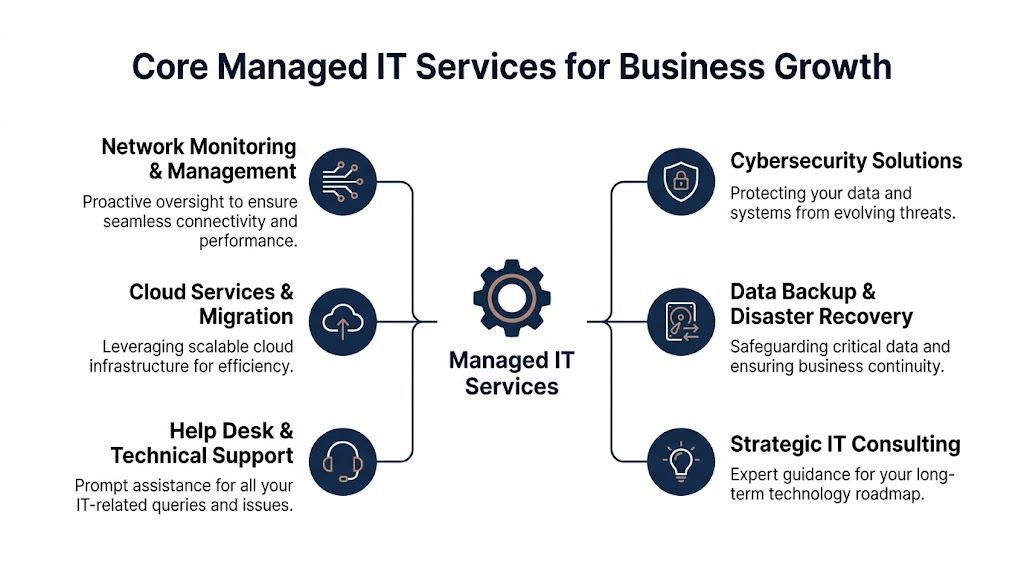
A staff member in a clinic can’t print intake forms. A logistics coordinator loses access to shared folders. A lawyer joins a call and the headset won’t connect. None of these issues sound strategic, but each one blocks revenue-producing work.
That’s where a managed help desk earns its keep. Good support isn’t just technical. It’s operational. It gets people back to work quickly, documents recurring issues, and spots patterns that suggest a larger root cause.
A strong provider will usually handle:
Many SMBs still think security means antivirus plus staff reminders not to click suspicious links. That’s no longer enough. Modern managed security is layered. It watches devices, user activity, logs, alerts, and cloud systems together.
According to the AITS guide to Canadian managed IT service providers, providers using EDR with SIEM can reduce the mean time to detect breaches by up to 70% compared with reactive models. The same source notes that proactive monitoring can predict 85% of failures pre-emptively and cut downtime by 45 to 65%.
That sounds technical, so here’s the plain-English version:
Practical rule: If your provider can’t explain how they detect suspicious behaviour across endpoints and cloud systems, you’re probably buying basic support, not managed security.
Every business should ask the same thing. If a critical system fails tomorrow, how do we get back to work?
Backup alone doesn’t solve that. Recovery planning matters just as much. You need to know what gets backed up, how often it’s tested, where copies are stored, and who is responsible during an incident.
For a finance firm, recovery might mean restoring access to client files and email quickly. For a manufacturer, it may mean getting a line-of-business application running again before production slips. For a medical clinic, it may mean protecting availability while maintaining compliance expectations around patient data.
Cloud projects often begin with a simple goal. “We want staff to work from anywhere.” Then the complexity shows up. Which applications should move first? What should stay on-premises? How do you stop cloud costs from creeping upward after migration?
Insight notes in its overview of managed cloud services in Canada that cloud optimisation can deliver 20 to 30% utilisation gains and 25 to 35% OpEx reductions through right-sizing and forecasting. The same source states that post-migration optimisation can reclaim 15 to 25% wasted spend, and that managed environments can achieve 99.99% availability.
For an SMB, the business takeaway is straightforward. Cloud isn’t cheaper just because it’s cloud. It becomes cost-efficient when someone actively manages licences, workloads, storage, and user access.
In this aspect, many providers still fall short. They’ll provision accounts, enforce basic policies, and stop there. But buying Microsoft 365 doesn’t guarantee you’re using it well.
A useful MSP helps teams move from “we have the licences” to “we’re getting business value from the platform.” That can include:
For Canadian SMBs, that strategic layer matters because talent is limited and managers don’t have time to experiment blindly. A provider such as CloudOrbis managed IT support services may support Microsoft 365 administration, cybersecurity, cloud migration, and ongoing optimisation as part of a broader service relationship.
Many medium-sized firms have no shortage of technology decisions. They have a shortage of time and strategic capacity. Should you replace servers or move workloads to Azure? Standardise on Teams Phone or keep your current VoIP setup? Invest in security tooling now or after the ERP project?
That’s where a virtual CIO, often shortened to vCIO, becomes useful. This role connects business goals to IT decisions. It helps leadership prioritise, sequence projects, and avoid buying disconnected tools that create more complexity later.
A mature managed provider should be able to say, in plain language, what the next twelve months of IT should look like for your business and why.
For Canadian organisations, compliance isn’t an extra feature. It shapes how systems are configured, where data is stored, who can access it, and how incidents get handled.

A provider working in Canada should understand practical obligations around privacy, record handling, and data access. For many businesses, that starts with PIPEDA, which sets expectations around how organisations collect, use, and protect personal information. In healthcare, provincial requirements such as PHIPA add another layer. Some organisations also need to consider HIPAA alignment when dealing with cross-border healthcare relationships or vendor ecosystems.
Those acronyms can feel abstract, but they lead to very practical questions:
The need for local expertise shows up in the market itself. Statistics Canada reports that Canada’s computer systems design and related services industry generated $113.0 billion in operating revenue in 2024, with Ontario at 51.3%, Quebec at 23.8%, and Alberta at 6.8% according to Statistics Canada’s industry release. That concentration reflects where much of the country’s IT capability sits, including firms supporting regulated industries such as legal, finance, and healthcare.
For businesses in Toronto, that usually means a deep pool of providers and specialists. For firms in Calgary and Edmonton, it means choosing a partner that understands both national standards and regional operating realities, especially in sectors such as energy, construction, and professional services.
Compliance is not only about avoiding penalties. It’s about keeping customer trust intact when something goes wrong.
A provider doesn’t need to drown you in jargon. They should be able to answer clearly.
Ask questions like these:
If a provider struggles to explain those basics, that’s a warning sign. For a deeper look at the operational side of protection, this guide to data security management is a useful companion.
Pricing is where many business owners get uneasy. That’s understandable. Managed services can look straightforward until you start comparing proposals and realise two quotes with the same monthly fee may include very different levels of service.
The key is to focus on how the model fits your business, not just the line item.
Some firms have standardised devices and stable headcount. Others run shared workstations, shop-floor systems, or mixed environments with field users and office staff. The right model depends on how your team works.
| Model | Best For | Pros | Cons |
|---|---|---|---|
| Per user | Businesses where each employee uses a similar stack of devices and apps | Predictable budgeting, easy to scale as headcount changes, aligns with modern cloud-first work | Can feel expensive if some users need very little support |
| Per device | Environments with shared terminals, specialised hardware, or uneven user patterns | Useful when equipment matters more than named users, easier to cost specific assets | Can miss the full support picture when one employee uses multiple systems |
| Tiered package | Firms that want clear service bundles such as baseline, enhanced, and strategic support | Easier to compare service levels, can bundle security, backup, and advisory services | You need to read inclusions carefully to avoid gaps or overlap |
A good proposal should explain scope without forcing you to decode it. If pricing looks low, ask what isn’t included. Security tooling, after-hours response, project labour, licensing support, and onboarding often sit outside the headline number.
Look for clarity around these items:
Cheap IT support can become expensive very quickly if every meaningful change falls outside the agreement.
If you’re comparing providers, it helps to review how different firms package service, responsibility, and escalation. This overview of managed IT services companies is useful for spotting the differences that often get hidden behind similar pricing language.
Choosing an MSP is less like buying software and more like choosing an operating partner. You’re handing over access to systems that affect your staff, customer data, and daily revenue. Technical skill matters, but so do process, communication, and judgement.
Some providers sound impressive but struggle in the details. They promise fast response, strong security, and strategic guidance, yet can’t describe how onboarding works or who owns escalation when a serious incident happens.
Ask practical questions that reveal how they operate:
Those questions cut through polished sales language quickly.
In many Canadian SMBs, the next big productivity gain won’t come from replacing a switch or buying another firewall. It will come from using existing platforms better, especially inside the Microsoft ecosystem.
That’s why this overlooked criterion matters so much. As noted in TeckPath’s guide for Canadian small businesses, a key underserved angle is a provider’s ability to help SMBs fully utilise Microsoft 365 and Copilot, and providers that offer strategic guidance on these platforms can create a distinct competitive advantage as the market continues growing toward a projected $45 billion by 2032.
A modern MSP should be able to answer questions like:
A provider that only manages licences is maintaining software. A provider that helps your team use Microsoft 365 and Copilot well is improving the business.
You don’t need to wait for a disaster to identify a poor fit. Warning signs often appear during the sales process.
Watch for providers that:
A strong MSP should reduce complexity, not add another layer of confusion. If you leave the conversation with more buzzwords than clarity, keep looking.
A good provider conversation starts with self-assessment. If you can answer a few operational questions accurately, you’ll spot gaps much faster.
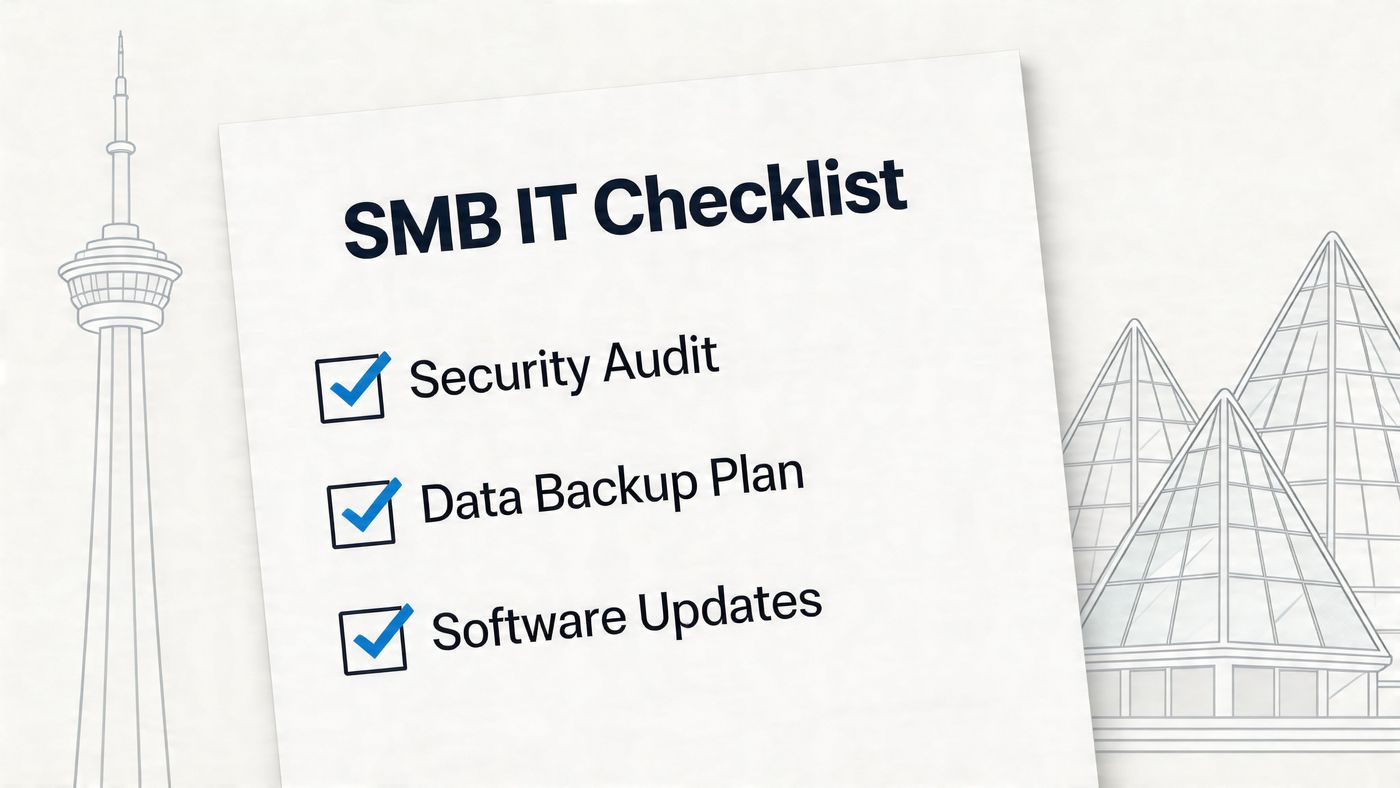
Go through these as simple yes-or-no checks.
If you’re unsure here, that’s usually a sign the process needs work.
This is the area many firms underestimate.
The last group tells you whether IT is being run intentionally or informally.
If you answer “no” or “not sure” to several of these, you probably don’t need more software first. You need a clearer operating model.
When IT is handled reactively, it behaves like overhead. It interrupts work, creates surprise costs, and makes growth feel risky. When it’s managed well, it becomes part of how the business moves faster and more safely.
This is the core argument for managed it services canada. You gain steadier operations, stronger security discipline, cleaner decision-making, and better use of the tools you already own. For many SMBs, the overlooked opportunity sits inside Microsoft 365, where governance, collaboration, and Copilot adoption can either provide advantage or create mess.
The same thinking applies beyond IT. Once core systems are stable, finance and operations leaders often look for adjacent process gains, such as how to automate accounts payable and remove repetitive work from back-office teams.
A business doesn’t grow because it bought more technology. It grows because the right technology is organised, supported, and aligned with real goals. That’s what a good managed services relationship should deliver.
Fully managed IT means the provider takes primary responsibility for day-to-day support, monitoring, maintenance, and often strategy. This works well for businesses without an internal IT team or with limited internal capacity.
Co-managed IT is a partnership model. Your in-house IT person or team keeps part of the function, while the provider fills gaps such as after-hours support, cybersecurity tooling, cloud administration, project delivery, or strategic planning. It’s common in firms that have internal knowledge but need broader coverage or specialist depth.
It can be, but it doesn’t have to be chaotic. A well-run transition usually starts with documentation review, access validation, backup checks, security review, and communication planning. The smoother the current environment is documented, the easier the move becomes.
Ask any new provider how they handle onboarding, password custody, vendor coordination, Microsoft 365 review, and endpoint management. If they don’t have a clear transition method, that’s a concern.
Often, yes. The question isn’t only headcount. It’s dependency. If your business relies on email, shared files, cloud apps, phones, remote work, or regulated data, even a small team can face outsized disruption from poor IT.
Very small firms may not need the same service depth as a larger organisation, but they usually still need dependable support, baseline security, backups, and guidance on Microsoft 365 setup. The right arrangement may be lighter in scope, but the need is still real.
If your organisation is tired of juggling support issues, security concerns, and underused Microsoft tools, CloudOrbis Inc. can help you assess where your current environment is creating risk or wasted effort. A no-obligation conversation can clarify what should be fixed first, what can wait, and how a managed IT plan can support growth without adding unnecessary complexity.
Book a 30-minute call with a senior engineer. No sales script, just straight answers about your environment.


