HIPAA Compliant Data Storage: Requirements for 2026
Learn the requirements, cloud options, and best practices for HIPAA compliant data storage in 2026. Ensure your data meets security standards.

Learn the requirements, cloud options, and best practices for HIPAA compliant data storage in 2026. Ensure your data meets security standards.

California's 2025 healthcare breach report found that business associates accounted for 35.8% of reported large healthcare breaches, while service providers appeared in 8 of the 20 largest incidents, affecting 231 million people nationally (2025 healthcare data breach report). That finding changes the way clinics should evaluate HIPAA compliant data storage. The question isn't only whether your primary cloud platform encrypts files. It's whether every company that stores, restores, supports, analyses, or transfers protected health information is accountable for the same standard.
For Ontario clinics, there's a second layer. PHIPA has governed personal health information protection in the province since 2004, and it requires reasonable safeguards against theft, loss, unauthorised use, disclosure, copying, modification, and disposal (Ontario IPC PHIPA FAQ). A storage design can satisfy a vendor's HIPAA checklist and still leave gaps under Canadian privacy obligations.
A clinic can sign a business associate agreement, enable encryption, and still have an exposed data chain. The primary storage service may be well configured, while an outsourced backup platform keeps accessible snapshots, a support contractor has broad administrator rights, or an archival vendor receives exports without equivalent controls.
That's the practical problem behind the California findings. A breach doesn't need to begin in the clinic's main tenant. It can begin with a vendor that restores a backup, troubleshoots a storage appliance, manages encryption keys, or retains an old copy for convenience.
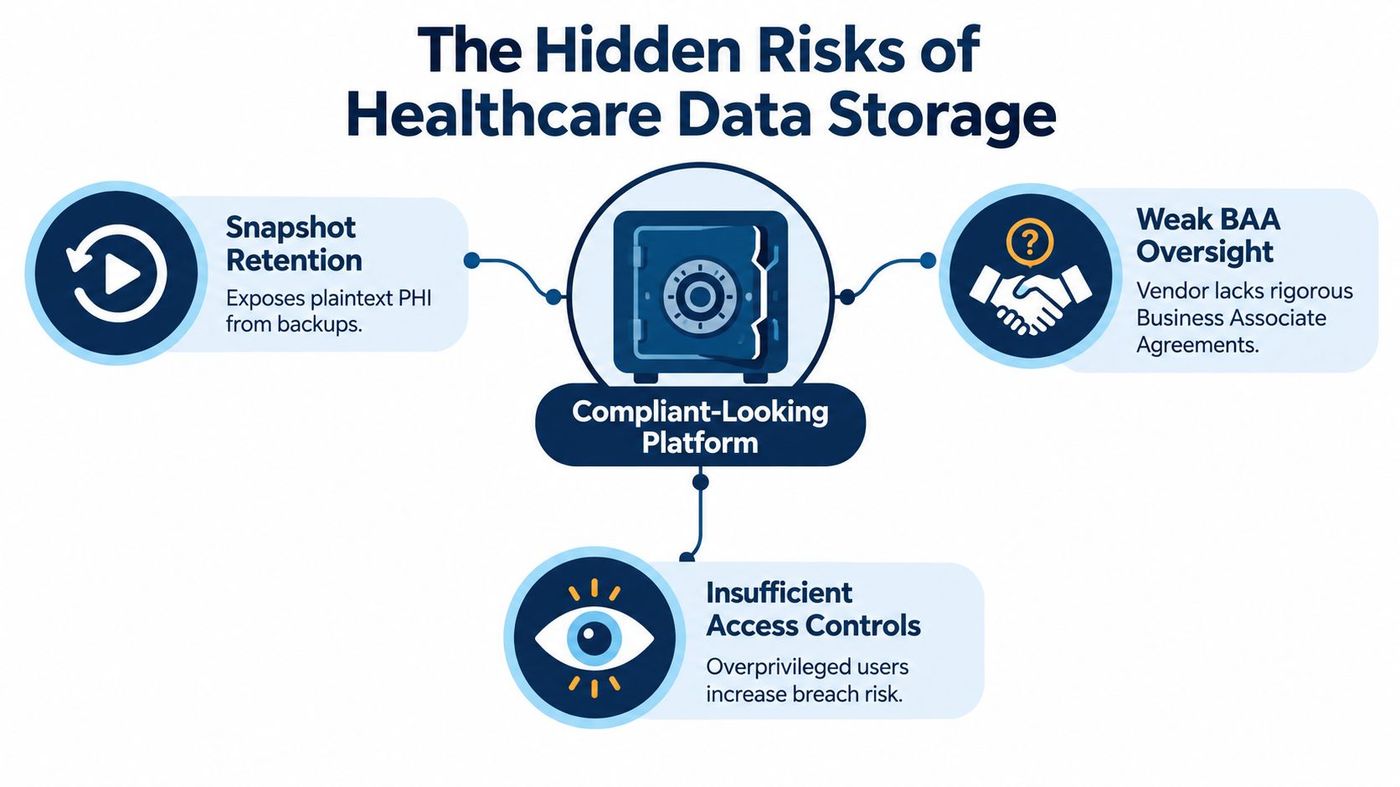
During a migration, I'd map the path of a patient record from the electronic health record to its final deletion. That map normally includes workstations, mobile devices, email attachments, cloud replicas, backup repositories, disaster-recovery environments, support tools, and occasionally analytics or scanning systems.
For each point, ask:
A signed BAA is necessary where HIPAA applies, but it doesn't replace technical verification or operational oversight. The clinic still needs to know which subcontractors participate in the service, how incidents are escalated, how logs are preserved, and who can investigate a suspicious restore.
Practical rule: Treat every party that can store, restore, administer, or transmit PHI as part of one accountable system.
Ontario clinics should also account for the fact that PHIPA doesn't automatically require records to remain in Ontario or Canada. Cross-border storage and disclosure must be assessed through PHIPA, contracts, and the clinic's risk-management obligations. Teams that need a broader technology perspective can also consult a healthcare digital transformation partner, particularly when storage changes are connected to clinical systems and workflows.
A useful companion resource is CloudOrbis's healthcare cybersecurity best practices, but storage should be assessed as its own operational discipline. The right question isn't “Is this platform compliant?” It's “Can we demonstrate that the whole storage chain protects PHI throughout its lifecycle?”
Four safeguards work together in a defensible design: encryption, access control, audit logging, and business associate governance. None is sufficient in isolation. Encryption can't compensate for lost keys, access controls can't explain an unauthorised download without logs, and a BAA can't secure a misconfigured backup.
Protect data at rest and in transit, including primary databases, object storage, replicas, backup repositories, endpoint disks, browser caches, temporary files, and removable media. Ontario guidance recommends encryption by default and secure authentication before decryption, because a stolen laptop or exposed snapshot containing plaintext PHI remains useful to an attacker (Ontario IPC encryption guidance).
Key management deserves the same attention as the encryption setting. If keys are forgotten, unavailable during an outage, or controlled by one departing administrator, the clinic may lose access to records it must retrieve. Use centrally governed keys, documented recovery procedures, and carefully limited key-administrator roles.
Role-based access and least privilege are more practical than trying to secure every folder through informal judgement. A receptionist may need scheduling information without access to clinical notes. A clinician may need patient records but not backup administration. A vendor technician may need temporary troubleshooting access without permanent permission to browse the full environment.
Require individual accounts, strong authentication, time-limited administrator access, and a documented joiner, mover, and leaver process. Cloud platforms frequently fail at the edges, where shared accounts, forgotten service credentials, and excessive emergency privileges remain active long after the original need disappears.
Audit logging should record access, changes, administrative actions, exports, failed authentication, restores, and permission changes. Logs must be protected from alteration and reviewed by someone who knows what unusual activity looks like.
A log that exists but nobody reviews won't help a clinic determine whether a large export was legitimate, whether an administrator accessed records outside normal duties, or whether a backup was restored to an unauthorised location.
Review the provider's BAA, subcontractor list, incident obligations, support model, backup arrangements, and termination process. Confirm whether the agreement covers the actual services in use, not merely the vendor's broader product family.
Teams handling sensitive records outside the EHR may also benefit from understanding the benefits of a secure virtual data room, especially where controlled document sharing, permission management, and auditability matter.
| Safeguard | Primary Purpose | Key Implementation |
|---|---|---|
| Encryption | Reduce the value of exposed media or intercepted traffic | Encrypt primary storage, endpoints, replicas, backups, and transfers. Govern keys separately. |
| Access controls | Limit who can view or change PHI | Use individual identities, role-based permissions, least privilege, MFA, and time-limited administration. |
| Audit logging | Detect and investigate inappropriate activity | Capture access, exports, restores, permission changes, and administrator actions. Review and protect logs. |
| BAA and vendor governance | Assign responsibility across the service chain | Review subcontractors, support access, backup providers, incident duties, and data return or destruction. |
A practical identity and access management programme ties these safeguards together. It gives the clinic a repeatable way to review permissions rather than treating access as a one-time setup task.
Cloud and on-premise storage can both support a defensible healthcare environment. Neither becomes compliant just because a brochure uses the words “secure” or “HIPAA-ready.” The better choice depends on who can operate the controls consistently, how the clinic handles recovery, and what its contracts require.
| Decision factor | Managed cloud | On-premise |
|---|---|---|
| Operational burden | Provider handles much of the infrastructure maintenance | Clinic or its IT partner owns hardware, patching, capacity, and physical controls |
| Control | Strong configuration options, but shared responsibility applies | Direct control over equipment and local network design |
| Backup isolation | Must verify separate credentials, repositories, and restore procedures | Must design a separate backup environment and protect it from local compromise |
| Administrator access | Review provider personnel, support workflows, and subcontractors | Review internal administrators and third-party technicians |
| Data location | Confirm regions, transfers, replicas, and contractual terms | Physical location is clearer, but remote access and off-site backups still matter |
| Cost pattern | More predictable operating expense, with recurring service and storage fees | Larger capital and maintenance burden, plus replacement and recovery planning |
Cloud is often sensible for a small clinic that lacks staff to maintain servers, test restores, manage storage growth, and monitor security events. A managed arrangement can reduce the number of tasks left to a busy office manager or a generalist technician. It only works, however, if the provider documents its responsibilities and the clinic configures its own identities, sharing policies, retention rules, and applications correctly.
On-premise storage can be appropriate where a clinic needs direct control over equipment, network paths, or specialised clinical systems. That control comes with obligations. The clinic must secure the server room, protect local and off-site backups, manage physical media, maintain spare capacity, apply patches, restrict administrator access, and test recovery without relying on assumptions.
Ontario's PHIPA framework doesn't automatically require records to be stored in the province or country. That leaves room for cloud adoption, but the clinic should examine cross-border access, contractual commitments, provider support locations, and risk-management requirements before choosing a region. Data residency is a governance decision, not a substitute for encryption or access control.
The most useful comparison is operational. Ask which model gives your clinic a documented answer to these questions:
A cloud computing versus on-premise comparison can help frame the decision, but the final choice should follow a risk assessment and recovery design rather than a preference for one hosting model.
A storage migration doesn't need to become a disruptive, all-at-once project. Clinics can reduce risk by starting with an inventory, separating urgent weaknesses from longer-term improvements, and testing each control before moving more PHI.
List EHR databases, file shares, email, scans, endpoint downloads, mobile devices, backups, replicas, vendor portals, and archived exports. Mark which systems create, receive, store, or transmit PHI. Identify the owner and administrator for each one.
Then document the current gaps. Forgotten administrator accounts, plaintext exports, shared passwords, public links, and untested restores deserve immediate attention because they can undermine a technically capable platform.
Define role groups, encryption requirements, backup isolation, logging, retention classes, legal-hold handling, and deletion approval. Include temporary files and local downloads. Decide how the clinic will recover encryption keys and who can authorise an emergency restore.
Request the BAA and review subcontractors, support access, backup locations, incident escalation, log availability, data-return procedures, and destruction evidence. Ask the vendor to explain what happens when a technician needs access, a snapshot is restored, or the contract ends.
Enable encryption, configure least privilege, require strong authentication, centralise logs, and protect backup credentials from ordinary administrator accounts. Test a representative restoration, record the result, and correct failures before declaring the environment ready.
Use a written HIPAA compliance checklist alongside Ontario-specific PHIPA requirements. The two frameworks should be mapped together rather than handled as unrelated paperwork.
| Action | Priority | Timeline |
|---|---|---|
| Inventory PHI locations and data flows | High | Begin immediately |
| Remove shared and unnecessary administrator access | High | Immediate remediation |
| Confirm BAA coverage and subcontractors | High | Before migration or renewal |
| Encrypt storage, transfers, endpoints, and backups | High | During architecture build |
| Configure audit logging and review ownership | High | Before production use |
| Test restoration and backup isolation | High | Before sign-off, then regularly |
| Document retention, legal holds, and destruction | Medium | During policy design |
| Exercise breach escalation and notification procedures | Medium | After the first control rollout |
A checklist becomes useful when a named person owns each action and keeps evidence. Screenshots, access-review records, restore results, vendor documents, deletion approvals, and incident decisions form the audit trail that a policy alone can't provide.
A product labelled “HIPAA compliant” does not accept responsibility for the clinic. The clinic still controls configuration, user behaviour, vendor selection, retention decisions, and incident response. Compliance is an operational accountability model that must follow PHI through the storage supply chain, including providers, backup firms, support contractors, and archival systems.

Deleting an exposed file from the primary interface may leave copies in a snapshot, recycle bin, replica, or offline backup. Treat every backup copy as production PHI. Document which systems hold those copies, limit administrative access, encrypt them, and confirm that the deletion process reaches every copy the clinic is required to remove.
A primary provider may sign a BAA while a backup company, support subcontractor, analytics tool, or archival service remains outside the review. Ask which organisations can restore data, access encryption keys, read support tickets, or receive diagnostic exports. The agreement should match the actual technical and operational responsibilities across the supply chain, not only the name on the main contract.
Roles created during implementation can remain unchanged while staff change jobs, temporary accounts stay active, and vendors retain emergency access. Review permissions against current duties, remove stale accounts, and preserve approval evidence. Assign an owner for vendor access so responsibility does not disappear between the clinic and its IT providers.
The College of Chiropractors of Ontario requires records to be retained at least seven years after the patient's last visit, or, for a patient under 18, until seven years after the patient reaches or would have reached 18 (College of Chiropractors of Ontario records standard). Ontario disposal guidance also requires destruction in a way that makes reconstruction not reasonably foreseeable (Ontario IPC PHIPA FAQ). Apply the approved schedule to live data, replicas, endpoints, and offline media, then retain evidence of the purge.
Operational test: If an auditor asks who approved a deletion and which storage copies were addressed, your team should answer from documented records rather than reconstructing the process from memory.
A workable storage programme combines architecture, policy, staff behaviour, and maintenance. CloudOrbis Inc. approaches that work through a 10-step engagement that moves from assessment and strategy to implementation, employee training, and ongoing optimisation. That sequence matters for clinics because a secure design still fails if staff don't understand sharing rules or administrators don't maintain it.
The engagement can begin with a review of where PHI lives, how it moves, and which vendors participate. From there, the technical work can address encrypted cloud storage, encrypted backups, access restrictions, audit logging, disaster recovery, and tested restoration. The clinic should receive documented decisions and operating procedures, not only a new login page.
A managed service can help assign responsibility for monitoring alerts, reviewing access, maintaining endpoints, testing backups, and escalating incidents. CloudOrbis provides 24/7 Canada-based helpdesk support, proactive monitoring, cybersecurity services, cloud and backup support, and compliance-focused architecture for organisations that don't want to maintain every control internally.
The provider's compliance solutions can fit into a broader healthcare IT programme, but the clinic remains responsible for approving policies, validating business requirements, and making sure its clinical and professional obligations are represented. That shared ownership is healthier than treating compliance as an outsourced label.
Ontario incident response also needs a clear route beyond internal IT. Health information custodians must report certain breaches to the Ontario IPC at the first reasonable opportunity, including incidents involving stolen information, unauthorised use or disclosure, or access by someone who knew or should have known the access was unauthorised (Ontario IPC breach reporting guidance). A response plan should identify the decision-maker, preserve evidence, assess affected records, and trigger the appropriate patient communication process.
Affected individuals must also be notified at the first reasonable opportunity when PHI is stolen, lost, or accessed by unauthorised persons. Ontario guidance says communications should describe the breach, identify the type of information involved, explain immediate and long-term corrective measures, and provide contact information for the custodian and the IPC (Ontario IPC notification guidance).
Canadian organisations should also consider PIPEDA where it applies. The federal privacy commissioner expects safeguards proportionate to the sensitivity, volume, distribution, format, and storage method of personal information, with examples including encryption, passwords, restricted physical access, staff training, patches, and contractual controls (PIPEDA safeguards principle).

CloudOrbis Inc. offers managed IT support, secure cloud storage, backup and disaster recovery, cybersecurity monitoring, and compliance support for healthcare clinics. Visit CloudOrbis Inc. to discuss your PHI data map, storage controls, vendor chain, and recovery plan with a Canada-based team.
Book a 30-minute call with a senior engineer. No sales script, just straight answers about your environment.


