Vulnerability Scanning Guide for Canadian SMBs
Learn how vulnerability scanning works, compare scan types, prioritise risks, support compliance, and build a practical remediation programme for your SMB.

Learn how vulnerability scanning works, compare scan types, prioritise risks, support compliance, and build a practical remediation programme for your SMB.
A small accounting firm discovers that its customer portal has been reachable from the internet for months. The system still works, no alarm has appeared, and the team has no clear evidence that anyone accessed it. A scan identifies the exposed service, but that discovery is only the beginning. Someone still needs to confirm whether the weakness is real, determine what the system can access, decide how quickly to respond, and verify that the fix worked.
That's the practical purpose of vulnerability scanning. It gives Canadian SMBs a repeatable way to discover weaknesses across endpoints, servers, applications, and cloud assets before attackers use them. It also creates a working record of what was found, who owns the fix, and whether remediation is complete. This guide focuses on those decisions, not just scanner features. You'll learn how scanning works, how scan types differ, how to validate findings, and how to build a programme that supports security, compliance, and business continuity.
The accounting firm's exposed portal might contain a software flaw, an unsafe configuration, or an old service that the team forgot to remove. A scanner can identify the condition and match it with known vulnerability intelligence. It can't automatically tell the business whether the affected system stores client tax records, connects to internal file shares, or sits in a low-risk test environment.
That distinction matters because attackers are constantly searching for publicly known vulnerabilities. Canada's National Cyber Threat Assessment 2025–2026 says threat actors scan for known weaknesses and exploit unpatched systems, with attacks starting within days after disclosure. The assessment also records a steady increase in CVEs across severity levels from 2017 to 2023. High-severity CVEs rose from 6,681 in 2017 to 9,602 in 2023, while critical CVEs increased from 2,163 to 3,960. The known weakness pool is expanding while the patching window can shrink quickly.
A useful vulnerability scanning programme performs four jobs:
Scanning isn't the same as penetration testing. A scan produces a repeatable inventory of known weaknesses and configuration issues. A penetration test simulates attacker behaviour and may chain several weaknesses together to demonstrate an attack path. Both have value, but they answer different questions. A scan asks, “What known problems can we identify across this scope?” A test asks, “What could an attacker achieve under these conditions?”
An unresolved vulnerability can contribute to ransomware downtime, unauthorised access to personal information, contractual disputes, and difficult conversations with customers. A breach involving personal information may also create notification and reporting obligations under Canada's PIPEDA breach requirements. Insurance underwriters may ask for evidence of ongoing vulnerability management, and a weak programme can affect renewal discussions.
Remote work, cloud services, and unmanaged shadow IT have expanded the number of places where a weakness can hide. A practical starting point is to pair scanning with the broader cybersecurity best practices for business, including asset ownership, access control, backups, and incident response. The goal isn't to collect an impressive report. It's to reduce the likelihood that a known weakness becomes an avoidable business interruption.
Think of a scanner as a security camera system for your technology environment. A camera first needs to know where the doors and windows are. It then identifies what it can see, compares observations with known warning signs, and sends an alert that a person must interpret.
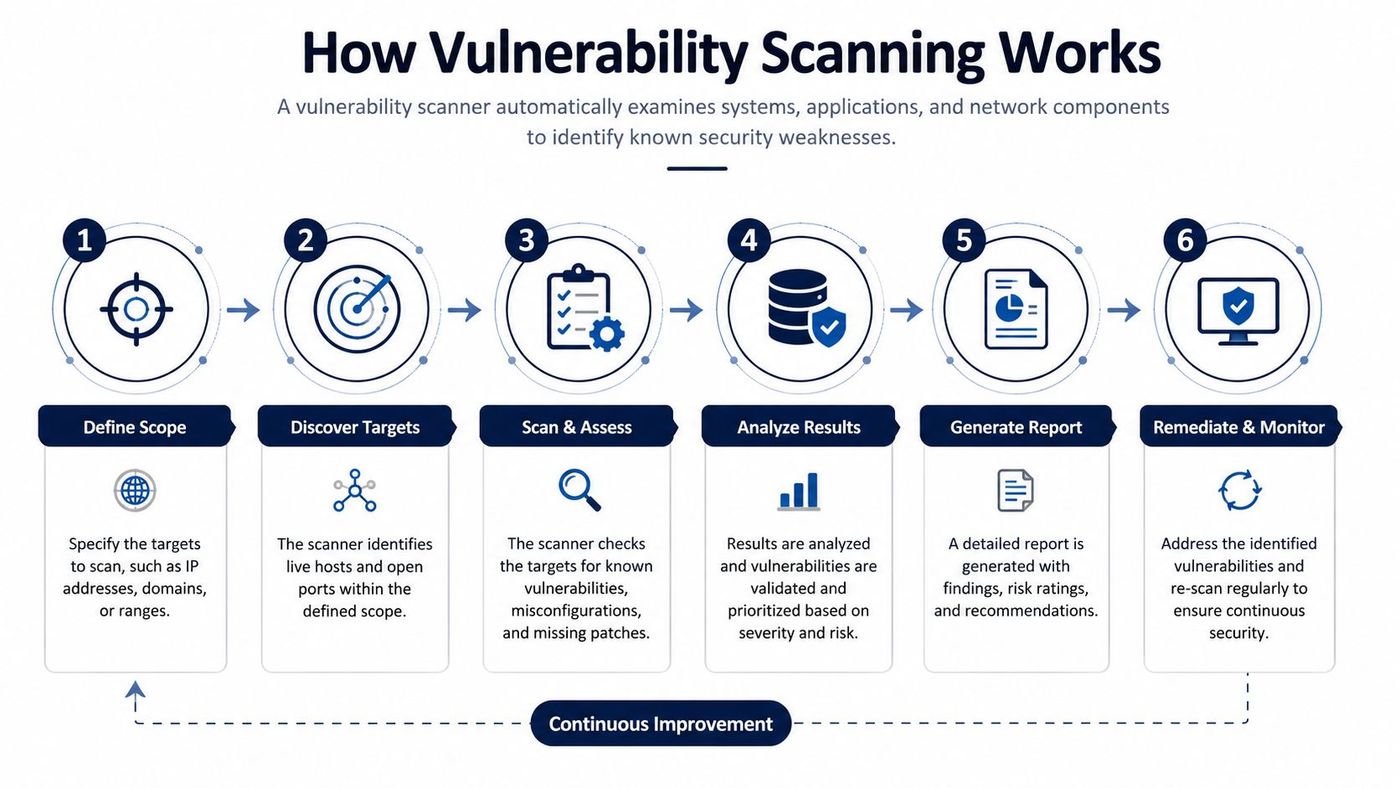
An unauthenticated scan views a system from the outside, similar to an internet attacker with no login. An authenticated, or credentialed, scan uses approved read-only access to inspect deeper details such as patch levels, installed software, and local settings. It generally produces more useful evidence, but the credentials must be protected, limited, monitored, and rotated through a controlled process.
Teams also choose between network-based scanners and agents installed on hosts. Network scans are useful for perimeter and connectivity visibility. Agents can report local state when a laptop is remote or a workload isn't reachable during a scheduled window. Scan windows should avoid operational disruption, and post-change or delta scans can focus on systems affected by a patch, deployment, or configuration update.
For application teams, a practical companion resource is securing live apps with vulnerability scanning, particularly when the application itself changes more often than the underlying network. The important principle is simple: raw scanner output is not a risk decision. Its value appears when findings move into triage, remediation, and verification.
No single scan sees everything. An external network scan can show what an attacker reaches from outside, but it won't reveal every local setting on a workstation. A host scan can inspect a server's software inventory, but it may not identify a business logic flaw in a customer portal. SMBs usually gain better coverage by combining methods according to their assets and risk.
| Scan Type | What It Covers | Visibility Level | Best Use Case | Key Trade-off |
|---|---|---|---|---|
| Network | Internet-facing services, network devices, servers, and exposed ports | External or internal network view | Perimeter discovery and infrastructure exposure | Can miss local configuration and patch details |
| Host-based | Operating systems, installed software, patches, and local security settings | Deep view of the host | Laptops, servers, and cloud workloads | Requires agents or reliable host access |
| Authenticated | System state available through approved credentials | Deep internal view | Patch verification and configuration assessment | Credentials need careful protection and maintenance |
| Unauthenticated | Services and weaknesses visible without login | Attacker-like external view | Measuring reachable exposure | Produces less detail about internal conditions |
| Web application | Live HTTP applications and application-layer behaviour | Application-level view | Customer portals, e-commerce, and business apps | Needs careful tuning and may require manual validation |
A network scan is often the first practical layer for a smaller company. It can reveal an exposed administration service, an outdated perimeter appliance, or a forgotten development system. It won't reliably show whether every endpoint has the right patch level or whether a local policy is unsafe.
A host-based scan adds that local perspective. Agents or authenticated connections can inspect laptops, servers, and cloud workloads for missing patches and misconfigurations. The trade-off is operational. The team must deploy the agent, maintain coverage, and investigate systems that are offline or reporting stale data.
Authenticated scanning is especially valuable for internal systems because it can distinguish an installed patch from a service banner that merely looks current. Unauthenticated scanning remains important because it shows what an outsider can observe without privileges. Using both perspectives helps identify the difference between internal weakness and externally exploitable exposure.
Web application scanning deserves its own place in the programme. Generic network checks may identify that a web server is running, but application testing can examine issues such as cross-site scripting and SQL injection. A customer portal, online booking service, or payment workflow may need application testing alongside infrastructure scans.
An SMB handling card data or health records will generally need authenticated network and host coverage, supported by periodic web application testing. A smaller operation with limited public services may begin with external network scanning, then expand into authenticated endpoint and cloud coverage as its inventory and operating model mature.
Penetration testing remains complementary rather than interchangeable. A penetration testing service can examine realistic attack paths, while vulnerability scanning supplies repeatable coverage for known conditions between formal tests.
Tool selection should follow coverage requirements, not a dashboard demo. Open-source options such as OpenVAS and Nuclei can suit teams with the skills to configure, update, tune, and integrate them. Commercial platforms such as Tenable Nessus, Qualys VMDR, and Rapid7 InsightVM commonly add vendor support, workflow integrations, and broader operational management.
Cloud-native products address a different layer. AWS Inspector and Microsoft Defender for Cloud can assess cloud workloads and related security conditions from within their respective ecosystems. Web specialists such as Burp Suite and OWASP ZAP focus on live applications and application-layer testing rather than acting as general infrastructure scanners.
| Category | Examples | Strengths | Limitations | Best Fit For |
|---|---|---|---|---|
| Open-source | OpenVAS, Nuclei | Flexible, accessible, useful for targeted assessments | Requires internal maintenance, tuning, and integration | Technical teams with available security expertise |
| Commercial platform | Tenable Nessus, Qualys VMDR, Rapid7 InsightVM | Mature reporting, support, asset and workflow features | Licensing and configuration still require governance | SMBs needing managed operational visibility |
| Cloud-native | AWS Inspector, Microsoft Defender for Cloud | Cloud-aware assessment and tenant integration | May not cover non-cloud assets equally | Cloud-heavy environments |
| Web application | Burp Suite, OWASP ZAP | Application-focused testing and request analysis | Requires careful scope and human review | Customer portals and bespoke applications |
A CVSS score describes technical severity, but it doesn't determine your business priority on its own. A sensible triage decision combines:
A high technical score on a disposable test server may require a scheduled fix. A medium finding on a customer-facing production database may warrant immediate containment and validation. Analysts should confirm the asset, reproduce the evidence safely, check whether the vulnerable component is present, and determine whether controls reduce exposure.
Practical rule: Prioritise the weakness that is exploitable, reachable, and connected to something important, not simply the finding with the loudest label.
A defensible programme begins with scope. List the assets you own or operate, record their business purpose, identify the data they handle, and note whether they're internet-facing, remote, segmented, or hosted in a cloud tenant. If the inventory excludes a system, the scan report can look clean while the business remains exposed.
Canadian federal guidance recommends regular internal and external assessments with automated tools, followed by manual testing and validation. The Government of Canada vulnerability management guideline describes that combined model. British Columbia's vulnerability management standard also describes continuous internal and external scanning, with findings parsed by vulnerability response management and used to notify owners.
A baseline schedule should reflect exposure and change velocity. Many SMBs can use quarterly external scanning as a starting point, with more frequent checks for internet-facing systems and scans after significant deployments or configuration changes. The CIS Vulnerability Scanning Standard describes monthly scanning for High-risk infrastructure, quarterly scanning for Medium-risk infrastructure, and semi-annual scanning for Low-risk infrastructure. It also says systems without a risk rating should be treated as High until they're rated, while High-risk web applications require quarterly scans or scanning after significant change. These frequencies are documented in the Government of Canada digital security guidance.
The Cyber Centre's risk-assessment guidance says organizations should scan systems and hosted applications at an organisation-defined frequency, and again when a new vulnerability that may affect the system is identified and reported. That means a calendar alone isn't enough. A newly disclosed weakness can trigger an out-of-cycle assessment.
External probing can't show every guest operating system, identity setting, permission, or workload condition inside AWS, Azure, or Google Cloud. Create approved scanner accounts and define exactly what they can inspect. Canadian cloud guidance says technical vulnerability assessments may require notification and authorisation from the cloud service provider so legitimate testing isn't mistaken for an attack. The Cyber Centre cloud-security guidance supports that need for planned, authorised assessment.
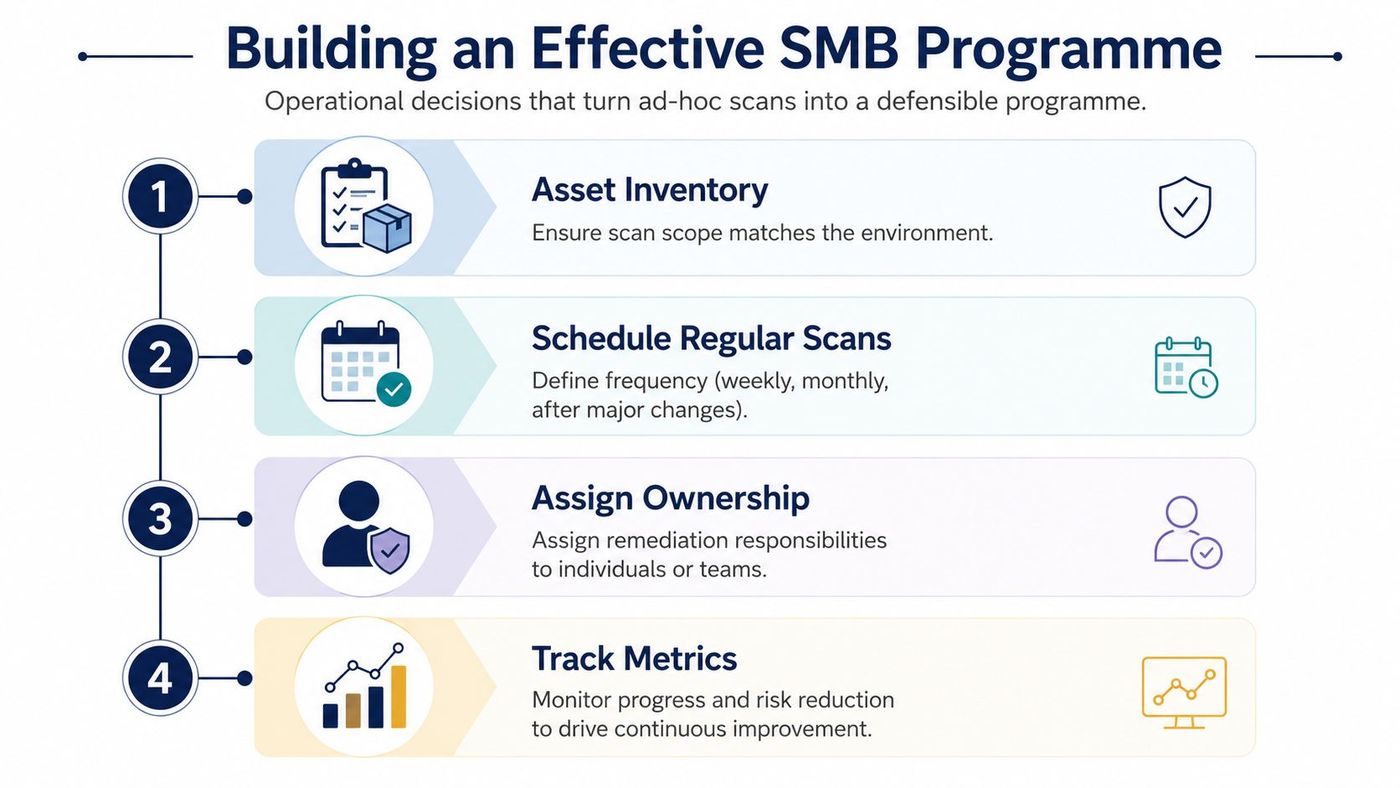
Map each finding to a named team. IT may handle workstation patches, infrastructure may own servers and network devices, and developers may remediate application dependencies or code-level weaknesses. Define remediation deadlines according to severity and business impact, then create tickets that include evidence, affected assets, required action, and an accountable owner.
After deployment, perform a verification scan. Retain the original report, the remediation record, the verification result, and any approved exception. Those records can support audits, insurance reviews, and incident investigations. A practical vulnerability management operating model turns scanning from an occasional technical task into a controlled risk-reduction process.
Scanning supports compliance, but it doesn't equal compliance. A clean report can show that the scanner found no matching weaknesses within its scope. It can't prove that the organisation has effective policies, trained staff, appropriate access controls, tested backups, or a workable breach response plan.
For healthcare organisations handling electronic protected health information, the HIPAA Security Rule requires risk analysis and risk management. Vulnerability identification forms part of that risk-analysis process, but scanning must sit alongside administrative, physical, and technical safeguards. Canadian healthcare providers may also have provincial privacy duties, contractual requirements, and internal security standards that extend beyond HIPAA.
For payment environments, PCI DSS Requirement 11 explicitly addresses vulnerability assessment activities, including quarterly external and internal scans and scans after significant change. A scan report can provide evidence for those activities, but only if scope, authentication, exceptions, remediation, and retesting are documented.
PIPEDA requires safeguards appropriate to the sensitivity of personal information. Vulnerability scanning can support those safeguards by identifying known weaknesses in systems that store or process personal data. It doesn't replace privacy governance, data minimisation, access reviews, breach procedures, or decisions about retention.
Finance and legal firms face a similar reality. Clients, regulators, and insurers may expect demonstrable cybersecurity risk management, yet no single scanner can validate the entire programme. A useful compliance package connects each finding to an asset owner, remediation decision, verification result, and approved exception where a fix can't be applied immediately.
A scan report is evidence of an assessment activity, not proof that every security control works.
Keep reports in a controlled repository with dates, scope, scanner configuration, findings, tickets, and retest results. Teams reviewing broader IT compliance in 2026 can use the same principle: map technical evidence to the requirement, then preserve the surrounding governance and operational records.
The in-house versus MSSP decision depends less on company size than on operating capacity. Consider the depth of your security staffing, whether you need predictable spending, and how quickly someone must respond to a critical finding outside normal business hours.
An in-house model can work when staff have time to maintain credentials, tune scan policies, investigate false positives, coordinate patches, and produce audit evidence. An MSSP becomes more practical when the environment includes mixed cloud and on-premises systems, critical findings need continuous triage, or internal staff can't reliably close the loop from detection to verification. The MSSP security services overview provides useful context for evaluating that operating model.
First 30 days, establish visibility. Build the asset inventory, classify systems by business importance, identify internet-facing services, and define approved scan boundaries. Confirm who owns each asset and document cloud-provider authorisation requirements before testing begins.
Days 31 to 60, improve scan depth. Deploy authenticated scans using restricted, read-only credentials where possible. Protect scanner accounts with strong access controls, avoid unnecessary privilege, monitor their use, and create a process for credential rotation. Add host coverage for endpoints and servers, then include cloud-native assessment for workloads that external scanning can't inspect adequately.
Days 61 to 90, prove the workflow. Create tickets for findings, assign remediation owners, define severity-based service levels, and test the path from patch deployment to verification scan. Produce an executive report that summarises unresolved high-risk exposure, affected business services, ageing exceptions, remediation progress, and decisions requiring leadership attention.
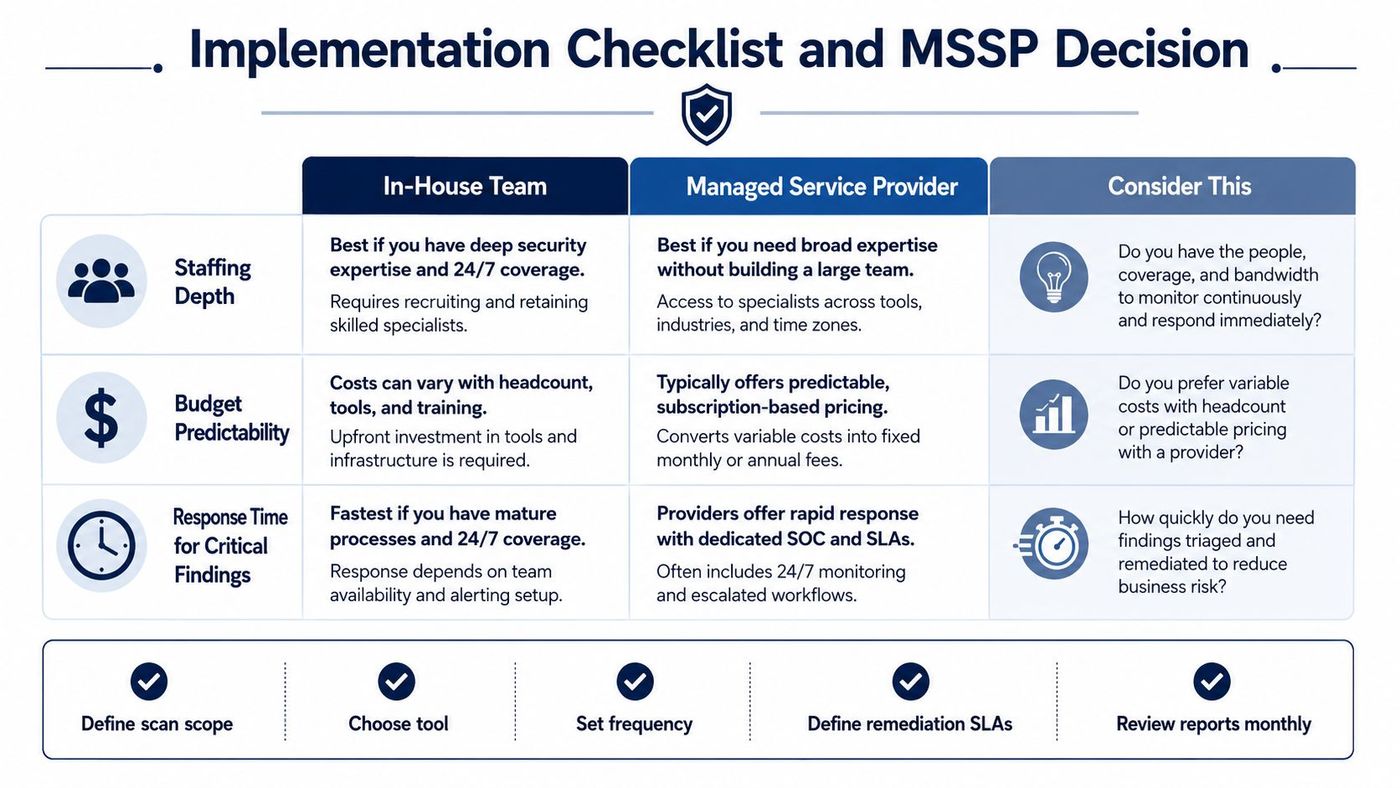
Use an in-house programme when your team can sustain the work, not merely launch the tool. Choose an MSSP when you need ongoing scan tuning, coverage monitoring, prioritised remediation support, after-hours triage, mixed-environment coordination, and documented evidence on demand. A managed service should clarify responsibilities rather than create another dashboard that nobody reviews.
CloudOrbis Inc. offers vulnerability assessments and ongoing vulnerability management that can connect regular scanning with prioritisation, remediation tracking, endpoint protection, and broader managed security support. For a Canadian SMB, that can provide a structured alternative to building every scanning, triage, and reporting function internally.
CloudOrbis Inc. can help you inventory your environment, extend vulnerability scanning across endpoints, applications, and cloud assets, and turn findings into verified remediation work. Visit CloudOrbis Inc. to discuss a practical managed security programme for your organisation.
Book a 30-minute call with a senior engineer. No sales script, just straight answers about your environment.


