Toronto IT Support Services: A Practical Buyer's Guide
A practical buyer's guide to Toronto IT support services for SMBs. Learn what to expect, how to evaluate providers, pricing models, and next steps.

A practical buyer's guide to Toronto IT support services for SMBs. Learn what to expect, how to evaluate providers, pricing models, and next steps.
Toronto's cybercrime rate rose to 162.4 incidents per 100,000 people in 2025, up from 146.1 in 2024, while the national rate fell during the same period, according to the GTA SMB Cybersecurity Report. Toronto businesses recorded 10,280 reported cybercrime incidents in 2025, compared with 9,271 the year before. That local increase changes the IT support conversation. For a Toronto SMB, managed support isn't just a way to reset passwords faster. It's a risk-reduction investment tied to security, uptime, compliance, and recovery.
Toronto's cybercrime pressure is moving against local businesses. Ontario recorded 196.4 incidents per 100,000 people in 2025, while the national rate declined during the same period, according to the same GTA cybersecurity analysis. That gap matters to a 20- to 75-person company. A small internal team may not have enough coverage to monitor endpoints, investigate alerts, validate backups, and respond outside business hours.
Toronto IT support services should be evaluated as a risk-reduction investment, not a catalogue of technical tasks. A managed agreement may combine helpdesk assistance, remote and on-site support, device monitoring, patching, Microsoft 365 administration, backup management, cybersecurity controls, and technology planning. The provider should extend your team's capacity, define ownership clearly, and reduce the chance that a routine issue becomes an interruption.
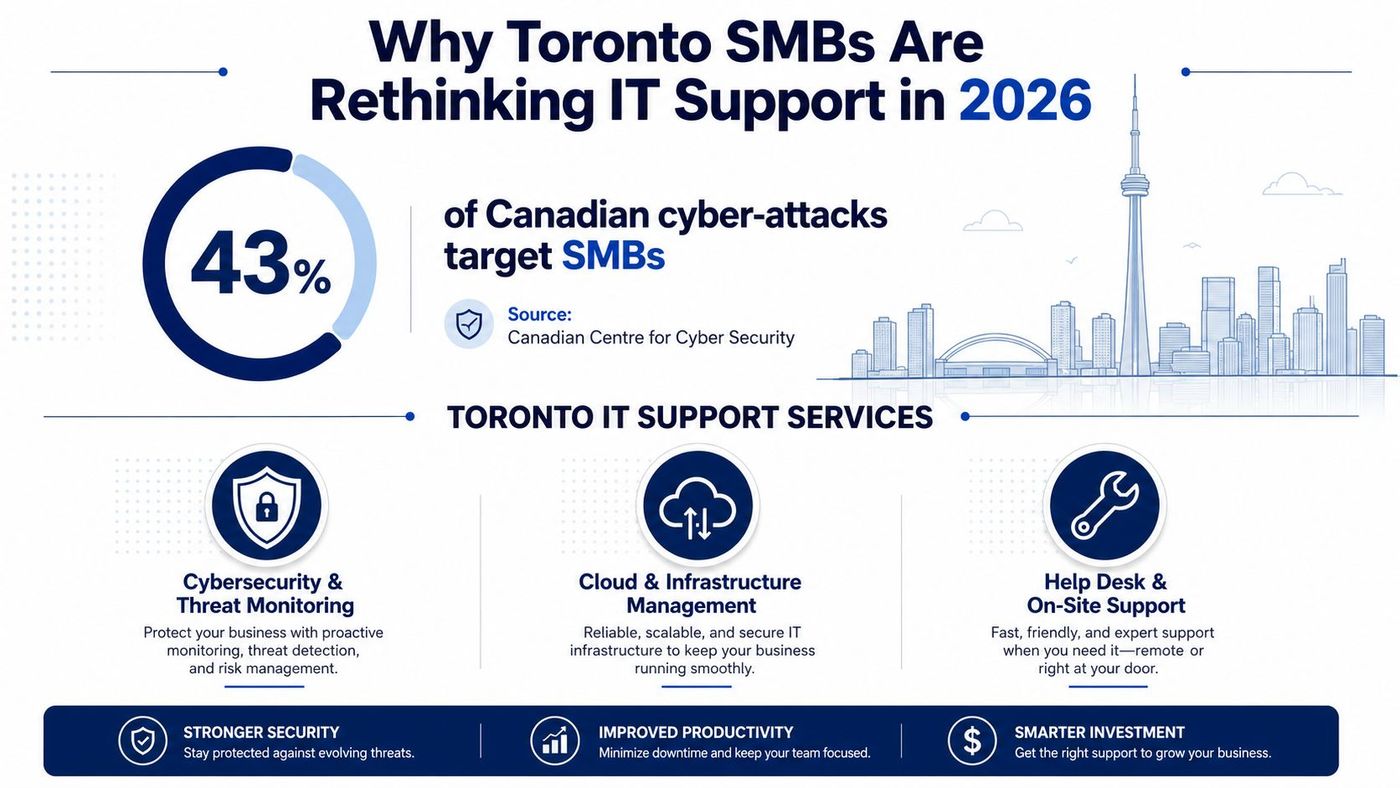
Toronto's professional-services economy attracts credential theft, business email compromise, and ransomware. Law firms, accountants, brokers, consultants, clinics, and construction companies hold valuable information and depend on systems that cannot stay offline while one generalist investigates an incident.
Compliance raises the operating standard. Healthcare providers must protect patient information. Legal firms need defensible access controls and retention practices. Retailers handling payment data require safeguards around cardholder information. Your provider should connect day-to-day controls with PHIPA, PIPEDA, PCI DSS, and contractual obligations.
Coverage is another practical concern. One employee may manage Microsoft 365, another may handle network equipment, and nobody may own tested disaster recovery. Outsourcing can fill those gaps only if the agreement defines responsibilities, escalation paths, response windows, and deliverables.
Consultant's view: Buy managed IT when the provider can reduce the likelihood, duration, or impact of a business interruption. A longer service list is not proof of better protection.
Use SigOS's guide to prioritize revenue with IT planning when technology spending competes with hiring, sales, and operations. For context on the local market, review CloudOrbis's overview of Toronto tech companies. Then select a vendor against your own risks, compliance duties, response requirements, and recovery expectations.
A serious managed-IT agreement should describe outcomes, not just tool names. “Monitoring included” is meaningless unless the contract explains what gets monitored, who receives the alert, how quickly someone responds, and what happens when the issue requires a project rather than routine support.
The daily service normally begins with a helpdesk that handles user incidents, access requests, device problems, Microsoft 365 issues, and basic application troubleshooting. Ask whether the desk is available after hours, whether users can call or submit tickets, and whether critical incidents receive direct phone escalation.
Remote monitoring and management should cover device health, patch status, antivirus or endpoint detection alerts, storage capacity, backup jobs, and service availability. Patching needs an approval and exception process, because an uncontrolled update can disrupt a line-of-business application, while delayed patching leaves known weaknesses exposed.
On-site support still matters for network equipment, printers, meeting-room systems, cabling issues, hardware swaps, and offices that depend on physical infrastructure. A provider may include remote troubleshooting but bill separately for travel, dispatch, or hands-on work, so the contract must say where the boundary sits.
Microsoft 365 administration should include identity lifecycle management, MFA, conditional access, mailbox security, licensing coordination, SharePoint and OneDrive governance, and tenant configuration. If your business is considering Copilot or other AI tools, ask how the provider will address oversharing, permissions, retention, and data-loss prevention before enabling them.
Cloud and server administration covers Azure resources, virtual machines, firewalls, storage, hybrid connectivity, and core infrastructure. Backup and disaster recovery should go further than confirming that a job completed. The provider should test restoration, document recovery procedures, and state recovery objectives in writing.
| Service Category | In Scope, Bundled | Out of Scope, Project-Billed |
|---|---|---|
| Helpdesk | User incidents, access support, routine troubleshooting | Application development or extensive training programmes |
| Monitoring and patching | Alerts, maintenance, approved updates, endpoint health | Major operating-system refreshes or unsupported systems remediation |
| Microsoft 365 | User administration, security configuration, licensing coordination | Tenant migrations, complex SharePoint builds, large data restructuring |
| Backup and recovery | Job monitoring, restore checks, recovery guidance | Full disaster-recovery redesign or emergency recovery outside agreed limits |
| On-site support | Included visits within the stated service area and terms | Cabling, construction work, hardware installation projects |
| Advisory services | Roadmap discussions, reporting, quarterly reviews | Mergers, acquisitions, office moves, and major infrastructure projects |
Scope drift causes many contract disputes. Assign a clear RACI, meaning who is responsible, accountable, consulted, and informed, for identity, applications, devices, internet connectivity, vendors, and approvals. Give an internal “tech champion” authority to approve routine changes and escalate business priorities.
Connectivity also belongs in the operating discussion. If your internet service is unreliable, managed endpoint support won't solve the root problem. Use a practical business internet guide from SwiftNet Wifi when comparing circuits, redundancy, and service expectations. For a broader explanation of how managed support works in the Toronto market, review CloudOrbis's Toronto managed-services guide.
The delivery model should follow the way your business operates. Remote-only support keeps costs and response logistics simple, but it depends on functioning connectivity, cooperative users, remote-access tools, and equipment that can be managed without physical intervention. It suits distributed teams with standardised devices and cloud-based applications.
On-site dispatched support makes sense when your business depends on office hardware, local servers, specialised equipment, or rapid hands-on intervention. A downtown law firm with 40 employees and regulated workloads may need guaranteed physical response because a network appliance, access-control system, or conference-room failure can affect client work immediately.
Hybrid support is the practical default for many GTA SMBs. Remote engineers handle routine alerts and user incidents, while a local technician handles hardware, office infrastructure, and incidents that can't be resolved securely over a remote session. That balance gives a distributed team in Mississauga and Markham broad coverage without paying for a permanent technician at each site.
| Criterion | Remote-Only | On-Site Dispatched | Hybrid, Recommended |
|---|---|---|---|
| Response model | Phone, portal, and remote tools | Physical dispatch for qualifying incidents | Remote triage with local escalation |
| Cost profile | Usually the leanest | Higher because travel and physical coverage are built in | Moderate, with coverage matched to risk |
| Best fit | Cloud-first, remote teams | Hardware-heavy or highly location-dependent offices | Most multi-site GTA SMBs |
| Coverage breadth | Strong for standard endpoints and cloud services | Strong for physical infrastructure | Broadest practical combination |
| Key risk | Physical issues take longer | Paying for presence you rarely use | Contract must define dispatch triggers |
Set service targets before signing. A useful comparison point is a P1 phone response within 15 minutes, remote resolution or active remediation within 4 hours where feasible, and on-site arrival within 4 to 8 hours across the GTA for incidents that require physical intervention. These are buying benchmarks, not substitutes for a written SLA.
For a deeper look at physical coverage, see CloudOrbis's on-site IT support resource. My decision rule is simple: if one full business day of outage would cost more than a year of hybrid coverage, the hybrid premium deserves serious consideration.
Toronto providers usually price managed IT support in three ways. Judge each model by the risks it covers, not by the lowest monthly figure. A proposal that excludes incident response, backup work, or after-hours support can leave an SMB paying more when operations stop.
Per-user pricing typically runs from $125 to $250 per user per month, based on Ontario IT support cost guidance. Budgeting is straightforward, and the model suits lean professional-services teams. Costs become less predictable when contractors, shared accounts, or users with multiple devices make the definition of “user” unclear.
Per-device pricing generally sits between $40 and $150 per endpoint per month. It fits warehouses, laboratories, studios, and other operational businesses where device counts do not match employee counts. Require a written coverage list. Servers, mobile devices, network equipment, and specialised systems may otherwise become billing disputes.
All-inclusive tiered packages commonly fall between $2,500 and $8,000 per month for a 20- to 75-person firm. They often bundle helpdesk, monitoring, backup, security controls, reporting, and vCIO guidance. Budgeting is easier, though strict user, site, or project limits can reduce flexibility.
| Model | Typical Range | Best Fit | Main Trade-off |
|---|---|---|---|
| Per user | $125 to $250 per user monthly | Lean professional-services teams | Contractors and device-heavy users can raise costs |
| Per device | $40 to $150 per endpoint monthly | Warehouses, labs, studios, and operational firms | Device definitions and coverage exclusions need scrutiny |
| Tiered package | $2,500 to $8,000 monthly | Firms wanting one accountable provider | Flexibility may be limited by package boundaries |
Ask what changes the quote. Location count, after-hours coverage, Microsoft 365 licensing, compliance requirements, onboarding, on-site dispatch, and backup architecture all affect the total. Cloud-only backup does not provide the same protection as backup-as-a-service with immutable storage, documented retention, and tested restoration.
Per-user pricing suits lean teams. Per-device pricing suits hardware-heavy operations. Tiered pricing suits buyers who want predictable budgeting and one accountable vendor. Review CloudOrbis's break-fix versus managed-services analysis before choosing between reactive support and managed services. Your vendor checklist should require clear inclusions, exclusions, response targets, backup ownership, and project pricing.
Compliance shouldn't sit in a separate binder from IT operations. Your provider's monitoring, identity, backup, and incident processes should produce evidence that supports the obligations your organisation already carries.
Healthcare and health-tech companies need providers familiar with PHIPA, Ontario healthcare cybersecurity expectations, encrypted devices, role-based access, and auditable logs. A clinic should be able to identify who accessed sensitive records, revoke access promptly when employment changes, and recover systems without exposing patient information.
PIPEDA matters to organisations that handle personal information in commercial activity. Your support contract should address access controls, privacy incident escalation, breach documentation, data handling, and the roles of the business and service provider. Don't accept a generic promise to “follow privacy laws.” Ask for written responsibilities and notification procedures.
Firms serving Quebec customers may also need to assess Law 25 obligations, including privacy governance and impact assessments. Retailers and e-commerce companies processing payment information should examine PCI DSS 4.0 responsibilities, network segmentation, access restrictions, logging, and attestation work. Your IT provider may not own every compliance task, but it should identify the technical controls it operates and the evidence it can provide.
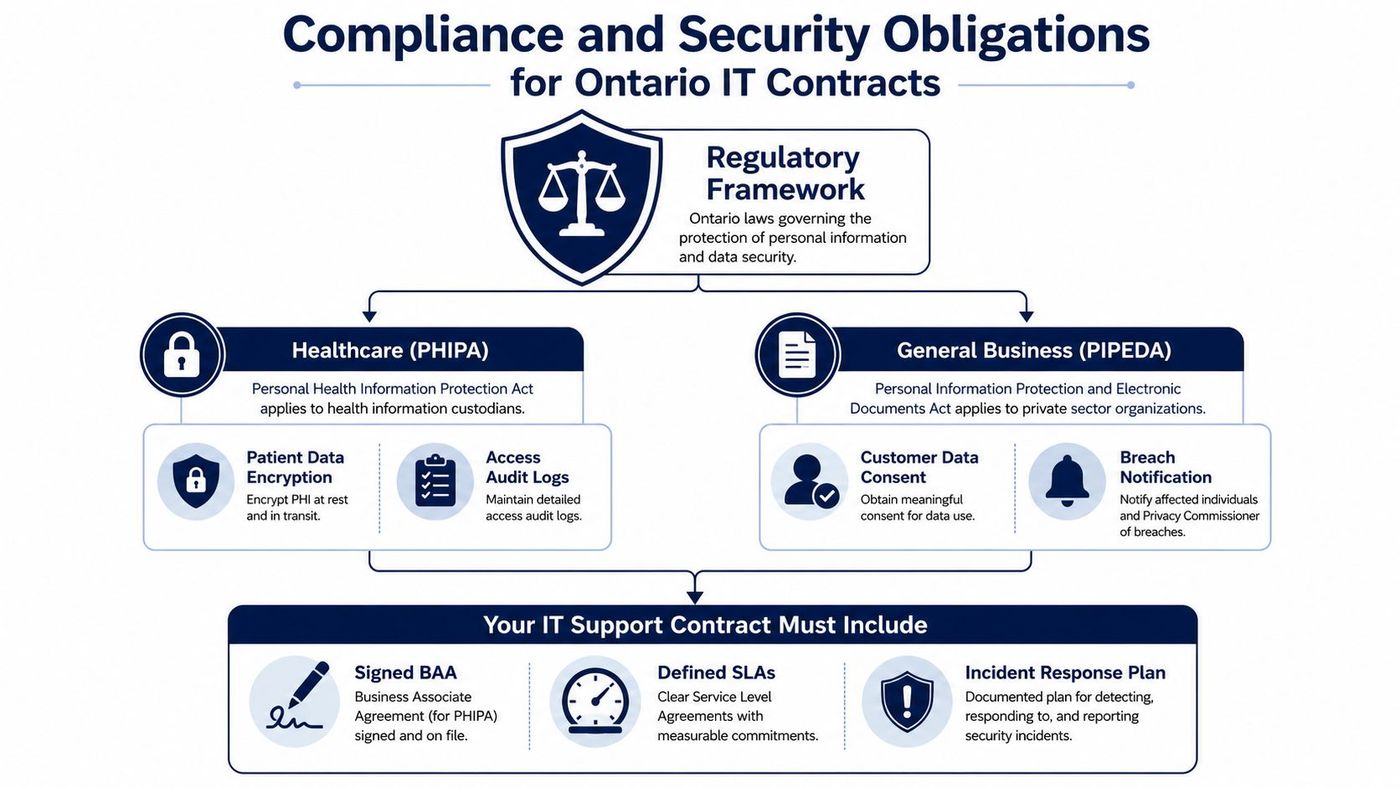
The Canadian Centre for Cyber Security promotes a unified source of cybersecurity guidance and a layered security posture. In practical terms, that means combining identity security, endpoint protection, email controls, vulnerability management, and recoverable backups rather than buying disconnected tools.
Your contract should state:
A practical small-business checklist, such as MY CYBER GUARD's security checklist, can help identify gaps before you meet providers. Use it as a conversation starter, then translate every relevant requirement into a deliverable, owner, and review cadence.
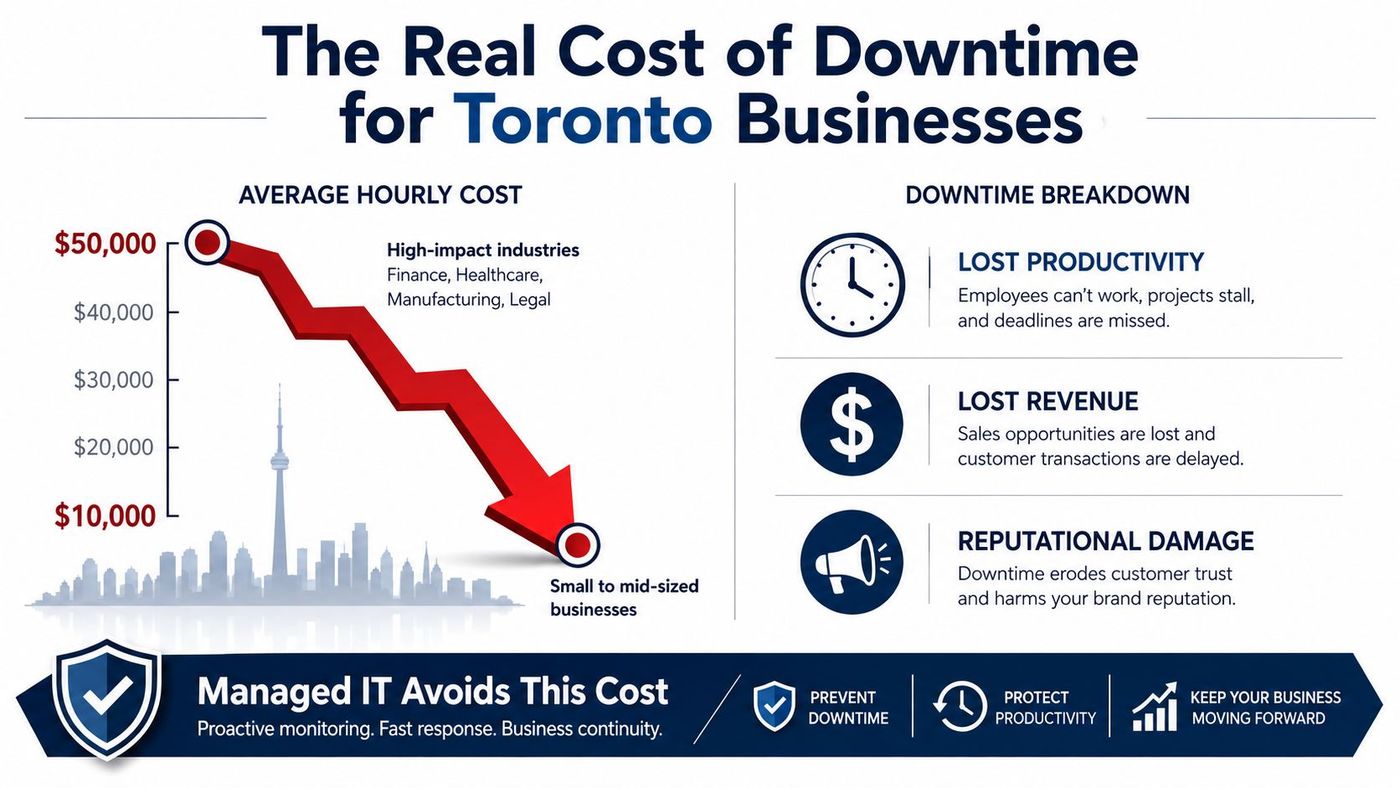
The strongest business case for managed IT is downtime avoidance, not a technology refresh. For an Ontario business with about 25 employees, one hour offline can cost roughly $2,000 to $6,000 in lost revenue and idle payroll. Across Canadian SMBs, the estimated range is about $1,500 to $15,000 per hour, according to IT Rapids Support's downtime analysis.
The financial impact extends beyond the initial outage. A clinic may lose appointment capacity, a law firm may miss billable work, and a manufacturer may interrupt production while staff wait for systems to return. Recovery labour, emergency vendors, customer communication, and reputational harm can continue after the technical fault is fixed.
Start with four questions:
Compare those answers with the controls each provider delivers. Centralised monitoring can identify failing services earlier. Patch management reduces avoidable vulnerabilities. Tested backups shorten restoration time. A documented incident playbook reduces delays when the wrong person is coordinating recovery.
Treat the monthly fee as a risk-reduction line item, not an IT convenience charge. Compare prevention and recoverability with the financial and operational consequences of a serious interruption, then choose the provider that can demonstrate both.
Shortlist providers against evidence, not presentation quality. A polished sales meeting doesn't prove that the service desk will respond during a critical incident or that backups can be restored.
Be cautious when a provider demands long-term lock-in with vague exit language. You should understand data-return obligations, transition assistance, tool removal, documentation ownership, and termination costs before signing.
An overseas-only helpdesk may be acceptable for some low-risk environments, but it's a poor fit when Canadian data handling, local dispatch, or regulated workloads are central concerns. Walk away from providers that can't show a documented incident-response runbook, or that advertise a flat fee while excluding patching, backup monitoring, security response, or essential Microsoft 365 administration.
Use a structured selection process:
The CloudOrbis IT consultant resource for Toronto businesses offers another perspective on the advisory role, but the final decision should come from your risk assessment, service requirements, and contract review. CloudOrbis Inc. provides Canada-based managed IT support, cybersecurity, cloud and Microsoft 365 services, backup and disaster recovery, on-site assistance, and vCIO guidance for SMBs that need a more proactive operating model.
Book a free IT assessment with CloudOrbis Inc. to receive a practical risk snapshot, a review of your current support gaps, and a sample SLA you can use when comparing Toronto IT support providers. Bring your outage concerns, compliance requirements, Microsoft 365 questions, and vendor contract, and leave with clear next steps.
Book a 30-minute call with a senior engineer. No sales script, just straight answers about your environment.


