Data Recovery Plan Outline for Canadian SMBs
Copy a data recovery plan outline with RTO, RPO, roles, backups, tests and PIPEDA steps for Canadian SMBs.

Copy a data recovery plan outline with RTO, RPO, roles, backups, tests and PIPEDA steps for Canadian SMBs.

In a 2025 ransomware survey reported by SecurityBrief Canada, 94% of Canadian respondents felt confident they could recover, yet only 25% had fully restored their data after an attack; 3% recovered nothing. Confidence and a successful backup job are weak evidence that your business can resume work.
A useful data recovery plan outline closes that gap. It identifies who restores each service, what counts as an acceptable recovery, and who decides whether a privacy breach requires notification. For an operations lead, the deliverable isn't a reassuring policy document. It's a runbook backed by a measured restore, a staged rebuild, and a documented privacy decision.
Complete the outline before drafting policy prose. Missing owners, conflicting priorities, and untested assumptions are easier to spot in a table than in a lengthy document.
Use the following parts in writing order. Replace role titles with named people in your working copy, and give each approver authority to accept the result or require changes.
| Plan part | What to record | Approver | Review trigger |
|---|---|---|---|
| Purpose and scope | Systems, sites, and scenarios in and out of scope | Executive sponsor | New site, acquisition, or major system |
| Business-impact tiers | Service, owner, RTO, RPO, minimum capacity, restore order | Business owner with IT | New critical process or changed tolerance |
| Roles and escalation | Incident commander, privacy lead, counsel, insurer, spokesperson | Executive sponsor | Role vacancy or vendor change |
| Backup inventory | Scope, copies, media, location, encryption, access, retention | Technical owner | Backup job failure or new data store |
| Recovery procedures | Isolate, preserve, rebuild, validate, reconnect, by scenario | Technical owner | Failed test or architecture change |
| Communications and privacy | Decision record, regulator report fields, audience messages | Privacy lead with counsel | Breach assessment or law change |
| Testing and evidence | Scenario, date, times, data point, defects, action owner | Incident commander | Each scheduled test |
| Maintenance | Version, next review date, related policies | Plan owner | Annual review or after every incident |
An approver isn't necessarily the person doing the work. A database administrator may restore a production database, but the manufacturing manager must confirm that staff can release work orders and record completed production.
Every row needs a named owner and a measurable result. Suitable results include an approved recovery target, a verified clean recovery point, a written notification decision, or a dated test report with unresolved defects assigned.
Completion rule: A backup checkbox proves that a setting exists. A measured restore proves whether the recovery method works.
Separate the failure scenarios before writing procedures:
These scenarios can overlap, but they shouldn't share a generic instruction to restore the latest backup. Restoring a deleted folder doesn't require the same response as rebuilding a compromised Microsoft 365 tenant.
Write scope boundaries plainly. Include outsourced applications, remote locations, and essential cloud services, but also identify systems that the business has deliberately excluded.
Record how staff will operate while restoration proceeds. A dispatch team may need an approved paper workflow; a legal team may need controlled access to urgent matter information. The recovery-tier matrix supplies the downtime and data-loss limits behind these decisions.
A backup setting shows that a job is configured. A measured restore shows how much service the business can recover, and how quickly. Use tier targets to set acceptable limits, then verify those limits through a staged rebuild.
| Tier | Example systems | RTO | RPO | Minimum capacity |
|---|---|---|---|---|
| Tier 1 | Clinical, production, dispatch, payment, legal records | 90 minutes | 60 minutes | Core transactions only |
| Tier 2 | Email, files, departmental apps | 8 hours | 4 hours | Key departments working |
| Tier 3 | Archives and convenience tools | 72 hours | 24 hours | Deferred until Tier 1 and 2 are stable |
A business-impact analysis (BIA) identifies critical services, their dependencies, owners, and the consequences of an outage. Use the business-impact analysis guide to help structure that assessment. Business owners should approve the recovery objectives based on the impact of downtime and data loss; IT should confirm that the recovery approach can meet them.
A recovery time objective (RTO) is the maximum tolerable time before a service is restored. A recovery point objective (RPO) sets how old recovered data can be, and therefore the maximum tolerable data loss.
Keep the two limits distinct. A service might be restored within its RTO but with data older than its RPO. Or the data may be current, while the service has remained unavailable too long. Either result misses the agreed target.
Pair the tier matrix with a service register. For each service, record its technical owner, business approver, escalation path, and restoration sequence.
For example, Tier 1 recovery may require restoring trusted identity, network, and database services before the application. Tier 2 collaboration tools may depend on identity and file services being stable. Tier 3 archives can wait until higher-priority services are accepted. These dependencies matter: a payment application may show as healthy while remaining unusable if staff cannot authenticate.
Describe the work people must be able to do, not just the systems that must be online. For a clinic, minimum capacity might mean authorised staff can access the current patient schedule and record essential clinical information. For a manufacturer, it might mean supervisors can view released work orders and record production safely.
Have a business user complete those tasks during acceptance. A server health check alone does not prove the service is usable.
Document any manual workaround for the period before the RTO expires. State who authorises it, where temporary records are kept, and how staff reconcile them after restoration. Close the outline only when a measured restore, staged rebuild, and PIPEDA notification decision are documented.
Recovery slows down when people have responsibility without decision-making authority. Fill the following seats even if a smaller organisation assigns several roles to the same person.
| Seat | Decision authority | Boundary |
|---|---|---|
| Incident commander | Declares the incident and sets priorities against the tier list | Doesn't bypass privacy or evidence-preservation controls |
| Technical recovery lead | Isolates systems and selects a proposed restore point | Doesn't notify clients |
| Privacy lead | Assesses personal-information involvement and potential significant harm | Doesn't declare a system technically clean |
| Legal counsel | Reviews the notification record and legal obligations | Doesn't direct technical changes without coordination |
| Insurer contact | Coordinates policy notice and approval requirements | Doesn't assume every vendor or expense is covered |
| Executive spokesperson | Approves and issues external statements | Doesn't speculate about unconfirmed exposure |
Say a clinic's database is ready to return, but the restored permissions give reception staff access to restricted clinical notes. The technical lead has recovered the database, but the privacy lead should pause production release until access controls are corrected.
Legal and finance teams need the same authority boundary for confidential client or financial records. Write the pause-and-release process into the plan so staff don't have to negotiate it during an outage.
Counsel should review the notification record, including decisions not to notify. The insurer contact should check policy requirements before a ransom-payment decision or a vendor engagement outside the policy. Neither action should happen through an informal technical conversation.
Adopt explicit response targets as internal planning rules. For example, contact the on-call technician within 15 minutes and the incident commander within 30 minutes of identifying a qualifying incident.
Bring in privacy and counsel whenever personal information may be involved. Escalate to the executive sponsor as soon as the team expects a Tier 1 RTO to be missed, rather than waiting until the deadline expires.
Attach a concise call tree to the runbook. It should show who calls whom, the acknowledgement deadline, and the next person to contact if nobody answers. Keep procedure steps elsewhere so the call tree remains usable under pressure.
The Canadian Centre for Cyber Security's backup guidance describes the 3-2-1 baseline as three copies in total, consisting of an original and two backups, stored on two different media types with one copy off site. It also recommends encryption and access limited to people responsible for testing or restoration.
Translate that baseline into fields your technical owner can verify. A label such as cloud backup doesn't establish geographic separation, isolation, or protection from compromised production credentials.
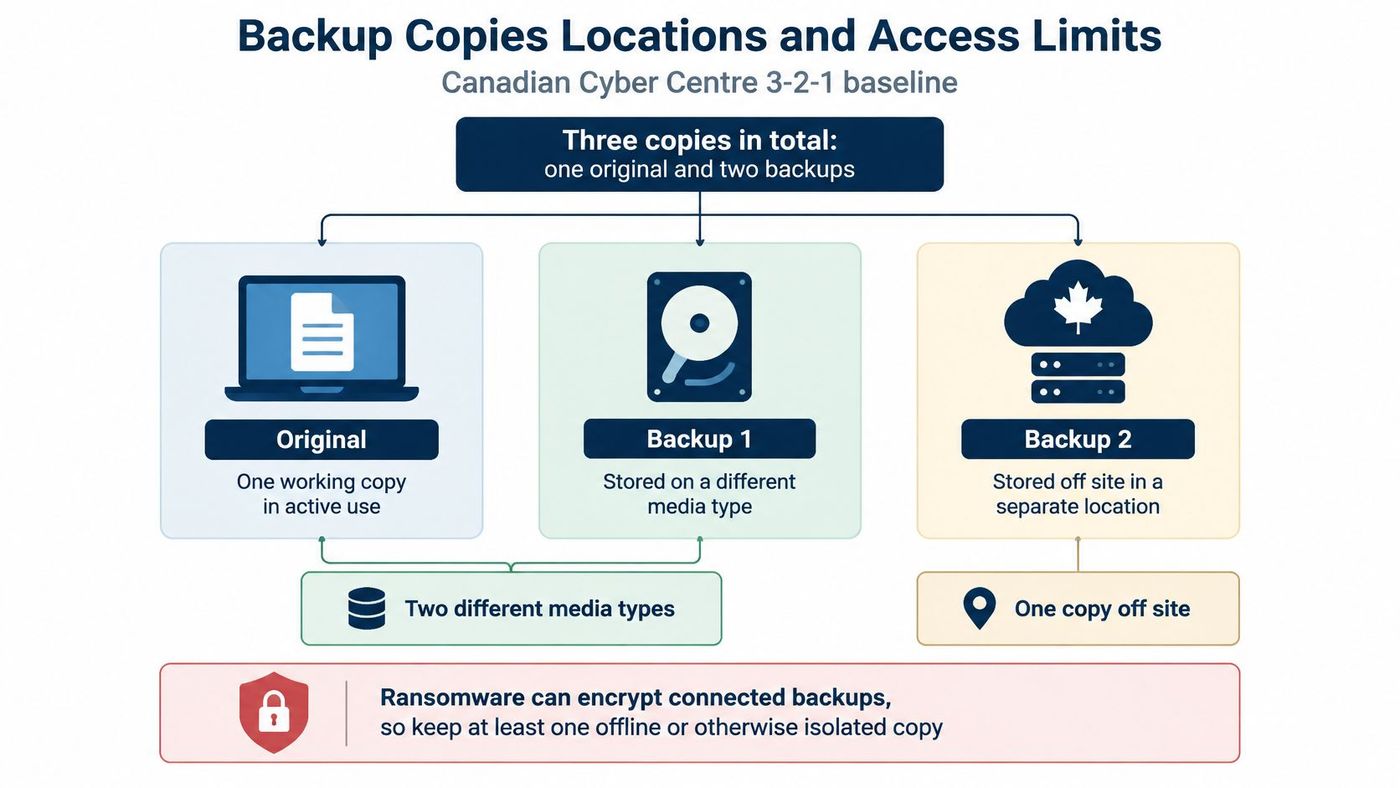
The following targets are practical design requirements for the example clinic. Offline copies and the secondary cloud copy may require more copies than the baseline minimum.
| Control | Target | Clinic example |
|---|---|---|
| Copies in total | Three minimum: one original and two backups | Live practice database plus backup copies |
| Media types | Two different types | Disk snapshots plus encrypted tape or another distinct medium |
| Off-site copy | One in a geographically separate location | Secondary cloud copy outside the production region |
| Offline copies | At least two unreachable from networks and internet | Rotating daily offline copies, both disconnected when stored |
| Frequency | Matches the example Tier 1 RPO of 60 minutes | Hourly snapshots |
| Protection | Encrypted and write-protected or immutable | Encryption keys stored apart from production |
| Access | Limited to testers and restorers | Named restore group only |
A separate disk target isn't automatically a different media type. Document the actual storage medium rather than treating another folder, appliance, or account as sufficient.
Keep production administrators from deleting every recovery point. Separate backup administration, protect privileged accounts, and apply immutability or write protection where supported. Offline storage and immutability address different risks; don't mark them as interchangeable controls.
Inventory servers, databases, irreplaceable endpoint data, identity systems, configurations, and encryption keys. Include Microsoft 365 and other SaaS exports where native recovery features or recycle bins don't cover the business requirement.
In the clinic example, hourly snapshots support routine recovery of the practice-management database, while daily offline copies provide a separate fallback. If ransomware makes the recent snapshots untrustworthy, the daily copy may exceed the service's RPO. Record that gap rather than claiming the entire design meets the target.
Shared mail can sit in a lower tier if clinical workflows don't depend on it. Check that assumption with staff rather than classifying every email system identically.
A cloud tenant in the same region as production doesn't provide the geographic independence needed for a region-outage scenario. Record the recovery region and its dependencies explicitly.
For file-level basics, CTF Mobile Phones & Computer Repairs explains how to protect your computer data with CTF. For backup-chain design, compare incremental and differential backups against restoration speed and storage requirements.
For every job, record scope, frequency, retention, geographic location, media, isolation method, owner, access group, and last successful verification. The recovery procedure then identifies which inventory entry to use.
Use a shared sequence with scenario-specific branches. Don't ask an engineer to improvise the security checks while a business owner watches the outage clock.
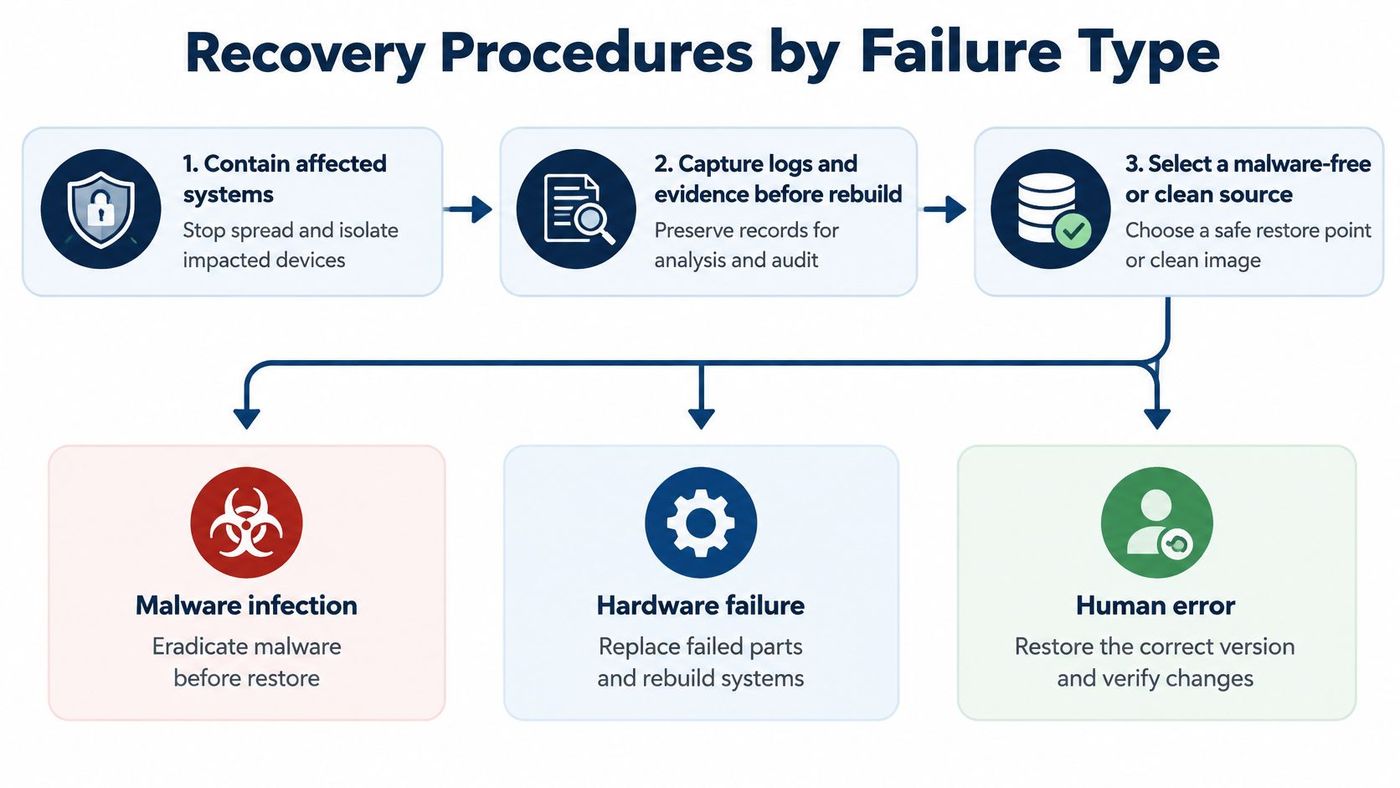
The runbook should include the console locations, required permissions, expected results, and stop conditions for each system. Store credentials in an approved secrets system, not in the procedure itself.
A faster restore isn't always safer. Restoring an unverified environment can destroy forensic evidence or give the attacker access again.
For lost or misplaced records, restore the missing set rather than isolating the whole network without cause. Verify that the selected version is correct and that recovery remains consistent with retention policy.
A missing laptop or paper record can also require a privacy assessment. Recovering a replacement copy doesn't establish where the original went or who accessed it.
For hardware or site loss, use the off-site recovery path and bring critical services to minimum capacity first. Confirm that the replacement environment has the networking, licensing, identity access, and computing capacity needed to operate, not merely store restored files.
Isolate affected systems and preserve ransom notes, logs, and relevant communications. Investigate possible data theft rather than assuming encryption was the only activity.
Rotate exposed credentials, including backup-administrator accounts, and check whether the attacker changed recovery settings. Prove the selected recovery point is clean before reconnecting restored systems.
Rebuild affected systems from trusted sources rather than relying on decryption in place as the recovery method. Successful decryption doesn't demonstrate that persistence, stolen credentials, or malicious configuration changes are gone.
Revoke active sessions and reset affected privileged accounts. Review administrator assignments, application permissions, authentication changes, mailbox forwarding rules, and other persistence paths.
Only restore mail or files after the team has secured the identity environment. Otherwise, the compromised administrator may retain access to the recovered information or delete it again.
Use system-specific Office 365 backup and recovery procedures to document the actual restore path. Close the recovery record with the start time, completion time, recovered data point, validation results, and the person who accepted the service back.
Under the Office of the Privacy Commissioner of Canada's PIPEDA guidance, an organisation must report a breach of security safeguards involving personal information when it poses a real risk of significant harm, notify affected individuals, and retain records of all breaches. Technical restoration doesn't resolve that decision.
Prepare the report template before an incident. Give the privacy lead a controlled place to record confirmed facts, uncertainties, supporting evidence, and approvals.
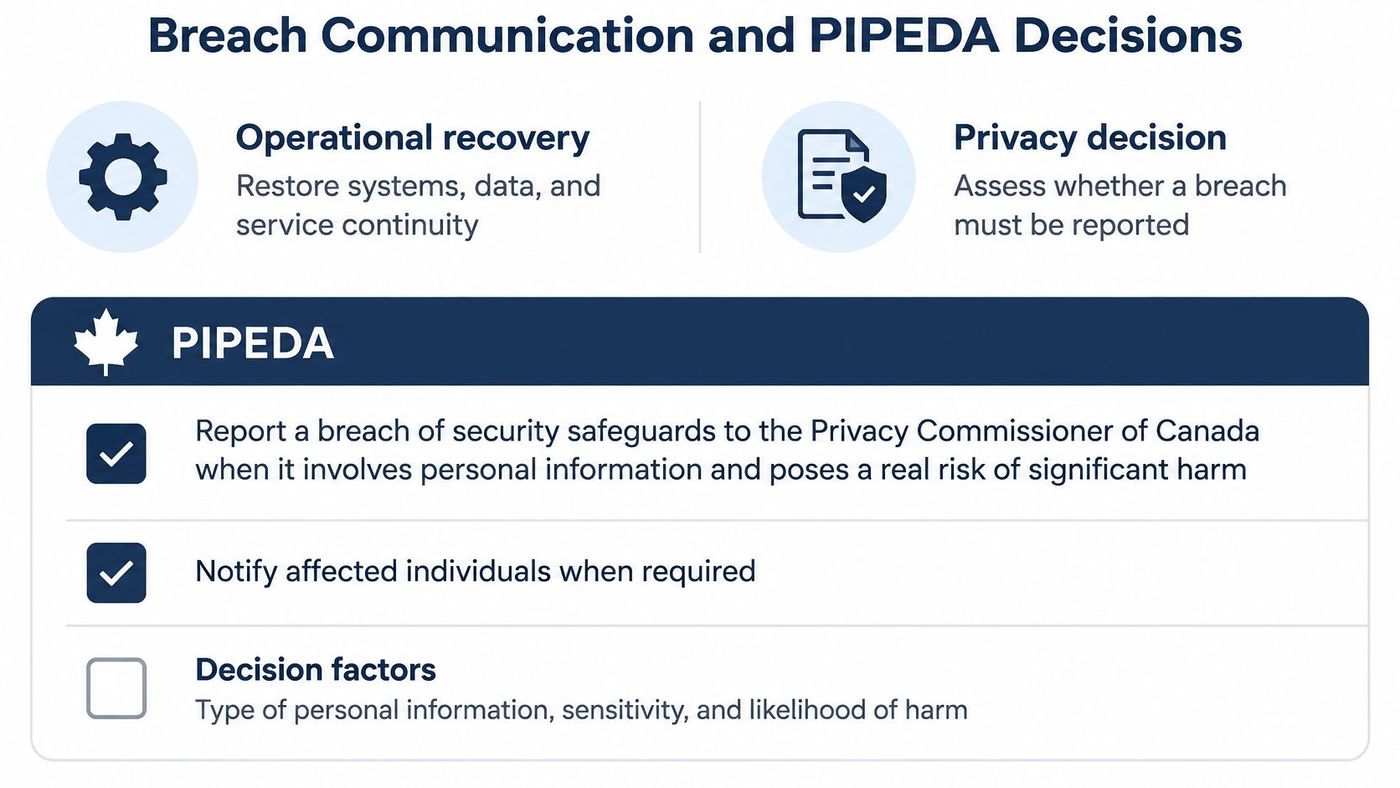
The report checklist should capture:
The privacy lead should answer these questions in writing: Was personal information involved? Is there a real risk of significant harm? Who must be told? Who approved the wording?
A decision not to report still needs a defensible record. Ordinary loss and employee error belong in this process, not just deliberate attacks.
Identify employees, customers or patients, regulators, police, the Canadian Anti-Fraud Centre, the Cyber Centre for ransomware, and the insurer in the communications worksheet. The appropriate recipients depend on the incident and applicable obligations; this isn't a universal mailing list.
Clinics and professional firms should avoid definitive client statements about record exposure until investigators establish what happened. Don't confuse that caution with permission to delay required notifications. A restored database can be operational while questions about unauthorised access remain unresolved.
Map applicable federal, provincial, and sector obligations with counsel. The overview of Canadian data privacy laws can support that preparation, but the incident decision must reflect the organisation's actual circumstances.
For spokesperson preparation, Carlos Alba Media's guide to prepare your SME for emergencies offers useful crisis-communications context. Keep message approval separate from technical troubleshooting.
An approved holding statement could read:
We're investigating an incident affecting access to some services. We've activated our response procedures and are assessing whether personal information was involved. We'll provide further information as facts are confirmed.
Use that wording only when it accurately describes the situation. Technical staff should send findings to the incident team, not email clients directly.
Use a calendar that identifies what each exercise must prove. The Canadian Centre for Cyber Security's ransomware playbook recommends at least two offline backups inaccessible from organisational networks and the internet, a secondary cloud backup, and regular restoration testing, with monthly testing given as an example.
The following is a suggested operating schedule, not a universal compliance standard.
| Scenario | Cadence | Pass evidence | Plan part proved |
|---|---|---|---|
| Offline copy isolation | Monthly | Copy unreachable from the network | Backup inventory |
| Tier 1 restore | Annual, or quarterly if higher compliance | Time within RTO and data point within RPO | Recovery tiers |
| Microsoft 365 admin compromise | Twice a year | Identity cleaned before data restore | Recovery procedures |
| Ransomware with backup credentials exposed | Annual | Clean point found and credentials rotated | Recovery procedures |
| Cloud-region outage | Annual | Services return in dependency order | Recovery tiers |
| Mock lost-record privacy decision | Annual | Written decision record completed | Communications and privacy |
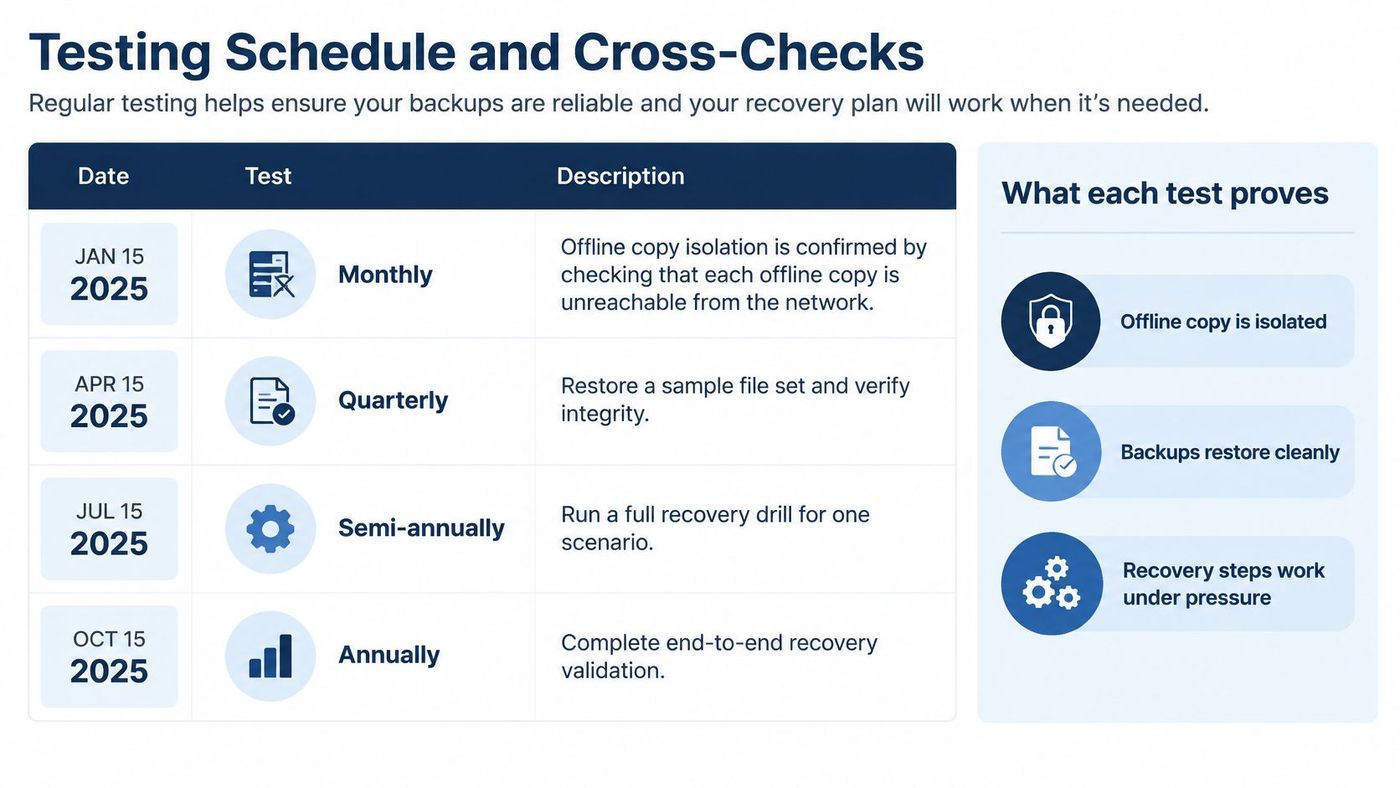
Every test records start time, restore completion time, recovered data point, integrity checks, user-level validation, and unresolved defects. Assign each corrective action an owner and deadline.
A restore passes only when its completion time meets the service's RTO and its recovered data point meets the RPO. Don't introduce easier targets during the exercise or stop the timer before staff can perform the agreed workflow.
Cross-check the supporting records too. The inventory must identify the copy used, the call tree must reach a live deputy, and the mock privacy assessment must produce a written decision.
At CloudOrbis, we conduct disaster recovery tests annually to validate backup integrity and recovery procedures. Our post-test reports list identified gaps and improvements; higher-compliance clients can have quarterly tests.
File each report with the runbook version used and track remediation through retesting. A year with no failed checks and no changed steps deserves scrutiny: the exercises may not be challenging the recovery method.
Use the broader data backup and recovery strategies framework to assess whether a defect requires a procedural fix or a different architecture.
Name a plan owner and place the version number, effective date, and next review date at the top of the document. That person coordinates updates but shouldn't approve changes to business tolerance or legal decisions alone.
Review the runbook annually and after every incident, failed test, named-role departure, or critical-system change. Connect recovery documentation to change management so a migration doesn't leave the old recovery instructions in circulation.
Each review should produce a concise record rather than a fresh policy document.
Withdraw obsolete offline copies when issuing replacements. Otherwise, a deputy may follow an old recovery order even though the shared document is current.
Clinics, legal teams, and finance firms should map each critical system to applicable record-keeping, retention, notification, and sector-regulator requirements. Confirm that mapping with counsel annually and when relevant operations or obligations change.
Keep breach records even when no regulator report is filed. Retain test reports and decision records for the period established by applicable requirements and the organisation's approved retention schedule.
Check insurance conditions alongside the technical plan. A policy may require notice or approval before a ransom payment or an outside vendor engagement, and it may contain backup or testing conditions.
Store the runbook's version history with the policy file. The executive sponsor should be able to show which recovery arrangements existed, what the team tested, and how it addressed identified gaps.
Spend a working session producing concrete artefacts: the completed outline with named approvers, a tier matrix containing your actual systems, and a booked critical-service restore test. Keep the runbook somewhere that survives the outage, including an offline contact list and recovery order.
When turning technical notes into repeatable sops, Trupeer Inc.’s documentation tool can help organise procedural steps. The technical owner still needs to verify every instruction, required permission, and expected result against the actual environment.
Use this as an internal action window, not a claim that recovery readiness can always be achieved within that period.
If your team lacks capacity, a managed partner such as CloudOrbis can help run timed restores and produce written post-test reports. Compare the proposed work against the acceptance criteria, not just the list of backup tools.
In a CloudOrbis case study, a 90-person law firm that came to us after a ransomware scare achieved zero security incidents in 18 months, quarterly DR testing with documented RTOs, 95% phishing-training completion, and a 22% reduction in its cyber insurance premium. Those results describe that engagement, not a guaranteed outcome for another organisation.
The practical decision is simpler: pick an owner and a test date this week. A data recovery plan outline without a dated exercise is still only a backup setting.
CloudOrbis Inc. offers a free IT Risk Assessment and data backup and disaster recovery services to help organisations identify recovery gaps. Visit CloudOrbis Inc. to discuss your critical systems, recovery targets, and the evidence your next restore test should produce.
Book a 30-minute call with a senior engineer. No sales script, just straight answers about your environment.


