VoIP Business Telephone: How to Choose and Deploy It
Learn how a VoIP business telephone works, what drives its cost, and how to deploy it safely across Canadian offices and remote teams.

Learn how a VoIP business telephone works, what drives its cost, and how to deploy it safely across Canadian offices and remote teams.

Your reception team is juggling ringing phones, staff working from home and callers who won't leave voicemail. You're considering a VoIP business telephone system, but the quotes make it hard to tell what you're buying, who supports it and what happens when the internet fails.
The useful starting point isn't a feature list. It's a clear account of how calls should reach people, which services must survive an outage and who keeps emergency-location information accurate when employees move.
Consider a hypothetical 40-person clinic. Its old analogue lines ring at a single reception desk, and after 5 p.m., nobody answers. Patients don't know whether to leave a message, call another number or try again tomorrow.
Business VoIP, short for voice over internet protocol, converts speech into digital packets and sends them across a network rather than a dedicated copper circuit. Think of a courier dividing a parcel into labelled pieces, sending them along different roads and reassembling them at the door. The recipient doesn't see the route, and the address stays the same.
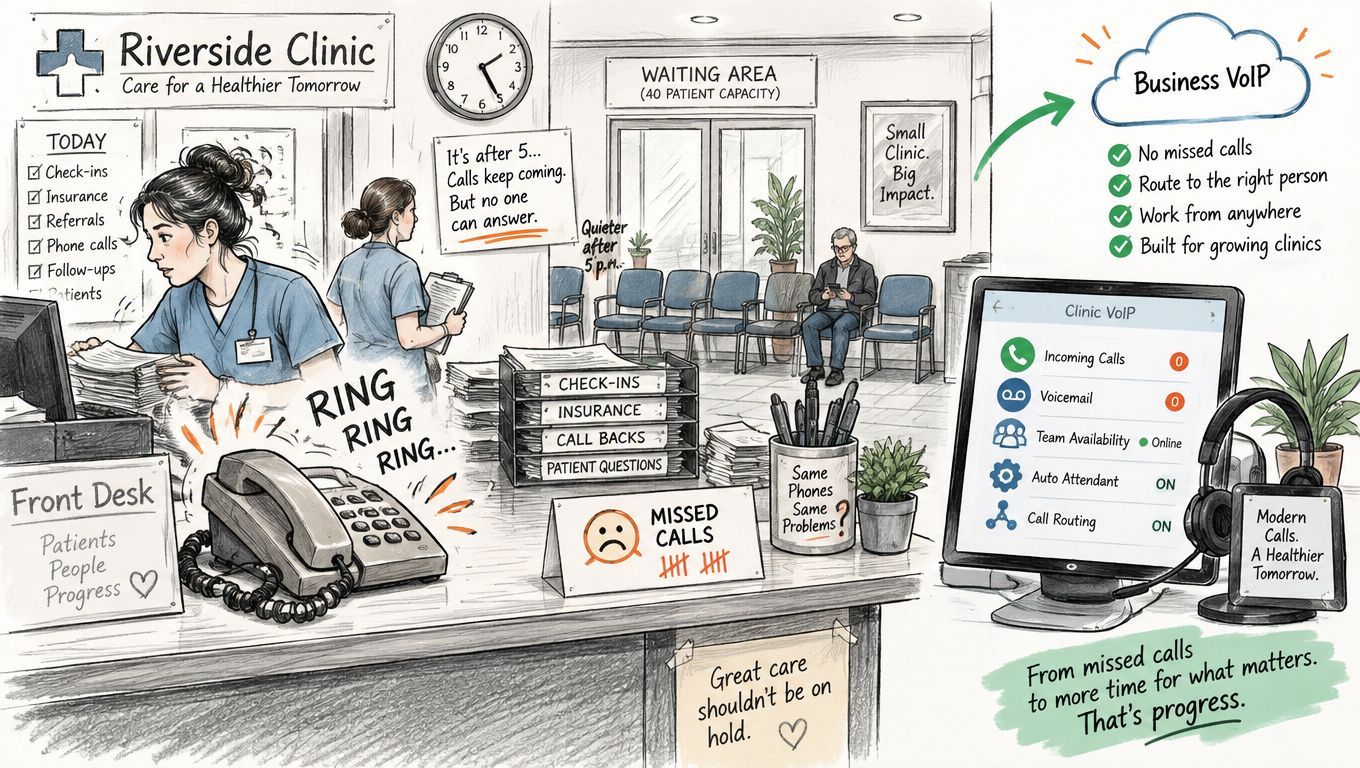
You'll encounter these components:
Together, these can replace the traditional private branch exchange, or PBX, and its analogue lines. VoIP describes the calling technology, however, not necessarily where the replacement platform runs.
By 2020, the CRTC telecommunications report recorded approximately 850,000 access-independent VoIP subscribers, representing 17% of Canadian retail VoIP subscriptions.
For sales-focused organizations, MakeAutomation's explanation of call automation for B2B sales teams offers useful context for distinguishing inbound handling from outbound workflows.
Practical takeaway: A business phone is now a network service. The handset alone doesn't determine whether callers can reach you.
For the clinic, better routing can solve the reception problem. Choosing the right platform still means checking connectivity, costs, emergency calling and support responsibilities.
Deployment models compared for Canadian businesses
| Model | Who runs the system | Upfront cost | Best fit | Remote staff support |
|---|---|---|---|---|
| On-premises PBX | Your IT team or a managed provider | High: hardware, licences and installation | Single or stable sites with reliable power | Limited unless you add secure remote access |
| Hosted cloud | The provider | Low: mostly a per-user subscription | Several sites, hybrid or remote teams | Full: softphone and mobile apps |
| Hybrid with SIP trunks | You keep the PBX; the provider supplies calling | Medium: some hardware already owned | Organizations with working equipment they want to keep | Requires compatible PBX configuration and secure remote access |
These are cost profiles, not quotations. A cloud installation can still require network upgrades, while an existing on-premises system may need replacement licences or handsets.
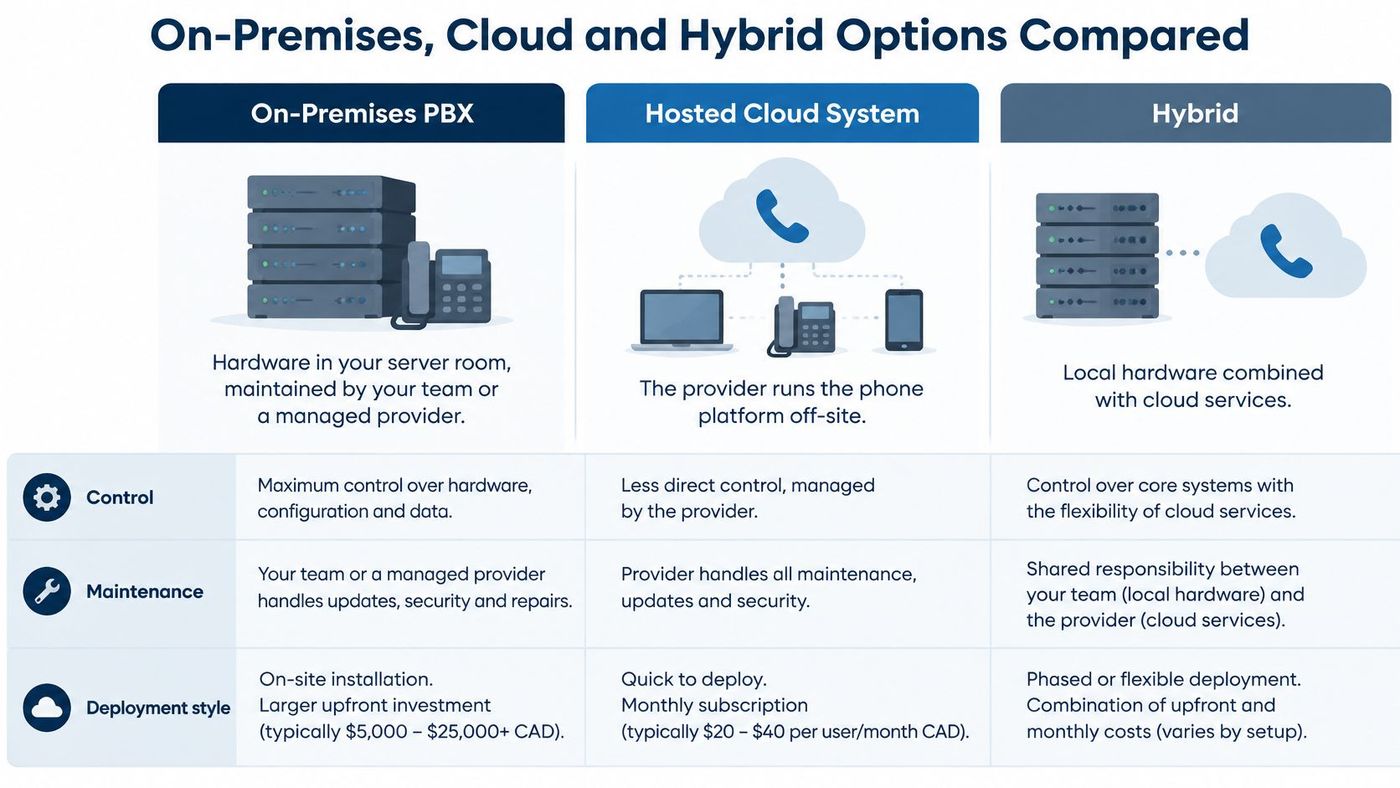
An on-premises PBX puts the platform in your server room. It can suit an organization with working equipment, specific control requirements and staff who can maintain the environment. Reliable local power and networking support that choice, but they don't remove the need for maintenance, backup and recovery procedures.
A hosted cloud system puts platform operation with the provider, typically under a subscription. It can simplify administration for several locations or a small IT team. Remote support still requires suitable apps, approved devices and secure access, rather than merely buying cloud seats.
Cloud adoption provides context, not proof that cloud is right for every phone system. Statistics Canada reported that 48% of Canadian businesses used cloud computing in 2023, up three percentage points from 2021, with adoption reaching 81% in information and cultural industries.
A hybrid deployment preserves local equipment while a provider supplies calling through SIP trunks. A SIP trunk connects the PBX to a provider's telephone service over an IP network. This can postpone hardware replacement, but older equipment may restrict mobile apps, integrations or remote administration.
The distinction between capital spending and subscription spending matters less than the work each option leaves with your team. Identify who applies updates, restores configuration and troubleshoots a failed call.
Before choosing, answer these questions:
Test the network before installing phones. A fast internet package doesn't establish whether calls will sound clear during a busy afternoon.
Measure latency, the delay in delivery; jitter, the variation in packet arrival timing; and packet loss, the information that never arrives. Obtain the platform's acceptance targets and test against them using its supported assessment tools.
Each concurrent call consumes bandwidth in both directions. The requirement changes with the codec, which encodes speech, and with network overhead.
For a hypothetical calculation, suppose a provider specifies 100 kbps each way per call. An office expecting 10 simultaneous calls would budget 1 Mbps each way for voice before adding capacity for other traffic. Those are example inputs, not universal sizing requirements.
Use this readiness routine:
Quality of service, or QoS, marks and prioritizes voice traffic on equipment you control. It can't guarantee priority across every public internet connection, and it won't repair an overloaded or failing circuit.
CloudOrbis's quality-of-service setup guide explains the configuration considerations. For additional implementation context, the resource on router configuration with Nerds 2 You Edmonton describes practical QoS setup.
Where equipment supports it, separate voice into its own network segment. That makes traffic policies and troubleshooting easier to manage.
Buy features that complete a task, not features that make a proposal look impressive. Start with the calls employees handle most often and describe what a successful outcome looks like.
An auto-attendant should provide a useful greeting, simple menu choices and an after-hours destination. A clinic might direct appointment requests to reception while explaining what callers should do when the clinic is closed.
Ring groups and call queues solve different problems. A ring group alerts available people; a queue holds callers until someone can answer. In a hypothetical 12-person law office, reception could ring first, followed by two assistants, while callers wait rather than immediately reaching voicemail.
Call recording needs a defined purpose, access controls, retention rules and an appropriate consent notice. Check applicable provincial, professional and privacy requirements before enabling it. A notice alone isn't a complete recording policy.
Skip bundled video meetings if employees already have an approved meeting platform. Advanced analytics won't help if nobody owns follow-up, and recording shouldn't be enabled because it's included.
For platform-specific considerations, the business benefits of a 3CX phone system provide a starting point for evaluation.
Test the whole call journey, not just whether the phone rings.
During a trial, call from an outside number, choose a menu option, wait in a queue, transfer the call and leave a message. Have the employee who performs that task confirm the result.
What drives a business VoIP bill and what to ask
| Cost driver | What it covers | Question to ask |
|---|---|---|
| Per-user seat | Licence for each person who makes or receives calls | Are shared or contact-centre seats priced differently? |
| Phone numbers | Each direct number and any toll-free number | How many numbers are included, and what does a new one cost? |
| Calling plan | Local, long-distance and international minutes | Which destinations are unlimited, and which are metered? |
| Emergency (9-1-1) service | Location registration for each line | Is 9-1-1 included, and how are address changes handled? |
| Add-ons | Call recording, analytics, advanced auto-attendant | Which features are standard, and which cost extra? |
| Hardware | Desk phones, headsets, adapters | Is hardware bought, leased or included? |
| Setup and porting | Moving existing numbers and configuring the system | Are these one-time charges, and can they be waived? |
Per-user seats deserve attention first because adding employees can increase the recurring licence total. Shared reception devices, queue agents and occasional users may need different licence arrangements.
Phone numbers and calling plans come next. Separate the right to use a number from the cost of making or receiving calls, particularly for toll-free and international traffic.
Consider a hypothetical organization with 25 standard users and two shared reception lines. Its quote won't necessarily resemble one for 25 staff plus five contact-centre seats with recording, even if the advertised standard-seat price matches.
Emergency service, add-ons and hardware can introduce additional recurring charges. Setup and porting may appear separately as one-time costs.
Use a common comparison period and your actual calling destinations when reviewing proposals. CloudOrbis's total cost of ownership guide offers a useful way to assess costs beyond the headline subscription.
We commit to clear communication with client leadership and no opaque billing. A decision-maker should be able to distinguish the ongoing service commitment from the implementation work.
A Microsoft 365 subscription doesn't automatically mean your employees can make public telephone calls through Teams. Teams calling, identity and business integrations are separate configuration decisions.
Start by identifying the supported calling arrangement. Confirm whether the proposal uses Microsoft calling services, a supported operator connection or Direct Routing, which connects Teams to an external telephone service through supported infrastructure.
Identity comes next. Microsoft Entra ID, formerly Azure AD, should align with the phone platform's user records where identity integration is supported. Match accounts, assigned licences and telephone numbers, and test access for new starters and departing employees.
Contacts and calendars need feature-level verification. Don't assume Outlook contacts will appear on incoming calls or that click-to-call works in every client. Confirm the supported Outlook version, required connector and any calendar-based availability behaviour.
Business-system integration should reduce manual work. A logistics dispatcher might receive a driver's call and see the relevant shipment record. That requires a compatible CRM or dispatch-system connector, reliable caller matching and appropriate permissions.
A connector that only copies a call log isn't the same as one that opens a customer record. CloudOrbis's Microsoft Teams phone system overview can help frame the telephony side of that decision.
Use this pre-deployment checklist:
Include the person responsible for Microsoft administration and the owner of the connected application. Otherwise, a successful phone demonstration can conceal an integration nobody has authority to maintain.
A nurse answers calls on a softphone at home. Reception uses a shared number, while the clinic moved two floors last spring. Each arrangement can work for ordinary calls while creating uncertainty about where an emergency caller is located.
Emergency location is an operational record, not a one-time installation field. A registered address may no longer describe the caller's location after a device, employee or department moves.
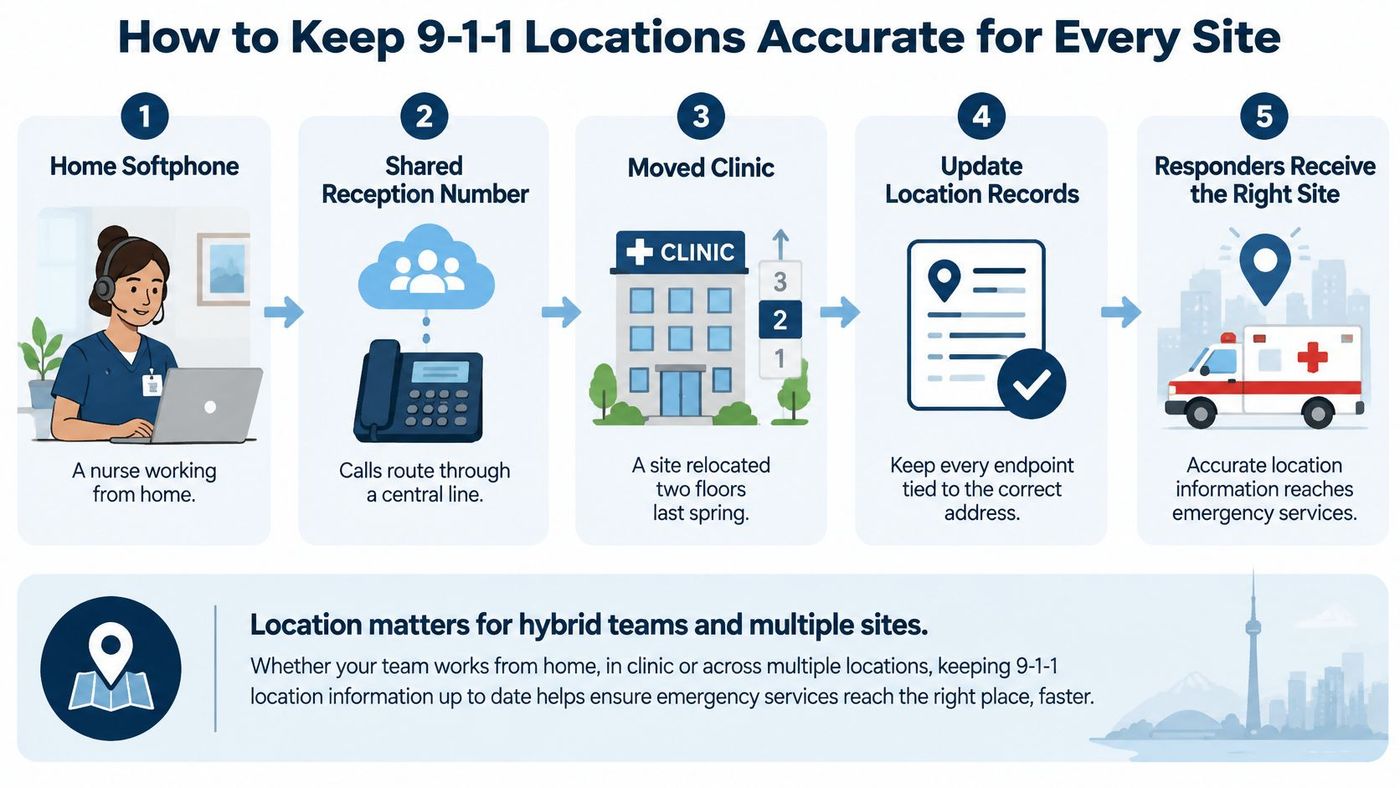
The CRTC's VoIP emergency-calling guidance explains provider obligations to supply Basic or Enhanced 9-1-1 where available and disclose limitations before activation and during service. For fixed endpoints, accurate subscriber location, calling-number information and routing to the appropriate emergency answering point are essential.
Nomadic services can handle emergency calls differently from fixed services. Employees need instructions specific to their service, including stating their current location and not assuming an app has detected it.
A compliant service plan doesn't maintain your floor numbers, home-working records or employee instructions. Your organization must assign that work.
Include building, floor and unit details where the service supports them. Keep extension, calling number, site and emergency-address mappings consistent rather than maintaining disconnected spreadsheets.
Assign a named location-record owner, supported by site managers who report moves and IT staff who implement changes. HR should notify that owner when working arrangements change; the provider should confirm how updates become active.
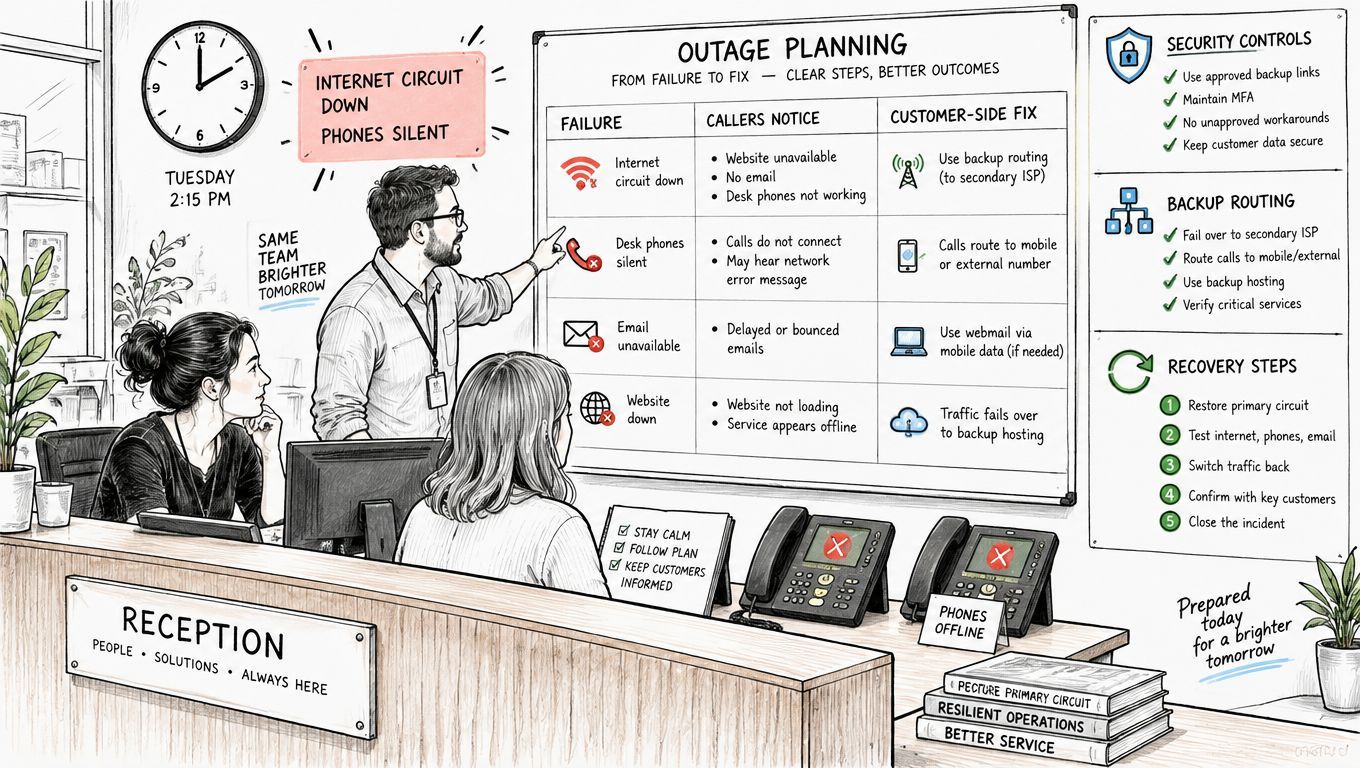
On Tuesday afternoon, the internet circuit fails and reception's phones go silent. The cloud platform may still be operating, but staff need an immediate, usable way to receive calls.
Outage scenarios and the customer-side fix for each
| Failure | What callers notice | Customer-side fix |
|---|---|---|
| Internet circuit down | Calls fail to connect or drop | Cellular failover or call forwarding to mobile numbers |
| Site power outage | Desk phones and the PoE switch go dark | UPS-backed PoE switch and mobile forwarding |
| Local router or network fault | Phones lose registration | A second internet path that bypasses failed equipment, or a documented manual reroute |
| Provider platform outage | The whole system is unavailable | Provider status alerts and pre-set alternate numbers through an independent arrangement |
| Login or identity failure | Staff cannot sign in to the softphone | Protected admin accounts with multi-factor authentication and a documented recovery path |
| Misconfigured call routing | Calls ring nowhere | Scheduled route tests and a written change log |
Cloud removes some local hardware dependencies. It doesn't remove dependencies on internet access, power, identity services or accurate configuration.
The CRTC's emergency-network decision cites 99.999% availability, approximately 5.26 minutes of annual downtime, for a 9-1-1 network. That's an emergency-infrastructure benchmark, not an ordinary business phone SLA.
For business service, obtain measured uptime definitions, exclusions and restoration targets. A working administration portal doesn't prove that callers can reach reception.
Test failover with the primary connection unavailable. Confirm that forwarding can be activated without signing into the failed service, and that the alternate route doesn't reuse the same broken router or power supply.
Statistics Canada reported that 16% of Canadian businesses experienced a cybersecurity incident in 2023, while only 26% had written cybersecurity policies. Phone platforms deserve security controls because they contain credentials, call records and potentially sensitive recordings.
Require administrator multi-factor authentication, restrict external access to approved methods, patch supported equipment and investigate unusual logins or calling activity.
Where PIPEDA applies, the Office of the Privacy Commissioner of Canada says organizations must retain records of every privacy breach for two years, including breaches below the significant-harm reporting threshold.
Assign an operational owner for failover and a security owner for investigation. Incorporate both into business continuity and disaster recovery planning, including exercises for reception, voicemail and critical outbound calls.
Choose the provider that passes a realistic pilot, not the one with the lowest seat price. A demonstration proves that a feature exists; a pilot establishes whether your people can use it under your working conditions.
For legal teams evaluating mobile workflows, Attorney Assistant's resource to compare VoIP apps for law firms can help identify app-level questions. Keep the final decision tied to your own call journeys and support requirements.
Use this cutover checklist:
Record results, not impressions. Reception should approve queue behaviour, administrators should verify account management, and department owners should confirm that essential calls reach the right destination.
CloudOrbis is a Canadian managed IT provider. We coordinate with clients' existing ISPs, software vendors, hardware suppliers and application support teams, handling escalation communication and follow-up as needed.
We can help organize the assessment, implementation and support work around a business telephone deployment. Prospects can book a 15-minute Discovery Call with our founders by calling 1-888-755-3022.
CloudOrbis Inc. offers business VoIP, network management and managed IT support to help Canadian organizations deploy and maintain their telephone systems. This week, gather your sites, users and phone numbers, then visit CloudOrbis Inc. to book a Discovery Call about routing, emergency-location records and outage readiness.
Book a 30-minute call with a senior engineer. No sales script, just straight answers about your environment.


