Network Security for Small Business: A Practical Roadmap
Network security for small business made simple: a prioritized roadmap for firewalls, backups, monitoring and compliance in regulated sectors.

Network security for small business made simple: a prioritized roadmap for firewalls, backups, monitoring and compliance in regulated sectors.

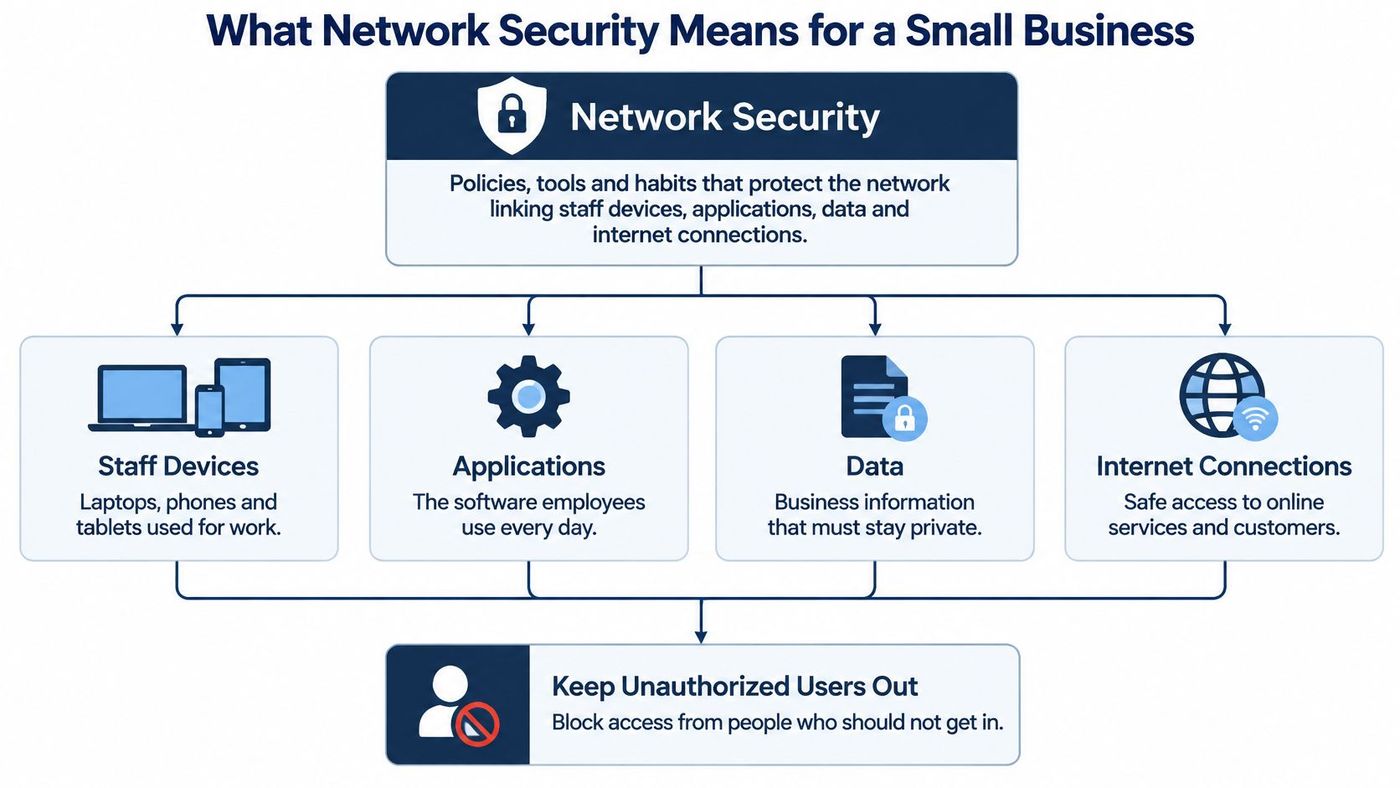
You started the day with a busy inbox, a shared drive everyone can open, and a router nobody has touched since it was installed. Then a staff member clicks a convincing invoice, or a former employee's login still works, and you don't know what that account can reach. Good network security for small business doesn't start with buying another product. It starts with closing the doors attackers use most often, in order.
Think of your network as an office building. The firewall is the locked front door, segmentation works like key cards for separate floors, monitoring is the camera log, and backups are your records kept safely off site. No single lock protects the whole building.
The goal is straightforward. Keep private information confidential, prevent unauthorized changes to records, and keep systems available for staff and customers. For a clinic, law firm or logistics office, lost availability can hurt immediately because bookings, files and dispatch work stop even when nothing was stolen.
Statistics Canada's 2023 Canadian Survey of Cyber Security and Cybercrime found that 14% of small businesses with 10 to 49 employees were impacted by a cyber security incident, compared with 23% of medium-sized and 30% of large businesses. Only 12% of affected small businesses reported incidents to police, so official figures likely understate the actual scale.
Separately, Statistics Canada's 2025 survey found that 15% of small businesses with 10 or more employees experienced a cybersecurity incident. That different base still points to persistent risk, not a problem that has gone away.
Resources such as ABCO Security Services Australia network protection use similar layered thinking, and our overview of what cybersecurity covers for Canadian businesses explains how those layers fit together. I would judge your setup by whether each layer works, not by how many tools you own.
| Priority | Control | What It Stops | Usual Owner |
|---|---|---|---|
| 1 | Written policies and asset inventory | Unmanaged devices and unknown exposure | Owner or office manager |
| 2 | Multifactor authentication on email, remote access and admin accounts | Logins using stolen passwords | Owner, with provider help for admin accounts |
| 3 | Automatic patching of internet-facing devices | Attacks that exploit known flaws | Owner enables auto-updates, provider verifies firewall and VPN patches |
| 4 | Tested, offline backups | Ransomware that destroys recovery copies | Owner runs restore test, provider builds isolated copy |
| 5 | Managed endpoint protection (EDR and MDR) | Malware spreading across workstations | Provider |
| 6 | Business firewall with default-deny rules | Unsolicited inbound connections | Provider |
| 7 | Network segmentation by zone | Lateral movement after one device is compromised | Provider |
| 8 | Logging, alerts and monthly review | Undetected intrusions and slow response | Provider runs alerts, owner reviews monthly |
Inventory tells you what you're protecting. Multifactor authentication, or MFA, then blocks many logins attempted with stolen passwords, while patching removes known openings before attackers find them. Those early steps reduce entry without requiring a major network redesign.
Backups come next because recovery limits damage when prevention fails. In the Canadian Centre for Cyber Security ransomware outlook drawing on the 2023 survey, 13% of businesses reporting cybersecurity incidents identified ransomware as the attack method, up two percentage points from 2021. A backup that ransomware can also encrypt doesn't give you much protection.
Practical rule: Finish identity, patching and recovery before spending on advanced detection for a network with unknown devices.
A business without IT staff can usually complete priorities 1 and 2 in about a week. Priorities 3 and 4 need owner tasks plus verification, while priorities 5 to 8 usually need a managed provider because alerts, firewall rules and segmentation require ongoing technical review.
Personal devices make the case for starting here. Statistics Canada's 2021 cyber security survey found that 64% of small businesses had no security measures governing employees' use of personal devices, versus 46% of medium-sized and 21% of large businesses. An unmanaged phone or laptop can reach email and shared files while bypassing updates and malware protection.
Written policies and a current inventory are the work a non-IT owner can do this week without a provider. They also cut the cost of every later control, because a technician works faster on a documented network.
Each document should state who it applies to, what's allowed, when it's reviewed and how compliance is checked. Keep them short enough that managers will use them, and put a review date on each one, because a policy nobody revisits stops being enforced.
Next, build an asset inventory covering every device, cloud account, shared drive and internet-facing service, each with an owner and a criticality rating. Our guide to building an asset inventory that stays current gives a workable structure. A 12-person clinic that runs this review might find three active accounts belonging to former staff and a personal laptop syncing patient files. One afternoon of cleanup closes real openings.
Physical access belongs in the same inventory. Lock network cabinets and communication closets, and a business running a dedicated server room can add a controlled enclosure such as data center cages from Material Handling USA.
Ownership turns documents into practice. Name one accountable owner, let an office administrator maintain the lists and reports, and assign firewall and patch verification to someone qualified, whether internal staff or a managed provider.
A business firewall blocks unsolicited inbound traffic and permits only connections your work requires. Use default-deny rules, review old exceptions, and remove services that no longer need internet exposure. A consumer router isn't an adequate substitute because it offers limited rule control, logging and support.
A firewall guards entry points. It doesn't contain an attacker who has already signed in with a valid account.
Remote staff should connect through a VPN or secure access service protected by MFA. Never expose Remote Desktop directly to the internet. Give administrators separate admin accounts, restrict them to approved workstations where practical, and review privileges regularly.
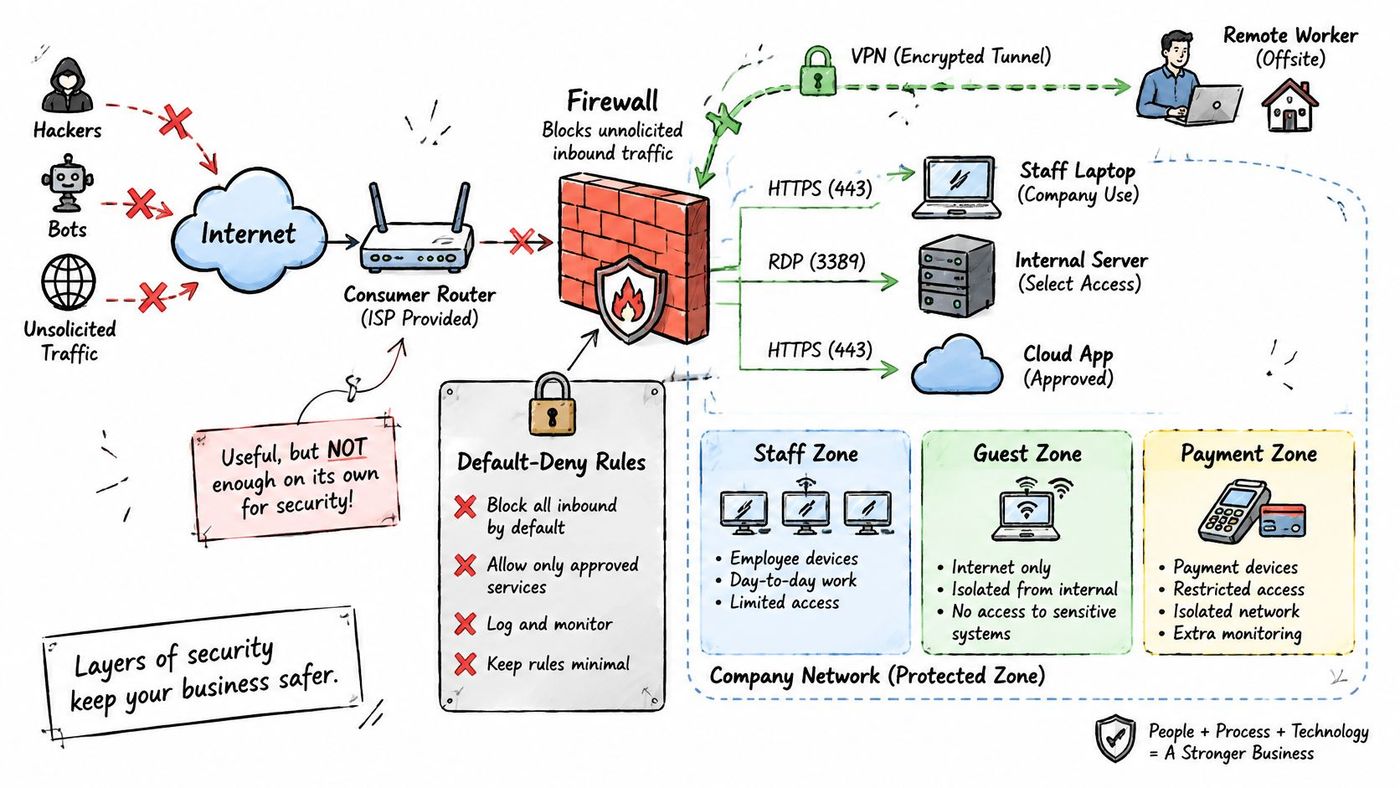
The Canadian Centre for Cyber Security baseline controls recommend segmenting networks so traffic cannot move freely into sensitive or restricted zones. Place staff devices, servers, guest Wi-Fi, VoIP equipment, operational technology and backup systems in separate VLANs or security zones, then allow only required traffic between them.
Say a logistics warehouse scanner shares a segment with finance laptops. If that scanner is compromised, weak separation could let an attacker probe payroll files from a device that never needed finance access. Our explanation of how network segmentation limits lateral movement covers the design in more detail.
Test the result yourself. Join guest Wi-Fi with a laptop and confirm you can't reach the file server, printers used for confidential work, or backup system. Multi-site businesses should connect offices with site-to-site VPNs and apply the same zone rules at every location, not only at head office.
The Canadian Centre for Cyber Security baseline guidance for small and medium organizations advises enabling automatic updates, prioritizing internet-exposed services and systems, and maintaining offline backups isolated from network connections. Patch operating systems, applications, firmware, routers, firewalls and VPN gateways. An unpatched gateway is reachable around the clock.
Turn on automatic updates where it's operationally safe. Verify high-risk infrastructure patches manually, schedule reboots, and track devices that miss their window. Unsupported equipment needs replacement or isolation, because no policy can fix software the vendor no longer updates.
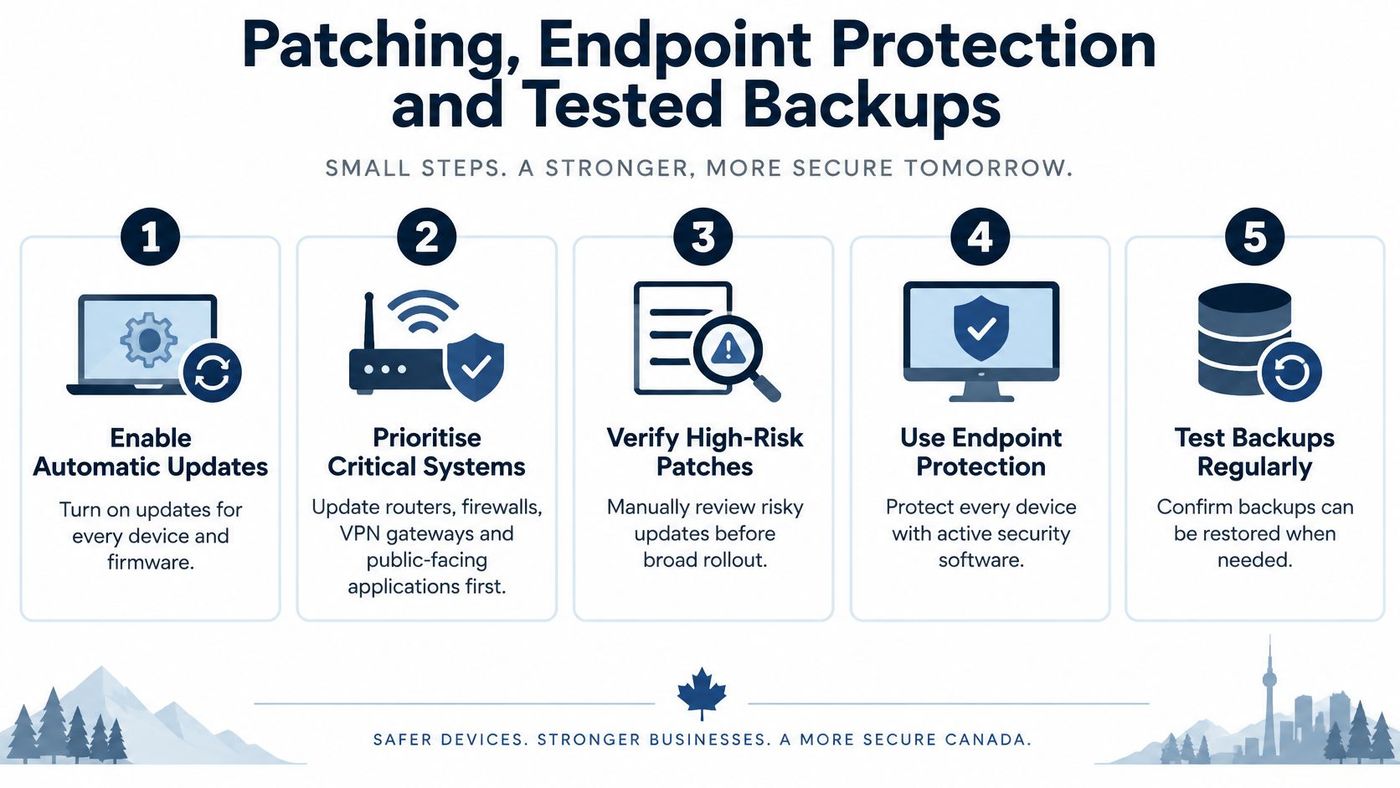
Basic antivirus mainly recognises known malware. Endpoint detection and response, or EDR, watches behaviour, records suspicious activity and can isolate a workstation. Managed detection and response, or MDR, adds human review so alerts aren't ignored after hours. Our endpoint security best practices explain the settings that matter most on each device.
Use the 3-2-1 approach for backups. Keep three copies, store them on two types of media, and keep one copy offline or immutable. Protect backup consoles with separate credentials and MFA so one stolen admin password can't delete production data and recovery copies together.
When devices reach end of life, wipe them before resale or disposal. The privacy guidance for UK phone sellers is a useful reminder that old phones can retain business accounts and files.
Finally, distinguish a completed backup from a proven restore. Every quarter, restore one file set and one complete system, time both, and record who performed the test, what failed and what changed afterward. That written record is stronger evidence than a green backup dashboard.
Collect logs from your firewall, email platform, identity provider and endpoints. Alert on new administrator accounts, impossible or unusual logins, disabled security tools and unusually large downloads. An office manager can review a short monthly summary, but someone technical must investigate the alerts behind it.
Logging also supports legal decisions. Under the incident response guidance describing PIPEDA duties, private-sector organizations must report a breach of personal information posing a real risk of significant harm to the Office of the Privacy Commissioner of Canada, notify affected individuals and retain records of every breach. Quebec's Law 25 adds duties for businesses operating there, so confirm provincial requirements too.
| Sector | Main Obligation | First Control to Add |
|---|---|---|
| Healthcare clinics (Ontario) | PHIPA for health information, plus PIPEDA for commercial activity | Access logging, role-based access and audit trails |
| Finance and accounting | PIPEDA, FINTRAC rules for reporting entities, PCI DSS if card data is stored | Segment payment and banking systems and enforce MFA on all access |
| Legal | PIPEDA, provincial law society rules on client confidentiality | Encrypted storage, matter-based access and retention schedules |
| Manufacturing and logistics | PIPEDA for customer data, customer contracts and security schedules | Isolate operational technology from the office network |
Our compliance risk management framework helps connect these obligations to evidence you can produce. We also help clients prepare for cyber insurance with formal policies, EDR and MDR, password governance, training records, patch reporting, backup validation and monthly compliance reporting.
Repeat core checks quarterly, including a phishing exercise and segmentation test. If you have no IT staff or work in a regulated sector, assign roadmap priorities 5 to 8 to a provider. CloudOrbis offers a free IT Risk Assessment, and in Week 1 of transition we map the client's network and identify risks without disrupting the team. Book that assessment or start the two week check now, but don't leave the results as an untracked list.
CloudOrbis can assess your firewall, accounts, backups and network zones, then build the roadmap in priority order with managed support suited to a small Canadian team. Start with a free IT Risk Assessment and a clear list of fixes you can verify. Visit CloudOrbis Inc. to book your assessment this week.
Book a 30-minute call with a senior engineer. No sales script, just straight answers about your environment.


