Mobile Device Management: 2026 Guide for Canadian SMBs
Secure your Canadian SMB with mobile device management (MDM). Our 2026 guide explains MDM to ensure compliance and implement your strategy.

Secure your Canadian SMB with mobile device management (MDM). Our 2026 guide explains MDM to ensure compliance and implement your strategy.
An employee approves an invoice from a personal iPhone at breakfast. A clinic manager checks patient schedules on a tablet between appointments. A dispatcher leaves a laptop in a truck after a late shift. None of that is unusual anymore. What's unusual is how many Canadian SMBs still rely on trust, scattered settings, and verbal policy reminders to protect business data on those devices.
That approach breaks down fast when a phone is lost, a staff member leaves, or a regulator asks how company data is secured on BYOD and field devices. Mobile device management gives you a way to control that risk without killing flexibility. It turns a loose collection of phones, tablets, laptops, and specialty devices into something your business can govern.
That matters more now because the category itself is expanding quickly. The global mobile device management market was estimated at USD 7.67 billion in 2024 and is projected to reach USD 28.37 billion by 2030, according to Grand View Research's mobile device management market analysis. For Canadian business owners, that growth isn't just a market story. It reflects a practical shift in how companies secure remote work, frontline operations, and mobile access to sensitive data.
For many SMBs, the device problem starts small. One salesperson wants email on a personal phone. A supervisor needs a tablet on the warehouse floor. A physician wants secure mobile access from home. Then the business adds Microsoft 365, cloud file sharing, field apps, and remote approvals. Suddenly, sensitive company information lives in more places than anyone intended.
The operational strain shows up in everyday decisions. Who can install apps on work phones? What happens when a device is stolen? Can you remove company data without touching family photos on a BYOD device? Questions like these sit inside a broader business shift that also affects routing, dispatch, and field productivity. Teams reviewing strategies for sales efficiency often discover the same truth: mobility only helps when device control is built in from the start.
A lot of owners treat this as a technology purchase. It's closer to a governance decision. If your business is already planning wider modernization, a digital transformation roadmap should include device governance early, not after the first incident.
Practical rule: If staff can access business data from a device you can't configure, audit, or wipe, you don't control your data exposure.
Mobile device management fixes that by giving your business a policy layer. It doesn't remove flexibility. It gives flexibility guardrails.
At its core, mobile device management is a central command centre for company devices. You define rules once, and those rules follow the device whether it's in your office, a clinic, a truck, or an employee's home.
According to Fortinet's definition of mobile device management, MDM is security software that lets organizations secure, monitor, manage, and enforce policies on employees' mobile devices through two core components: an MDM server management console and an MDM agent that receives and implements policies on user devices via built-in APIs.
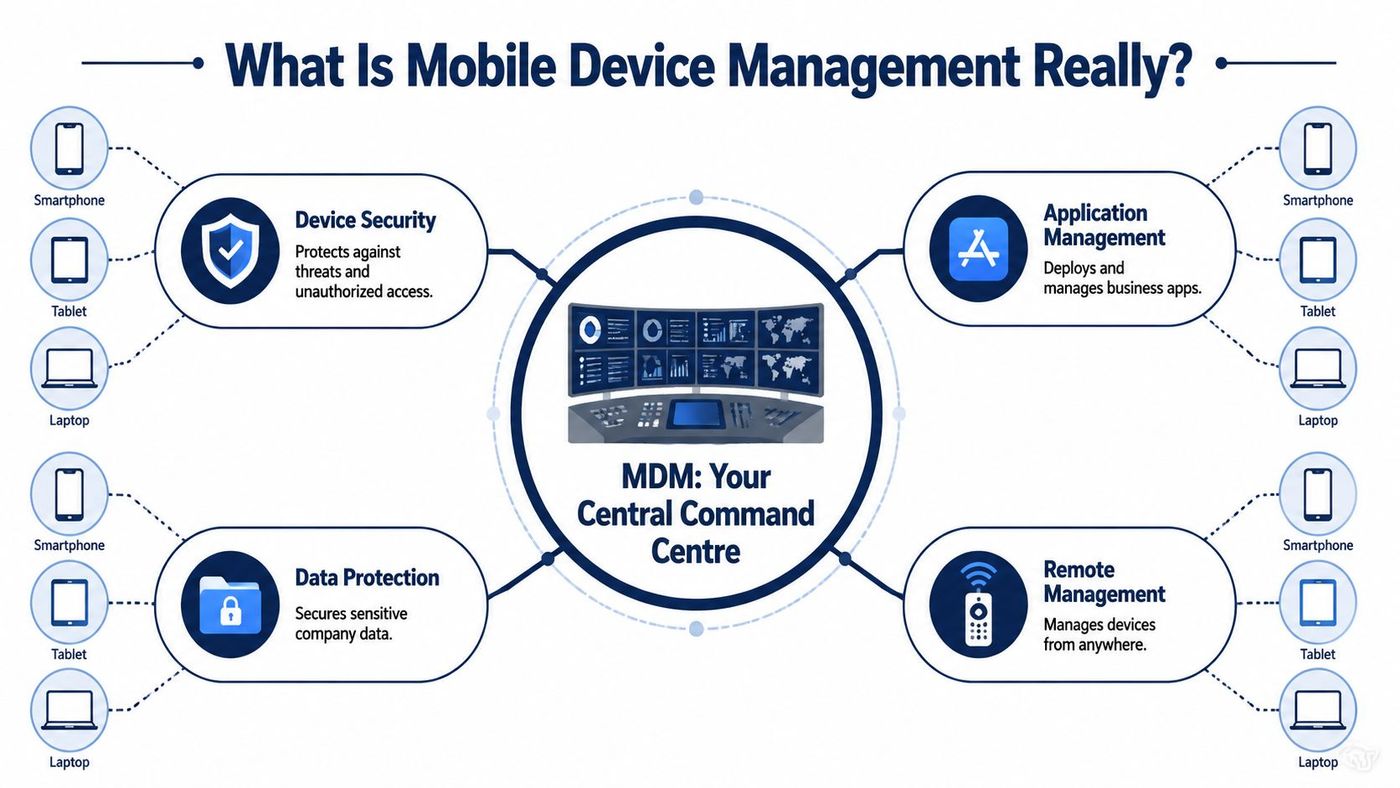
Think of the server console as the control panel. That's where IT or your service provider sets passcode rules, encryption requirements, approved apps, compliance checks, and response actions such as remote lock or wipe.
The agent is the part on the device that carries out those instructions. If the business requires encryption, the agent enforces it. If a device falls out of compliance, the agent reports back. If a phone is lost, the agent can receive a remote command.
That architecture matters because it changes device management from manual effort to policy-based management.
Most owners hear “mobile” and think only of smartphones. In practice, MDM often covers:
A good way to think about it is as an extension of disciplined IT asset management. You're not just tracking who has what. You're controlling how those devices behave, what data they can access, and whether they stay within policy.
A device inventory without policy enforcement is just a list.
The best MDM deployments don't feel dramatic. They handle routine control in the background:
That's the practical value. MDM isn't interesting because it's technical. It matters because it reduces preventable mistakes.
The terminology confuses buyers because vendors often blur the lines. The easiest way to sort it out is to look at scope, not branding.
MDM is the foundation. It focuses on controlling devices themselves. EMM expands into managing business apps and content. UEM goes broader and aims to manage mobile devices, laptops, desktops, and other endpoints from one framework.
| Aspect | Mobile Device Management (MDM) | Enterprise Mobility Management (EMM) | Unified Endpoint Management (UEM) |
|---|---|---|---|
| Primary focus | Device configuration and security | Devices plus apps and business data | Broad endpoint control across mobile and non-mobile systems |
| Typical scope | Smartphones, tablets, some laptops | Mobile estate with deeper app and content controls | Mobile, laptops, desktops, and other connected endpoints |
| Best fit | SMBs that need fast policy enforcement and secure BYOD basics | Firms with heavier app governance and mobile workflow demands | Businesses standardizing endpoint operations across the full environment |
| Main strength | Simplicity and speed | Better control over business mobility | Operational consolidation |
| Common trade-off | May not go far enough for app-level governance | More moving parts to configure | Can become expensive and complex if your needs are narrow |
If you run a clinic, legal practice, construction company, or logistics team, don't start by asking which acronym is most advanced. Start with your operational problem.
If the problem is lost devices, inconsistent settings, weak passcodes, or unmanaged BYOD, MDM is often the right starting point. If the problem is also about securing mobile apps, corporate documents, and workflow-specific access controls, EMM may fit better. If you're trying to manage phones, laptops, and broader endpoint policy from one operating model, UEM becomes more relevant.
A lot of SMBs make the wrong choice in one of two ways:
For firms evaluating user permissions and endpoint behaviour, even something as narrow as iPhone application permissions can reveal whether the issue is device control, app governance, or broader endpoint management.
Buy for the environment you run today, but make sure the platform won't trap you when your device mix changes.
The best MDM feature lists aren't product brochures. They connect control settings to business outcomes. That's the standard to use when you evaluate any platform.
Research published through ACM on MDM technologies and challenges states that the primary role of MDM is to increase device supportability, security, and corporate functionality while maintaining user flexibility. That's exactly the balance Canadian SMBs need.

These are the controls that stop a device issue from becoming a company issue.
For smaller teams, these basics often close the largest gaps first. If your staff still rely on personal judgement instead of enforced settings, start there. A practical companion is this guide on how to secure your business smartphone in 5 minutes.
A strong MDM deployment also cuts friction. That matters because security tools fail when they make daily work harder than it needs to be.
Here's what saves time:
A field team feels this immediately. New hires get a configured device faster. Existing users stop calling support for repetitive setup tasks.
You can't govern what you can't see. MDM gives your business a live view of device status and compliance posture.
A useful platform should tell you:
That visibility matters just as much as the controls themselves. It's the difference between hoping your policy is working and knowing where it isn't.
Generic MDM advice usually falls short because Canadian SMBs don't just need “better security.” They need device controls that fit PIPEDA, provincial privacy obligations, and sector-specific realities such as PHIPA in Ontario healthcare.
The compliance issue is straightforward. If staff can access regulated information on mobile devices, your business needs a defensible way to enforce security controls, limit exposure, and prove that you did.
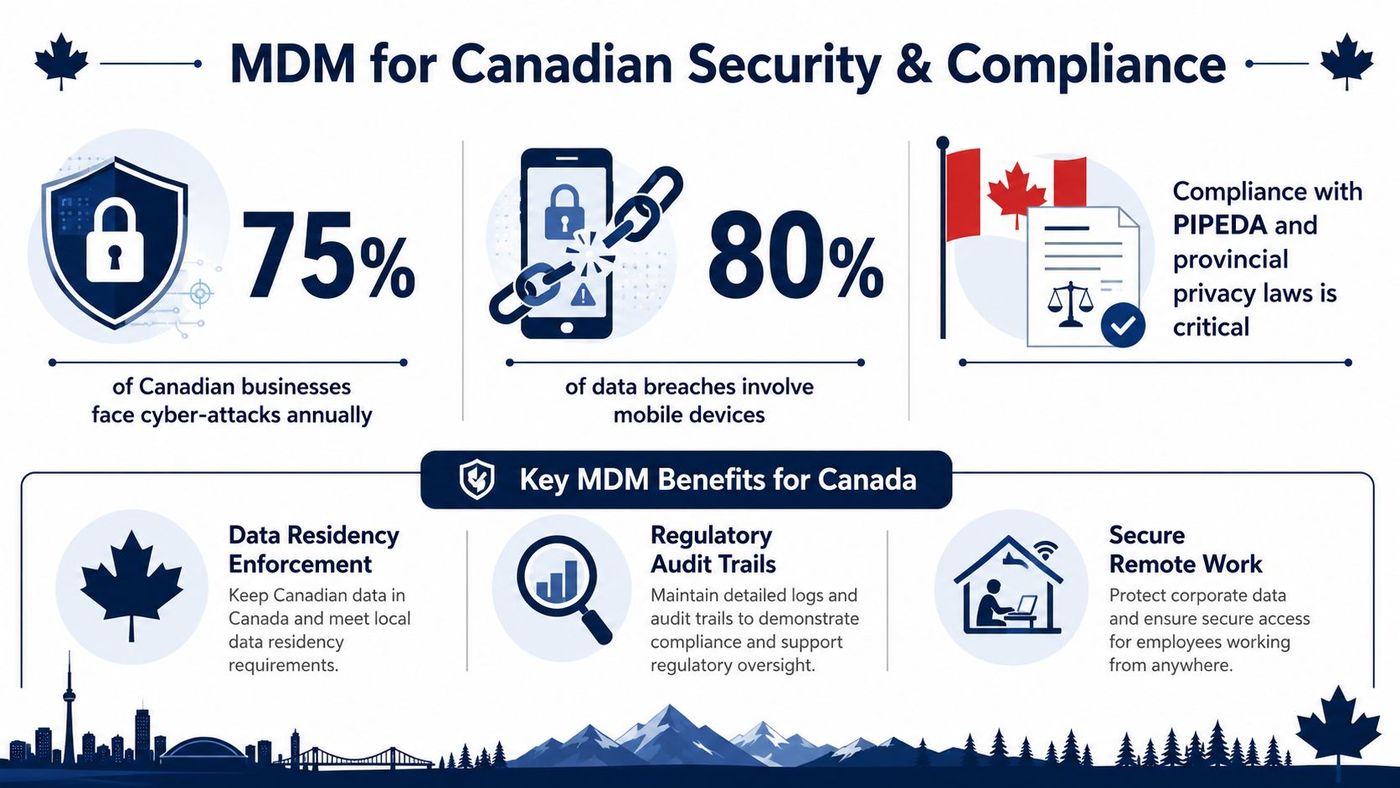
In Canada, MDM is critical for enforcing HIPAA-equivalent and PIPEDA-compliant mobile security policies. Research shows that 87% of Canadian healthcare organizations experiencing mobile data breaches lacked strong endpoint encryption and remote wipe capabilities configured via MDM agents.
That's not a theoretical compliance gap. It points to a specific operational failure. Devices were in use, data was exposed, and the organizations did not have enforceable mobile controls in place.
Many MDM articles are written for U.S. enterprise environments. That creates a bad fit for Canadian SMBs dealing with local privacy rules, smaller IT teams, and mixed device ownership.
Two issues come up repeatedly:
The gap is well documented. A 2025 report by the Office of the Privacy Commissioner of Canada found that 42% of Canadian SMBs in regulated sectors fail MDM audits due to inadequate data localization policies, while over 90% of MDM articles focus on U.S. frameworks. Without proper configuration for data sovereignty, SMBs can face $100,000+ penalties under provincial laws.
Compliance lens: If your MDM can enforce passcodes but can't support your data residency and audit requirements, it's incomplete for a regulated Canadian business.
A workable Canadian MDM design usually includes:
The point isn't to make every device identical. It's to make your policy enforceable.
Most MDM failures happen before rollout. The platform gets chosen too early, policies stay vague, or nobody accounts for the odd devices the business still depends on.
For Canadian manufacturing and logistics organizations, that mistake is costly. Data shows that 78% of operational downtime incidents involving mobile devices were caused by unmanaged configuration drift and lack of real-time security patching. If you operate scanners, tablets, shared handhelds, or vehicle-connected devices, MDM isn't just a security tool. It's part of uptime management.
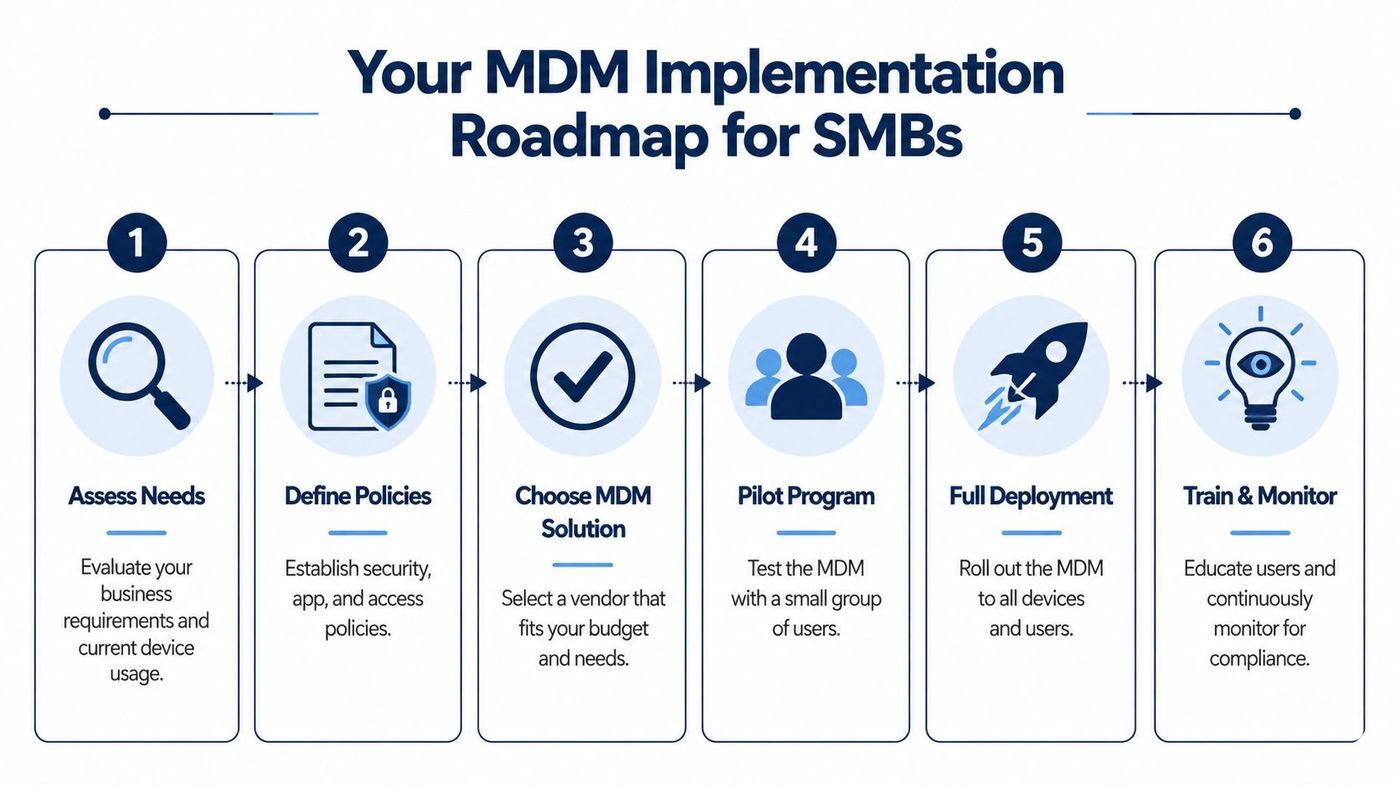
Start with business reality, not vendor demos.
Now test whether the tool fits your environment.
Pilot for edge cases, not just easy users.
Deployment is where communication matters most.
A few mistakes show up often:
Good MDM implementation is steady, not flashy. That's why it works.
MDM isn't hard because the controls are mysterious. It's hard because Canadian businesses rarely have a simple environment. They have mixed ownership, legacy devices, sector-specific compliance pressure, Microsoft ecosystems, and frontline teams that can't afford downtime.
That's where a managed IT partner changes the outcome. A good partner brings policy design, platform administration, user support, and ongoing monitoring into one operating model. They also help connect device management to the rest of your stack, including identity, security monitoring, cloud access, and network oversight. For owners comparing wider infrastructure support models, this overview of managed network services is useful context because MDM works best when it isn't isolated from the rest of IT operations.
The primary value is the advantage gained. Your internal team doesn't have to become expert in every enrolment method, privacy edge case, or device exception. A provider can build the guardrails, monitor compliance, and handle the daily administration that otherwise gets deferred.
If your business is already weighing external support, this guide on managed IT services for small business is a useful next step. It frames the broader question behind MDM adoption: do you want to own another IT workload, or do you want the outcome it delivers?
For most SMBs, the best answer is the same. Keep control of the business policy. Let specialists handle the operational heavy lifting.
If your business needs a practical mobile device management strategy that fits Canadian compliance, BYOD realities, and legacy operational devices, CloudOrbis Inc. can help you design it, deploy it, and support it with a 100% Canada-based team. Book a conversation to map out a secure, workable approach for your users, your industry, and your risk profile.
Book a 30-minute call with a senior engineer. No sales script, just straight answers about your environment.